|
-
April 8th, 2005, 03:36 PM
#1
config.sys HELP!
I have an old computer that I have kept just to play old games.
A 486 pentium running 98.
I am trying to run a game from 1994 called MAJIC by Simtex (ancient)
Unfortunately I do not know how to change the config.sys. or autoexec.bat.
without chancing total distruction.
The game says to get rid of TSR's?
I need 581k more memory.
Please help, I can implement in DOS if someone justs types out the lines.
Files=?
Buffer=?
etc.
Thanks
Laura
-
April 9th, 2005, 06:49 AM
#2
Hi Laura, dont think you are gonna have much luck running it on a 486, you will need at least 32 megs of ram to run that game. Most likely that old machine is stressed enough just running win 98 BJ
-
April 9th, 2005, 08:23 AM
#3
Laura, if you could give us some more information it would help us to help you.
Firstly, do you know the specifications of the computer system? eg there is no "486 pentium", if you are really running Windows 98 on a 486, as BJ says, it will be unlikely to be able to run much of a game...
If you can download and install the Everest program on the system, let us know what report it gives about the system. If you can't get Everest onto it, tell us anything you can about what the system has (memory, CPU speed, type of sound card...)
Is the game you want to use Master of Magic? I can't identify "Majic" to know what setup it needs. For example when you say it needs 581k more memory, do you mean "581k or more" memory? The DOS 7 that Windows uses is not that great for games, it can be best to use a DOS 5 or DOS 6 boot disk, but then you need to know what sound card is in the system to set up drivers.
-
April 9th, 2005, 09:26 AM
#4
 Originally Posted by BIG JOHN
she will need at least 32 megs of ram to run that game.
Yes, 98 gets clunky just running itself with any less than 24
-
April 9th, 2005, 07:12 PM
#5
If we are talking about Master of Magic, I run it via a windows, dos prompt.
My autoexec.bat file contains only support for my sound card under dos,
SET BLASTER=A220 I2 D3 T4
LH C:\WINDOWS\ASP4DOS.COM
Config.sys is empty
A mem at the dos prompt gives me ..
Code:
C:\WINDOWS>mem

Memory Type        Total       Used       Free
----------------  --------   --------   --------
Conventional          640K        35K       605K
Upper                   0K         0K         0K
Reserved                0K         0K         0K
Extended (XMS)     65,472K          ?   300,428K
----------------  --------   --------   --------
Total memory       66,112K          ?   301,033K

Total under 1 MB      640K        35K       605K

Total Expanded (EMS)                   64M (67,108,864 bytes)
Free Expanded (EMS)                    16M (16,777,216 bytes)

Largest executable program size       605K (619,040 bytes)
Largest free upper memory block         0K       (0 bytes)
MS-DOS is resident in the high memory area.

C:\WINDOWS>
Current PC
Zoostorm
Windows 7 Home Premium 64bit, (XP Mode virtual pc enabled)
WEI 7.4, 7.6, 7.9, 7.9, 5.9
Intel Core i5-2310, 8GB Ram
Geforce GTX 660 OC
Samsung Syncmaster SA300 23.6" monitor
Folding@home
User Name Sintares
Team guru3d
There is no such thing as overkill. 'Open fire' and 'is it dead?' are the only sane options when threatened.
-
April 11th, 2005, 07:07 PM
#6
Thank you for your help.
Yes, it's Masters of Majic and I'm trying to run it on a 100 mhz
Windows 3.11 Dos ver 6.22
When I typed mem:
Conventional 640 39 601
Upper 151 151 0
Reserved 384 384 0
Exten (XMS) 15,209 14,185 1,024
Total 16,384 14,759 1,625
Total under 1mb 791 190 601
I can type out the autoexec.bat and config.sys if it would help you.
Again thanks so much. I haven't been able to play this game since I worked for Simtex back in 1993 before they became Microprose property.
Laura Barratt
-
April 13th, 2005, 03:28 AM
#7
You are running windows 98 right ?
Go to msconfig and disable the autoexec and config entries.
Reboot, and at a windows dos prompt, (start-run-command) type mem and return
Use the mark and copy buttons on the dos window to capture the screen and paste it into your next post as per my post above.
Current PC
Zoostorm
Windows 7 Home Premium 64bit, (XP Mode virtual pc enabled)
WEI 7.4, 7.6, 7.9, 7.9, 5.9
Intel Core i5-2310, 8GB Ram
Geforce GTX 660 OC
Samsung Syncmaster SA300 23.6" monitor
Folding@home
User Name Sintares
Team guru3d
There is no such thing as overkill. 'Open fire' and 'is it dead?' are the only sane options when threatened.
-
April 13th, 2005, 10:21 AM
#8
Like General Winters, I'm a little confused now Laura. The information you posted above reports using Windows 3.11/DOS6.22, whereas you originally said Win98?
If the MEM figures are from the system in question, you appear to have 601K of conventional mamory available and XMS enabled, but only 1Meg available. It may need more, as I gather MoM uses XMS memory not EMS - a large amount of EMS may be allocated. Does it show an EMS figure available?
It would help to post the AUTOEXEC.BAT and CONFIG.SYS file contents.
-
April 13th, 2005, 01:22 PM
#9
Sorry guys...I have 2 old computers. Not sure which one can run MoM.
One is the Genuine Intel Celeron Processor, Win 98, 382.0 RAM, 32 bit.
The other is the 100 Mhz, win 3.11, Dos ver 6.22
Neither have sound or internet.
Which one do you think I'll have the best chances with?
I can type out whatever info you need, but I can't copy and paste the MEM info that's why I typed it out...not very well I guess.
I know that you guys have a bunch of people to help out that probably have serious problems unlike mine but it would be so cool to play MoM, I haven't been able to since I worked for Simtex in 94 as a composer.
The other game I'd like to get working is MTG which tries to run on the 98 but as soon as you go into a duel, it blacks out. I think I need to put a better graphics card in or something.
Get back to me if you can...I appreciate your time.
Laura Barratt
-
April 13th, 2005, 04:12 PM
#10
I am running Master of Magic on a Pentium 2, 350mhz, with 384 MB
To post a mem screen from windows open the windows dos prompt, either start- run - command and press return
Or start-Msdos prompt (or start - programs - msdos prompt, depending where the link is in your system)

Type mem in the dos window , press return , and then press the Mark button (the outlined square)
Drag the mouse over the memory details , which turns white to highlight the marked area.
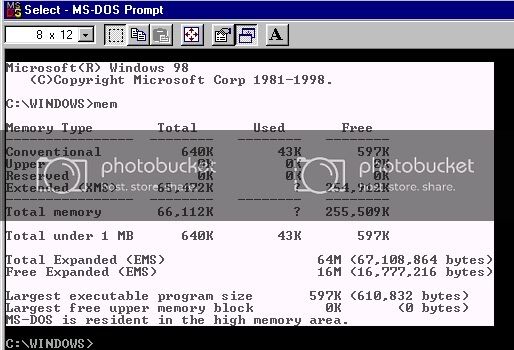
And then press the copy button ( the one beside the mark button, it has 2 sheets of paper with folded corners ), this copies the selection to your clipboard so you can paste (ctrl - v) , into your next reply.
Current PC
Zoostorm
Windows 7 Home Premium 64bit, (XP Mode virtual pc enabled)
WEI 7.4, 7.6, 7.9, 7.9, 5.9
Intel Core i5-2310, 8GB Ram
Geforce GTX 660 OC
Samsung Syncmaster SA300 23.6" monitor
Folding@home
User Name Sintares
Team guru3d
There is no such thing as overkill. 'Open fire' and 'is it dead?' are the only sane options when threatened.
-
April 13th, 2005, 09:46 PM
#11
I will have to type it in by hand because the computer does not have the internet.
Memory type Total Used Free
------------- ------- ------- ---------
Conventional 640k 39k 601k
Upper 151k 151k 0 k
Reserved 384k 384k 0 k
Extended (XMS) 15,209k 14,185k 1,024k
Total Memory 16,384k 14,759k 1,625k
Total under 1mb 791k 190k 601k
Largest executable program size 601k (651,104 bytes)
Largest free upper memory block 0k ( 0 bytes)
MS-DOS is resident in the high memory area.
That's it.
I will type out the mem info on the other computer to see if it'll work.
Thanks for everything....hope it works.
Laura
-
April 13th, 2005, 10:01 PM
#12
Here is the Config.sys info for the 100 mhz./Win 3.11
Device:\Dos\Himem.sys\Emm386.exe Noems
BUFFERS=15,0
FILES=40
DOS=UMB
Lastdrive=E
FCBS=4,0
REM**FILES=30
DOS=HIGH
DEVICEHIGH/L:1,4560=C:\WINDOWS\IFSHLP.SYS
STACKS=9,256
DEVICE=C:\PLUGPLAY\DRIVERS\DOS\DWCFGMG.SYS/FILE,0
DEVICEHIGH/L:1,24736=C:\SBCD\DRV\SBIDE.SYS/D:MSCD001/V
AUTOEXEC.BAT
C:\WIN\VGAUTIL\C LMODE.EXE T6=0 T8=2 T1=2 T2=239
LH/L:0;1,45456/S C:\DOS\SMARTDRV.EXE/X2048 128
@ECHO OFF
PROMPT $P$G
PATH C:\WIN;C:\DOS
PATH=%PATH%;
SET MSINPUT=C:\MSINPUT
C:\MSINPUT\MOUSE\MOUSE.EXE/Q
SET TEMP=C:\TEMP
LH/L:1,46544 C:\SBCD\DRV\MSCDEX.EXE/D:MSCD001/V/M:15
WIN
That's it. If you need anything else let me know.
If this doesn't work...thanks for trying.
Laura
-
April 14th, 2005, 12:16 AM
#13
The games install notes say it requires 2.7Mb of expanded memory and you post does not mention any ... However that might have something to do with the ... EMM386.EXE NOEMS line in your config.sys ..
So , it may be better to try to get the game running under dos (via a dos startup disk) than via a dos prompt in windows. In that case it might be better to ask someone in the dos forum who has experience of such arcane matters !
However, lets try getting rid of the autoexec and config files and see if that helps ..
Start - run - msconfig
Selective startup, untick process autoexec.bat and config.sys
Reboot.
Your autoexec and config files will be backed up to *.tsh if I remember correctly so you can reenable them if neccessary.
You say you do not have a sound card in that system, so no need to add any dos drivers to the autoexec.bat .
Open a dos prompt, change to the directory you have installed MoM (or extracted MoM if the game came in a 'zip file' -- cough--) , and run the install file , see if you can configure the game now.
Any luck? What does a mem say now ? Any mention of expanded memory ?
If not its looking to be time to post in the dos forum, while win98 does not need an autoexec or config.sys file , dos will, so you will need someone expert on that I am afraid.
Last edited by General Winters; April 14th, 2005 at 12:23 AM.
Current PC
Zoostorm
Windows 7 Home Premium 64bit, (XP Mode virtual pc enabled)
WEI 7.4, 7.6, 7.9, 7.9, 5.9
Intel Core i5-2310, 8GB Ram
Geforce GTX 660 OC
Samsung Syncmaster SA300 23.6" monitor
Folding@home
User Name Sintares
Team guru3d
There is no such thing as overkill. 'Open fire' and 'is it dead?' are the only sane options when threatened.
-
April 14th, 2005, 09:56 AM
#14
I think General Winters has hit on the solution with the requirement for 2.7 MB of EMS memory - the comment I had seen about it using XMS was certainly wrong.
The specifications indicate the game should run quite happily on the 100MHz DOS/Win3.11 system, whether it is a 486DX4-100 or a Pentium 100. But I'd suggest the game should be run from true DOS on this system rather than a Windows DOS session.
I'm not sure if GW's suggestions about the configuration files relate to your Win98 system or not, he makes reference to features of the Win3.11 files.
Either way, if EMS is set up properly in DOS 6, I suspect you should be up and running, but doing it on the Win98 system may involve less fiddling with configuration files. How fast is the Celeron in that machine? At least it has plenty of memory.
The specifications say the system will need at least 575K of conventional memory available and 2.7M of EMS (Expanded Memory) for which EMM386.EXE has to be set up. I'm a little puzzled by the MEM report, was it done from a Windows DOS prompt or true DOS? It looks a bit like maybe a Windows DOS prompt report, if so, close Windows back to the C: prompt and type MEM from there, post if the figures are different. It also seems MEMMAKER has been run on the system, which may account for the odd HIMEM/EMM386 line.
If you'd like to go for setting up the 100MHz system with EMS memory and trying it that way, let us know.
Last edited by Platypus; April 14th, 2005 at 09:58 AM.
-
April 14th, 2005, 11:50 AM
#15
I'll try this out later today and let you know if it works.
I actually have the orginal CD ; )
Thanks again
Laura
Thread Information
Users Browsing this Thread
There are currently 1 users browsing this thread. (0 members and 1 guests)
 Posting Permissions
- You may not post new threads
- You may not post replies
- You may not post attachments
- You may not edit your posts
-
Forum Rules
|
|


 Reply With Quote


