|
-
January 15th, 2005, 04:10 AM
#1
Computer reaches 100% CPU resources all the time
My computer reaches 100% CPU resources all the time and starts beeping. This happens while running any mildly resource-intensive programs (like spybot, windows file search, etc). When the prgram finishes the task that caused it, it goes back down and the alarm stops.
Do you think that I need a new processor or would adding more memory might help?
Here are the my computer specs from Everest:
Computer:
Operating System Microsoft Windows 2000 Professional
OS Service Pack Service Pack 4
Internet Explorer 5.50.4134.0600 (IE 5.5)
DirectX 4.09.00.0900 (DirectX 9.0)
Motherboard:
CPU Type Intel Pentium 4, 1600 MHz (16 x 100)
Motherboard Name ECS P4ITA (5 PCI, 1 AGP, 1 CNR, 4 RIMM, Audio)
Motherboard Chipset Intel Tehama i850
System Memory 256 MB (RDRAM)
BIOS Type Award Modular (10/12/01)
Communication Port Communications Port (COM1)
Communication Port Communications Port (COM2)
Communication Port ECP Printer Port (LPT1)
Display:
Video Adapter RV100 (64 MB)
3D Accelerator ATI RV100 DDR
Multimedia:
Audio Adapter Intel 82801BA(M) ICH2 - AC'97 Audio Controller [B-4]
Storage:
IDE Controller Standard Dual Channel PCI IDE Controller
Floppy Drive Floppy disk drive
Disk Drive MAXTOR 6L040J2 (40 GB, 7200 RPM, Ultra-ATA/133)
Disk Drive WDC WD400EB-00CPF0 (37 GB, IDE)
Disk Drive LEXAR JUMPDRIVE SECURE USB Device (988 MB, USB)
Optical Drive ARTEC WRR-52Z (52x/32x/52x CD-RW)
Optical Drive SONY DVD-ROM DDU1621 (16x/40x DVD-ROM)
SMART Hard Disks Status OK
Partitions:
C: (NTFS) 38170 MB (22590 MB free)
E: (NTFS) 38162 MB (23483 MB free)
G: (FAT32) 986 MB (840 MB free)
Input:
Keyboard Standard 101/102-Key or Microsoft Natural PS/2 Keyboard
Mouse PS/2 Compatible Mouse
Network:
Network Adapter WAN (PPP/SLIP) Interface (4.226.0.31)
Modem HCF 56K PCI Modem
Peripherals:
Printer Acrobat Distiller
Printer Acrobat PDFWriter
Printer Fax
Printer PaperPort Color
Printer PaperPort
Printer Samsung ML-1710 Series
USB1 Controller Intel 82801BA(M) ICH2 - USB Controller 1 [B-4]
USB1 Controller Intel 82801BA(M) ICH2 - USB Controller 2 [B-4]
USB1 Controller NEC PCI-USB Open Host Controller
USB1 Controller NEC PCI-USB Open Host Controller
USB2 Controller NEC USB Enhanced Host Controller [B-1]
USB Device Composite USB Device
USB Device Composite USB Device
USB Device USB Composite Device
USB Device USB Mass Storage Device
USB Device USB Printing Support
USB Device Visioneer OneTouch 9320
my code doesn't break, it only bends
-
January 15th, 2005, 07:51 AM
#2
Why have a good fast processor if you don't use ALL it's capacity
Need to be more concerned with the beeping than the 100%. It could be an over heating alarm.
If you're happy and you know it......it's your meds.
-
January 15th, 2005, 12:13 PM
#3
Originally posted by Steve R Jones
Why have a good fast processor if you don't use ALL it's capacity
Need to be more concerned with the beeping than the 100%. It could be an over heating alarm.
Well it starts beeping ONLY when it reaches 100%. Are you saying that when CPU reaches 100% it makes it overheat at the same time and that is actually what causes it to start beeping??
What is it normal temeprature of CPU, HD and MOBO?
Thanks in advance.
here is more information about temprature:
Sensor
--------------------------------------------------------------------------------
Sensor Properties:
Sensor Type Winbond W83627HF (ISA 290h)
Motherboard Name ECS P4ITA / P4ITM / S4-3
Temperatures:
Motherboard 49 °C (120 °F)
CPU 61 °C (142 °F)
MAXTOR 6L040J2 58 °C (136 °F)
Cooling Fans:
CPU 3516 RPM
Voltage Values:
CPU Core 1.71 V
+1.8 V 1.76 V
+3.3 V 3.31 V
+5 V 4.92 V
+12 V 11.73 V
-12 V -12.03 V
-5 V -4.85 V
+5 V Standby 4.87 V
VBAT Battery 3.31 V
Debug Info V 6B 6E CF B7 C1 23 39 D0 (01)
Debug Info T 208 61 49
my code doesn't break, it only bends
-
January 15th, 2005, 01:13 PM
#4
Motherboard 49 °C (120 °F)
CPU 61 °C (142 °F)
MAXTOR 6L040J2 58 °C (136 °F)
Those are a bit high! And 61C or higher yet is what is setting off the alarm.
When was the last time you opened the case and cleaned all the dust and stuff out of it?
Canned air which I buy is what I use. I also use a plastic straw or something to keep the fans from spinning and burning the bearings out.
-
January 15th, 2005, 02:50 PM
#5
And that Vcore looks way high, which would certainly cause the overheating. I'm having a hard job finding out exactly what the Intel specs are for that model, but I think it should be 1.45volts. I'll have a hunt ariound and try and confirm it later if nobody else knows.
Nick.
-
January 15th, 2005, 08:01 PM
#6
We need some more info on your CPU, there are 2 possible types of P4 with that speed rating, one with the Willamette core which has a Vcore of 1.7volts, and one with the Northwood core with a Vcore of 1.5volts.
Please could you run Everest and in Motherboard>CPU it will say which type you have:
Everest
Nick.
-
January 15th, 2005, 09:04 PM
#7
Since the P4ITA is a socket 423 motherboard then it would stand to reason that the processor is the Willamette core P4 that uses a 1.75v default vcore. So overvoltage to the cpu doesn't appear to be an issue here.
Last edited by DrMDJ; January 15th, 2005 at 09:10 PM.
Please remember to post back whether your problem is resolved or
not, so that others may gain from the knowledge.
-
January 15th, 2005, 09:41 PM
#8
Well I'm glad someone has their brain engaged round here 
I got so caught up with trying to hunt down tha Vcore info, that I completely overlooked that little detail 
Nick.
-
January 16th, 2005, 02:57 AM
#9
SuperSparks,
It is Willamette. I just checked.
What is it that I should do to resolve the overheating issue? I recently bought a hard drive and a HD cooler (with two fans). I also bought a computer vaccum. I am going to open it up, clean the dust, install the new HD with cooling fans.
Do you all think this will make any difference?
Also does adding more memory help with CPU resources?
my code doesn't break, it only bends
-
January 16th, 2005, 03:39 AM
#10
Adding more memory won't affect CPU resources. I would add more case fans, if you don't have any or only a few. Check about the dust inside paying close attention to the dust on the heatsink and fan on the cpu. Use a straw or pencil to hold the fans blades so you don't burn a bearing. After cleaning make sure fans are turning smoothly also.
-
January 16th, 2005, 11:47 AM
#11
Check the airflow through the case. After the clean up.
It should be like this.
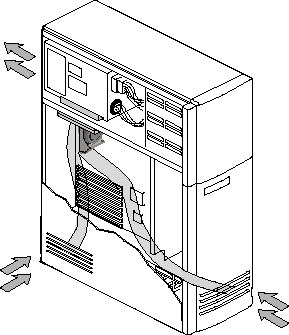
Cleanup of the case is something I have to do about every 4 - 6 weeks. And if this is the first time you have done it, I would expect the HSF on the cpu is about blocked and the fan blades have build up on them. Q-tips I find a work good for getting the crud off of them and I do the final cleaning of the blades with 90+% rubbing alcohol.
A example of a dirty hsf.

Thread Information
Users Browsing this Thread
There are currently 1 users browsing this thread. (0 members and 1 guests)
 Posting Permissions
- You may not post new threads
- You may not post replies
- You may not post attachments
- You may not edit your posts
-
Forum Rules
|
|


 Reply With Quote


