|
-
May 3rd, 2003, 06:36 PM
#1
 Chassis Fan, which direction? Chassis Fan, which direction?
Just wondering, which direction is the Chassis Fan supposed to be facing? Is it supposed to be blowing air into the case or out of it. (Does it even really matter?)
Thanks
"Dreams are born in your heart and in your mind, only there can they ever die." - Art Berg
-
May 3rd, 2003, 06:51 PM
#2
Re: Chassis Fan, which direction?
Originally posted by Fuelm@n
Just wondering, which direction is the Chassis Fan supposed to be facing? Is it supposed to be blowing air into the case or out of it. (Does it even really matter?)
Thanks
Does it matter, you bet it does.
The front one low and to the front of the case blows in. The one highin the rear, near the powersupply, blows out. Gots to get all that heated air out of the case.
-
May 3rd, 2003, 06:54 PM
#3
Just a bit more of info.
Do you have ribbons and cables in the airflow path from the front case fan to the rear ones? If so get them out of it.
Check the cfm of your fan on the hsf. the higher the better.
I use the Volcano 7 here. By the way, it runs cooler and quieter than the 7+ .
Front fan blowing in, rear fans blowing out.
And make sure the ribbons are out of the airflow path.
Here are some examples
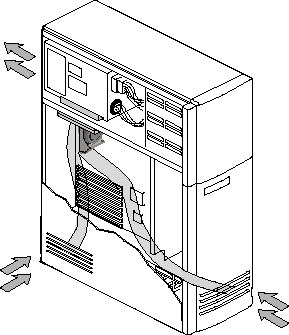
This diagram should give you a general IDEA of how the air should flow through the case.
I use Artic Silver paste and the Thermal compound instructions are here.
-
May 4th, 2003, 12:58 AM
#4
I have 4 case fans, and they're set as what your diagram suggests. What I was adding was a new fan called Smart Case Fan by Thermaltake with a Temperature Control , I got it free when I purchased a new CPU HSF by Zalman (model: CNPS 5000).
Anyways, the SCF connects directly to the motherboard, in the Chassis Fan connection. I gather from your diagram that this one should also be drawing air in, but I come to the place where I won't be using it. It is TOO loud, at 39 dB.
I will add, that the Zalman CPU Cooler is very quiet, at 20dB. I was replacing the HSF that came with my CPU, because the stock fan was too loud. With the Zalman HSF, my system is about 95% quieter. I can now hear myself think again.
Thanks,
"Dreams are born in your heart and in your mind, only there can they ever die." - Art Berg
-
May 4th, 2003, 01:33 AM
#5
"It is TOO loud, at 39 dB. "
I wish I could hear that low a sound.
Glad you got things set up.
Thread Information
Users Browsing this Thread
There are currently 1 users browsing this thread. (0 members and 1 guests)
 Posting Permissions
- You may not post new threads
- You may not post replies
- You may not post attachments
- You may not edit your posts
-
Forum Rules
|
|


 Reply With Quote

