|
-
June 13th, 2002, 08:38 PM
#1
Airflow through the Computer
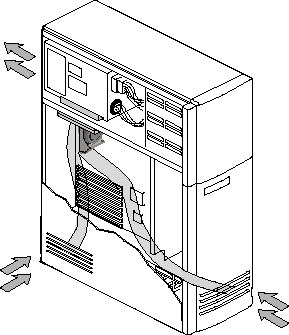
But I would cover the side vents from the inside and see if that would help cooling. Did on my InWin S500 case. This diagram should give you a general IDEA of how the air should flow through the case.
Last edited by Train; June 13th, 2002 at 08:41 PM.
-
June 13th, 2002, 08:47 PM
#2
http://www.compute-aid.com/atxspec.html
In reference to atx type questions. also a article on How do I test if the power supply is bad?
-
June 13th, 2002, 08:59 PM
#3
Hey Train,,thanks for the link,,lots of good info there.
My InWin full tower came out cooler with the last build when i removed the duct tape i had covering the panel vents. But,of course,those are located vertically at the front/sides of the case.
Did it for an experiment and when i fired it up,i used the phony smoke trick that's used to tell if you have insulation probs around door frames and such. It actually sucked the smoke "in".Telling me the lower front intake fan was causing a negative flow at the vents.
Even with the funky Asus Probe readings,it still seems to be running a' bit cooler than with them covered. Guess it depends on vent location/fan location as to how it goes?
Stupid question? No such thing!
Virtual Dr. to the rescue!
Just ask. Bookmark your post for easy reference.
==================================
-
June 13th, 2002, 09:12 PM
#4
I took and did a bunch of mods to the front intake area. 
-
June 13th, 2002, 09:30 PM
#5
Well,,besides removing the tape,i guess i did what would be called a "mod" too.. I removed the funky plastic holder for the stock 80mm fan and case tweeter. Mounted a 90mm Enermax adjustable RPM fan directly to the metal after sawing out the Mickey Mouse perforations to give the air a clean flow.And insulated the fan frame from the case metal with small rubber "O" rings over the mounting screws. Also cut a 90mm hole in the plastic front cover and inserted a plastic duct with a green "scrubby" for a filter behind the metal grill... Works pretty well,,,so far...
Stupid question? No such thing!
Virtual Dr. to the rescue!
Just ask. Bookmark your post for easy reference.
==================================
-
June 14th, 2002, 06:11 PM
#6
Looking at the ASUS A7V333 Without raid $119.95
Supports AMD Duron/Athlon TB/XP
3 DDR Memory Slot/
5PCI slot / 1 4X AGP Slot
Ultra ATA-133
Built in Stereo Sound
Thought this might be a good replacement for the Compaq. It needs to retire. Not as expensive as the A7V266-E for some reason?
-
June 14th, 2002, 09:55 PM
#7
I added another fan (80mm) diagonally facing the plugin boards to help in the air flow you depict. Helps alot.
-
June 15th, 2002, 06:43 AM
#8
One thing I have learned from a old server case is you should have a little foam filter in the front of the case, it not only keeps your mobo clean, it will make opening you PC alot nicer!
-
September 20th, 2002, 06:33 PM
#9
-
September 20th, 2002, 10:36 PM
#10
My new case with fans:
There are two more fans slots on the other side panel. Two fan slots in the front of the case and two more on the back under the power supply.
I currently have 1-Fan blowing air out on the top of the case, 2 fans below the power supply blowing air out, two fans in the front of the case bringing air in, 1 fan on side panel blowing out and have three fans with a outside filter, mounted in the front (one of the 5.25 bays (between the cdrw and cd)} bringing air in.
This case really runs cool.

Please do not use "PM" for personal help, post in forum so everybody can learn
-
September 20th, 2002, 11:00 PM
#11
Looks like a tornado generator to me
-
September 20th, 2002, 11:08 PM
#12
Actually with all them there fans, it's pretty quite, I used a brand BER Cooler case 80mm brushless sleeve bearing fans,
However, does sound like a blower when sitting next to it.... But CPU running cool:
800MHZ Celeron running at 34.8 C.
Please do not use "PM" for personal help, post in forum so everybody can learn
-
September 20th, 2002, 11:15 PM
#13
Not bad at all. Them 6k fans are a bit much. And is why I got the volcano 7 with the 80mm fan with a probe to adjust the rpm. 3668 and 51C with a xp1600. Room is about 86F/30C so not to bad. Knew the house was warm, but not that warm. 
-
September 20th, 2002, 11:19 PM
#14
I just don't sit in front of the case may get sucked in.
My tower is enclosed within my computer desk (not a good idea,) but that is why I went to so many fans as there is restricted airflow around the case. I 've gotten use to the fan noice, quite soothing anyways....
Please do not use "PM" for personal help, post in forum so everybody can learn
-
September 20th, 2002, 11:23 PM
#15
Beats the sound of a freight train!
Let us see.
4 ea 80mm case fans
One in ps and of coarse the 80 on the hsf.
The hsf is quieter and cooler than the one it REPLACED
Thread Information
Users Browsing this Thread
There are currently 1 users browsing this thread. (0 members and 1 guests)
 Posting Permissions
- You may not post new threads
- You may not post replies
- You may not post attachments
- You may not edit your posts
-
Forum Rules
|
|


 Reply With Quote


