|
-
June 12th, 2002, 07:23 PM
#1
Computer lockups at random, beleaved to be hardware falt.
I know this is long but please read it, i have ran out of idears and i need some help on this problem.
To give you an idear on the problem this will be a fairly long post but ive picked everyone I know's brains from tutors to people at the local PC shops and 2 months after we still are without a fix.
Ive not done this before so if my decription of my problem is lacking in detail or just not very relivent in parts please forgive me.
about 2 and a half months ago after Upgrading my computers memory from a P133 128MB single chip SDRAM to a P166 2 chips of 256 (total of 512) the computer devoloped a lock up problem, expecting it was falty memory i swaped back to the original but the problem persisted. I was running windows 98SE.
The lockup as i call it in more detail is as follows. I would tuen on the computer one day and before i can even click on the START bar the picture on the VDU would freeze the mouse pointer was unable to be seen if it was responding or not it just dissapeard and the keyboard becomes unresponsive. none of the keys appear to be regestring neather caps, Numlock, scorll lock would cause the lights to go on or off, and you could controll alt deleate till the ed of time with no affect, pressing the power off key on the computer that would normaly cause it to shut down did nothing. if i had any music playing it would hang or jump repearing say the last 5 seconds of song over and over and over...
This led me to think that there was a hardware or software problem, so i preceded to backup all data i needed (college work) and Formated the compyter useing the /u for an unconditional format and reinstalled windows, as i have done 100s of times before. this still lead to no corection to the problem. with some money i had saved up i went and purchased some new computer hardware in order of purchase this was a new videocard (Hercules 3D Profit 3, Titanium 500 64MB AGP) this was uncesfull in fixing the problem (Upgraded from a Matrox G400 Max 64MB AGP) I then Purchased a new Motherboard & Processor (from Gigabyte GA-BX2000 to a Shuttle AK32 SocketA motherboard, and a P3-450 to a AMD Duron 1300 Processor) Plus a new case and power supply (dont know the modles but if i have to ill get them for you) And the problem Remained.
buy this time I had enough parts to build 2 computers so i did.
Computer number one consits of the Matrox, one of the 2 new chips of memory, A 8.2 GB harddrive (Cant think of the make right now) my old Sound Blaster AWE 64, Generic network card, CD-ROM, Gigabyte and P3 Processor. old case and power pack. (I think that was the lot hehe)
The other computer was the new processor. new motherboard, new videocard, the other chip of memory, IBM 30GB, an identical generic network card, my Cable Modem (USB) soundblaster Live! Value (taken out of the other computer that had the problems), CD-RW.
forgive me if i missed something its been a while, but that was the general setup and the problem remained.
So i striped the computers down to Motherboard, Videocard, Processor, Memory.
It still happend so I tryed another Os Windows 2000 Pro
but! now the newer computer (the one with the Druon does not doing it as frequant, it still does it but I will need to be playing something like Everquest, Unreal torny, Warrior Kings before it locks up, so bascialy anything that require high processor, memory and video access.
One intreasting thing i found this time around was that when the other computer that was locking up still (just opening notepad would cause it) I could still access its Harddrive vie the network save and retrave documents on the other computer. So while the picture beeing displayed was locking up, with no mouse, or keyboard access and the power button was not responsive, i was still able to work on it vie the network. and the same applied to the new computer when it locked up.
to further test i put in a sound card and to my surprise, if I had a song going in the background say a MP3 it would continue playing when the picture mouse keyboard ect was frozen (I have left them for over 5 hours and it does not unfreaze)
wondering if its the memory I swap them around and the times do not differ, the one that took its time still did and the one that locked up just fro you looking at it was as frequant, if i put oth chips into the new computer i did find it wanted to lock up sooner tho. if this was considence or not i was unshure so useing the last of my saving i got another chip of memory (PC133 128) and tryed it in the computers and thay still locked up.
Yesterday I installed Linux on the computer that locked up a LOT and it does not untill I do anything with a high amout of graphics, (3D games) because of this im not shure if it memory, processor or videocard, but consideing the problem is on 2 computers one with brandnew parts im at a loss to what might be causeing it.
Ive done many virus scans and have the most uptodate files (my virus killer is McAffe) and its found nothing at all, scaned all my CDs, Install CDs, Disklets, Files, and I still cant find anything.
Please if anyone has any idear what might have caused this to suddenly appear out of no where please tell me and if anyone has a fix please let me know, as on the 23rd this month college will be done for the year so ill be able to open up and start redoing hardware checks on the computer so any sujestions on checks to see if there working corectaly would be much appreashated.
Anything really would be loved im out of Ideards, after doing 2 years in computering at college myself and none of the the Tutors or technitions have a clue. but maby someone out there will.
Ritchie.
Slight Edit, the Linux version is 8.2 Mandrake. and sorry for the poor spelling and grammer.
Last edited by Fujiiro; June 12th, 2002 at 07:28 PM.
-
June 13th, 2002, 11:05 AM
#2
Try installing the original memory in different slots in the computer with the original motherboard.
If that does not work, then was anything changed in BIOS?
If so, then change the BIOS settings back to the original(or default) ones.
If still no good, then suspect either a faulty power supply or motherboard.
Replace the P166 memory with something that's compatible in the computer with the new motherboard.
If no luck, then the problem with this system may be caused either by overheating or an undersized power supply module.
Remove the computer's case and run an external fan blowing on the internal components. If this solves the problem, then add additional fans and/or a higher capacity CPU fan.
If the problem persists, then the PSM may not have sufficient capacity. Which CPU, video card, and MB is installed in this unit, and what's the watt rating of its power supply module?
-
June 13th, 2002, 12:02 PM
#3
How's the hard drive? Maybe that is dying and causing the problems? I think that is about the only thing you did not replace. Has the one you built with the other hard drive locking up also or was the one locking up just the original Computer? (got kind of confused on that part). I have heard that some Hard drives when about to Die would do some funny things, but yet still let you down load different files etc, depending on where they were on the drive. Have you tried Scan disk and have it do a through scan to check for disk errors (might be a pain since it takes forever). Some other things to try, how about safe mode? Will it still freeze in safe mode if not try that and then scan with scandisk and also try defragging as well. I once lost my auto shutdown when I stopped a defrag before it finished and when I re-did it and let it finished it came back, however that was the only thing effected when I stopped the defrag? These computers do some strange things. Only other thing I can think of is the memory since you say this happened right after. Make sure the mem is compatible (i.e. use the same exact mem) Maybe the mem got messed up when you put the old back in. meaning that when you took out the old it got static shocked or something, so when you put it back in it was messed up. I would start with the defrag, scan disk in safe mode if you can get there, then if that does not work, buy all new memory of the exact kind that you fist started with (PC133) and see what happens. Good Luck, not sure what else to suggest. hope I helped a little even if it just inspires a thought.
-
June 13th, 2002, 12:11 PM
#4
Sorry one other thought just occured. How about the version of DirectX your running? Is that up to date (8.1) and have you tried running the tests from the directx utility under Accessories, system tools,system information? That might uncover some things as well. Good Luck.
-
June 13th, 2002, 02:32 PM
#5
Thanks for all the idears, ill give them all a go some i just did not think of doing like the defrag & Scandisk, after looking at a problem for to long my drain goes a little dead.
The old computer that had the problem origionaly had both the hard drives in, so i left the 8gig in there and moved the 30 to the new one.
Im going to probly be out of action for maby 3 days, but the laptop should be able to get online. so ill try to keep everyone uptodate on what happens, and what i find out.
Ritchie
-
June 13th, 2002, 05:35 PM
#6
-
June 13th, 2002, 06:57 PM
#7
Better see about getting some cooler air to the video cards. Had a fight with Prophet II until I put a Blue Orb on it.
Also, on the SB cards, did you install the dos drivers. SB16 is the name. Because they can cause all kinds of problems with some setups.
-
June 18th, 2002, 01:39 PM
#8
Little update on whats happerning, on the comp that was doing the majority of the lock ups ive done a compleate reinstall using win 98se and ive been able to fine a way to make it lock up, just type, hehe yup. typing locks it up, esp explora, trying to type in www.microsodt.com/directx, cant even get in the www. before it freazes up, but ive notest something strange to say the least the mouse does not lock up right away it will keep going for a little bit but if you try to type more it will go lockup also.
will keep on expermenting and let you know how things go, if anyone gets any idears let me know.
thanks.
Ritchie
Just a little edit, running in linux it does not lock up when trying to go to a webpage, maby its IE, but it does lock up if you try to run TuxRacer. Sigh. computers can be such a pain when thay descide to go nuts.
Last edited by Fujiiro; June 18th, 2002 at 01:44 PM.
-
June 18th, 2002, 11:02 PM
#9
What version of dx you running. 8.1 locked me up also. I am using 8
-
June 19th, 2002, 01:23 AM
#10
hi fujiro
can you post the machine components and operating system of
computer ONE
and
computer TWO
and, I understand they are networked...
I have this gut feeling that the duron is overheating, and the other has a real hardware conflict
(could be NIC related)
to be succesful, you will have to post things you did to troubleshoot, and do that PER MACHINE.. or one machine at the time
I would suggest you do not plug soundcard nor network card in the slot next to graphics card.
i would also suggest you do some temperature monitoring on the duron. (what cooling system did you assemble, how did you do it... there are tons of questions...)
anyway, you should perhaps lower its Vcore in BIOS or by jumper.
(something Train taught me)
I feel, that when a machine has big hiccups before drivers are installed, it will be hiccuping again.
Kind regards, Jaak.
When I pull my bootstraps, why don't I load Windows?
-
June 19th, 2002, 01:36 AM
#11
and by the way, I don't like them duron much... not for intensive tasks. (they are worse than comparable celeron.)
it was suggested you look at graphics card cooling
that is a great tip
you should at least get an idea how hot it becomes...
Kind regards, Jaak.
When I pull my bootstraps, why don't I load Windows?
-
June 19th, 2002, 05:40 PM
#12
jaak
My duron runs 3D rendering just fine.  Only a 800 Only a 800 
On the duron, the Vcore should be 1.65V , mine would run just fine at 1.60V. From the default of 1.80V to 1.65V dropped the temps by about 10C while working.
i have a case fan low and to the front blowing in,
and one high by the ps blowing out.
So air travels through the case like this:
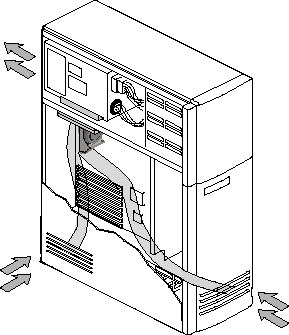
Hope this helps!
Thread Information
Users Browsing this Thread
There are currently 1 users browsing this thread. (0 members and 1 guests)
 Posting Permissions
- You may not post new threads
- You may not post replies
- You may not post attachments
- You may not edit your posts
-
Forum Rules
|
|


 Reply With Quote


