|
-
August 20th, 2015, 05:29 PM
#1
Homegroup Problem
Hi Everybody !
I have my Windows 7 Pro desktop and my newly upgraded Windows 10 Home laptop networked through a router.
I have all sharing turned on. My printer is attached to the desktop. I can print from the laptop with no problems. But I cannot transfer files e.g. Word document from the laptop to the desktop. I get an error message that I do not have permission. I don't get it. How do i fix this? I can see the content of both computers. I can copy files from the desktop to the laptop though. How do i fix this? I can see the content of both computers. I can copy files from the desktop to the laptop though.
If somebody knows what they are doing, I might permit remote assistance to my computer to show me how to fix it.
Thanks as always,
Dave
Last edited by davidgsmith; August 20th, 2015 at 05:40 PM.
*** Help others less fortunate.  JESUS IS LORD !
-
August 20th, 2015, 05:41 PM
#2
Was the homegroup working BEFORE you upgraded?
Are you going through Homegroup - Libraries to view the other computer's files?
http://www.7tutorials.com/homegroup-...e-how-it-works (see the section How to Access What's Shared on the Homegroup)
If you don't want to use Homegroups, you can try this:
http://www.howtogeek.com/howto/windo...dows-7-and-xp/
-
August 20th, 2015, 10:02 PM
#3
Thanks Midknyte,
I actually don't think it was totally working before the upgrade. I'm not sure. (senility)
This is what I do know.
- I can print from the laptop. (printer is connected physically to desktop)
- I can see both computers and their files in Explorer -Under 'Networks' on both computers.
- From the laptop I can copy (drag&drop) files from the desktop to the laptop
- From the desktop I can copy (drag&drop) files from the laptop to the desktop
- From the desktop I cannot copy files (drag&drop) to the laptop - Error message says permission required
- From the laptop I cannot copy files (drag&drop) to the desktop - Error message says permission required
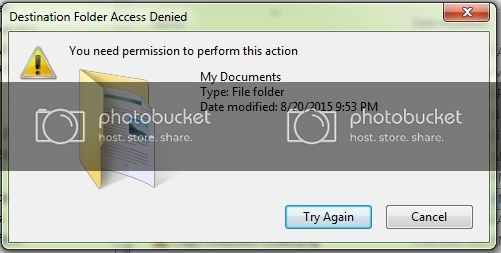
In the meantime, I will look at the links you provided.
Dave
Last edited by davidgsmith; August 20th, 2015 at 10:13 PM.
Reason: Add image
*** Help others less fortunate.
JESUS IS LORD !
-
August 20th, 2015, 10:12 PM
#4
What are the exact paths you are using? Like I mentioned, you should have been going through Homegroups - Libraries if you were really using homegroups. From your description, it sounds like regular network file sharing.
It sounds like you only have read permissions and not write permissions to your shares. I.E. the laptop can't write to the desktop share and vice versa.
From the laptop I can copy (drag&drop) files from the desktop to the laptop (read)
From the desktop I can copy (drag&drop) files from the laptop to the desktop (read)
From the desktop I cannot copy files (drag&drop) to the laptop - Error message says permission required (write)
From the laptop I cannot copy files (drag&drop) to the desktop - Error message says permission required (write)
-
August 20th, 2015, 11:00 PM
#5
Hey Midknyte
Thanks for staying up !!!
This explains it all...

You were right. I did not have all of the sharing settings properly set, or not set at all.
Everything is turned on and all works well! FINALLY 
Thanks again sir for all you do!
Dave
*** Help others less fortunate.
JESUS IS LORD !
-
August 20th, 2015, 11:39 PM
#6
NP. I was pretty sure it wasn't homegroups from what you described.
Thread Information
Users Browsing this Thread
There are currently 1 users browsing this thread. (0 members and 1 guests)
 Posting Permissions
- You may not post new threads
- You may not post replies
- You may not post attachments
- You may not edit your posts
-
Forum Rules
|
|


 Reply With Quote


