|
-
March 16th, 2012, 04:04 PM
#2
Boot into the new Windows XP and set your Folder Options like this:
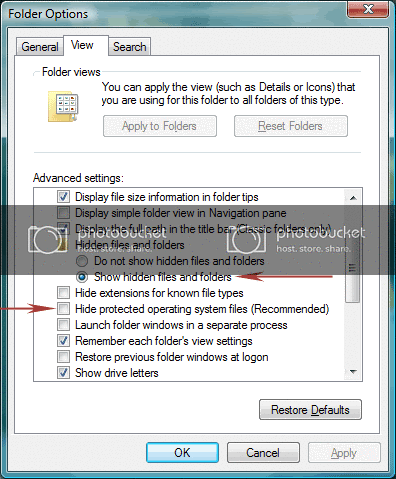
Then, in Explorer you can delete everything from the C:\ drive except:
Boot.ini
ntldr
ntdetect.com
Then go to Start>Run>msconfig, then in the Boot.ini tab, click "Check all boot paths". That should get rid of the dual boot menu.
Nick.
Thread Information
Users Browsing this Thread
There are currently 1 users browsing this thread. (0 members and 1 guests)
 Posting Permissions
- You may not post new threads
- You may not post replies
- You may not post attachments
- You may not edit your posts
-
Forum Rules
|
|


 Reply With Quote

