|
-
October 2nd, 2011, 02:21 PM
#1
Border colour has changed
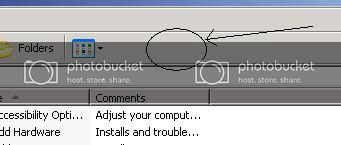
My border colour, on all windows, has changed to a sick looking puce shade. At first I thought the monitor was failing, but it can still do the full palate elsewhere. Where can I change it back (and what is the std colour?)
Its this part I mean, not sure how well the colour itself will represent for everyone
-
October 2nd, 2011, 03:26 PM
#2
Right-click the Desktop and choose Properties, then go to the Appearance tab. Click Advanced, then choose 3D Objects from the drop-down list, and change the colour to what you want.
Nick.
-
October 3rd, 2011, 04:39 AM
#3
Or in the Appearance tab - select XP Style instead of Classic.
If you're happy and you know it......it's your meds.
Thread Information
Users Browsing this Thread
There are currently 1 users browsing this thread. (0 members and 1 guests)
 Posting Permissions
- You may not post new threads
- You may not post replies
- You may not post attachments
- You may not edit your posts
-
Forum Rules
|
|


 Reply With Quote


