|
-
September 5th, 2011, 03:57 PM
#1
 [RESOLVED] non-booting pc - bios? [RESOLVED] non-booting pc - bios?
I have a pic running windows xp. This morning it wouldn't boot.
It doesn't emit any post beeps, and everything seems to power up - certainly the fan spins, the screen, keyboard and mouse all power up. Just in case, I tried it connected to different peripherals, but with the same result. I say the screen powers up because the power light comes on, but nothing whatsoever appears on it.
I also tried swapping the ram stick for one from a working machine, but no change.
It doesn't seem to get as far as a hard disk access because there's no sound from that. Could it be a bios failure - I can't think of anything else that would cause no start up without any beeps? And if it is a bios failure, is there anything to be done
all advice welcome
-
September 5th, 2011, 04:05 PM
#2
Check the motherboard for bulging or leaking capacitors. Also, it could be the power supply. Check the voltages and post the make and model.
-
September 5th, 2011, 04:28 PM
#3
Try testing the power supply. If you have, or can borrow, a multimeter, here's how to test one:
Testing PSU Voltages
ATX Power Supplies
Trigger Power Supply for testing
In depth look at the power supply
Or alternatively you can buy a proper PSU tester, they don't cost much:
PSU Tester
ATX12V PSU Tester
Nick.
-
September 5th, 2011, 04:59 PM
#4
You also might want to try resetting the BIOS with the Motherboard jumper or removing the battery for a few minutes and reinstalling.
Biostar TA790GX A2+ 6.0
AMD Phenom X4 9750 CPU.
4 Gig DDR2 Memory.
ATI HD 5450 PCIe Video
ATI HD 5450 PCIe Video
500 Watt P.S.
LG W2241T Widescreen 22" LCD
ViewSonic VA721 17" LCD
Envision 17" LCD
2 LG DVD Drives
Floppy Disk Drive
Maxtor 120 Gig Windows 7 Home Premium 32 bit
Gateway NV5378-U Windows 7 Home Premium 64 bit
Acer Aspire V3-731 Windows 7 Home Premium 64 bit
-
September 5th, 2011, 08:16 PM
#5
Clear CMOS, set BIOS/CMOS menu to fail safe defaults and test for POST.
Disconnect all non-essentials and test for POST.
Cheers.
-
September 6th, 2011, 02:50 PM
#6
So, I tried a clear cmos but no change
I decided rather than test the PSU it would be more conclusive to swap it out for one from a working machine. I did that but it didn't make any difference.
I can't see any physical damage to anything on the MB, but I guess we are looking at an MB failure? Or could it be the CPU.
The board is an ASUS P5N-MX running one of the core 2 duo CPUs although I forget what clock speed it is.
-
September 6th, 2011, 02:59 PM
#7
Statistically it is far, far more likely to be a mobo failure rather than CPU. CPU failure is rare.
Nick.
-
September 6th, 2011, 03:00 PM
#8
Ditto.
I would suspect mobo failure before a processor failure.
Cheers.
-
September 6th, 2011, 03:11 PM
#9
I'll probably look for one of the same board then, which will save me from doing a windows reinstall. Don't particularly need to upgrade the machine (man, I would never have said that when I had a 386)
-
September 10th, 2011, 06:55 AM
#10
non-booting pc - new evidence
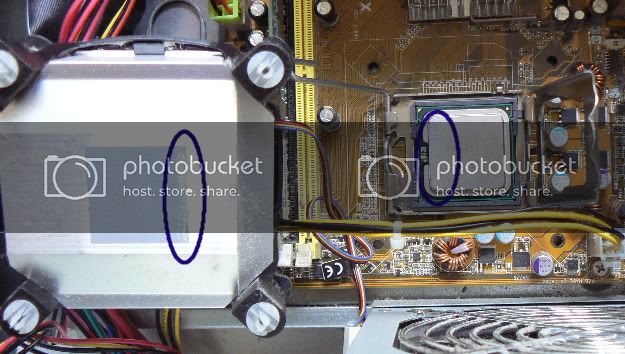
So I ordered another motherboard since that seems the most likely culprit. I took the cpu fan off just now and found this - it was only seating down one edge. I replaced this fan about a year ago, so its been like that ever since. On the other hand, the pc has not be shutting down which is what I've found before with overheating CPUs. Any opinions?
-
September 10th, 2011, 10:08 AM
#11
An Intel CPU is unlikely to shut down when it overheats, rather it will throttle back instead. You have probably been getting seriously reduced performance at times, but is most likely all that would have happened.
Nick.
-
September 10th, 2011, 11:00 AM
#12
 Originally Posted by SuperSparks

An Intel CPU is unlikely to shut down when it overheats, rather it will throttle back instead. You have probably been getting seriously reduced performance at times, but is most likely all that would have happened.
Ah, right. I nearly always use AMDs, in fact this is the first intel I've used since a P100. We'll see what happens when the MB arrives then, thanks.
-
September 22nd, 2011, 03:19 PM
#13
So, this is what happened:
Ebay -> troublesome seller who took ages to post -> arrived -> installed -> computer working again
thanks to all
-
September 22nd, 2011, 04:56 PM
#14
I'm glad you got it sorted out in the end. Thanks for letting us know the outcome 
Nick.
Thread Information
Users Browsing this Thread
There are currently 1 users browsing this thread. (0 members and 1 guests)
 Posting Permissions
- You may not post new threads
- You may not post replies
- You may not post attachments
- You may not edit your posts
-
Forum Rules
|
|


 Reply With Quote


