|
-
August 22nd, 2011, 01:42 PM
#1
Intermittent disconnects...
So I have a client ... here's their setup.
Couple of laptops connecting wirelessly, one with XP the other is Win 7 I'm pretty sure... They're getting network disconnects quite frequently which require a router reset or simply wait a few minutes and it gets better. Joy.
They have a fairly normal SOHO setup ... cable through Comcast business class, and a wireless router that's been swapped out a few times. Started with a Linksys, then a D-Link and now it's a Netgear router.
Installing the Netgear router seemed to fix it, then it came back... tried switching the channel from auto to a fixed channel 11, no luck there... then tried the other end with channel 2 late last week and it was fine and dandy.
It was good for Thursday and Friday... then multiple disconnects on Saturday and a few already today (Monday)... begs the question, what's the interference that comes and goes?
And it seems to be on one of the machines mostly ... although the other machine also gets disconnected now and again so maybe it's just not as sensitive to the interference.
So ... let me know what you think good people. Even the not so good are invited to chime in!
Point me in a direction or two ... be it the router side or the laptops. Also would like to know if there's a good network monitoring utility that might log some things and give a clue...
TIA people...
~ Paul
Windows 10 on: ~Asus P5B-E ~Intel Core 2 Duo E8400 @ 3GHz ~G. Skill (2 x 2GB) PC2-6400 ~EVGA 7900GTX ~Kingston SSD (for the OS) ~Western Digital 650GB Hard Drive (Data), Turtle Beach Santa Cruz w/Klipsh 2.1 Pro Media Speakers ~ Twin BenQ FP202W 20.1" LCD's
-
August 22nd, 2011, 01:57 PM
#2
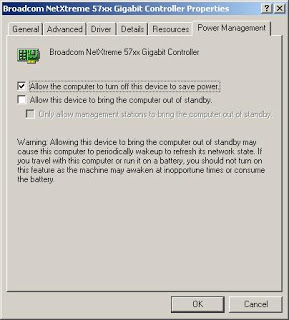
Go into device manager, find the nic, open the properties and uncheck the save power option.
-
August 22nd, 2011, 02:00 PM
#3
The first thing you might want to try to determine is if it is the wireless signal that is causing the issue, or the connection from the ISP that is going down. If possible, you might try using a wired connection to one of the laptops for a while to see if the issue disappears on that laptop. If so, you have a wireless issue. If not, then it is an ISP issue.
-
August 22nd, 2011, 02:35 PM
#4
Pretty sure all that's been checked, by me or others... Comcast has been out several times and insists that it's not them, suppose they might be right but there are times!
I'm going to remote in this afternoon and I'll double check that setting Train...
Windows 10 on: ~Asus P5B-E ~Intel Core 2 Duo E8400 @ 3GHz ~G. Skill (2 x 2GB) PC2-6400 ~EVGA 7900GTX ~Kingston SSD (for the OS) ~Western Digital 650GB Hard Drive (Data), Turtle Beach Santa Cruz w/Klipsh 2.1 Pro Media Speakers ~ Twin BenQ FP202W 20.1" LCD's
-
August 22nd, 2011, 03:22 PM
#5
Install this nice utility one one of the laptops, and you'll soon see if there are other devices interfering with the wifi signal:
Inssider
Nick.
-
August 22nd, 2011, 03:31 PM
#6
 Originally Posted by SuperSparks

Install this nice utility one one of the laptops, and you'll soon see if there are other devices interfering with the wifi signal:
Inssider
THAT's what I've been looking for!!! Thank you SS! I've got that utility around here somewhere but can't figure out what I did with it. And the name escaped me long ago... so we'll see what that does for me this afternoon too...
Windows 10 on: ~Asus P5B-E ~Intel Core 2 Duo E8400 @ 3GHz ~G. Skill (2 x 2GB) PC2-6400 ~EVGA 7900GTX ~Kingston SSD (for the OS) ~Western Digital 650GB Hard Drive (Data), Turtle Beach Santa Cruz w/Klipsh 2.1 Pro Media Speakers ~ Twin BenQ FP202W 20.1" LCD's
-
August 22nd, 2011, 04:46 PM
#7
Wireless net view
http://www.nirsoft.net/utils/wireless_network_view.html
Does not install and can be run from a usb stick.
-
August 23rd, 2011, 01:30 PM
#8
Wow ... just typed a bunch and then an email link decided to open up in this tab and wiped it all out. Ain't that special.
So ... little or no progress on the issue. Waiting for a report back from the client to see if anything changed after a few tweaks yesterday afternoon.
And what's with the Microsoft Virtual WiFi Miniport Adapter ... exclamation point in DM on that but the physical adapter is fine. Thinking that should be okay but who knows.
And oh yeah, thanks Train, that's been added to my USB drive full of various utilities.
Last edited by Abhoth; August 23rd, 2011 at 02:21 PM.
Windows 10 on: ~Asus P5B-E ~Intel Core 2 Duo E8400 @ 3GHz ~G. Skill (2 x 2GB) PC2-6400 ~EVGA 7900GTX ~Kingston SSD (for the OS) ~Western Digital 650GB Hard Drive (Data), Turtle Beach Santa Cruz w/Klipsh 2.1 Pro Media Speakers ~ Twin BenQ FP202W 20.1" LCD's
-
August 23rd, 2011, 04:04 PM
#9
Ain't them sticks handy. Just got a bigger one for those programs myself.
-
August 23rd, 2011, 04:10 PM
#10
Oh yeah ... I've got a FreeNAS file server that runs from a 1gig USB stick mounted internally in an old system I had hanging around, works great. They are quite handy!
Windows 10 on: ~Asus P5B-E ~Intel Core 2 Duo E8400 @ 3GHz ~G. Skill (2 x 2GB) PC2-6400 ~EVGA 7900GTX ~Kingston SSD (for the OS) ~Western Digital 650GB Hard Drive (Data), Turtle Beach Santa Cruz w/Klipsh 2.1 Pro Media Speakers ~ Twin BenQ FP202W 20.1" LCD's
Thread Information
Users Browsing this Thread
There are currently 1 users browsing this thread. (0 members and 1 guests)
 Posting Permissions
- You may not post new threads
- You may not post replies
- You may not post attachments
- You may not edit your posts
-
Forum Rules
|
|


 Reply With Quote


