|
-
March 7th, 2011, 01:25 PM
#1
Installed new SATA HDD, how to add old HDD as secondary?
Installed a new SATA drive in my friend's PC and trying to figure out how to set the old one as a secondary drive.
I removed the old one, formatted the new HDD and installed Win-7 and it's running great. I want to add the old one now so he can copy off all of his files to his new drive and use the old one as a backup, but I'm concerned there will be a conflict when I add a second HDD with an OS to the setup (I haven't tried it yet, but I know this used to be a problem with the IDE's if there were 2 Masters installed).
Is there a simple solution to my dilemma?
WinXP/98 dualboot - P4 2.4b 533FSB
Asus P4PE/L MoBo
512MB Corsair DDR PC2700
HDD1 - 160gig Seagate HDD2 - 60gig Maxtor
Antec SOHO File Server w/400 watt PSU
-
March 7th, 2011, 01:34 PM
#2
Are both drives SATA? If so, you need to change a setting in BIOS to make the new one as the boot drive. You'll need his motherboard manual to see how it says to do that change. My mobo has three SATA connectors. One for Master, the other two for slave. Check that his mobo might have the same settings, also.
-
March 7th, 2011, 03:51 PM
#3
You can add the old drive with no problem, the new Windows install will just see the old Windows install as a bunch of files. There is no risk that the computer will try and boot into the old Windows, as the boot files have no idea of its existence.
Nick.
-
March 7th, 2011, 05:21 PM
#4
That's the way it should work Nick, but mine hung up before I changed the BIOS setting. That's why I said what I did above.
-
March 11th, 2011, 11:31 PM
#5
A small update to this. Looking in my ASUS motherboard manual it appears the 4 SATA ports are designated primary and secondary. Two of them are for slave designation and two are for master designation. According to what I read thats how it determines whats going on with the drives. By luck I had incidentally plugged the SATA drive into the SATA ports that designated it as slave.
I have not plugged the drive into the lower two master designated ports but if anyone's curious (hell I kinda am, only thing stopping me is laziness) I can do the quick switch and see whats up.
-
March 12th, 2011, 11:25 AM
#6
I think you have got the wrong end of the stick there Chris - SATA has no Master and Slave designations, as it only allows one device per channel (so effectively everything is a "Master"). If that manual really does say that, I'd be grateful if you could post a link to it.
Nick.
-
March 12th, 2011, 01:02 PM
#7
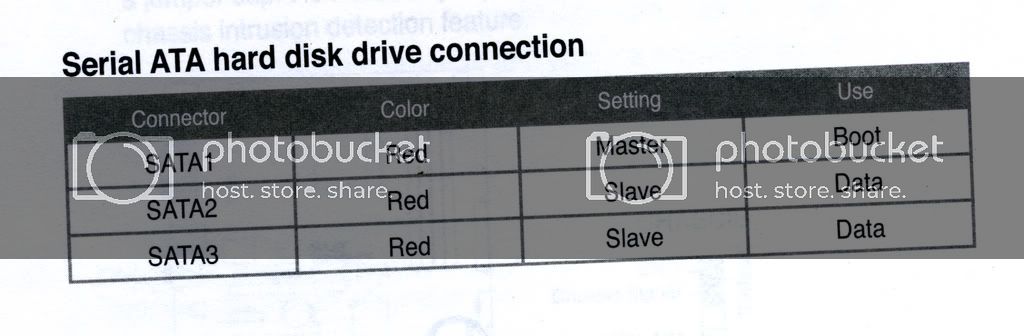
My motherboard also says Master and Slave on the SATA ports. SATA 1, is designated Master, while SATA 2, and 3 are designated slave ports. These are written beside the ports on the motherboard.
photo of my manual SATA port designation:
-
March 12th, 2011, 02:25 PM
#8
 Originally Posted by SuperSparks

I think you have got the wrong end of the stick there Chris - SATA has no Master and Slave designations, as it only allows one device per channel (so effectively everything is a "Master"). If that manual really does say that, I'd be grateful if you could post a link to it.
Here you go, screenshot of the PDF page. I can post link to the manual if you wish.
If this sata designation is not exactly what it says it is it would be interesting to know exactly what it is talking about. It does seem to read the sata drive as IDE once its plugged in.
Last edited by A31Chris; July 29th, 2011 at 10:57 PM.
-
March 12th, 2011, 02:28 PM
#9
Whoops, I actually posted all this in the wrong thread. I saw the title to this thread and got it confused with the very similiar thread I made about a month back. Ah well! :P
-
March 12th, 2011, 03:23 PM
#10
Originally Posted by photolady
Are both drives SATA? If so, you need to change a setting in BIOS to make the new one as the boot drive. You'll need his motherboard manual to see how it says to do that change. My mobo has three SATA connectors. One for Master, the other two for slave. Check that his mobo might have the same settings, also.
Thanks buddy. It works. I have tried this with mine and it is being working.
-
March 12th, 2011, 03:27 PM
#11
Originally Posted by A31Chris
Whoops, I actually posted all this in the wrong thread. I saw the title to this thread and got it confused with the very similiar thread I made about a month back. Ah well! :P
Something crazy for you.
By the way if both the harddisk are the same model, there should not be a problem at all.
-
March 12th, 2011, 04:18 PM
#12
That Master/Slave, from what I can make out, appears to be a rather unfortunate use of terminology. It would seem that on those particular boards, you have to use a specific port for the boot disk, which they have called "Master". It may make more sense to circuit designers, as I suppose it could relate to the way the disk controllers are wired up. But it is a very poor term to use in a manual, where it would easily be confused with the Master/Slave settings on PATA drives.
Apart from booting, it shouldn't make any difference what port you plug into. And on my last 3 builds, using Gigabyte boards, you can boot from any port, and there are no references to Master/Slave in those manuals.
Nick.
-
March 12th, 2011, 09:54 PM
#13
Originally Posted by alstonas
Something crazy for you.
By the way if both the harddisk are the same model, there should not be a problem at all.
No they aren't same model at all. Not even the same type. One's an IDE with my OS on it and the other is mostly going to be for games. So now I got the original 60 gb IDE hard drive as the master with the OS on it and the 500gb SATA as the slave drive. I did not have to change any bios settings at all. There actually wasnt any that related directly to this that I could find anyway.
Original thread of mine:
http://discussions.virtualdr.com/sho...d.php?t=247850
-
March 14th, 2011, 01:25 PM
#14
Originally Posted by A31Chris
No they aren't same model at all. Not even the same type. One's an IDE with my OS on it and the other is mostly going to be for games. So now I got the original 60 gb IDE hard drive as the master with the OS on it and the 500gb SATA as the slave drive. I did not have to change any bios settings at all. There actually wasnt any that related directly to this that I could find anyway.
Original thread of mine:
http://discussions.virtualdr.com/sho...d.php?t=247850
I understood your points. For this problem, it would be best to resolve this problem from an expert about this matter. Do not waste your time and loss your hard disk by doing anything
-
March 14th, 2011, 08:27 PM
#15
Getting very confusing here. alstonas, are you replies really for tA31Chris' thread instead of this one?
Back to the OP. Don't worry, just connect the old drive, it won't confuse the OS. The boot.ini contains info as to which drive (and actually down to the particular partition within the drive) to boot from. But if you want to be absolutely sure, buy a usb adapter / enclosure for the old drive (they are so cheap these days), so that you can plug the old drive in as a usb drive after Windows loads, so, absolutely no confusion there.
I agree w/ SuperSparks. That's a funky way to label those ports on ASUS's part. SATA doesn't have master and slave channels. Otherwise, you'll have to set master / slave / CS on a SATA drive just like PATA drives, but, of course, we don't and can't on a SATA drive.
Thread Information
Users Browsing this Thread
There are currently 1 users browsing this thread. (0 members and 1 guests)
 Posting Permissions
- You may not post new threads
- You may not post replies
- You may not post attachments
- You may not edit your posts
-
Forum Rules
|
|


 Reply With Quote


