|
-
January 13th, 2011, 12:19 PM
#1
 My version of Spyware Blaster is sick...Any suggestions here? My version of Spyware Blaster is sick...Any suggestions here?
Now that I look back where I originally posted this on the official Spyware Blaster security forums, this has been a major annoyance for a long time.
My help thread on their site is here.
Their support people and I closed the case unsolved and then I had another one of my 2010 health episodes to contend with in August last year, so I've just been dealing with it, which means I've got to check my protective status multiple times per day.
You'd think after this long I would have noticed a pattern, but there is none.
Problem in a nutshell:
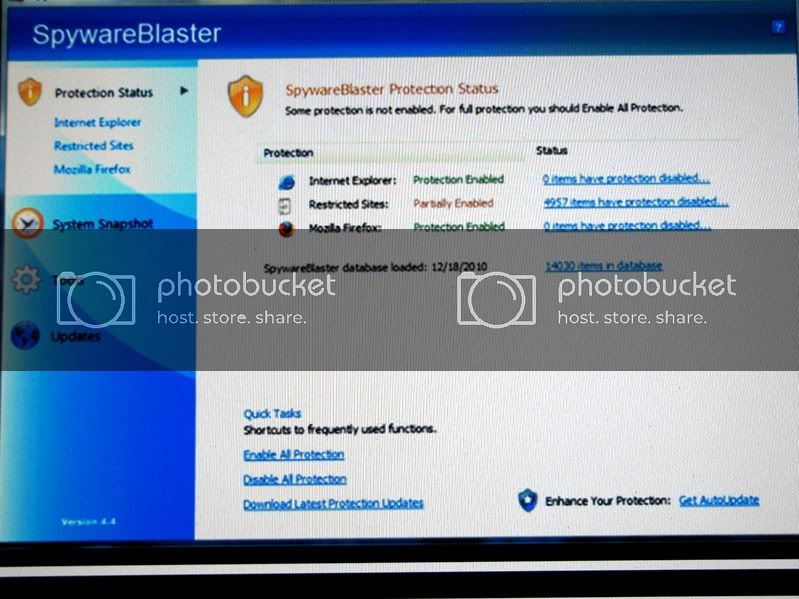
Inevitably someday during any given day, I'll come up with 4957 unprotected items.
When I enable all protection again, it'll be fine until ??? (whatever)....then it reoccurs.
So my help thread on the Wilders forum was:
How do you uninstall Spyware Blaster ?
You'd think if one just uninstalled the thing, then reinstalled it, it would be fixed.
No matter what I do, or how many steps I take, I still come up with 4957 unprotected items several times a day.

So do any off the resident experts here have any thoughts, please?
Basics:
Program version is 4.4.
Happens on my Vista Ultimate x64 drive (and)
On the Windows 7 Ultimate x64 second drive.
I could go into Restricted Sites, Mozilla Firefox and start ticking more items.....let's say I ticked 20) more for example.
I enable all protection, it goes into it's state of partial protection and I'm right back to 4957 unprotected items.

IMO the problem seems to be that I can't completely remove this program, so when I reinstall it, I get the same old results.
I've even been through 2 program revisions (from 4.3 on 8/3/2010) and nothing changed.
My last effort before I just gave up was using one of the most aggressive uninstallers that was suggested called Revo Uninstaller in aggressive mode.
And, yes.....I'm cleaning my registry between program gone & back.
Same results.
There's plenty to chew on here if someone feels like tossing out some suggestions, I'm sure open & willing to try.
No...this isn't a critical deal, just an annoyance that bugs me like that mosquito flying around inside your tent at night.
Thanks for reading this post, if anyone does.
Steve_83 
-
January 13th, 2011, 03:40 PM
#2
What other antispy programs are you using or have you used? Some, like spybot s&d, will lock that registry entry and not allow it to be changed... even after it (Spybot) has been uninstalled. You'd need to turn that/those features off in Spybot or other programs before you uninstall them.
-
January 13th, 2011, 11:10 PM
#3
Thanks fink.
The wilders moderators had the same idea & here's what I told them at:
http://www.wilderssecurity.com/showt...18#post1767418
From them....What other security/privacy/maintenance/clean-up software do you have installed? ----->
The primary defense is Kaspersky Internet Security 2010.
I also use & run daily:
CCleaner
Superantispyware
Malwarebytes
I update Windows Defender but rarely run it.
I download & run the Microsoft Malicious software removal tool a couple of times a month.
I'm running and use Mozilla's Firefox 3.6.10 almost exclusively if that matters and I think it does.
Specifically, another security application could be incorrectly blocking SpywareBlaster's ability to modify the registry, or a clean-up tool may be incorrectly removing some of the entries.
Would you kindly elaborate that reply javacool ?
I appreciate the response guys.
~~~~~~~~~~~~~~~~
Here's an after thought:
In Firefox > Tools > Options > Privacy I believe your program auto fills the restricted sites in > Exceptions................correct me if I'm mistaken.
I have never cleared these restricted sites out when I uninstalled the problematic version and then installed a new version.
Matter of fact I never checked either.
I wonder if that's the problem?
All these misc. programs were disabled & I tried several times again fink.
Think I'd be posting here if that worked?

Everything and everything else we tried is in that wilders thread, if you have the time to scan it real quick buddy.
I am Lost, but if you want me to try again....I will.

And before I put this to bed.....I just checked and #%^&** !! 4957 items are disabled.
Steve_83
-
January 14th, 2011, 01:22 AM
#4
If that's a bug in their program, is there another similar one he can use instead?
Win7 Ult/ 3.40 GHZ Intel Core i5-3570K /ASRock mobo Z77 Pro4 /SSD/ EUFI MS 3400 MHZ/8 GB RAM; Win 7 Ult/Verizon FIOS wired network
Waterfox Classic/Chrome / Firefox 115esr
--------------------------------------------------------------------------------
"The medium is the message." - Marshall McLuhan
-
January 14th, 2011, 03:03 AM
#5
All in all Spyware Blaster does not do much for you anyway...if thats any comfort.
-
January 14th, 2011, 05:44 AM
#6
foxy & paul,
The way I see it it's kind of like taking one particular allergy medicine that's worked for years & all of a sudden you start getting pills that are 25% broken off.
No I really don't know of another free program that's as nice.
I just depend on it for proactive defense when I get steered to a dangerous site. And that happens to me mostly on forums where people can post links as [ URL= """""""", or < a href="""""".
The eBay forums are famous about that. (or used to be)
Malicious intent to trap your online competitors or as childish as someone you got into an argument with.
I detest getting infected.
That program has warned me dozens of times.
I guess one other thing is just the challenge of fixing a problem.
I always learn something on those types of journeys.
There has to be a fix.
Don't you find those types of challenges intriguing?
Steve_83
-
January 14th, 2011, 10:46 AM
#7
I'm not sure what else to suggest. Are you sure you never had spybot s&d installed in the past then uninstalled it?
-
January 14th, 2011, 11:30 AM
#8
 Maybe we oughta close it here too then Maybe we oughta close it here too then
Ya think, fink?
With no hard feelings, of course.
I actually didn't expect too much after messing with this for 6 months.
No Spybot buddy.
I gave up on that several years ago.
My opinion now is:
If Kaspersky & SAS can't find it, I'm in bigger trouble than I can fix.
Then I bring in the broni/spyware doc arsenal.
I do run that Microsoft Malicious software removal tool 2) times a month too.
It comes out the 2nd Tuesday of every month.
I guess I'll just wait until the next inevitable hard drive crash & I'm sure it'll get repaired that way.
Dang I just can't think of anything I didn't disable, remnants I didn't remove or modes I haven't tried that would make this exact problem reoccur over & over.
And it's duplicated on 2) OSs.....Vista & 7.
You can remove this thread completely if you want fink.
Steve
Thread Information
Users Browsing this Thread
There are currently 1 users browsing this thread. (0 members and 1 guests)
 Posting Permissions
- You may not post new threads
- You may not post replies
- You may not post attachments
- You may not edit your posts
-
Forum Rules
|
|


 Reply With Quote


