|
-
November 2nd, 2010, 07:35 PM
#1
 [RESOLVED] Shortened Win7 Paths [RESOLVED] Shortened Win7 Paths
Hi All, .............. Once again I have installed Windows7 as part of a double boot system and I'm having trouble finding my way around. Let me use an example of finding my Thundebird Profile folder. In WinXP the path is:
C:\Documents and Settings\name\Application Data\Thunderbird\Profiles
and with Windows7 Installed in F:, the path is:
F:\Users\name\AppData\Roaming\Thunderbird\Profiles.
In XP starting at C: there is no problem moving through the folder designations to the Profile folder.
In Win7 starting with Computer and F: I can't get past \name\, there is no AppData to move onward. This type of stoppage happens if I use Search for succeeding missing folder types. Obviously I can get to the Profiles folder in Win7 but my question is: why the difference between the C: or F: paths Or, should I be looking at another path different from the C:?
-
November 2nd, 2010, 10:28 PM
#2
Did you go into folder options and set the hidden folder to shown.
-
November 3rd, 2010, 11:22 AM
#3
To be sure of seeing all files and folders, set your Folder Options like this:
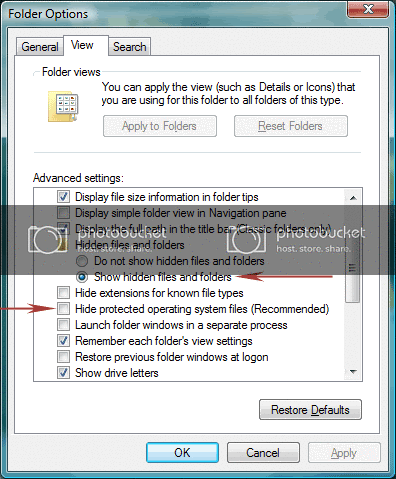
Nick.
-
November 3rd, 2010, 12:11 PM
#4
Train and Supersparks, ......... Your responses fixed me and the computer exactly right. My thanks to each of you.
-
November 3rd, 2010, 12:12 PM
#5
You're very welcome 
Nick.
Thread Information
Users Browsing this Thread
There are currently 1 users browsing this thread. (0 members and 1 guests)
 Posting Permissions
- You may not post new threads
- You may not post replies
- You may not post attachments
- You may not edit your posts
-
Forum Rules
|
|


 Reply With Quote


