|
-
August 9th, 2010, 09:36 AM
#1
mass email attack
I logged in this morning to find several emails that got sent out from my contacts returned to me because those emails dont exist anymore.
A friend said that she received an email from me about some pills.
So it looks like my msn contacts have been compromised.
Where do I start in fixing this.
I am using msn messenger threw Microsoft Outlook 2007 using outlook connector.
Win7
thanks VDR
terry
-
August 9th, 2010, 09:14 PM
#2
You should know the drill....hmmmm
Please, read here: http://discussions.virtualdr.com/sho...d.php?t=167915 and post required logs.
-
August 10th, 2010, 06:23 PM
#3
Broni thanks for the directions.
Here are the logs. I will add to my previous description that it is a hotmail account being used with my Outlook client. Contacts from my hotmail account received emails under my account to some advertisement for pills.
I am using win7 64 bit.
I understand that the hotmail account could have been compromised on by the web client but I figured it was best to stop in here and get my PC checked out.
Logs:
MAlware Bytes
Malwarebytes' Anti-Malware 1.46
www.malwarebytes.org
Database version: 4410
Windows 6.1.7600
Internet Explorer 8.0.7600.16385
8/10/2010 5:35:13 PM
mbam-log-2010-08-10 (17-35-13).txt
Scan type: Quick scan
Objects scanned: 121652
Time elapsed: 3 minute(s), 12 second(s)
Memory Processes Infected: 0
Memory Modules Infected: 0
Registry Keys Infected: 0
Registry Values Infected: 0
Registry Data Items Infected: 0
Folders Infected: 0
Files Infected: 0
Memory Processes Infected:
(No malicious items detected)
Memory Modules Infected:
(No malicious items detected)
Registry Keys Infected:
(No malicious items detected)
Registry Values Infected:
(No malicious items detected)
Registry Data Items Infected:
(No malicious items detected)
Folders Infected:
(No malicious items detected)
Files Infected:
(No malicious items detected)
DDS log:
DDS (Ver_10-03-17.01) - NTFSX64
Run by TWjr at 17:19:51.45 on Tue 08/10/2010
Internet Explorer: 8.0.7600.16385 BrowserJavaVersion: 1.6.0_15
Microsoft Windows 7 Ultimate 6.1.7600.0.1252.1.1033.18.8191.6909 [GMT -4:00]
============== Running Processes ===============
svchost.exe
svchost.exe
svchost.exe
svchost.exe
svchost.exe
svchost.exe
svchost.exe
svchost.exe
svchost.exe
svchost.exe
C:\Windows\system32\taskhost.exe
C:\Windows\system32\Dwm.exe
C:\Windows\Explorer.EXE
C:\Windows\vVX1000.exe
C:\Program Files (x86)\Windows Sidebar\sidebar.exe
C:\Program Files\Alwil Software\Avast4\ashDisp.exe
C:\Program Files (x86)\KeyScrambler\KeyScrambler.exe
C:\Program Files (x86)\KeyScrambler\x64\KeyScrambler.exe
C:\Program Files (x86)\VMware\VMware Workstation\vmware-tray.exe
svchost.exe
C:\Windows\explorer.exe
C:\Windows\system32\conhost.exe
C:\Users\TWjr\Desktop\dds.scr
C:\Windows\system32\conhost.exe
============== Pseudo HJT Report ===============
mLocal Page = c:\windows\syswow64\blank.htm
BHO: Adobe PDF Link Helper: {18df081c-e8ad-4283-a596-fa578c2ebdc3} - c:\program files (x86)\common files\adobe\acrobat\activex\AcroIEHelperShim.dll
BHO: KeyScramblerBHO Class: {2b9f5787-88a5-4945-90e7-c4b18563bc5e} - c:\program files (x86)\keyscrambler\KeyScramblerIE.dll
BHO: {5C255C8A-E604-49b4-9D64-90988571CECB} - No File
BHO: Groove GFS Browser Helper: {72853161-30c5-4d22-b7f9-0bbc1d38a37e} - c:\program files (x86)\microsoft office\office12\GrooveShellExtensions.dll
BHO: Windows Live Sign-in Helper: {9030d464-4c02-4abf-8ecc-5164760863c6} - c:\program files (x86)\common files\microsoft shared\windows live\WindowsLiveLogin.dll
BHO: Java(tm) Plug-In 2 SSV Helper: {dbc80044-a445-435b-bc74-9c25c1c588a9} - c:\program files (x86)\java\jre6\bin\jp2ssv.dll
uRun: [msnmsgr] "c:\program files (x86)\windows live\messenger\msnmsgr.exe" /background
uRun: [Sidebar] c:\program files (x86)\windows sidebar\sidebar.exe /autoRun
uRun: [EA Core] c:\program files (x86)\electronic arts\eadm\Core.exe -silent
mRun: [avast!] "c:\program files\alwil software\avast4\ashDisp.exe"
mRun: [LifeCam] "c:\program files (x86)\microsoft lifecam\LifeExp.exe"
mRun: [KeyScrambler] c:\program files (x86)\keyscrambler\keyscrambler.exe /a
mRun: [GrooveMonitor] "c:\program files (x86)\microsoft office\office12\GrooveMonitor.exe"
mRun: [Adobe Reader Speed Launcher] "c:\program files (x86)\adobe\reader 9.0\reader\Reader_sl.exe"
mRun: [Adobe ARM] "c:\program files (x86)\common files\adobe\arm\1.0\AdobeARM.exe"
mRun: [ZDConfig]
mRun: [vmware-tray] "c:\program files (x86)\vmware\vmware workstation\vmware-tray.exe"
mRun: [Malwarebytes Anti-Malware (reboot)] "c:\program files (x86)\malwarebytes' anti-malware\mbam.exe" /runcleanupscript
mRunOnce: [Malwarebytes' Anti-Malware] c:\program files (x86)\malwarebytes' anti-malware\mbamgui.exe /install /silent
mPolicies-explorer: NoActiveDesktop = 1 (0x1)
mPolicies-explorer: NoActiveDesktopChanges = 1 (0x1)
mPolicies-explorer: ForceActiveDesktopOn = 0 (0x0)
mPolicies-system: ConsentPromptBehaviorAdmin = 5 (0x5)
mPolicies-system: ConsentPromptBehaviorUser = 3 (0x3)
mPolicies-system: EnableUIADesktopToggle = 0 (0x0)
IE: E&xport to Microsoft Excel - c:\progra~2\micros~3\office12\EXCEL.EXE/3000
IE: {5C106A59-CC3C-4caa-81A4-6D909B5ACE23}
IE: {2670000A-7350-4f3c-8081-5663EE0C6C49} - {48E73304-E1D6-4330-914C-F5F514E3486C} - c:\progra~2\micros~3\office12\ONBttnIE.dll
IE: {92780B25-18CC-41C8-B9BE-3C9C571A8263} - {FF059E31-CC5A-4E2E-BF3B-96E929D65503} - c:\progra~2\micros~3\office12\REFIEBAR.DLL
LSP: c:\program files (x86)\vmware\vmware workstation\vsocklib.dll
DPF: {8AD9C840-044E-11D1-B3E9-00805F499D93} - hxxp://java.sun.com/update/1.6.0/jinstall-1_6_0_15-windows-i586.cab
DPF: {CAFEEFAC-0016-0000-0015-ABCDEFFEDCBA} - hxxp://java.sun.com/update/1.6.0/jinstall-1_6_0_15-windows-i586.cab
DPF: {CAFEEFAC-FFFF-FFFF-FFFF-ABCDEFFEDCBA} - hxxp://java.sun.com/update/1.6.0/jinstall-1_6_0_15-windows-i586.cab
DPF: {D27CDB6E-AE6D-11CF-96B8-444553540000} - hxxp://fpdownload2.macromedia.com/get/shockwave/cabs/flash/swflash.cab
Handler: grooveLocalGWS - {88FED34C-F0CA-4636-A375-3CB6248B04CD} - c:\program files (x86)\microsoft office\office12\GrooveSystemServices.dll
SEH: Groove GFS Stub Execution Hook: {b5a7f190-dda6-4420-b3ba-52453494e6cd} - c:\program files (x86)\microsoft office\office12\GrooveShellExtensions.dll
BHO-X64: KeyScramblerBHO Class: {2B9F5787-88A5-4945-90E7-C4B18563BC5E} - c:\program files (x86)\keyscrambler\x64\KeyScramblerIE.dll
BHO-X64: QFX Software KeyScrambler - No File
mRun-x64: [VX1000] c:\windows\vVX1000.exe
mRun-x64: [LogMeIn GUI] "c:\program files (x86)\logmein\x64\LogMeInSystray.exe"
================= FIREFOX ===================
FF - ProfilePath -
---- FIREFOX POLICIES ----
c:\program files (x86)\mozilla firefox\greprefs\all.js - pref("ui.use_native_colors", true);
c:\program files (x86)\mozilla firefox\greprefs\all.js - pref("ui.use_native_popup_windows", false);
c:\program files (x86)\mozilla firefox\greprefs\all.js - pref("browser.enable_click_image_resizing", true);
c:\program files (x86)\mozilla firefox\greprefs\all.js - pref("accessibility.browsewithcaret_shortcut.enabled", true);
c:\program files (x86)\mozilla firefox\greprefs\all.js - pref("javascript.options.mem.high_water_mark", 32);
c:\program files (x86)\mozilla firefox\greprefs\all.js - pref("javascript.options.mem.gc_frequency", 1600);
c:\program files (x86)\mozilla firefox\greprefs\all.js - pref("network.IDN.whitelist.lu", true);
c:\program files (x86)\mozilla firefox\greprefs\all.js - pref("network.IDN.whitelist.nu", true);
c:\program files (x86)\mozilla firefox\greprefs\all.js - pref("network.IDN.whitelist.nz", true);
c:\program files (x86)\mozilla firefox\greprefs\all.js - pref("network.IDN.whitelist.xn--mgbaam7a8h", true);
c:\program files (x86)\mozilla firefox\greprefs\all.js - pref("network.IDN.whitelist.xn--mgberp4a5d4ar", true);
c:\program files (x86)\mozilla firefox\greprefs\all.js - pref("network.IDN.whitelist.xn--p1ai", true);
c:\program files (x86)\mozilla firefox\greprefs\all.js - pref("network.IDN.whitelist.xn--mgbayh7gpa", true);
c:\program files (x86)\mozilla firefox\greprefs\all.js - pref("network.IDN.whitelist.tel", true);
c:\program files (x86)\mozilla firefox\greprefs\all.js - pref("network.auth.force-generic-ntlm", false);
c:\program files (x86)\mozilla firefox\greprefs\all.js - pref("network.proxy.type", 5);
c:\program files (x86)\mozilla firefox\greprefs\all.js - pref("network.buffer.cache.count", 24);
c:\program files (x86)\mozilla firefox\greprefs\all.js - pref("network.buffer.cache.size", 4096);
c:\program files (x86)\mozilla firefox\greprefs\all.js - pref("dom.ipc.plugins.timeoutSecs", 45);
c:\program files (x86)\mozilla firefox\greprefs\all.js - pref("svg.smil.enabled", false);
c:\program files (x86)\mozilla firefox\greprefs\all.js - pref("ui.trackpoint_hack.enabled", -1);
c:\program files (x86)\mozilla firefox\greprefs\all.js - pref("browser.formfill.debug", false);
c:\program files (x86)\mozilla firefox\greprefs\all.js - pref("browser.formfill.agedWeight", 2);
c:\program files (x86)\mozilla firefox\greprefs\all.js - pref("browser.formfill.bucketSize", 1);
c:\program files (x86)\mozilla firefox\greprefs\all.js - pref("browser.formfill.maxTimeGroupings", 25);
c:\program files (x86)\mozilla firefox\greprefs\all.js - pref("browser.formfill.timeGroupingSize", 604800);
c:\program files (x86)\mozilla firefox\greprefs\all.js - pref("browser.formfill.boundaryWeight", 25);
c:\program files (x86)\mozilla firefox\greprefs\all.js - pref("browser.formfill.prefixWeight", 5);
c:\program files (x86)\mozilla firefox\greprefs\all.js - pref("accelerometer.enabled", true);
c:\program files (x86)\mozilla firefox\greprefs\all.js - pref("html5.enable", false);
c:\program files (x86)\mozilla firefox\greprefs\security-prefs.js - pref("security.ssl.allow_unrestricted_renego_everywhere__temporarily_available_pref", true);
c:\program files (x86)\mozilla firefox\greprefs\security-prefs.js - pref("security.ssl.renego_unrestricted_hosts", "");
c:\program files (x86)\mozilla firefox\greprefs\security-prefs.js - pref("security.ssl.treat_unsafe_negotiation_as_broken", false);
c:\program files (x86)\mozilla firefox\greprefs\security-prefs.js - pref("security.ssl.require_safe_negotiation", false);
c:\program files (x86)\mozilla firefox\greprefs\security-prefs.js - pref("security.ssl3.rsa_seed_sha", true);
c:\program files (x86)\mozilla firefox\defaults\pref\firefox-branding.js - pref("app.update.download.backgroundInterval", 600);
c:\program files (x86)\mozilla firefox\defaults\pref\firefox-branding.js - pref("app.update.url.manual", "http://www.firefox.com");
c:\program files (x86)\mozilla firefox\defaults\pref\firefox-branding.js - pref("browser.search.param.yahoo-fr-ja", "mozff");
c:\program files (x86)\mozilla firefox\defaults\pref\firefox.js - pref("extensions.{972ce4c6-7e08-4474-a285-3208198ce6fd}.name", "chrome://browser/locale/browser.properties");
c:\program files (x86)\mozilla firefox\defaults\pref\firefox.js - pref("extensions.{972ce4c6-7e08-4474-a285-3208198ce6fd}.description", "chrome://browser/locale/browser.properties");
c:\program files (x86)\mozilla firefox\defaults\pref\firefox.js - pref("xpinstall.whitelist.add", "addons.mozilla.org");
c:\program files (x86)\mozilla firefox\defaults\pref\firefox.js - pref("xpinstall.whitelist.add.36", "getpersonas.com");
c:\program files (x86)\mozilla firefox\defaults\pref\firefox.js - pref("lightweightThemes.update.enabled", true);
c:\program files (x86)\mozilla firefox\defaults\pref\firefox.js - pref("browser.allTabs.previews", false);
c:\program files (x86)\mozilla firefox\defaults\pref\firefox.js - pref("plugins.hide_infobar_for_outdated_plugin", false);
c:\program files (x86)\mozilla firefox\defaults\pref\firefox.js - pref("plugins.update.notifyUser", false);
c:\program files (x86)\mozilla firefox\defaults\pref\firefox.js - pref("toolbar.customization.usesheet", false);
c:\program files (x86)\mozilla firefox\defaults\pref\firefox.js - pref("dom.ipc.plugins.enabled.nptest.dll", true);
c:\program files (x86)\mozilla firefox\defaults\pref\firefox.js - pref("dom.ipc.plugins.enabled.npswf32.dll", true);
c:\program files (x86)\mozilla firefox\defaults\pref\firefox.js - pref("dom.ipc.plugins.enabled.npctrl.dll", true);
c:\program files (x86)\mozilla firefox\defaults\pref\firefox.js - pref("dom.ipc.plugins.enabled.npqtplugin.dll", true);
c:\program files (x86)\mozilla firefox\defaults\pref\firefox.js - pref("dom.ipc.plugins.enabled", false);
c:\program files (x86)\mozilla firefox\defaults\pref\firefox.js - pref("browser.taskbar.previews.enable", false);
c:\program files (x86)\mozilla firefox\defaults\pref\firefox.js - pref("browser.taskbar.previews.max", 20);
c:\program files (x86)\mozilla firefox\defaults\pref\firefox.js - pref("browser.taskbar.previews.cachetime", 20);
============= SERVICES / DRIVERS ===============
R1 aswSP;avast! Self Protection;c:\windows\system32\drivers\aswSP.sys [2009-11-28 89680]
R1 vwififlt;Virtual WiFi Filter Driver;c:\windows\system32\drivers\vwififlt.sys [2009-7-13 59904]
R2 aswFsBlk;aswFsBlk;c:\windows\system32\drivers\aswFsBlk.sys [2009-11-28 22096]
R2 aswMonFlt;aswMonFlt;c:\windows\system32\drivers\aswMonFlt.sys [2009-11-28 65616]
R2 avast! Antivirus;avast! Antivirus;c:\program files\alwil software\avast4\ashServ.exe [2009-11-28 138680]
R2 LMIInfo;LogMeIn Kernel Information Provider;c:\program files (x86)\logmein\x64\rainfo.sys [2008-8-11 15928]
R2 LMIRfsDriver;LogMeIn Remote File System Driver;c:\windows\system32\drivers\LMIRfsDriver.sys [2010-5-27 72216]
R2 Stereo Service;NVIDIA Stereoscopic 3D Driver Service;c:\program files (x86)\nvidia corporation\3d vision\nvSCPAPISvr.exe [2010-7-9 248936]
R2 VMUSBArbService;VMware USB Arbitration Service;c:\program files (x86)\common files\vmware\usb\vmware-usbarbitrator.exe [2009-10-22 563760]
R3 avast! Mail Scanner;avast! Mail Scanner;c:\program files\alwil software\avast4\ashMaiSv.exe [2009-11-28 254040]
R3 avast! Web Scanner;avast! Web Scanner;c:\program files\alwil software\avast4\ashWebSv.exe [2009-11-28 352920]
S2 gupdate;Google Update Service (gupdate);c:\program files (x86)\google\update\GoogleUpdate.exe [2010-6-2 136176]
S3 KeyScrambler;KeyScrambler;c:\windows\system32\drivers\keyscrambler.sys [2009-11-28 129384]
S3 MEMSWEEP2;MEMSWEEP2;c:\windows\system32\F79A.tmp [2010-8-9 6144]
S3 netr28ux;RT2870 USB Wireless LAN Card Driver for Vista;c:\windows\system32\drivers\netr28ux.sys [2009-6-10 867328]
S3 RTL8167;Realtek 8167 NT Driver;c:\windows\system32\drivers\Rt64win7.sys [2009-8-20 239616]
S3 RTL8187;Realtek RTL8187 Wireless 802.11b/g 54Mbps USB 2.0 Network Adapter;c:\windows\system32\drivers\RTL8187.sys [2010-1-7 448512]
S3 WatAdminSvc;Windows Activation Technologies Service;c:\windows\system32\wat\WatAdminSvc.exe [2010-3-7 1255736]
=============== Created Last 30 ================
==================== Find3M ====================
============= FINISH: 17:21:21.69 ===============
The 3 files were to big for one posting.
The second DDS file is on the next posting.
Thanks,
TyWelcome
Terry Welcome
-
August 10th, 2010, 06:25 PM
#4
here is the second DDS file
Second DDS log:
UNLESS SPECIFICALLY INSTRUCTED, DO NOT POST THIS LOG.
IF REQUESTED, ZIP IT UP & ATTACH IT
DDS (Ver_10-03-17.01)
Microsoft Windows 7 Ultimate
Boot Device: \Device\HarddiskVolume2
Install Date: 11/28/2009 2:57:49 PM
System Uptime: 8/10/2010 12:25:42 PM (5 hours ago)
Motherboard: MSI | | MS-7369
Processor: AMD Athlon(tm) 64 X2 Dual Core Processor 5600+ | CPU 1 | 2800/200mhz
==== Disk Partitions =========================
A: is Removable
C: is FIXED (NTFS) - 298 GiB total, 187.447 GiB free.
D: is FIXED (NTFS) - 466 GiB total, 111.186 GiB free.
E: is CDROM ()
F: is Removable
G: is CDROM (CDFS)
==== Disabled Device Manager Items =============
==== System Restore Points ===================
No restore point in system.
==== Installed Programs ======================
Adobe Flash Player 10 ActiveX
Adobe Flash Player 10 Plugin
Adobe Reader 9.3.3
Adobe Shockwave Player 11.5
Aion
avast! Antivirus
AVIcodec (remove only)
Baldur's Gate(TM) II - Shadows of Amn(TM)
Bowflex i-Trainer
Dungeon Siege 2
Dungeons & Dragons Online ®: Eberron Unlimited ™ v01.10.00.805
Google Earth
Google Update Helper
HashCalc 2.02
HiJackThis
International Volleyball 2009
iSEEK AnswerWorks English Runtime
Java(TM) 6 Update 15
JDownloader
K-Lite Codec Pack 5.5.6 (Full)
KeyScrambler
LogMeIn
Magic ISO Maker v5.5 (build 0276)
MagicDisc 2.7.106
Malwarebytes' Anti-Malware
Microsoft .NET Framework 1.1
Microsoft .NET Framework 1.1 Security Update (KB953297)
Microsoft Choice Guard
Microsoft Corporation
Microsoft Games for Windows - LIVE
Microsoft Games for Windows - LIVE Redistributable
Microsoft Office 2007 Service Pack 2 (SP2)
Microsoft Office Access MUI (English) 2007
Microsoft Office Access Setup Metadata MUI (English) 2007
Microsoft Office Enterprise 2007
Microsoft Office Excel MUI (English) 2007
Microsoft Office Groove MUI (English) 2007
Microsoft Office Groove Setup Metadata MUI (English) 2007
Microsoft Office InfoPath MUI (English) 2007
Microsoft Office OneNote MUI (English) 2007
Microsoft Office Outlook Connector
Microsoft Office Outlook MUI (English) 2007
Microsoft Office PowerPoint MUI (English) 2007
Microsoft Office Proof (English) 2007
Microsoft Office Proof (French) 2007
Microsoft Office Proof (Spanish) 2007
Microsoft Office Proofing (English) 2007
Microsoft Office Proofing Tools 2007 Service Pack 2 (SP2)
Microsoft Office Publisher MUI (English) 2007
Microsoft Office Shared MUI (English) 2007
Microsoft Office Shared Setup Metadata MUI (English) 2007
Microsoft Office Word MUI (English) 2007
Microsoft Silverlight
Microsoft Visual C++ 2005 ATL Update kb973923 - x86 8.0.50727.4053
Microsoft Visual C++ 2005 Redistributable
mIRC
Mozilla Firefox (3.6.8)
MSVCRT
NCsoft Launcher
NVIDIA PhysX
NVIDIA Stereoscopic 3D Driver
PFPortChecker 1.0.32
PunkBuster Services
QuickTime
Samsung PC Studio 3 USB Driver Installer
Samsung USB Driver (MCCI 4.34) WHQL v3.4
Security Update for 2007 Microsoft Office System (KB969559)
Security Update for 2007 Microsoft Office System (KB976321)
Security Update for 2007 Microsoft Office System (KB982312)
Security Update for 2007 Microsoft Office System (KB982331)
Security Update for CAPICOM (KB931906)
Security Update for Microsoft Office Access 2007 (KB979440)
Security Update for Microsoft Office Excel 2007 (KB982308)
Security Update for Microsoft Office InfoPath 2007 (KB979441)
Security Update for Microsoft Office Outlook 2007 (KB980376)
Security Update for Microsoft Office PowerPoint 2007 (KB982158)
Security Update for Microsoft Office Publisher 2007 (KB982124)
Security Update for Microsoft Office system 2007 (972581)
Security Update for Microsoft Office system 2007 (KB969613)
Security Update for Microsoft Office system 2007 (KB974234)
Security Update for Microsoft Office Visio Viewer 2007 (KB973709)
Security Update for Microsoft Office Word 2007 (KB982135)
Sid Meier's Civilization 4 Complete
Sid Meier's Civilization IV Colonization
SMPlayer 0.6.7
Sophos Anti-Rootkit 1.5.0
SUPER © Version 2010.bld.37 (Jan 2, 2010)
Swiff Player 1.5
TestOut Navigator (Stand-Alone Version)
tools-freebsd
tools-linux
tools-netware
tools-solaris
tools-windows
tools-winPre2k
Tropico 3 1.00
TurboTax 2009 WinBizFedFormset
TurboTax 2009 WinBizReleaseEngine
TurboTax 2009 WinBizTaxSupport
TurboTax 2009 wrapper
TurboTax Business 2009
Update for 2007 Microsoft Office System (KB967642)
Update for Microsoft Office 2007 Help for Common Features (KB963673)
Update for Microsoft Office Access 2007 Help (KB963663)
Update for Microsoft Office Excel 2007 Help (KB963678)
Update for Microsoft Office Infopath 2007 Help (KB963662)
Update for Microsoft Office OneNote 2007 (KB980729)
Update for Microsoft Office OneNote 2007 Help (KB963670)
Update for Microsoft Office Outlook 2007 Help (KB963677)
Update for Microsoft Office Powerpoint 2007 Help (KB963669)
Update for Microsoft Office Publisher 2007 Help (KB963667)
Update for Microsoft Office Script Editor Help (KB963671)
Update for Microsoft Office Word 2007 Help (KB963665)
Update for Outlook 2007 Junk Email Filter (kb2202131)
Ventrilo Server
VMware Workstation
Watson
Windows Live Call
Windows Live Communications Platform
Windows Live Essentials
Windows Live Messenger
Windows Live OneCare safety scanner
Windows Live Sign-in Assistant
Windows Live Upload Tool
Windows Media Player Firefox Plugin
Windows Server 2008 Essentials Training
WinPcap 4.1.1
Wireshark 1.2.6
World War One v1.0.8
X-NetStat Pro 5.55
==== Event Viewer Messages From Past Week ========
8/9/2010 9:56:44 AM, Error: Application Popup [1060] - \??\C:\Windows\system32\F486.tmp has been blocked from loading due to incompatibility with this system. Please contact your software vendor for a compatible version of the driver.
8/9/2010 10:48:41 AM, Error: Service Control Manager [7000] - The MEMSWEEP2 service failed to start due to the following error: This driver has been blocked from loading
8/9/2010 10:48:41 AM, Error: Application Popup [1060] - \??\C:\Windows\system32\F79A.tmp has been blocked from loading due to incompatibility with this system. Please contact your software vendor for a compatible version of the driver.
8/10/2010 4:32:00 PM, Error: Microsoft-Windows-DistributedCOM [10016] - The application-specific permission settings do not grant Local Activation permission for the COM Server application with CLSID {0C0A3666-30C9-11D0-8F20-00805F2CD064} and APPID {9209B1A6-964A-11D0-9372-00A0C9034910} to the user tywelcome-PC\TWjr SID (S-1-5-21-1775958735-2736017920-1642952330-1003) from address LocalHost (Using LRPC). This security permission can be modified using the Component Services administrative tool.
==== End Of File ===========================
Thanks again,
TyWelcome
-
August 10th, 2010, 10:02 PM
#5
I understand that the hotmail account could have been compromised on by the web client
Very possible.
but I figured it was best to stop in here and get my PC checked out.
Very smart 
==================================================================
Download SUPERAntiSpyware Free for Home Users:
http://www.superantispyware.com/
* Double-click SUPERAntiSpyware.exe and use the default settings for installation.
* An icon will be created on your desktop. Double-click that icon to launch the program.
* If asked to update the program definitions, click "Yes". If not, update the definitions before scanning by selecting "Check for Updates". (If you encounter any problems while downloading the updates, manually download and unzip them from here: http://www.superantispyware.com/definitions.html.)
* Close SUPERAntiSpyware.
Restart computer in Safe Mode.
To enter Safe Mode, restart computer, and keep tapping F8 key, until menu appears; pick Safe Mode; you'll see "Safe Mode" in all four corners of your screen
* Open SUPERAntiSpyware.
* Under "Configuration and Preferences", click the Preferences button.
* Click the Scanning Control tab.
* Under Scanner Options make sure the following are checked (leave all others unchecked):
- Close browsers before scanning.
Scan for tracking cookies.
Terminate memory threats before quarantining.
* Click the "Close" button to leave the control center screen.
* Back on the main screen, under "Scan for Harmful Software" click Scan your computer.
* On the left, make sure you check C:\Fixed Drive.
* On the right, under "Complete Scan", choose Perform Complete Scan.
* Click "Next" to start the scan. Please be patient while it scans your computer.
* After the scan is complete, a Scan Summary box will appear with potentially harmful items that were detected. Click "OK".
* Make sure everything has a checkmark next to it and click "Next".
* A notification will appear that "Quarantine and Removal is Complete". Click "OK" and then click the "Finish" button to return to the main menu.
* If asked if you want to reboot, click "Yes".
* To retrieve the removal information after reboot, launch SUPERAntispyware again.
- Click Preferences, then click the Statistics/Logs tab.
Under Scanner Logs, double-click SUPERAntiSpyware Scan Log.
If there are several logs, click the current dated log and press View log. A text file will open in your default text editor.
Please copy and paste the Scan Log results in your next reply.
* Click Close to exit the program.
Post SUPERAntiSpyware log.
==============================================================
Download MBRCheck to your desktop
Double click MBRCheck.exe to run (Vista and Windows 7 users, right click and select Run as Administrator).
It will show a black screen with some data on it.
A report called MBRcheckxxxx.txt will be on your desktop
Open this report and post its content in your next reply.
-
August 11th, 2010, 11:19 AM
#6
Super log and MBRcheck
Just to note when I shutdown last night I had some Win7 updates they started right up when shutting down so I did not want to interrupt. This morning I checked the updates and searched most appear to by security updates that were released by Microsoft on the 9th.
SuperAntiSpyware ran fine and I got the log.
For the MBRcheck the program ran fine but no log was left on my desktop.
The program was ran from the desktop with admin rights.
MBRcheck came up with these results:
For window drive (c: ) it says RE: (in blue) and Windows 7 MBR code detected (in green).
My data drive (d: ) its says in red MBR Code Faked!
if you need the SHA1 numbers let me know.
Here is the SuperAntioSpyware log:
SUPERAntiSpyware Scan Log
http://www.superantispyware.com
Generated 08/11/2010 at 11:04 AM
Application Version : 4.41.1000
Core Rules Database Version : 5344
Trace Rules Database Version: 3156
Scan type : Complete Scan
Total Scan Time : 01:15:42
Memory items scanned : 283
Memory threats detected : 0
Registry items scanned : 14533
Registry threats detected : 0
File items scanned : 201071
File threats detected : 81
Adware.Tracking Cookie
C:\Users\TWjr\AppData\Roaming\Microsoft\Windows\Cookies\twjr@invitemedia[1].txt
C:\Users\TWjr\AppData\Roaming\Microsoft\Windows\Cookies\[email protected][1].txt
C:\Users\TWjr\AppData\Roaming\Microsoft\Windows\Cookies\twjr@yieldmanager[1].txt
C:\Users\TWjr\AppData\Roaming\Microsoft\Windows\Cookies\[email protected][1].txt
C:\Users\TWjr\AppData\Roaming\Microsoft\Windows\Cookies\twjr@mediaplex[2].txt
C:\Users\TWjr\AppData\Roaming\Microsoft\Windows\Cookies\twjr@pointroll[1].txt
C:\Users\TWjr\AppData\Roaming\Microsoft\Windows\Cookies\[email protected][1].txt
C:\Users\TWjr\AppData\Roaming\Microsoft\Windows\Cookies\twjr@adbrite[2].txt
C:\Users\TWjr\AppData\Roaming\Microsoft\Windows\Cookies\[email protected][2].txt
C:\Users\TWjr\AppData\Roaming\Microsoft\Windows\Cookies\twjr@apmebf[2].txt
C:\Users\TWjr\AppData\Roaming\Microsoft\Windows\Cookies\twjr@serving-sys[2].txt
C:\Users\TWjr\AppData\Roaming\Microsoft\Windows\Cookies\twjr@imrworldwide[2].txt
C:\Users\TWjr\AppData\Roaming\Microsoft\Windows\Cookies\twjr@interclick[2].txt
C:\Users\TWjr\AppData\Roaming\Microsoft\Windows\Cookies\[email protected][2].txt
C:\Users\TWjr\AppData\Roaming\Microsoft\Windows\Cookies\twjr@tradedoubler[1].txt
C:\Users\TWjr\AppData\Roaming\Microsoft\Windows\Cookies\twjr@bluestreak[1].txt
C:\Users\TWjr\AppData\Roaming\Microsoft\Windows\Cookies\twjr@pro-market[1].txt
C:\Users\TWjr\AppData\Roaming\Microsoft\Windows\Cookies\[email protected][1].txt
C:\Users\TWjr\AppData\Roaming\Microsoft\Windows\Cookies\twjr@doubleclick[1].txt
C:\Users\TWjr\AppData\Roaming\Microsoft\Windows\Cookies\twjr@questionmarket[2].txt
C:\Users\TWjr\AppData\Roaming\Microsoft\Windows\Cookies\twjr@advertising[1].txt
C:\Users\TWjr\AppData\Roaming\Microsoft\Windows\Cookies\twjr@collective-media[1].txt
C:\Users\TWjr\AppData\Roaming\Microsoft\Windows\Cookies\twjr@zedo[1].txt
C:\Users\TWjr\AppData\Roaming\Microsoft\Windows\Cookies\twjr@fastclick[1].txt
C:\Users\TWjr\AppData\Roaming\Microsoft\Windows\Cookies\[email protected][1].txt
C:\Users\TWjr\AppData\Roaming\Microsoft\Windows\Cookies\twjr@atdmt[1].txt
C:\Users\TWjr\AppData\Local\Temp\Cookies\[email protected][1].txt
C:\Users\TWjr\AppData\Local\Temp\Cookies\twjr@apmebf[1].txt
C:\Users\TWjr\AppData\Local\Temp\Cookies\twjr@atdmt[2].txt
C:\Users\TWjr\AppData\Local\Temp\Cookies\[email protected][1].txt
C:\Users\TWjr\AppData\Local\Temp\Cookies\twjr@doubleclick[2].txt
C:\Users\TWjr\AppData\Local\Temp\Cookies\twjr@mediaplex[2].txt
C:\Users\TWjr\AppData\Local\Temp\Cookies\twjr@pointroll[2].txt
C:\Users\TWjr\AppData\Local\Temp\Cookies\twjr@serving-sys[2].txt
cdn-www.pornhub.com [ C:\Users\TWjr\AppData\Roaming\Macromedia\Flash Player\#SharedObjects\CN4D34JR ]
imagec05.247realmedia.com [ C:\Users\TWjr\AppData\Roaming\Macromedia\Flash Player\#SharedObjects\CN4D34JR ]
media.ign.com [ C:\Users\TWjr\AppData\Roaming\Macromedia\Flash Player\#SharedObjects\CN4D34JR ]
media.scanscout.com [ C:\Users\TWjr\AppData\Roaming\Macromedia\Flash Player\#SharedObjects\CN4D34JR ]
objects.tremormedia.com [ C:\Users\TWjr\AppData\Roaming\Macromedia\Flash Player\#SharedObjects\CN4D34JR ]
secure-us.imrworldwide.com [ C:\Users\TWjr\AppData\Roaming\Macromedia\Flash Player\#SharedObjects\CN4D34JR ]
C:\Users\TWjr\AppData\Roaming\Microsoft\Windows\Cookies\Low\[email protected][1].txt
C:\Users\TWjr\AppData\Roaming\Microsoft\Windows\Cookies\Low\twjr@adbureau[1].txt
C:\Users\TWjr\AppData\Roaming\Microsoft\Windows\Cookies\Low\[email protected][2].txt
C:\Users\TWjr\AppData\Roaming\Microsoft\Windows\Cookies\Low\twjr@apmebf[1].txt
C:\Users\TWjr\AppData\Roaming\Microsoft\Windows\Cookies\Low\twjr@atdmt[1].txt
C:\Users\TWjr\AppData\Roaming\Microsoft\Windows\Cookies\Low\[email protected][2].txt
C:\Users\TWjr\AppData\Roaming\Microsoft\Windows\Cookies\Low\twjr@doubleclick[2].txt
C:\Users\TWjr\AppData\Roaming\Microsoft\Windows\Cookies\Low\twjr@fastclick[1].txt
C:\Users\TWjr\AppData\Roaming\Microsoft\Windows\Cookies\Low\[email protected][1].txt
C:\Users\TWjr\AppData\Roaming\Microsoft\Windows\Cookies\Low\twjr@insightexpressai[1].txt
C:\Users\TWjr\AppData\Roaming\Microsoft\Windows\Cookies\Low\twjr@interclick[2].txt
C:\Users\TWjr\AppData\Roaming\Microsoft\Windows\Cookies\Low\twjr@mediaplex[2].txt
C:\Users\TWjr\AppData\Roaming\Microsoft\Windows\Cookies\Low\[email protected][1].txt
C:\Users\TWjr\AppData\Roaming\Microsoft\Windows\Cookies\Low\[email protected][2].txt
1zz.cqcounter.com [ C:\Users\TWjr\AppData\Roaming\Mozilla\Firefox\Profiles\xwbxphlz.default\cookies.sqlite ]
.apmebf.com [ C:\Users\TWjr\AppData\Roaming\Mozilla\Firefox\Profiles\xwbxphlz.default\cookies.sqlite ]
.fastclick.net [ C:\Users\TWjr\AppData\Roaming\Mozilla\Firefox\Profiles\xwbxphlz.default\cookies.sqlite ]
.fastclick.net [ C:\Users\TWjr\AppData\Roaming\Mozilla\Firefox\Profiles\xwbxphlz.default\cookies.sqlite ]
.atdmt.com [ C:\Users\TWjr\AppData\Roaming\Mozilla\Firefox\Profiles\xwbxphlz.default\cookies.sqlite ]
.atdmt.com [ C:\Users\TWjr\AppData\Roaming\Mozilla\Firefox\Profiles\xwbxphlz.default\cookies.sqlite ]
.doubleclick.net [ C:\Users\TWjr\AppData\Roaming\Mozilla\Firefox\Profiles\xwbxphlz.default\cookies.sqlite ]
ad.yieldmanager.com [ C:\Users\TWjr\AppData\Roaming\Mozilla\Firefox\Profiles\xwbxphlz.default\cookies.sqlite ]
ad.yieldmanager.com [ C:\Users\TWjr\AppData\Roaming\Mozilla\Firefox\Profiles\xwbxphlz.default\cookies.sqlite ]
.invitemedia.com [ C:\Users\TWjr\AppData\Roaming\Mozilla\Firefox\Profiles\xwbxphlz.default\cookies.sqlite ]
.invitemedia.com [ C:\Users\TWjr\AppData\Roaming\Mozilla\Firefox\Profiles\xwbxphlz.default\cookies.sqlite ]
.invitemedia.com [ C:\Users\TWjr\AppData\Roaming\Mozilla\Firefox\Profiles\xwbxphlz.default\cookies.sqlite ]
.collective-media.net [ C:\Users\TWjr\AppData\Roaming\Mozilla\Firefox\Profiles\xwbxphlz.default\cookies.sqlite ]
.collective-media.net [ C:\Users\TWjr\AppData\Roaming\Mozilla\Firefox\Profiles\xwbxphlz.default\cookies.sqlite ]
C:\Users\tywelcome\AppData\Roaming\Microsoft\Windows\Cookies\Low\[email protected][2].txt
C:\Users\tywelcome\AppData\Roaming\Microsoft\Windows\Cookies\Low\[email protected][2].txt
C:\Users\tywelcome\AppData\Roaming\Microsoft\Windows\Cookies\Low\tywelcome@atdmt[1].txt
C:\Users\tywelcome\AppData\Roaming\Microsoft\Windows\Cookies\Low\tywelcome@fastclick[1].txt
C:\Users\tywelcome\AppData\Roaming\Microsoft\Windows\Cookies\Low\tywelcome@interclick[2].txt
C:\Users\tywelcome\AppData\Roaming\Microsoft\Windows\Cookies\Low\[email protected][1].txt
C:\Users\tywelcome\AppData\Roaming\Microsoft\Windows\Cookies\Low\[email protected][1].txt
C:\Users\tywelcome\AppData\Roaming\Microsoft\Windows\Cookies\tywelcome@atdmt[2].txt
C:\Users\tywelcome\AppData\Roaming\Microsoft\Windows\Cookies\tywelcome@statcounter[2].txt
C:\Users\tywelcome\AppData\Roaming\Microsoft\Windows\Cookies\[email protected][1].txt
Trojan.Agent/CDesc[Generic]
C:\PROGRAM FILES (X86)\NCSOFT\AION\BIN32\D3DX9_38.DLL
C:\USERS\TWJR\DOWNLOADS\GAMEZAION\GAMEZAION\BIN32\D3DX9_38.DLL
Trojan.Agent/Gen-FakeAlert[Local]
C:\USERS\TWJR\APPDATA\LOCAL\TEMP\UBIB12.TMP.EXE
-
August 12th, 2010, 12:15 AM
#7
Please, re-run MBRCheck and see, if it'll produce any log.
-
August 12th, 2010, 01:10 PM
#8
I have rerun a few times now and I have explored all the options but did not execute the other options. Not sure what I can do now.
-
August 12th, 2010, 01:23 PM
#9
I found a nice little tutorial on copy the command window. I hope this is the log of MBRCheck you are looking for:
MBRCheck, version 1.2.3
(c) 2010, AD
Command-line:
Windows Version: Windows 7 Ultimate Edition
Windows Information: (build 7600), 64-bit
Base Board Manufacturer: MSI
BIOS Manufacturer: American Megatrends Inc.
System Manufacturer: MSI
System Product Name: MS-7369
Logical Drives Mask: 0x0000007d
\\.\C: --> \\.\PhysicalDrive1 at offset 0x00000000`00100000 (NTFS)
\\.\D: --> \\.\PhysicalDrive0 at offset 0x00000000`00100000 (NTFS)
Size Device Name MBR Status
--------------------------------------------
298 GB \\.\PhysicalDrive1 RE: Windows 7 MBR code detected
SHA1: 4379A3D43019B46FA357F7DD6A53B45A3CA8FB79
465 GB \\.\PhysicalDrive0 MBR Code Faked!
SHA1: E0A69E0CB602E93F46A61221E7610C9CEE63A078
Found non-standard or infected MBR.
Enter 'Y' and hit ENTER for more options, or 'N' to exit:
-
August 12th, 2010, 08:27 PM
#10
Run MBRCheck again.
When it's done you'll see the following line:
Enter 'Y' and hit ENTER for more options, or 'N' to exit:
Pres the Y key and then press Enter
When the program asks you to Enter your choice, enter 2 and press the Enter key.
Next the program will ask you to Enter the physical disk number to fix (0-99, -1 to cancel):
Enter 0 (zero) and press the Enter key.
Next the program will show Available MBR codes:, followed by a list of operating systems.
Please enter 5 for Windows 7, and then press Enter.
Next the program will prompt for confirmation.
Type YES and hit Enter.
When it's done there should be a text file with the results on your desktop.
Please copy and paste it back here.
Then reboot, run MBRCheck again and post new log.
-
August 13th, 2010, 11:23 AM
#11
I can no longer access my data D: HDD. Please assure me I did not lose all data on D:
Here are the results from the MBRCheck logs.
The execution log:
Execution log
MBRCheck, version 1.2.3
(c) 2010, AD
Command-line:
Windows Version: Windows 7 Ultimate Edition
Windows Information: (build 7600), 64-bit
Base Board Manufacturer: MSI
BIOS Manufacturer: American Megatrends Inc.
System Manufacturer: MSI
System Product Name: MS-7369
Logical Drives Mask: 0x0000007d
\\.\C: --> \\.\PhysicalDrive1 at offset 0x00000000`00100000 (NTFS)
\\.\D: --> \\.\PhysicalDrive0 at offset 0x00000000`00100000 (NTFS)
Size Device Name MBR Status
--------------------------------------------
298 GB \\.\PhysicalDrive1 RE: Windows 7 MBR code detected
SHA1: 4379A3D43019B46FA357F7DD6A53B45A3CA8FB79
465 GB \\.\PhysicalDrive0 MBR Code Faked!
SHA1: E0A69E0CB602E93F46A61221E7610C9CEE63A078
Found non-standard or infected MBR.
Enter 'Y' and hit ENTER for more options, or 'N' to exit: y
Options:
[1] Dump the MBR of a physical disk to file.
[2] Restore the MBR of a physical disk with a standard boot code.
[3] Exit.
Enter your choice: 2
Enter the physical disk number to fix (0-99, -1 to cancel): 0
Available MBR codes:
[ 0] Default (Windows 7)
[ 1] Windows XP
[ 2] Windows Server 2003
[ 3] Windows Vista
[ 4] Windows 2008
[ 5] Windows 7
[-1] Cancel
Please select the MBR code to write to this drive: 5
Do you want to fix the MBR code? Type 'YES' and hit ENTER to continue: YES
Wrote new MBR code with API! Fix may not be successful.
Please reboot your computer to complete the fix.
Done!
Press ENTER to exit...
And the MBRCheck scan:
MBRCheck, version 1.2.3
(c) 2010, AD
Command-line:
Windows Version: Windows 7 Ultimate Edition
Windows Information: (build 7600), 64-bit
Base Board Manufacturer: MSI
BIOS Manufacturer: American Megatrends Inc.
System Manufacturer: MSI
System Product Name: MS-7369
Logical Drives Mask: 0x00000075
\\.\C: --> \\.\PhysicalDrive1 at offset 0x00000000`00100000 (NTFS)
Size Device Name MBR Status
--------------------------------------------
298 GB \\.\PhysicalDrive1 RE: Windows 7 MBR code detected
SHA1: 4379A3D43019B46FA357F7DD6A53B45A3CA8FB79
Done!
Press ENTER to exit...
-
August 13th, 2010, 01:25 PM
#12
It looks like MBR for drive C is missing...
We'll have to reset it in different way.
If you have Vista/7 DVD...
start with step 2
If you don't have Vista/7 DVD...
1. Create Vista/7 Recovery Disc.
Option 1 :
Vista: http://www.c4consulting.com.au/soluc...SOLUCTIONS.htm
Windows 7: http://www.guidingtech.com/3816/syst...isc-windows-7/
Option 2:
Download Vista Recovery Disc iso image: http://neosmart.net/blog/2008/window...disc-download/
Download Windows 7 Recovery Disc iso image: http://neosmart.net/blog/2009/window...-repair-discs/ (make sure to download 64-bit)
Burn it to CD, or DVD: http://neosmart.net/wiki/display/G/B...to+a+CD+or+DVD
2. Boot from created disk.
At first screen click on Repair your computer:

This will bring you to a new screen where the repair process will look for all Windows Vista installations on your computer. When done you will be presented with the System Recovery Options dialog box:
After this, it will present you with a list of options including startup repair, system restore and command prompt:
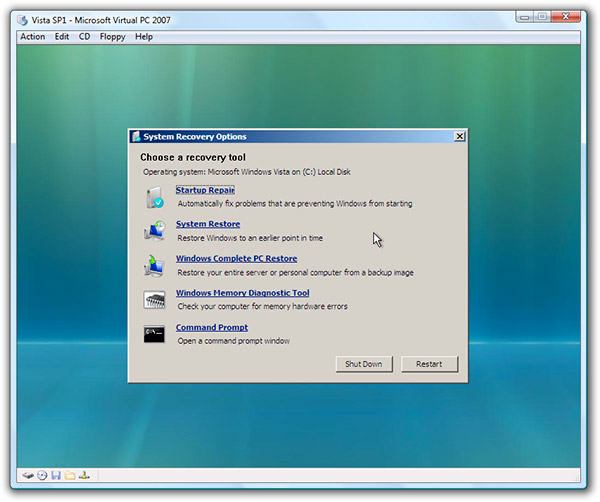
Select Command Prompt
Type in:
bootrec /FixMbr (<--- there is a "space" after "bootrec")
and then press Enter
Once completed then type Exit, press Enter and restart computer.
Post fresh MBRCheck log.
-
August 13th, 2010, 04:03 PM
#13
I am creating a rescue disk now but I do have a question.
I want to make sure I am understanding what we are doing.
You state "It looks like MBR for drive C is missing..."
but it is drive d: that is no longer available.
I noticed that the MBRcheck log said "Windows 7 MBR code detected"
If it is there why are we resetting it?
I really appreciate your help Broni just checking to understand.
-
August 13th, 2010, 08:30 PM
#14
You're absolutely correct.
My mistake and I apologize for that.
What do you mean exactly by not being able to access D drive?
-
August 13th, 2010, 08:44 PM
#15
I mean that the d: is no longer showing up.
Example.
Start pearl > computer > and it only shows the C:.
The D: is not showing up.
Prior to MBRcheck I had a C: for Windows and a D: for data..
They are separate HDD physically.
Thread Information
Users Browsing this Thread
There are currently 1 users browsing this thread. (0 members and 1 guests)
 Posting Permissions
- You may not post new threads
- You may not post replies
- You may not post attachments
- You may not edit your posts
-
Forum Rules
|
|


 Reply With Quote


