|
-
May 24th, 2010, 07:55 PM
#1
PCI and PCI Express slots.I have a hp d5200t
I have a HP d5200t using Windows 7Pro 64 bit. How can you tell if those PCI and PCI Express are 32 bit or 64 bit slots? Just like to know for future reference. Here is my specs System Manufacturer/Model Number HP Pavilion Elite d5200t ATX PC
OS Windows 7 Professional 64 bit
CPU Intel(R)Core(TM)2Quad procQ9550(2.83GHZ)
Motherboard Pegatron
Memory 8 GB
Graphics Card 768MB NVIDIA GEFORCE 9600GS
Sound Card Creative Sound Blaster X-Fi Xtreme
Monitor(s) Displays Samsung T190
Screen Resolution 1440x900
squid13
-
May 24th, 2010, 08:44 PM
#2
-
May 24th, 2010, 09:08 PM
#3
Yes that's it. Guess I was pretty dumb not thinking about going to HP but it doesn't tell me if the slots are 32 or 64 bit or it does and I don't understand it.
squid13
-
May 24th, 2010, 09:43 PM
#4
You would know if you had 64-bit PCI. It's way longer than a regular PCI slot.
http://en.wikipedia.org/wiki/Conventional_PCI
Don't confuse with PCI-X and PCI-Express. They are two different things.
-
May 24th, 2010, 11:28 PM
#5
Maybe. . . .
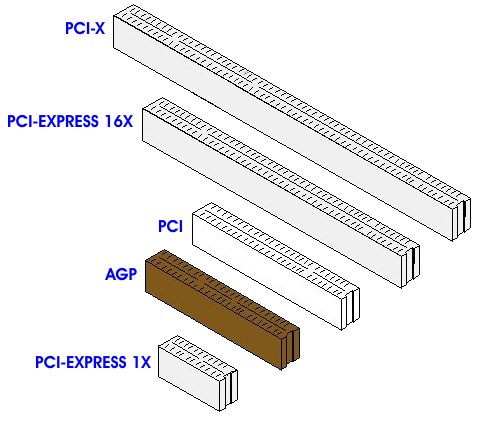
-
May 25th, 2010, 09:20 AM
#6
With PCI-Express you don't need to worry about the bit width. Instead all you really need to know is how many lanes it has (ie x1, x2, x4, x8, x16). A card with fewer lanes will always fit in any lot that has more - in other words, you can fit a x1 sound card into a x16 extra graphics card slot. You cannot fit a card with more lanes into a slot with fewer (it won't physically fit).
Nick.
Thread Information
Users Browsing this Thread
There are currently 1 users browsing this thread. (0 members and 1 guests)
 Posting Permissions
- You may not post new threads
- You may not post replies
- You may not post attachments
- You may not edit your posts
-
Forum Rules
|
|


 Reply With Quote


