[RESOLVED] Unknown trojan, Malwarebytes executable deleted
Page 1 of 3 123 LastLast
Results 1 to 15 of 42

Thread: [RESOLVED] Unknown trojan, Malwarebytes executable deleted

  1. #1
    Join Date
    Oct 2001
    Posts
    352

    Resolved [RESOLVED] Unknown trojan, Malwarebytes executable deleted

    I was surfing the web with Firefox the other day when a warning from Avast popped up. I closed the offending tab immediately, but from that point on, I started getting popup ads showing up randomly. I decided to run the usual gamut of tests, but that's when things got complicated.

    I first went to Malwarebytes, only to discover that the executable was missing. No problem, I thought, I'll just uninstall and reinstall. I did that, but after completing the installation and opting to run it after exiting the installer, I received an error message that the executable, mbam.exe, was missing. SUPER Antispyware is still running fine, but I can't get Malware bytes onto my computer, it seems.

    I ran Adaware, and it claimed to have removed some trojan I had never heard of, but as of right now, there has been no effect. Should I just run a complete SUPER Antispyware scan in Safe Mode and post a log of just that?


    Edit: Sorry, just realized I posted this in the Hijack This forum with no Hijack This log.
    Last edited by shazbot; January 23rd, 2010 at 01:11 AM.

  2. #2
    Join Date
    Feb 2004
    Location
    Mandurah, Western Australia
    Posts
    10,157
    Download DDS from the following location:


    DDS Tool

    Save dds.scr to the desktop

    Disable any script-blocking programs and then double-click on the DDS.scr icon to start the program. If you did not disable a script-blocker that may be part of your antimalware program, you may receive a warning from your antimalware product asking if you would like DDS.scr to run. Please allow it to do so.

    Once you double-click the icon a Windows security warning may also appear asking if you are sure you would like to run the program. Click on the Run button to start DDS. If no warning appeared, then you should just continue.

    DDS will now display a small black window providing information as to what DDS is doing on your computer.

    DDS will now start scanning your computer and compiling a variety of information about what programs are starting on your computer, what files have been recently created, and the general configuration of your computer. When DDS has finished scanning, all of this information will be compiled and be displayed in two Notepad windows named dds.txt and attach.txt.

    You will then be shown a small box giving instructions as to what you should do with these files. Feel free to close this message box by pressing the OK button.

    We now need to save the two log files that were created. First click on the DDS.txt window and click on the File menu and then select Save As... menu option.

    Save DDS.txt to the desktop. Now click on the Attach.txt Notepad window and save that to the desktop also.

    Copy the contents of the DDS.txt log and paste it into your reply here.
    Attach the attach.txt log with your reply using Reply to Thread button, then the Manage Attachments button.

  3. #3
    Join Date
    Oct 2001
    Posts
    352
    DDS (Ver_09-12-01.01) - NTFSx86
    Run by John Bower at 1:26:05.51 on Sat 01/23/2010
    Internet Explorer: 8.0.6001.18702 BrowserJavaVersion: 1.6.0_13
    Microsoft Windows XP Professional 5.1.2600.3.1252.1.1033.18.2047.1093 [GMT -8:00]

    AV: avast! antivirus 4.8.1368 [VPS 100123-0] *On-access scanning enabled* (Updated) {7591DB91-41F0-48A3-B128-1A293FD8233D}

    ============== Running Processes ===============

    C:\WINDOWS\System32\nvsvc32.exe
    C:\WINDOWS\system32\svchost -k DcomLaunch
    svchost.exe
    C:\WINDOWS\System32\svchost.exe -k netsvcs
    svchost.exe
    svchost.exe
    C:\Program Files\Alwil Software\Avast4\aswUpdSv.exe
    C:\Program Files\Lavasoft\Ad-Aware\AAWService.exe
    C:\WINDOWS\Explorer.EXE
    C:\Program Files\Alwil Software\Avast4\ashServ.exe
    C:\WINDOWS\system32\spoolsv.exe
    C:\Program Files\Panda USB Vaccine\USBVaccine.exe
    C:\Program Files\Analog Devices\Core\smax4pnp.exe
    C:\Program Files\CyberLink\PowerDVD\PDVDServ.exe
    C:\WINDOWS\system32\Rundll32.exe
    C:\WINDOWS\system32\RUNDLL32.EXE
    C:\PROGRA~1\ALWILS~1\Avast4\ashDisp.exe
    C:\WINDOWS\system32\ctfmon.exe
    C:\Program Files\Java\jre6\bin\jqs.exe
    C:\WINDOWS\System32\svchost.exe -k imgsvc
    C:\WINDOWS\System32\StkASv2K.exe
    C:\Program Files\Common Files\Ulead Systems\DVD\ULCDRSvr.exe
    C:\Program Files\Alwil Software\Avast4\ashMaiSv.exe
    C:\Program Files\Alwil Software\Avast4\ashWebSv.exe
    C:\Program Files\Lavasoft\Ad-Aware\AAWTray.exe
    C:\Program Files\SUPERAntiSpyware\SUPERAntiSpyware.exe
    C:\Program Files\Mozilla Firefox\firefox.exe
    C:\Documents and Settings\John Bower\Desktop\dds.scr

    ============== Pseudo HJT Report ===============

    uStart Page = hxxp://www.google.com/
    uInternet Settings,ProxyServer = http=127.0.0.1:5555
    uInternet Settings,ProxyOverride = <local>
    BHO: AcroIEHlprObj Class: {06849e9f-c8d7-4d59-b87d-784b7d6be0b3} - c:\program files\adobe\acrobat 7.0\activex\AcroIEHelper.dll
    BHO: {3CA2F312-6F6E-4B53-A66E-4E65E497C8C0} - No File
    BHO: Groove GFS Browser Helper: {72853161-30c5-4d22-b7f9-0bbc1d38a37e} - c:\progra~1\micros~2\office12\GRA8E1~1.DLL
    BHO: JQSIEStartDetectorImpl Class: {e7e6f031-17ce-4c07-bc86-eabfe594f69c} - c:\program files\java\jre6\lib\deploy\jqs\ie\jqs_plugin.dll
    EB: {32683183-48a0-441b-a342-7c2a440a9478} - No File
    uRun: [igndlm.exe] c:\program files\download manager\DLM.exe /windowsstart /startifwork
    uRun: [ctfmon.exe] c:\windows\system32\ctfmon.exe
    mRun: [UVS10 Preload] c:\program files\ulead systems\ulead videostudio se dvd\uvPL.exe
    mRun: [ussshreg] c:\progra~1\uleads~1.0\Ussshreg.exe /r
    mRun: [SoundMAXPnP] c:\program files\analog devices\core\smax4pnp.exe
    mRun: [RemoteControl] "c:\program files\cyberlink\powerdvd\PDVDServ.exe"
    mRun: [QuickTime Task] "c:\program files\quicktime\qttask.exe" -atboottime
    mRun: [P17Helper] Rundll32 P17.dll,P17Helper
    mRun: [nwiz] c:\program files\nvidia corporation\nview\nwiz.exe /install
    mRun: [NvMediaCenter] RUNDLL32.EXE c:\windows\system32\NvMcTray.dll,NvTaskbarInit
    mRun: [NvCplDaemon] RUNDLL32.EXE c:\windows\system32\NvCpl.dll,NvStartup
    mRun: [avast!] c:\progra~1\alwils~1\avast4\ashDisp.exe
    mRun: [gimaloyan] Rundll32.exe "c:\windows\system32\wivatema.dll",a
    mRun: [MSConfig] c:\windows\pchealth\helpctr\binaries\MSCONFIG.EXE /auto
    mRunOnce: [Malwarebytes' Anti-Malware] c:\program files\malwarebytes' anti-malware\mbamgui.exe /install /silent
    dRunOnce: [tscuninstall] %systemroot%\system32\tscupgrd.exe
    IE: E&xport to Microsoft Excel - c:\progra~1\micros~2\office12\EXCEL.EXE/3000
    IE: {85d1f590-48f4-11d9-9669-0800200c9a66} - %windir%\bdoscandel.exe
    IE: {e2e2dd38-d088-4134-82b7-f2ba38496583} - %windir%\Network Diagnostic\xpnetdiag.exe
    IE: {FB5F1910-F110-11d2-BB9E-00C04F795683} - c:\program files\messenger\msmsgs.exe
    IE: {2670000A-7350-4f3c-8081-5663EE0C6C49} - {48E73304-E1D6-4330-914C-F5F514E3486C} - c:\progra~1\micros~2\office12\ONBttnIE.dll
    IE: {92780B25-18CC-41C8-B9BE-3C9C571A8263} - {FF059E31-CC5A-4E2E-BF3B-96E929D65503} - c:\progra~1\micros~2\office12\REFIEBAR.DLL
    DPF: DirectAnimation Java Classes - file://c:\windows\java\classes\dajava.cab
    DPF: Microsoft XML Parser for Java - file://c:\windows\java\classes\xmldso.cab
    DPF: {166B1BCA-3F9C-11CF-8075-444553540000} - hxxp://download.macromedia.com/pub/shockwave/cabs/director/sw.cab
    DPF: {215B8138-A3CF-44C5-803F-8226143CFC0A} - hxxp://housecall65.trendmicro.com/housecall/applet/html/native/x86/win32/activex/hcImpl.cab
    DPF: {2D8ED06D-3C30-438B-96AE-4D110FDC1FB8} - hxxp://acs.pandasoftware.com/activescan/cabs/as2stubie.cab
    DPF: {39B0684F-D7BF-4743-B050-FDC3F48F7E3B} - hxxp://www.fileplanet.com/fpdlmgr/cabs/FPDC_2.3.9.113.cab
    DPF: {5D86DDB5-BDF9-441B-9E9E-D4730F4EE499} - hxxp://download.bitdefender.com/resources/scanner/sources/en/scan8/oscan8.cab
    DPF: {6414512B-B978-451D-A0D8-FCFDF33E833C} - hxxp://update.microsoft.com/windowsupdate/v6/V5Controls/en/x86/client/wuweb_site.cab?1236324225929
    DPF: {8AD9C840-044E-11D1-B3E9-00805F499D93} - hxxp://java.sun.com/update/1.6.0/jinstall-1_6_0_13-windows-i586.cab
    DPF: {8FFBE65D-2C9C-4669-84BD-5829DC0B603C} - hxxp://fpdownload.macromedia.com/get/flashplayer/current/polarbear/ultrashim.cab
    DPF: {CAFEEFAC-0016-0000-0013-ABCDEFFEDCBA} - hxxp://java.sun.com/update/1.6.0/jinstall-1_6_0_13-windows-i586.cab
    DPF: {CAFEEFAC-FFFF-FFFF-FFFF-ABCDEFFEDCBA} - hxxp://java.sun.com/update/1.6.0/jinstall-1_6_0_13-windows-i586.cab
    DPF: {D27CDB6E-AE6D-11CF-96B8-444553540000} - hxxp://download.macromedia.com/pub/shockwave/cabs/flash/swflash.cab
    TCP: {F57130FC-9478-4985-B467-E0D2BA23FE67} = 209.18.47.61,209.18.47.62
    Handler: grooveLocalGWS - {88FED34C-F0CA-4636-A375-3CB6248B04CD} - c:\progra~1\micros~2\office12\GR99D3~1.DLL
    AppInit_DLLs: litinika.dll c:\windows\system32\wivatema.dll
    SSODL: WPDShServiceObj - {AAA288BA-9A4C-45B0-95D7-94D524869DB5} - c:\windows\system32\WPDShServiceObj.dll
    SSODL: rutuwekoh - {6b349bb2-f526-4b0b-80c0-2aeadae6e441} - c:\windows\system32\wivatema.dll
    STS: kupuhivus: {6b349bb2-f526-4b0b-80c0-2aeadae6e441} - c:\windows\system32\wivatema.dll
    SEH: Groove GFS Stub Execution Hook: {b5a7f190-dda6-4420-b3ba-52453494e6cd} - c:\progra~1\micros~2\office12\GRA8E1~1.DLL
    SEH: SABShellExecuteHook Class: {5ae067d3-9afb-48e0-853a-ebb7f4a000da} - c:\program files\superantispyware\SASSEH.DLL
    LSA: Notification Packages = scecli bekumura.dll

    ================= FIREFOX ===================

    FF - ProfilePath - c:\docume~1\johnbo~1\applic~1\mozilla\firefox\profiles\n8mto4st.default\
    FF - prefs.js: browser.startup.homepage - hxxp://www.google.com/
    FF - plugin: c:\program files\download manager\npfpdlm.dll
    FF - HiddenExtension: Microsoft .NET Framework Assistant: {20a82645-c095-46ed-80e3-08825760534b} - c:\windows\microsoft.net\framework\v3.5\windows presentation foundation\dotnetassistantextension\
    FF - HiddenExtension: Java Console: No Registry Reference - c:\program files\mozilla firefox\extensions\{CAFEEFAC-0016-0000-0013-ABCDEFFEDCBA}

    ---- FIREFOX POLICIES ----
    c:\program files\mozilla firefox\greprefs\security-prefs.js - pref("security.ssl3.rsa_seed_sha", true);

    ============= SERVICES / DRIVERS ===============

    R0 Lbd;Lbd;c:\windows\system32\drivers\Lbd.sys [2010-1-22 64288]
    R0 pavboot;pavboot;c:\windows\system32\drivers\pavboot.sys [2009-5-24 28544]
    R1 aswSP;avast! Self Protection;c:\windows\system32\drivers\aswSP.sys [2009-12-7 114768]
    R1 SASDIFSV;SASDIFSV;c:\program files\superantispyware\sasdifsv.sys [2009-5-14 9968]
    R1 SASKUTIL;SASKUTIL;c:\program files\superantispyware\SASKUTIL.SYS [2009-5-14 72944]
    R2 aswFsBlk;aswFsBlk;c:\windows\system32\drivers\aswFsBlk.sys [2009-12-7 20560]
    R2 avast! Antivirus;avast! Antivirus;c:\program files\alwil software\avast4\ashServ.exe [2009-12-7 138680]
    R2 Lavasoft Ad-Aware Service;Lavasoft Ad-Aware Service;c:\program files\lavasoft\ad-aware\AAWService.exe [2009-12-2 1181328]
    R3 avast! Mail Scanner;avast! Mail Scanner;c:\program files\alwil software\avast4\ashMaiSv.exe [2009-12-7 254040]
    R3 avast! Web Scanner;avast! Web Scanner;c:\program files\alwil software\avast4\ashWebSv.exe [2009-12-7 352920]
    R3 SASENUM;SASENUM;c:\program files\superantispyware\SASENUM.SYS [2009-5-14 7408]

    ============== File Associations ===============

    scrfile="%1" /S "%3"

    =============== Created Last 30 ================

    2010-01-23 04:08:08 38224 ----a-w- c:\windows\system32\drivers\mbamswissarmy.sys
    2010-01-23 04:08:07 19160 ----a-w- c:\windows\system32\drivers\mbam.sys
    2010-01-23 04:08:07 0 d-----w- c:\program files\Malwarebytes' Anti-Malware
    2010-01-23 02:55:16 15880 ----a-w- c:\windows\system32\lsdelete.exe
    2010-01-23 01:20:34 64288 ----a-w- c:\windows\system32\drivers\Lbd.sys
    2010-01-23 01:19:46 0 dc-h--w- c:\docume~1\alluse~1\applic~1\{BC9FCCF7-E686-494B-8C9B-55C9A39A7CA9}
    2010-01-23 01:19:33 0 d-----w- c:\program files\Lavasoft
    2010-01-21 09:40:08 0 d-----w- c:\program files\CAPCOM
    2010-01-18 05:30:39 1152563 ----a-w- C:\W1_2007_1920x1200.zip
    2010-01-15 19:20:55 0 d-----w- c:\program files\PFPortChecker
    2010-01-01 08:26:22 0 d-----w- c:\docume~1\alluse~1\applic~1\Divinity 2
    2010-01-01 08:21:32 0 d-----w- c:\program files\Divinity II - Ego Draconis - Demo
    2010-01-01 07:55:05 266 ----a-w- C:\UnInstall.dat
    2010-01-01 07:54:59 16896 ----a-w- c:\windows\system32\grwinsthlp.exe
    2009-12-30 05:40:00 0 d-sh--w- c:\docume~1\alluse~1\applic~1\SecuROM
    2009-12-30 05:29:36 0 d-----w- c:\program files\2K Games

    ==================== Find3M ====================

    2009-12-17 23:08:29 717296 ----a-w- c:\windows\system32\drivers\sptd.sys
    2009-10-29 02:11:16 23348 ----a-w- c:\windows\system32\emptyregdb.dat
    2009-07-10 03:21:33 245760 --sha-w- c:\windows\system32\config\systemprofile\ietldcache\index.dat
    2009-06-07 22:35:47 991264 --sha-w- c:\windows\system32\drivers\fidbox.dat

    ============= FINISH: 1:26:26.68 ===============
    Attached Files Attached Files

  4. #4
    Join Date
    Feb 2004
    Location
    Mandurah, Western Australia
    Posts
    10,157
    Ok. You have some infections still there.

    Please download ComboFix by sUBs from HERE or HERE
    • You must download it to and run it from your Desktop
    • Physically disconnect from the internet.
    • Now STOP all your monitoring programs (Antivirus/Antispyware, Guards and Shields) as they could easily interfere with ComboFix.
    • Double click combofix.exe & follow the prompts.
    • When finished, it will produce a log. Please save that log to post in your next reply along with a fresh HJT log
    • Re-enable all the programs that were disabled during the running of ComboFix..


    Note:
    Do not mouse-click combofix's window while it is running. That may cause it to stall.

    CF disconnects your machine from the internet. The connection is automatically restored before CF completes its run. If CF runs into difficulty and terminates prematurely, the connection can be manually restored by restarting your machine.

    Run Combofix ONCE only!!

  5. #5
    Join Date
    Oct 2001
    Posts
    352
    ComboFix 10-01-23.02 - John Bower 01/23/2010 10:54:15.9.2 - x86
    Microsoft Windows XP Professional 5.1.2600.3.1252.1.1033.18.2047.1488 [GMT -8:00]
    Running from: c:\documents and settings\John Bower\Desktop\ComboFix.exe
    AV: avast! antivirus 4.8.1368 [VPS 100123-0] *On-access scanning disabled* (Updated) {7591DB91-41F0-48A3-B128-1A293FD8233D}
    .

    ((((((((((((((((((((((((( Files Created from 2009-12-23 to 2010-01-23 )))))))))))))))))))))))))))))))
    .

    2010-01-23 04:08 . 2010-01-08 00:07 38224 ----a-w- c:\windows\system32\drivers\mbamswissarmy.sys
    2010-01-23 04:08 . 2010-01-23 04:08 -------- d-----w- c:\program files\Malwarebytes' Anti-Malware
    2010-01-23 04:08 . 2010-01-08 00:07 19160 ----a-w- c:\windows\system32\drivers\mbam.sys
    2010-01-23 02:55 . 2009-12-02 13:19 15880 ----a-w- c:\windows\system32\lsdelete.exe
    2010-01-23 01:20 . 2009-12-02 13:19 64288 ----a-w- c:\windows\system32\drivers\Lbd.sys
    2010-01-23 01:19 . 2010-01-23 01:19 -------- dc-h--w- c:\documents and settings\All Users\Application Data\{BC9FCCF7-E686-494B-8C9B-55C9A39A7CA9}
    2010-01-23 01:19 . 2010-01-23 01:20 -------- d-----w- c:\documents and settings\All Users\Application Data\Lavasoft
    2010-01-23 01:19 . 2010-01-23 01:19 -------- d-----w- c:\program files\Lavasoft
    2010-01-21 09:49 . 2010-01-21 09:49 -------- d-----w- c:\documents and settings\John Bower\Application Data\Leadertech
    2010-01-21 09:40 . 2010-01-21 09:40 -------- d-----w- c:\program files\CAPCOM
    2010-01-21 01:14 . 2010-01-21 01:14 -------- d-----w- c:\program files\Ubisoft
    2010-01-18 05:30 . 2010-01-18 05:30 1152563 ----a-w- C:\W1_2007_1920x1200.zip
    2010-01-17 06:37 . 2010-01-17 06:37 -------- d-----w- c:\program files\Electronic Arts
    2010-01-15 19:20 . 2010-01-15 19:20 -------- d-----w- c:\program files\PFPortChecker
    2010-01-01 08:26 . 2010-01-01 08:26 -------- d-----w- c:\documents and settings\All Users\Application Data\Divinity 2
    2010-01-01 08:21 . 2010-01-01 08:26 -------- d-----w- c:\program files\Divinity II - Ego Draconis - Demo
    2010-01-01 07:55 . 2010-01-01 07:55 266 ----a-w- C:\UnInstall.dat
    2010-01-01 07:54 . 2010-01-01 07:53 16896 ----a-w- c:\windows\system32\grwinsthlp.exe
    2009-12-30 05:40 . 2009-12-30 05:40 -------- d-sh--w- c:\documents and settings\All Users\Application Data\SecuROM
    2009-12-30 05:29 . 2009-12-30 05:29 -------- d-----w- c:\program files\2K Games

    .
    (((((((((((((((((((((((((((((((((((((((( Find3M Report ))))))))))))))))))))))))))))))))))))))))))))))))))))
    .
    2010-01-21 01:20 . 2009-03-06 07:28 -------- d--h--w- c:\program files\InstallShield Installation Information
    2010-01-21 00:42 . 2009-05-01 08:53 -------- d-----w- c:\program files\Steam
    2010-01-18 05:24 . 2009-03-08 00:45 -------- d-----w- c:\documents and settings\John Bower\Application Data\IGN_DLM
    2010-01-17 06:55 . 2009-03-08 00:36 -------- d-----w- c:\documents and settings\All Users\Application Data\Microsoft Help
    2010-01-16 08:34 . 2009-03-08 01:18 -------- d-----w- c:\program files\MUSICMATCH
    2010-01-16 06:48 . 2009-03-11 06:32 -------- d-----w- c:\program files\AGEIA Technologies
    2009-12-31 05:37 . 2009-05-12 06:04 -------- d-----w- c:\documents and settings\John Bower\Application Data\Broken Rules
    2009-12-31 01:08 . 2009-03-06 08:01 82168 ----a-w- c:\documents and settings\John Bower\Local Settings\Application Data\GDIPFONTCACHEV1.DAT
    2009-12-31 00:47 . 2009-09-16 06:58 -------- d-----w- c:\program files\Ja2 Demo
    2009-12-23 23:35 . 2009-12-23 22:08 -------- d-----w- c:\documents and settings\John Bower\Application Data\Larva Mortus
    2009-12-22 08:47 . 2009-12-22 08:47 -------- d-----w- c:\program files\GOG.com
    2009-12-22 01:39 . 2009-12-22 01:39 -------- d-----w- c:\documents and settings\All Users\Application Data\media center programs
    2009-12-22 01:07 . 2009-12-22 01:07 -------- d-----w- c:\program files\Funcom
    2009-12-22 01:06 . 2009-12-22 01:06 -------- d-----w- c:\documents and settings\All Users\Application Data\Funcom
    2009-12-20 07:32 . 2009-11-13 06:34 -------- d-----w- c:\program files\Activision
    2009-12-17 23:32 . 2009-03-29 06:02 -------- d-----w- c:\program files\DAEMON Tools Lite
    2009-12-17 23:08 . 2009-03-08 04:25 717296 ----a-w- c:\windows\system32\drivers\sptd.sys
    2009-10-29 02:13 . 2009-10-29 02:13 2678 ----a-w- c:\windows\java\Packages\Data\LN3DZ3HN.DAT
    2009-10-29 02:13 . 2009-10-29 02:13 2678 ----a-w- c:\windows\java\Packages\Data\XJ1BTNDB.DAT
    2009-10-29 02:13 . 2009-10-29 02:13 2678 ----a-w- c:\windows\java\Packages\Data\U8R9FHFN.DAT
    2009-10-29 02:13 . 2009-10-29 02:13 2678 ----a-w- c:\windows\java\Packages\Data\PN5BRZX7.DAT
    2009-10-29 02:13 . 2009-10-29 02:13 2678 ----a-w- c:\windows\java\Packages\Data\HR7XB7ZP.DAT
    2009-10-29 02:11 . 2009-03-06 07:15 23348 ----a-w- c:\windows\system32\emptyregdb.dat
    2009-06-07 22:35 . 2009-06-07 22:25 991264 --sha-w- c:\windows\system32\drivers\fidbox.dat
    .

    ((((((((((((((((((((((((((((((((((((( Reg Loading Points ))))))))))))))))))))))))))))))))))))))))))))))))))
    .
    .
    *Note* empty entries & legit default entries are not shown
    REGEDIT4

    [HKEY_CURRENT_USER\SOFTWARE\Microsoft\Windows\CurrentVersion\Run]
    "igndlm.exe"="c:\program files\Download Manager\DLM.exe" [2009-05-15 1103216]

    [HKEY_LOCAL_MACHINE\SOFTWARE\Microsoft\Windows\CurrentVersion\Run]
    "UVS10 Preload"="c:\program files\Ulead Systems\Ulead VideoStudio SE DVD\uvPL.exe" [2006-08-09 36864]
    "ussshreg"="c:\progra~1\ULEADS~1.0\Ussshreg.exe" [2000-04-21 32768]
    "SoundMAXPnP"="c:\program files\Analog Devices\Core\smax4pnp.exe" [2006-12-18 868352]
    "RemoteControl"="c:\program files\CyberLink\PowerDVD\PDVDServ.exe" [2003-11-01 32768]
    "QuickTime Task"="c:\program files\QuickTime\qttask.exe" [2009-05-27 413696]
    "P17Helper"="P17.dll" [2005-05-03 64512]
    "nwiz"="c:\program files\NVIDIA Corporation\nView\nwiz.exe" [2009-08-13 1657376]
    "NvMediaCenter"="c:\windows\System32\NvMcTray.dll" [2009-08-17 86016]
    "NvCplDaemon"="c:\windows\System32\NvCpl.dll" [2009-08-17 13877248]
    "avast!"="c:\progra~1\ALWILS~1\Avast4\ashDisp.exe" [2009-11-24 81000]

    [HKEY_USERS\.DEFAULT\Software\Microsoft\Windows\CurrentVersion\RunOnce]
    "tscuninstall"="c:\windows\system32\tscupgrd.exe" [2002-08-28 40960]

    [hkey_local_machine\software\microsoft\windows\currentversion\explorer\ShellExecuteHooks]
    "{5AE067D3-9AFB-48E0-853A-EBB7F4A000DA}"= "c:\program files\SUPERAntiSpyware\SASSEH.DLL" [2008-05-13 77824]

    [HKEY_LOCAL_MACHINE\SYSTEM\CurrentControlSet\Control\SafeBoot\Minimal\Lavasoft Ad-Aware Service]
    @="Service"

    [HKLM\~\startupfolder\C:^Documents and Settings^All Users^Start Menu^Programs^Startup^Adobe Reader Speed Launch.lnk]
    path=c:\documents and settings\All Users\Start Menu\Programs\Startup\Adobe Reader Speed Launch.lnk
    backup=c:\windows\pss\Adobe Reader Speed Launch.lnkCommon Startup

    [HKEY_LOCAL_MACHINE\software\microsoft\shared tools\msconfig\startupreg\combofix]
    c:\combofix\CF20599.cfxxe [X]

    [HKEY_LOCAL_MACHINE\software\microsoft\shared tools\msconfig\startupreg\MSMSGS]
    2008-04-14 00:12 1695232 ------w- c:\program files\Messenger\msmsgs.exe

    [HKLM\~\services\sharedaccess\parameters\firewallpolicy\standardprofile\AuthorizedApplications\List]
    "%windir%\\system32\\sessmgr.exe"=
    "%windir%\\Network Diagnostic\\xpnetdiag.exe"=
    "c:\\Program Files\\BitTornado\\btdownloadgui.exe"=
    "c:\\Program Files\\Common Files\\AOL\\Loader\\aolload.exe"=
    "c:\\Program Files\\AIM6\\aim6.exe"=
    "c:\\Program Files\\Microsoft Office\\Office12\\OUTLOOK.EXE"=
    "c:\\Program Files\\Microsoft Office\\Office12\\GROOVE.EXE"=
    "c:\\Program Files\\Microsoft Office\\Office12\\ONENOTE.EXE"=
    "c:\\Program Files\\Bethesda Softworks\\Fallout 3\\Fallout3.exe"=
    "c:\\Program Files\\Mozilla Firefox\\firefox.exe"=
    "c:\\WINDOWS\\system32\\mmc.exe"=
    "c:\\Program Files\\Paradox Interactive\\Majesty 2 (Demo)\\Majesty2-Demo.exe"=
    "c:\\Program Files\\Steam\\steamapps\\common\\aquaria\\Aquaria.exe"=
    "c:\\Program Files\\Steam\\steamapps\\common\\time gentlemen, please! - demo\\TGP.exe"=
    "c:\\Program Files\\Steam\\steamapps\\common\\tachyon the fringe\\Tachyon.exe"=
    "c:\\Program Files\\Steam\\steamapps\\common\\shadowgrounds survivor\\survivor.exe"=
    "c:\\Program Files\\2K Games\\Gearbox Software\\Borderlands\\Binaries\\Borderlands.exe"=
    "c:\\Program Files\\Steam\\steamapps\\common\\oddworld abes oddysee\\AbeWin.exe"=
    "c:\\Program Files\\Steam\\steamapps\\common\\serious sam hd the first encounter\\Bin\\SamHD.exe"=
    "c:\\Program Files\\Steam\\steamapps\\common\\hammerfight\\Hammerfight.exe"=
    "c:\\Program Files\\PFPortChecker\\PFPortChecker.exe"=
    "c:\\Program Files\\Ubisoft\\Techland\\Call of Juarez - Bound in Blood\\CoJBiBGame_x86.exe"=
    "c:\\WINDOWS\\system32\\wbem\\unsecapp.exe"=
    "c:\\WINDOWS\\system32\\spoolsv.exe"=
    "c:\\Program Files\\Alwil Software\\Avast4\\ashWebSv.exe"=
    "c:\\WINDOWS\\system32\\wbem\\wmiprvse.exe"=

    R0 Lbd;Lbd;c:\windows\system32\drivers\Lbd.sys [1/22/2010 5:20 PM 64288]
    R0 pavboot;pavboot;c:\windows\system32\drivers\pavboot.sys [5/24/2009 7:54 PM 28544]
    R0 sptd;sptd;c:\windows\system32\drivers\sptd.sys [3/7/2009 8:25 PM 717296]
    R1 aswSP;avast! Self Protection;c:\windows\system32\drivers\aswSP.sys [12/7/2009 9:43 PM 114768]
    R1 SASDIFSV;SASDIFSV;c:\program files\SUPERAntiSpyware\sasdifsv.sys [5/14/2009 1:22 PM 9968]
    R1 SASKUTIL;SASKUTIL;c:\program files\SUPERAntiSpyware\SASKUTIL.SYS [5/14/2009 1:22 PM 72944]
    R2 aswFsBlk;aswFsBlk;c:\windows\system32\drivers\aswFsBlk.sys [12/7/2009 9:43 PM 20560]
    R2 Lavasoft Ad-Aware Service;Lavasoft Ad-Aware Service;c:\program files\Lavasoft\Ad-Aware\AAWService.exe [12/2/2009 5:19 AM 1181328]
    S3 SASENUM;SASENUM;c:\program files\SUPERAntiSpyware\SASENUM.SYS [5/14/2009 1:22 PM 7408]
    .
    Contents of the 'Scheduled Tasks' folder

    2010-01-23 c:\windows\Tasks\Ad-Aware Update (Daily 1).job
    - c:\program files\Lavasoft\Ad-Aware\Ad-AwareAdmin.exe [2009-12-02 01:20]

    2010-01-23 c:\windows\Tasks\Ad-Aware Update (Daily 2).job
    - c:\program files\Lavasoft\Ad-Aware\Ad-AwareAdmin.exe [2009-12-02 01:20]

    2010-01-23 c:\windows\Tasks\Ad-Aware Update (Daily 3).job
    - c:\program files\Lavasoft\Ad-Aware\Ad-AwareAdmin.exe [2009-12-02 01:20]

    2010-01-23 c:\windows\Tasks\Ad-Aware Update (Daily 4).job
    - c:\program files\Lavasoft\Ad-Aware\Ad-AwareAdmin.exe [2009-12-02 01:20]

    2010-01-23 c:\windows\Tasks\Ad-Aware Update (Weekly).job
    - c:\program files\Lavasoft\Ad-Aware\Ad-AwareAdmin.exe [2009-12-02 01:20]

    2010-01-23 c:\windows\Tasks\AppleSoftwareUpdate.job
    - c:\program files\Apple Software Update\SoftwareUpdate.exe [2008-07-30 20:34]

    2010-01-23 c:\windows\Tasks\PandaUSBVaccine.job
    - c:\program files\Panda USB Vaccine\RunInteractiveWin.exe [2009-11-07 00:45]
    .
    .
    ------- Supplementary Scan -------
    .
    uStart Page = hxxp://www.google.com/
    uInternet Settings,ProxyServer = http=127.0.0.1:5555
    uInternet Settings,ProxyOverride = <local>
    IE: E&xport to Microsoft Excel - c:\progra~1\MICROS~2\Office12\EXCEL.EXE/3000
    TCP: {F57130FC-9478-4985-B467-E0D2BA23FE67} = 209.18.47.61,209.18.47.62
    DPF: DirectAnimation Java Classes - file://c:\windows\Java\classes\dajava.cab
    DPF: Microsoft XML Parser for Java - file://c:\windows\Java\classes\xmldso.cab
    FF - ProfilePath - c:\documents and settings\John Bower\Application Data\Mozilla\Firefox\Profiles\n8mto4st.default\
    FF - prefs.js: browser.startup.homepage - hxxp://www.google.com/
    FF - plugin: c:\program files\Download Manager\npfpdlm.dll
    FF - HiddenExtension: Microsoft .NET Framework Assistant: {20a82645-c095-46ed-80e3-08825760534b} - c:\windows\Microsoft.NET\Framework\v3.5\Windows Presentation Foundation\DotNetAssistantExtension\
    .
    - - - - ORPHANS REMOVED - - - -

    SharedTaskScheduler-{6b349bb2-f526-4b0b-80c0-2aeadae6e441} - c:\windows\system32\wivatema.dll
    SSODL-rutuwekoh-{6b349bb2-f526-4b0b-80c0-2aeadae6e441} - c:\windows\system32\wivatema.dll
    MSConfigStartUp-gimaloyan - c:\windows\system32\wivatema.dll
    MSConfigStartUp-Malwarebytes Anti-Malware (reboot) - c:\program files\Malwarebytes' Anti-Malware\mbam.exe
    MSConfigStartUp-net - c:\windows\system32\net.net
    MSConfigStartUp-system tool - c:\windows\sysguard.exe
    MSConfigStartUp-vxcnqqpt - c:\documents and settings\John Bower\Local Settings\Application Data\punvso\cybfsysguard.exe
    AddRemove-{96443F45-13E2-11D6-AC87-00D0B7A9E540} - c:\program files\GOG.com\Arx Fatalis\unins000.exe


    **************************************************************************

    catchme 0.3.1398 W2K/XP/Vista - rootkit/stealth malware detector by Gmer, http://www.gmer.net
    Rootkit scan 2010-01-23 11:03
    Windows 5.1.2600 Service Pack 3 NTFS

    scanning hidden processes ...

    scanning hidden autostart entries ...

    scanning hidden files ...

    scan completed successfully
    hidden files: 0

    **************************************************************************

    Stealth MBR rootkit/Mebroot/Sinowal detector 0.3.7 by Gmer, http://www.gmer.net

    device: opened successfully
    user: MBR read successfully
    called modules: ntkrnlpa.exe CLASSPNP.SYS disk.sys ACPI.sys hal.dll atapi.sys spkr.sys >>UNKNOWN [0x89E04938]<<
    kernel: MBR read successfully
    detected MBR rootkit hooks:
    \Driver\Disk -> CLASSPNP.SYS @ 0xb810cf28
    \Driver\ACPI -> ACPI.sys @ 0xb7e67cb8
    \Driver\atapi -> atapi.sys @ 0xb7dfcb40
    IoDeviceObjectType -> DeleteProcedure -> ntkrnlpa.exe @ 0x805836a8
    ParseProcedure -> ntkrnlpa.exe @ 0x805827e8
    \Device\Harddisk0\DR0 -> DeleteProcedure -> ntkrnlpa.exe @ 0x805836a8
    ParseProcedure -> ntkrnlpa.exe @ 0x805827e8
    NDIS: Marvell Yukon 88E8056 PCI-E Gigabit Ethernet Controller -> SendCompleteHandler -> NDIS.sys @ 0xb7d05bb0
    PacketIndicateHandler -> NDIS.sys @ 0xb7d12a21
    SendHandler -> NDIS.sys @ 0xb7cf087b
    user & kernel MBR OK

    **************************************************************************
    .
    --------------------- LOCKED REGISTRY KEYS ---------------------

    [HKEY_USERS\S-1-5-21-1801674531-343818398-839522115-1003\Software\SecuROM\License information*]
    "datasecu"=hex:c3,f4,11,43,e2,2c,40,5d,ab,6c,45,c9,7a,30,b1,56,9f,12,aa,f9,e8,
    51,4e,6a,b0,86,1a,bd,f8,8b,d3,a9,63,b5,06,e5,1b,15,8c,5f,42,5f,bc,8a,12,44,\
    "rkeysecu"=hex:69,69,d2,ca,f2,3b,4e,bc,2e,97,4b,d6,f5,44,82,b8
    .
    --------------------- DLLs Loaded Under Running Processes ---------------------

    - - - - - - - > 'explorer.exe'(340)
    c:\windows\system32\ieframe.dll
    c:\windows\system32\webcheck.dll
    c:\windows\system32\WPDShServiceObj.dll
    c:\windows\system32\PortableDeviceTypes.dll
    c:\windows\system32\PortableDeviceApi.dll
    .
    ------------------------ Other Running Processes ------------------------
    .
    c:\windows\System32\nvsvc32.exe
    c:\program files\Alwil Software\Avast4\aswUpdSv.exe
    c:\program files\Alwil Software\Avast4\ashServ.exe
    c:\program files\Java\jre6\bin\jqs.exe
    c:\windows\System32\StkASv2K.exe
    c:\program files\Common Files\Ulead Systems\DVD\ULCDRSvr.exe
    c:\program files\Panda USB Vaccine\USBVaccine.exe
    c:\program files\Alwil Software\Avast4\ashMaiSv.exe
    c:\windows\System32\wbem\unsecapp.exe
    c:\program files\Alwil Software\Avast4\ashWebSv.exe
    c:\windows\system32\Rundll32.exe
    c:\windows\system32\RUNDLL32.EXE
    c:\program files\Lavasoft\Ad-Aware\AAWTray.exe
    .
    **************************************************************************
    .
    Completion time: 2010-01-23 11:10:17 - machine was rebooted
    ComboFix-quarantined-files.txt 2010-01-23 19:10
    ComboFix2.txt 2009-12-05 21:58

    Pre-Run: 59,966,083,072 bytes free
    Post-Run: 60,138,057,728 bytes free

    Current=1 Default=1 Failed=0 LastKnownGood=4 Sets=1,2,3,4
    - - End Of File - - A3639CAEB8A89A8660A845D1F3F48A32

  6. #6
    Join Date
    Oct 2001
    Posts
    352
    Logfile of Trend Micro HijackThis v2.0.2
    Scan saved at 11:22:36 AM, on 1/23/2010
    Platform: Windows XP SP3 (WinNT 5.01.2600)
    MSIE: Internet Explorer v8.00 (8.00.6001.18702)
    Boot mode: Normal

    Running processes:
    C:\WINDOWS\System32\smss.exe
    C:\WINDOWS\system32\winlogon.exe
    C:\WINDOWS\system32\services.exe
    C:\WINDOWS\system32\lsass.exe
    C:\WINDOWS\System32\nvsvc32.exe
    C:\WINDOWS\system32\svchost.exe
    C:\WINDOWS\System32\svchost.exe
    C:\Program Files\Alwil Software\Avast4\aswUpdSv.exe
    C:\Program Files\Alwil Software\Avast4\ashServ.exe
    C:\WINDOWS\system32\spoolsv.exe
    C:\Program Files\Java\jre6\bin\jqs.exe
    C:\WINDOWS\System32\svchost.exe
    C:\WINDOWS\System32\StkASv2K.exe
    C:\Program Files\Common Files\Ulead Systems\DVD\ULCDRSvr.exe
    C:\Program Files\Panda USB Vaccine\USBVaccine.exe
    C:\Program Files\Alwil Software\Avast4\ashMaiSv.exe
    C:\Program Files\Alwil Software\Avast4\ashWebSv.exe
    C:\Program Files\Analog Devices\Core\smax4pnp.exe
    C:\Program Files\CyberLink\PowerDVD\PDVDServ.exe
    C:\WINDOWS\system32\Rundll32.exe
    C:\WINDOWS\system32\RUNDLL32.EXE
    C:\PROGRA~1\ALWILS~1\Avast4\ashDisp.exe
    C:\WINDOWS\explorer.exe
    C:\Program Files\Mozilla Firefox\firefox.exe
    C:\Program Files\Trend Micro\HijackThis\HijackThis.exe

    R1 - HKLM\Software\Microsoft\Internet Explorer\Main,Default_Page_URL = http://go.microsoft.com/fwlink/?LinkId=69157
    R1 - HKLM\Software\Microsoft\Internet Explorer\Main,Default_Search_URL = http://go.microsoft.com/fwlink/?LinkId=54896
    R1 - HKLM\Software\Microsoft\Internet Explorer\Main,Search Page = http://go.microsoft.com/fwlink/?LinkId=54896
    R0 - HKLM\Software\Microsoft\Internet Explorer\Main,Start Page = http://go.microsoft.com/fwlink/?LinkId=69157
    R1 - HKCU\Software\Microsoft\Windows\CurrentVersion\Internet Settings,ProxyServer = http=127.0.0.1:5555
    O2 - BHO: AcroIEHlprObj Class - {06849E9F-C8D7-4D59-B87D-784B7D6BE0B3} - C:\Program Files\Adobe\Acrobat 7.0\ActiveX\AcroIEHelper.dll
    O2 - BHO: WormRadar.com IESiteBlocker.NavFilter - {3CA2F312-6F6E-4B53-A66E-4E65E497C8C0} - (no file)
    O2 - BHO: Groove GFS Browser Helper - {72853161-30C5-4D22-B7F9-0BBC1D38A37E} - C:\PROGRA~1\MICROS~2\Office12\GRA8E1~1.DLL
    O2 - BHO: JQSIEStartDetectorImpl - {E7E6F031-17CE-4C07-BC86-EABFE594F69C} - C:\Program Files\Java\jre6\lib\deploy\jqs\ie\jqs_plugin.dll
    O4 - HKLM\..\Run: [UVS10 Preload] C:\Program Files\Ulead Systems\Ulead VideoStudio SE DVD\uvPL.exe
    O4 - HKLM\..\Run: [ussshreg] C:\PROGRA~1\ULEADS~1.0\Ussshreg.exe /r
    O4 - HKLM\..\Run: [SoundMAXPnP] C:\Program Files\Analog Devices\Core\smax4pnp.exe
    O4 - HKLM\..\Run: [RemoteControl] "C:\Program Files\CyberLink\PowerDVD\PDVDServ.exe"
    O4 - HKLM\..\Run: [QuickTime Task] "C:\Program Files\QuickTime\qttask.exe" -atboottime
    O4 - HKLM\..\Run: [P17Helper] Rundll32 P17.dll,P17Helper
    O4 - HKLM\..\Run: [nwiz] C:\Program Files\NVIDIA Corporation\nView\nwiz.exe /install
    O4 - HKLM\..\Run: [NvMediaCenter] RUNDLL32.EXE C:\WINDOWS\System32\NvMcTray.dll,NvTaskbarInit
    O4 - HKLM\..\Run: [NvCplDaemon] RUNDLL32.EXE C:\WINDOWS\System32\NvCpl.dll,NvStartup
    O4 - HKLM\..\Run: [avast!] C:\PROGRA~1\ALWILS~1\Avast4\ashDisp.exe
    O4 - HKCU\..\Run: [igndlm.exe] C:\Program Files\Download Manager\DLM.exe /windowsstart /startifwork
    O4 - HKUS\S-1-5-18\..\RunOnce: [tscuninstall] &#37;systemroot%\system32\tscupgrd.exe (User 'SYSTEM')
    O4 - HKUS\.DEFAULT\..\RunOnce: [tscuninstall] %systemroot%\system32\tscupgrd.exe (User 'Default user')
    O8 - Extra context menu item: E&xport to Microsoft Excel - res://C:\PROGRA~1\MICROS~2\Office12\EXCEL.EXE/3000
    O9 - Extra button: Send to OneNote - {2670000A-7350-4f3c-8081-5663EE0C6C49} - C:\PROGRA~1\MICROS~2\Office12\ONBttnIE.dll
    O9 - Extra 'Tools' menuitem: S&end to OneNote - {2670000A-7350-4f3c-8081-5663EE0C6C49} - C:\PROGRA~1\MICROS~2\Office12\ONBttnIE.dll
    O9 - Extra button: (no name) - {85d1f590-48f4-11d9-9669-0800200c9a66} - C:\WINDOWS\bdoscandel.exe
    O9 - Extra 'Tools' menuitem: Uninstall BitDefender Online Scanner - {85d1f590-48f4-11d9-9669-0800200c9a66} - C:\WINDOWS\bdoscandel.exe
    O9 - Extra button: Research - {92780B25-18CC-41C8-B9BE-3C9C571A8263} - C:\PROGRA~1\MICROS~2\Office12\REFIEBAR.DLL
    O9 - Extra button: (no name) - {e2e2dd38-d088-4134-82b7-f2ba38496583} - C:\WINDOWS\Network Diagnostic\xpnetdiag.exe
    O9 - Extra 'Tools' menuitem: @xpsp3res.dll,-20001 - {e2e2dd38-d088-4134-82b7-f2ba38496583} - C:\WINDOWS\Network Diagnostic\xpnetdiag.exe
    O9 - Extra button: Messenger - {FB5F1910-F110-11d2-BB9E-00C04F795683} - C:\Program Files\Messenger\msmsgs.exe
    O9 - Extra 'Tools' menuitem: Windows Messenger - {FB5F1910-F110-11d2-BB9E-00C04F795683} - C:\Program Files\Messenger\msmsgs.exe
    O16 - DPF: {215B8138-A3CF-44C5-803F-8226143CFC0A} (Trend Micro ActiveX Scan Agent 6.6) - http://housecall65.trendmicro.com/ho...vex/hcImpl.cab
    O16 - DPF: {2D8ED06D-3C30-438B-96AE-4D110FDC1FB8} (ActiveScan 2.0 Installer Class) - http://acs.pandasoftware.com/actives.../as2stubie.cab
    O16 - DPF: {39B0684F-D7BF-4743-B050-FDC3F48F7E3B} (CDownloadCtrl Object) - http://www.fileplanet.com/fpdlmgr/ca..._2.3.9.113.cab
    O16 - DPF: {5D86DDB5-BDF9-441B-9E9E-D4730F4EE499} (BDSCANONLINE Control) - http://download.bitdefender.com/reso...an8/oscan8.cab
    O16 - DPF: {6414512B-B978-451D-A0D8-FCFDF33E833C} (WUWebControl Class) - http://update.microsoft.com/windowsu...?1236324225929
    O17 - HKLM\System\CCS\Services\Tcpip\..\{F57130FC-9478-4985-B467-E0D2BA23FE67}: NameServer = 209.18.47.61,209.18.47.62
    O18 - Protocol: grooveLocalGWS - {88FED34C-F0CA-4636-A375-3CB6248B04CD} - C:\PROGRA~1\MICROS~2\Office12\GR99D3~1.DLL
    O23 - Service: avast! iAVS4 Control Service (aswUpdSv) - ALWIL Software - C:\Program Files\Alwil Software\Avast4\aswUpdSv.exe
    O23 - Service: avast! Antivirus - ALWIL Software - C:\Program Files\Alwil Software\Avast4\ashServ.exe
    O23 - Service: avast! Mail Scanner - ALWIL Software - C:\Program Files\Alwil Software\Avast4\ashMaiSv.exe
    O23 - Service: avast! Web Scanner - ALWIL Software - C:\Program Files\Alwil Software\Avast4\ashWebSv.exe
    O23 - Service: Java Quick Starter (JavaQuickStarterService) - Sun Microsystems, Inc. - C:\Program Files\Java\jre6\bin\jqs.exe
    O23 - Service: Lavasoft Ad-Aware Service - Lavasoft - C:\Program Files\Lavasoft\Ad-Aware\AAWService.exe
    O23 - Service: NVIDIA Display Driver Service (NVSvc) - NVIDIA Corporation - C:\WINDOWS\System32\nvsvc32.exe
    O23 - Service: Syntek STK1150 Service (StkASSrv) - Syntek America Inc. - C:\WINDOWS\System32\StkASv2K.exe
    O23 - Service: Ulead Burning Helper (UleadBurningHelper) - Ulead Systems, Inc. - C:\Program Files\Common Files\Ulead Systems\DVD\ULCDRSvr.exe

    --
    End of file - 6732 bytes

  7. #7
    Join Date
    Feb 2004
    Location
    Mandurah, Western Australia
    Posts
    10,157
    Combofix's log is telling me it has been run 9 times now, which means I have no idea if it removed anything. There will be no log either as any logs older than the 5th one, are overwritten.
    I see Broni has had you run it before and even then it had been run 4 times.
    You should not be running this program without advice. Only a few weeks ago it was wrecking ppl's pc's.

    ==

    You need to tell me if any issues are resolved.

  8. #8
    Join Date
    Oct 2001
    Posts
    352
    The last time I had a problem and had to use Combofix, Broni said the very same thing to me. I assure you I have not been using the program without being explicitly told to. The very first time I had to run it was back in May of '09, and since then, I have had to run it a total of nine times (again, all on the advice of people on the boards). Also, I swear that after doing so each time, I was instructed on how to uninstall it, and I did exactly what was listed in the steps for uninstalling it (i.e., run -> combofix /uninstall). I put that in, and Combofix uninstalled itself, its desktop icon disappearing.

    It seems to have done the trick this time. I was able to reinstall and run Malwarebytes, and I'm not getting any of those popup ads anymore (and the slowdown for loading pages has disappeared as well). I am a little worried about Combofix apparently not being fully removed. I have saved all the logs from the nine different times I've run it, all from nine separate incidents, if those are needed for anything.

  9. #9
    Join Date
    Feb 2004
    Location
    Mandurah, Western Australia
    Posts
    10,157
    There should only be 5 logs unless you physically saved them all to another directory.
    Combofix must not uninstall everything if it retains a memory of it's use.
    At the very least, running it so many times on different boards shows that perhaps you need to be a little more careful of what you do on the net .
    Anyways, if you're good to go, just uninstall Combofix again.

    ====
    • Click START then RUN
    • Now copy/paste the following bolded text into the Run box and click OK:

      ComboFix /Uninstall in the runbox and click OK. Note the space between the X and the /, it needs to be there.


  10. #10
    Join Date
    Oct 2001
    Posts
    352
    Looks like it didn't take. Since I uninstalled combofix, I've only been to a handful of different websites, and these were all sites I had been visiting for years, long before I starting having trouble last May.

    This time, as I was sitting at a site, one of the familiar popups appeared. I closed it and checked on Malwarebytes. Sure enough, it was gone again. Then Adaware's live protection said there was a malicious program running and began a smart scan on its own. It finished, saying that a reboot was necessary, but as soon as I finished the scan, it began again with the same explanation and results.

    Is it possible that Combofix is leaving some kind of security gap open in its wake? It seems like I've been having regular problems ever since I first used it as part of fixing my PC, and you mentioned earlier that it was, at one point, messing up other people's machines.

  11. #11
    Join Date
    Feb 2004
    Location
    Mandurah, Western Australia
    Posts
    10,157
    It is messing up computers again, so do not run it unless asked.

    Please use the Internet Explorer browser (or FireFox with IETab), and do an online scan with Kaspersky Online Scanner

    Note: If you have used this particular scanner before, you MAY HAVE TO UNINSTALL the program through Add/Remove Programs before downloading the new ActiveX component

    Click Yes, when prompted to install its ActiveX component.
    (Note.. for Internet Explorer 7 users: If at any time you have trouble with the "Accept" button of the license, click on the "Zoom" tool located at the bottom right of the IE window and set the zoom to 75 &#37;. Once the license has been accepted, reset to 100%.)
    The program launches and downloads the latest definition files.
    • Once the files are downloaded click on Next
    • Click on Scan Settings and configure as follows:
      • Scan using the following Anti-Virus database:
        • Extended
      • Scan Options:
        • Scan Archives
        • Scan Mail Bases
    • Click OK and, under select a target to scan, select My Computer
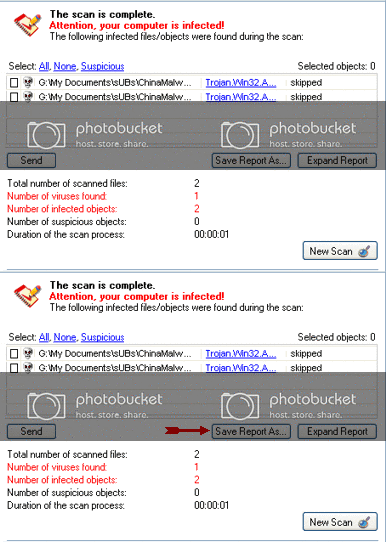
    When the scan is done, in the Scan is completed window (below), any infection is displayed.
    There is no option to clean/disinfect, however, we need to analyze the information on the report.


    To obtain the report:
    Click on: Save Report As (above - red blinking arrow)
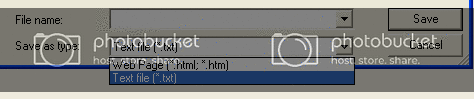
    Next, in the Save as prompt, Save in area, select: Desktop
    In the File name area, use KScan, or something similar
    In Save as type, click the drop arrow and select: Text file [*.txt]
    Then, click: Save
    Please post the Kaspersky Online Scanner Report in your reply.

  12. #12
    Join Date
    Oct 2001
    Posts
    352
    --------------------------------------------------------------------------------
    KASPERSKY ONLINE SCANNER 7.0: scan report
    Monday, January 25, 2010
    Operating system: Microsoft Windows XP Professional Service Pack 3 (build 2600)
    Kaspersky Online Scanner version: 7.0.26.13
    Last database update: Monday, January 25, 2010 05:03:01
    Records in database: 3367501
    --------------------------------------------------------------------------------

    Scan settings:
    scan using the following database: extended
    Scan archives: yes
    Scan e-mail databases: yes

    Scan area - My Computer:
    A:\
    C:\
    D:\

    Scan statistics:
    Objects scanned: 287930
    Threats found: 7
    Infected objects found: 11
    Suspicious objects found: 0
    Scan duration: 08:29:42


    File name / Threat / Threats count
    C:\Documents and Settings\John Bower\Local Settings\Temporary Internet Files\Content.IE5\SX5WJBS3\show_ads[1].js Infected: Trojan.JS.Redirector.ar 1
    C:\Documents and Settings\John Bower\My Documents\My Downloads\JackKeane_Demo_ENG.zip Infected: Packed.Win32.Krap.ai 1
    C:\Documents and Settings\John Bower\My Documents\My Downloads\wwiv_setup.exe Infected: not-a-virus:AdWare.Win32.NavExcel.h 5
    C:\Documents and Settings\John Bower\My Documents\My Downloads\wwiv_setup.exe Infected: not-a-virus:AdWare.Win32.NavExcel.i 1
    C:\Downloads\torrent\HiyokoBrand\[YoungJump][2004-18]HB042.zip Infected: Exploit.HTML.CodeBaseExec 1
    C:\Old Files\GordianKnot.CodecPack.1.1.exe Infected: not-a-virus:AdWare.Win32.Gator.3202 1
    C:\Old Files\kazaalite_202_b1.zip Infected: not-a-virus:AdWare.Win32.Altnet.o 1

    Selected area has been scanned.

  13. #13
    Join Date
    Feb 2004
    Location
    Mandurah, Western Australia
    Posts
    10,157
    You need to delete all those found by Kaspersky.

    Download and Run ATF Cleaner
    Download ATF (Atribune Temp File) Cleaner&#169; by Atribune to your desktop.

    Double-click ATF Cleaner.exe to open it.

    Under Main choose:
    Windows Temp
    Current User Temp
    All Users Temp
    Cookies
    Temporary Internet Files
    Prefetch
    Java Cache

    *The other boxes are optional*
    Then click the Empty Selected button.

    Firefox:
    Click Firefox at the top and choose: Select All
    Click the Empty Selected button.
    NOTE: If you would like to keep your saved passwords, please click NO at the prompt.

    Opera:
    Click Opera at the top and choose: Select All
    Click the Empty Selected button.
    NOTE: If you would like to keep your saved passwords, please click NO at the prompt.

    Click Exit on the Main menu to close the program.

    ===========

    Combofix is back up again too .

  14. #14
    Join Date
    Oct 2001
    Posts
    352
    I've run ATF Cleaner.

    Were you saying I should download and run Combofix again?

  15. #15
    Join Date
    Feb 2004
    Location
    Mandurah, Western Australia
    Posts
    10,157
    Only if you need to. How is the pc? Did you manage to delete those files?

Thread Information

Users Browsing this Thread

There are currently 1 users browsing this thread. (0 members and 1 guests)

Posting Permissions

  • You may not post new threads
  • You may not post replies
  • You may not post attachments
  • You may not edit your posts
  •