|
-
January 20th, 2010, 06:06 PM
#1
del win32 spyware-gen
please check im clean after this nasty beast was removed
Thanks & regards, Al
Logfile of Trend Micro HijackThis v2.0.2
Scan saved at 9:03:12 AM, on 1/21/2010
Platform: Windows XP SP3 (WinNT 5.01.2600)
MSIE: Internet Explorer v6.00 SP3 (6.00.2900.5512)
Boot mode: Normal
Running processes:
C:\WINDOWS\System32\smss.exe
C:\WINDOWS\system32\winlogon.exe
C:\WINDOWS\system32\services.exe
C:\WINDOWS\system32\lsass.exe
C:\WINDOWS\system32\Ati2evxx.exe
C:\WINDOWS\system32\svchost.exe
C:\Program Files\Windows Defender\MsMpEng.exe
C:\WINDOWS\System32\svchost.exe
C:\Program Files\Alwil Software\Avast5\AvastSvc.exe
C:\WINDOWS\system32\spoolsv.exe
C:\WINDOWS\system32\acs.exe
C:\Program Files\TOSHIBA\ConfigFree\CFSvcs.exe
C:\WINDOWS\system32\DVDRAMSV.exe
C:\WINDOWS\system32\Ati2evxx.exe
C:\WINDOWS\Explorer.EXE
C:\Program Files\TOSHIBA\TOSHIBA Zooming Utility\SmoothView.exe
C:\Program Files\ATI Technologies\ATI Control Panel\atiptaxx.exe
C:\Program Files\TOSHIBA\ConfigFree\NDSTray.exe
C:\WINDOWS\system32\dla\tfswctrl.exe
C:\Program Files\Toshiba\Windows Utilities\Hotkey.exe
C:\Program Files\TOSHIBA\Touch and Launch\PadExe.exe
C:\WINDOWS\System32\spool\DRIVERS\W32X86\3\E_FATIAIP.EXE
C:\Program Files\Telstra\BigPond Wireless Broadband 2.13.16\BigPond_CM.exe
C:\Program Files\TOSHIBA\ConfigFree\CFSServ.exe
C:\PROGRA~1\ALWILS~1\Avast5\avastUI.exe
C:\Program Files\Windows Defender\MSASCui.exe
C:\Program Files\TOSHIBA\TOSCDSPD\toscdspd.exe
C:\WINDOWS\system32\ctfmon.exe
C:\Program Files\Messenger\msmsgs.exe
C:\WINDOWS\system32\RAMASST.exe
C:\WINDOWS\system32\wuauclt.exe
C:\Program Files\Internet Explorer\iexplore.exe
C:\WINDOWS\system32\wuauclt.exe
C:\WINDOWS\system32\msiexec.exe
C:\Program Files\Common Files\Microsoft Shared\Source Engine\OSE.EXE
E:\HijackThis.exe
R0 - HKCU\Software\Microsoft\Internet Explorer\Main,Start Page = http://au.my.yahoo.com/
R1 - HKCU\Software\Microsoft\Internet Connection Wizard,ShellNext = http://www.bigpond.com/jumpoff/adsl/
R1 - HKCU\Software\Microsoft\Windows\CurrentVersion\Internet Settings,ProxyServer = http=127.0.0.1:5555
R3 - URLSearchHook: Yahoo! Toolbar - {EF99BD32-C1FB-11D2-892F-0090271D4F88} - C:\Program Files\Yahoo!\Companion\Installs\cpn\yt.dll
O2 - BHO: &Yahoo! Toolbar Helper - {02478D38-C3F9-4efb-9B51-7695ECA05670} - C:\Program Files\Yahoo!\Companion\Installs\cpn\yt.dll
O2 - BHO: AcroIEHlprObj Class - {06849E9F-C8D7-4D59-B87D-784B7D6BE0B3} - C:\Program Files\Adobe\Acrobat 5.0\Reader\ActiveX\AcroIEHelper.ocx
O2 - BHO: BigPond Wireless Broadband 2.0 Auto Dial - {DB92EC3F-697D-4C3B-9A3B-3ABBD23D4A85} - C:\Program Files\Telstra\BigPond Wireless Broadband 2.13.16\bpwbb2ad.dll
O2 - BHO: EpsonToolBandKicker Class - {E99421FB-68DD-40F0-B4AC-B7027CAE2F1A} - C:\Program Files\EPSON\EPSON Web-To-Page\EPSON Web-To-Page.dll
O3 - Toolbar: EPSON Web-To-Page - {EE5D279F-081B-4404-994D-C6B60AAEBA6D} - C:\Program Files\EPSON\EPSON Web-To-Page\EPSON Web-To-Page.dll
O3 - Toolbar: Yahoo! Toolbar - {EF99BD32-C1FB-11D2-892F-0090271D4F88} - C:\Program Files\Yahoo!\Companion\Installs\cpn\yt.dll
O4 - HKLM\..\Run: [SmoothView] C:\Program Files\TOSHIBA\TOSHIBA Zooming Utility\SmoothView.exe
O4 - HKLM\..\Run: [ATIPTA] "C:\Program Files\ATI Technologies\ATI Control Panel\atiptaxx.exe"
O4 - HKLM\..\Run: [NDSTray.exe] C:\Program Files\TOSHIBA\ConfigFree\NDSTray.exe
O4 - HKLM\..\Run: [dla] C:\WINDOWS\system32\dla\tfswctrl.exe
O4 - HKLM\..\Run: [Toshiba Hotkey Utility] "C:\Program Files\Toshiba\Windows Utilities\Hotkey.exe" /lang en
O4 - HKLM\..\Run: [PadTouch] C:\Program Files\TOSHIBA\Touch and Launch\PadExe.exe
O4 - HKLM\..\Run: [EPSON Stylus Photo R230 Series] C:\WINDOWS\System32\spool\DRIVERS\W32X86\3\E_FATIAIP.EXE /P30 "EPSON Stylus Photo R230 Series" /O6 "USB001" /M "Stylus Photo R230"
O4 - HKLM\..\Run: [BigPondWirelessBroadbandCM] "C:\Program Files\Telstra\BigPond Wireless Broadband 2.13.16\BigPond_CM.exe" -tsr
O4 - HKLM\..\Run: [CFSServ.exe] CFSServ.exe -NoClient
O4 - HKLM\..\Run: [avast5] C:\PROGRA~1\ALWILS~1\Avast5\avastUI.exe /nogui
O4 - HKLM\..\Run: [Windows Defender] "C:\Program Files\Windows Defender\MSASCui.exe" -hide
O4 - HKCU\..\Run: [TOSCDSPD] C:\Program Files\TOSHIBA\TOSCDSPD\toscdspd.exe
O4 - HKCU\..\Run: [ctfmon.exe] C:\WINDOWS\system32\ctfmon.exe
O4 - HKCU\..\Run: [MSMSGS] "C:\Program Files\Messenger\msmsgs.exe" /background
O4 - Global Startup: RAMASST.lnk = C:\WINDOWS\system32\RAMASST.exe
O9 - Extra button: Research - {92780B25-18CC-41C8-B9BE-3C9C571A8263} - C:\PROGRA~1\MICROS~2\OFFICE11\REFIEBAR.DLL
O9 - Extra button: (no name) - {e2e2dd38-d088-4134-82b7-f2ba38496583} - C:\WINDOWS\Network Diagnostic\xpnetdiag.exe
O9 - Extra 'Tools' menuitem: @xpsp3res.dll,-20001 - {e2e2dd38-d088-4134-82b7-f2ba38496583} - C:\WINDOWS\Network Diagnostic\xpnetdiag.exe
O9 - Extra button: Messenger - {FB5F1910-F110-11d2-BB9E-00C04F795683} - C:\Program Files\Messenger\msmsgs.exe
O9 - Extra 'Tools' menuitem: Windows Messenger - {FB5F1910-F110-11d2-BB9E-00C04F795683} - C:\Program Files\Messenger\msmsgs.exe
O16 - DPF: {6E32070A-766D-4EE6-879C-DC1FA91D2FC3} (MUWebControl Class) - http://www.update.microsoft.com/micr...?1263960084640
O17 - HKLM\System\CCS\Services\Tcpip\..\{1C13DD90-7467-48A6-BDD1-C591BB9C81D9}: Domain = nsw.bigpond.net.au
O17 - HKLM\System\CCS\Services\Tcpip\..\{3E331FBF-1425-4A39-A4F2-D5590C308697}: Domain = nsw.bigpond.net.au
O23 - Service: Atheros Configuration Service (ACS) - Unknown owner - C:\WINDOWS\system32\acs.exe
O23 - Service: Ati HotKey Poller - ATI Technologies Inc. - C:\WINDOWS\system32\Ati2evxx.exe
O23 - Service: avast! Antivirus - ALWIL Software - C:\Program Files\Alwil Software\Avast5\AvastSvc.exe
O23 - Service: avast! Mail Scanner - ALWIL Software - C:\Program Files\Alwil Software\Avast5\AvastSvc.exe
O23 - Service: avast! Web Scanner - ALWIL Software - C:\Program Files\Alwil Software\Avast5\AvastSvc.exe
O23 - Service: ConfigFree Service (CFSvcs) - TOSHIBA CORPORATION - C:\Program Files\TOSHIBA\ConfigFree\CFSvcs.exe
O23 - Service: DVD-RAM_Service - Matsu****a Electric Industrial Co., Ltd. - C:\WINDOWS\system32\DVDRAMSV.exe
O23 - Service: Google Update Service (gupdate1c9ae1be10cf9a6) (gupdate1c9ae1be10cf9a6) - Google Inc. - C:\Program Files\Google\Update\GoogleUpdate.exe
--
End of file - 6295 bytes
-
January 20th, 2010, 09:26 PM
#2
Log looks clean, but that's no guarantee.
Please use the Internet Explorer browser (or FireFox with IETab), and do an online scan with Kaspersky Online Scanner
Note: If you have used this particular scanner before, you MAY HAVE TO UNINSTALL the program through Add/Remove Programs before downloading the new ActiveX component
Click Yes, when prompted to install its ActiveX component.
(Note.. for Internet Explorer 7 users: If at any time you have trouble with the "Accept" button of the license, click on the "Zoom" tool located at the bottom right of the IE window and set the zoom to 75 %. Once the license has been accepted, reset to 100%.)
The program launches and downloads the latest definition files. - Once the files are downloaded click on Next
- Click on Scan Settings and configure as follows:
- Scan using the following Anti-Virus database:
- Scan Options:
- Click OK and, under select a target to scan, select My Computer
When the scan is done, in the Scan is completed window (below), any infection is displayed.
There is no option to clean/disinfect, however, we need to analyze the information on the report.
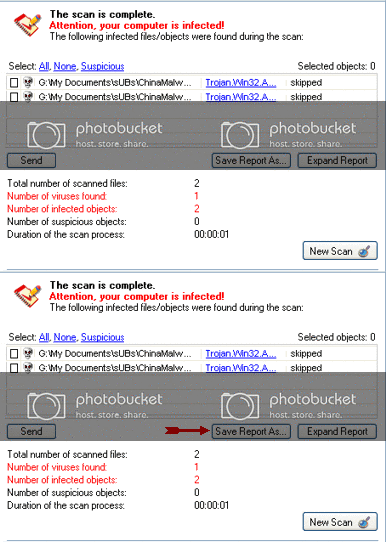
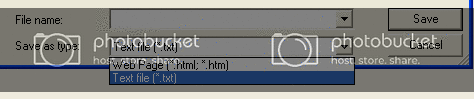
To obtain the report:
Click on: Save Report As (above - red blinking arrow)
Next, in the Save as prompt, Save in area, select: Desktop
In the File name area, use KScan, or something similar
In Save as type, click the drop arrow and select: Text file [*.txt]
Then, click: Save
Please post the Kaspersky Online Scanner Report in your reply.
-
January 21st, 2010, 04:29 PM
#3
thanks for the reply, I had to give this one back cause im going on leave. See how it goes.
-
January 21st, 2010, 04:35 PM
#4
Thread Information
Users Browsing this Thread
There are currently 1 users browsing this thread. (0 members and 1 guests)
 Posting Permissions
- You may not post new threads
- You may not post replies
- You may not post attachments
- You may not edit your posts
-
Forum Rules
|
|


 Reply With Quote


