|
-
January 4th, 2010, 07:31 PM
#1
Thermal Paste-Grease-Adhesive
Hi ALL. HAPPY NEW YEAR to you All.
Is Thermal Grease or Thermal Adhesive as good as Thermal Paste.
I have managed to get another OEM K8N-E Deluxe board so need Paste, but I don't want to pay more than £4. I have cleaned the AMD 64 processor and the Heatsink with Pure alcohol. (clean as a whistle). If I set this up outside the Tower, what should I attach. RAM, processor, Heatsink/fan, Graphics card. Anything else?? Been such a LooooonG time since I put a PC together and my memory ain't so good.
THANKS.
ASUS K8N-E Deluxe with NForce3----AMD Athlon64 3000+ @ 209.08MHz---Saphire Radeon 9600xt---Gone to HEAVEN!
Other PC is--ASUS M2N-SLI Deluxe--AMD Athlon 64 X2 Dual Core 6000+/2GB Corsair XMS2-6400C4 TwinX Dual Channel kit----ASUS GeForce 8600 GT 512 GDDR3 Silent HDTV/Dual DVI (PCI Express)
Corsair 520W Modular PSU---n a Load of Other things to numerous to mention..
I Am Me, You Are You. I Am Unique, So Are You.
-
January 4th, 2010, 11:18 PM
#2
Do not use adhesive on the hsf. MX-2 would be my pick for TIM as it is non-conductive.
-
January 5th, 2010, 02:46 AM
#3
 Originally Posted by scarecrowdr

... Is Thermal Grease or Thermal Adhesive as good as Thermal Paste...
The term, thermal grease/compound/paste... generally refers to the same thing.
The term, thermal adhesive on the other hand, usually refers to those liquid(s) intended to permanently bond the item(s).
Originally Posted by scarecrowdr
... RAM, processor, Heatsink/fan, Graphics card...
That's it, mobo connected to power source.
Last edited by Shinma; January 5th, 2010 at 02:49 AM.
Cheers.
-
January 5th, 2010, 10:44 AM
#4
I've always used Arctic Silver, and I've always had excellent results. Any top quality brand should be OK though, but don't use cheap stuff, it's just not worth it.
http://www.arcticsilver.com/
Nick.
-
January 5th, 2010, 02:37 PM
#5
OK I bought Thermal Grease and spread it thinly over the heatsink. I have put everything together, switch on power at socket, green light on mobo lights up, and all that happens is the Heatsink fan plus rear fans spin then stop. Nothing else works.
Any ideas. Bear in mind the PSU was tested when the other mobo stoped working n it was ok.
ASUS K8N-E Deluxe with NForce3----AMD Athlon64 3000+ @ 209.08MHz---Saphire Radeon 9600xt---Gone to HEAVEN!
Other PC is--ASUS M2N-SLI Deluxe--AMD Athlon 64 X2 Dual Core 6000+/2GB Corsair XMS2-6400C4 TwinX Dual Channel kit----ASUS GeForce 8600 GT 512 GDDR3 Silent HDTV/Dual DVI (PCI Express)
Corsair 520W Modular PSU---n a Load of Other things to numerous to mention..
I Am Me, You Are You. I Am Unique, So Are You.
-
January 5th, 2010, 03:45 PM
#6
Did you make certain that you plugged the sqare 4-pin 12 volt connector? If you don't hook that up then you get exactly what you are experiencing.
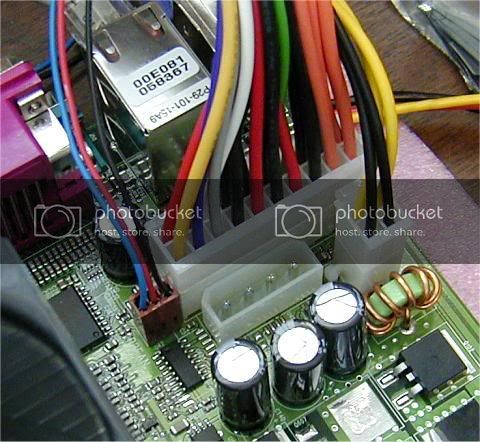
Nick.
-
January 5th, 2010, 05:11 PM
#7
yep! checked that un so many times it's done me head in..lol
Fan spins on rear of PSU, Both Fans Spin on rear, Fan spins on Heatsink, Lights come on in front of tower but PC don't fire up. Me thinks it is the Processor. I said that to three PC shops that looked at it last year and they all said it was mobo. I don't get beeps as there be no front speaker in this pc. What do you think Supersparks. ? I might buy an AMD 3000+ Newcastle on eBay. There are three for sale out there, used but working and I can get money back within 7 days if not satisfied. All from England. Cost approx £27 to £29
P.S-- I took that 4 pin 12volt pin off of the Board and fired up. That did exactly the same as above, plugged in and unpluged.
Last edited by scarecrowdr; January 5th, 2010 at 05:28 PM.
ASUS K8N-E Deluxe with NForce3----AMD Athlon64 3000+ @ 209.08MHz---Saphire Radeon 9600xt---Gone to HEAVEN!
Other PC is--ASUS M2N-SLI Deluxe--AMD Athlon 64 X2 Dual Core 6000+/2GB Corsair XMS2-6400C4 TwinX Dual Channel kit----ASUS GeForce 8600 GT 512 GDDR3 Silent HDTV/Dual DVI (PCI Express)
Corsair 520W Modular PSU---n a Load of Other things to numerous to mention..
I Am Me, You Are You. I Am Unique, So Are You.
-
January 5th, 2010, 05:58 PM
#8
Most of the time it would be the motherboard, CPU failure is rare. However, as this is a replacement mobo, I think that there's a good chance that in this case iot is the CPU. Unfortunately there is no practical way of testing one, all you can do is substitute a different CPU.
Before you do that though, take the mobo out of the case, but leave it plugged in. Lay it on some insulating material, and try and fire it up then. That eliminates any shorts causing the problem.
Nick.
-
January 5th, 2010, 07:58 PM
#9
PROBLEM there. The wires are not long enough to conect to mobo when taken out.
I will lay some newspaper inside case and rest mobo on that. Will let you know.
UPDATE---Put mobo inside case resting on newspaper, Still the same as before. CPU fan starts, PSU fan starts then stops. NOTHING.
Golly, with the worst snow UK has had in years I guess my cpu will arrive in a months time. LOL
I got a small tiny speaker that's attached to the mobo by the Start pins, but I never get any sounds (bleeps) from it. Never have done.
So me thinks it could be cpu
Thanks Supersparks.
Last edited by scarecrowdr; January 5th, 2010 at 08:14 PM.
ASUS K8N-E Deluxe with NForce3----AMD Athlon64 3000+ @ 209.08MHz---Saphire Radeon 9600xt---Gone to HEAVEN!
Other PC is--ASUS M2N-SLI Deluxe--AMD Athlon 64 X2 Dual Core 6000+/2GB Corsair XMS2-6400C4 TwinX Dual Channel kit----ASUS GeForce 8600 GT 512 GDDR3 Silent HDTV/Dual DVI (PCI Express)
Corsair 520W Modular PSU---n a Load of Other things to numerous to mention..
I Am Me, You Are You. I Am Unique, So Are You.
-
January 5th, 2010, 08:49 PM
#10
If your attached hard drive is ATA (not SATA) make sure it's jumpered properly for master.
BTW & FWIW, I have gotten into the habit of assembling a new system completely outside of its intended case and bench-testing it before its final assembly inside the case. It sure eliminates a raft of guesswork in the rare instance the system doesn't work afterward; and at that point, it's almost always inadvertent contact between mobo and case.
Last edited by lgbpop; January 5th, 2010 at 08:55 PM.
-
January 5th, 2010, 08:57 PM
#11
I do the same as lgbpop. Four screws hold the psu in, so it is not a great deal to attempt running it external to the case.
How you going lg?
-
January 5th, 2010, 09:12 PM
#12
HDD is SATA. Attached the HDD and Disconected HDD, still the same. Won't power up to start HDD anyway. Me thinks it is the cpu seeing as I got TWO Asus K8N-e Deluxe boards and one is new. Only fixed the old componants to it on Monday & retried umpteen times Tuesday. CHEERS.
ASUS K8N-E Deluxe with NForce3----AMD Athlon64 3000+ @ 209.08MHz---Saphire Radeon 9600xt---Gone to HEAVEN!
Other PC is--ASUS M2N-SLI Deluxe--AMD Athlon 64 X2 Dual Core 6000+/2GB Corsair XMS2-6400C4 TwinX Dual Channel kit----ASUS GeForce 8600 GT 512 GDDR3 Silent HDTV/Dual DVI (PCI Express)
Corsair 520W Modular PSU---n a Load of Other things to numerous to mention..
I Am Me, You Are You. I Am Unique, So Are You.
-
January 6th, 2010, 04:54 AM
#13
Clear CMOS jumper removed?
Cheers.
-
January 6th, 2010, 10:58 AM
#14
I'm mostly of the opinion that it's the CPU too. But the PSU fan stopping is very unusual. If you don't have a PSU tester, remove the mobo power connector and short the pins out, just to make sure that it starts up OK.
Testing PSU Voltages
Nick.
-
January 6th, 2010, 11:03 AM
#15
Not Cleared CMOS. Will try that later.
Just Took Battery out, did jumpers from 1&2 to2&3 for 10 sec, put back, STILL the same.
ASUS K8N-E Deluxe with NForce3----AMD Athlon64 3000+ @ 209.08MHz---Saphire Radeon 9600xt---Gone to HEAVEN!
Other PC is--ASUS M2N-SLI Deluxe--AMD Athlon 64 X2 Dual Core 6000+/2GB Corsair XMS2-6400C4 TwinX Dual Channel kit----ASUS GeForce 8600 GT 512 GDDR3 Silent HDTV/Dual DVI (PCI Express)
Corsair 520W Modular PSU---n a Load of Other things to numerous to mention..
I Am Me, You Are You. I Am Unique, So Are You.
Thread Information
Users Browsing this Thread
There are currently 1 users browsing this thread. (0 members and 1 guests)
 Posting Permissions
- You may not post new threads
- You may not post replies
- You may not post attachments
- You may not edit your posts
-
Forum Rules
|
|


 Reply With Quote


