|
-
October 28th, 2009, 02:19 PM
#16
Thanks for the great info! I'll measure the case today.
Thanks again,
Mike
-
October 28th, 2009, 04:45 PM
#17
I've just built a rig with an Antec Twelve Hundred, which is a big case and a GTX 275, and there is only barely enough room to plug the drive cables in.
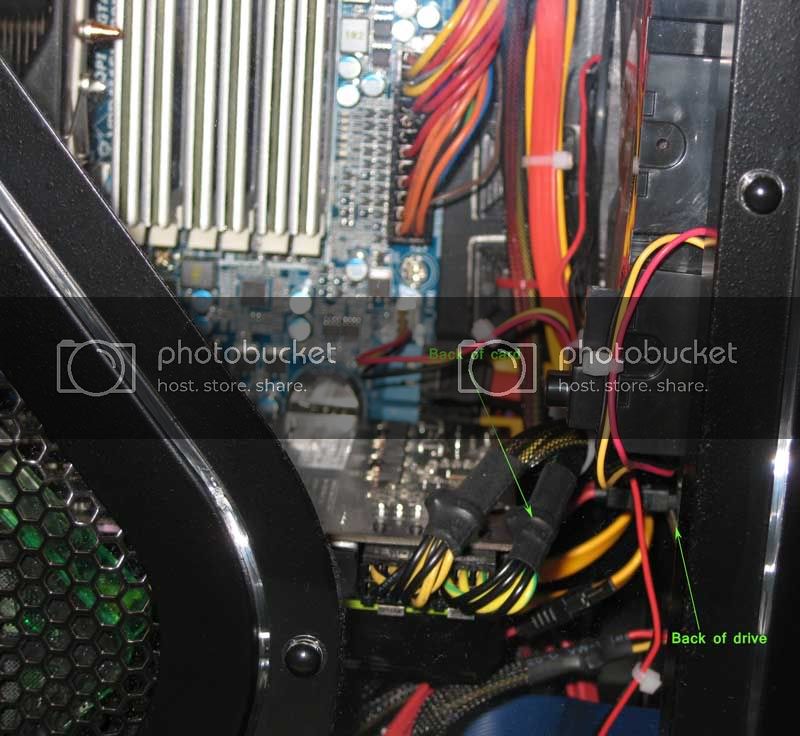
Nick.
-
October 28th, 2009, 07:39 PM
#18
This is a Thermaltake Swing Case that has a 128MB Gigabyte Radeon X600XT PCIe card installed. From the looks of things, your case should be able to handle most cards out there. It's really hard to tell by just looking, it would be much easier if I had a card and case to test it, but I don't. Here is the link with a photo fo the Swing case and the Radeon x600xt card:
http://www.bigbruin.com/reviews05/im...file=pic50.jpg
The EVGA card that I listed in my earlier post might fit better than some other cards out there (I'm not saying this card is better than some of the others). The power connection are on the side instead of on the end. If the power connections to the card are on the end it will add just that much more length to the card making it a tighter fit.
I measured my XFX nVidia GeForce 7800GT and my MSI nVidia GeForce 8600gts, both about 7 1/2". I then measured my XFX nVidia GeForce GTX285, it measured about 10 1/2". I measure the space from where the card mounts to the case in my Mid-Tower Case to the Hard Drive Racks, about 10 1/2". The XFX nVidia GeForce GTX285 might fit in my case, it would be tight! The power on my card is on the side (good), but the power on my Hard Drives face out towards the video card. If these power connections on the hard drives pointed out towards the outside cover it wouldn't be a problem getting the XFX nVidia GeForce GTX285 card intomy mid-tower.
I think I saw that on your Thermaltake Swing case the Hard Drive Power faced outward towards the case cover. This would be good for your upgrade!
Asus Zenbook Q508UG-212.R7TBL 2-in-1 Laptop
AMD Ryzen 7 5700U Processor
8gb DDR4 RAM (Soldered on Motherboard)
1gb Western Digital Blue NVMe SSD
NVIDA MX450 (DDR6)
15.6" 1920 x 1080 (Full HD) Touchscreen
Intel(R) Dual Band Wireless - AC 7260
USB 1 x 2.0 - USB 1 x 3.0 - USB-C 1 x 3.1
Micro SD Card Reader
Lighted Keyboard
Webcam/Microphone
Windows 11 Professional
MS Office 365 Family
Logitech Anywhere MX Mouse
-
October 29th, 2009, 08:52 PM
#19
SuperSparks,
Boy, you weren't kidding about your card being in there tight! My CoolerMaster Full-Tower I talked about in the post where you showed yours computer being put together has plenty of extra room where the Video Card goes .
mike2rc,
I never noticed that the EVGA nVidia GeForce gts250 is about 1 inch shorter than my XFX nVidia GeForce gtx285 (this card is in my full tower case). My gtx285 is 10 1/2" and that EVGA gts250 is 9 1/2" long.
Here is a photo of my Mid-tower case with a XFX nVidia GeForce 7800GT. If you will notice the hard drive power connection for my hard drive carrier face the video card. And the Video Card Power faces the Hard Drive Carrier. This gives me less room for one of these large video cards.
The hard drive carrier on your Thermaltake Swing case faces the window or side cover which should give you the room you need for a larger card. I think that I could squeeze the right Video card into my Mid-Tower Case. I have plenty of Room in the Full-Tower Case in my Sig. Here is my photo:

Asus Zenbook Q508UG-212.R7TBL 2-in-1 Laptop
AMD Ryzen 7 5700U Processor
8gb DDR4 RAM (Soldered on Motherboard)
1gb Western Digital Blue NVMe SSD
NVIDA MX450 (DDR6)
15.6" 1920 x 1080 (Full HD) Touchscreen
Intel(R) Dual Band Wireless - AC 7260
USB 1 x 2.0 - USB 1 x 3.0 - USB-C 1 x 3.1
Micro SD Card Reader
Lighted Keyboard
Webcam/Microphone
Windows 11 Professional
MS Office 365 Family
Logitech Anywhere MX Mouse
-
October 29th, 2009, 11:25 PM
#20
Thanks for the input! It's good to know an EVGA 01G-P3-1155-TR GeForce GTS 250 1GB 256-bit GDDR3 PCI Express 2.0 x16 or 260 if they make one will fit into my ThermalTake Swing case.
Is easy to put in like other cards are...I've done it a number of times over the years.
Thanks,
Mike
-
October 30th, 2009, 11:04 AM
#21
Yep, as long as the card doesn't physically clash with anything then new ones are just as easy to fit as older ones.
Comparing my photo and BP's, my card overhangs my full-size ATX mobo by about an inch, whereas his is a good inch short of the edge. I reckon my GTX 275 in his case would be as tight as it is in mine, so it's something that definitely needs watching with the GTX 250/260/275/285 series cards.
Nick.
-
October 30th, 2009, 01:38 PM
#22
I'm sure that most of the newer cards would have problems fitting into my Mid-Tower case I posted the picture of before. I was trying to point out which way the power connections face. The card in the photo is a 7800GT. The 7800GT was a big card for it's day but the newer 200 series cards are huge compared to the 7800GT.
I'm posting a photo of my XFX nVidia GeForce GTX285 inside of my CoolerMaster Cosmos Full-Tower case. In this case with that huge card I still have about 5"-6" of space. The Green card below the Black XFX Video Card is a Full Size Hauppauge HVR-1600 TV Tuner Card. The TV Tuner Card isn't small by any means (most likely about the size of my 7800 series Video Card). Here is the photo:
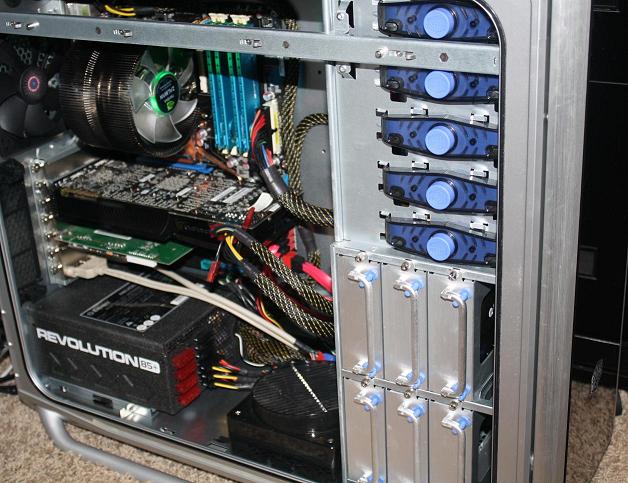
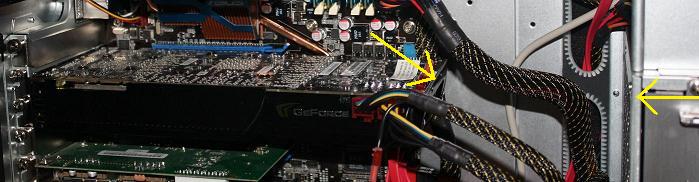
This picture shows a better angle, showing how much room I have in this CoolerMaster Case. So far I haven't been cramped for space in this case. I've had other Full-Towers before (still have one other full-tower) but they've never had this much space. I think it has something to do with the way CoolerMaster has organized everything. Here is the second photo:
Last edited by bugspop1; October 30th, 2009 at 02:25 PM.
Asus Zenbook Q508UG-212.R7TBL 2-in-1 Laptop
AMD Ryzen 7 5700U Processor
8gb DDR4 RAM (Soldered on Motherboard)
1gb Western Digital Blue NVMe SSD
NVIDA MX450 (DDR6)
15.6" 1920 x 1080 (Full HD) Touchscreen
Intel(R) Dual Band Wireless - AC 7260
USB 1 x 2.0 - USB 1 x 3.0 - USB-C 1 x 3.1
Micro SD Card Reader
Lighted Keyboard
Webcam/Microphone
Windows 11 Professional
MS Office 365 Family
Logitech Anywhere MX Mouse
-
October 30th, 2009, 01:49 PM
#23
I'll guess the best thing to do is measure my Swing case before I buy...it sounds close with the 250 and case.
Mike
-
October 30th, 2009, 02:15 PM
#24
I think you'll make it from the looks of the photos but a measurement is always the best way to be sure! I think I coud fit one in my Mid-Tower too, but it would be a really tight fit! I could get extra room if I re-routed the power connections for the hard drives to the other side of the hard drive carriage. It would be a total PITA but I could do it if I really wanted to upgrade the video card in that machine. Measure twice buy once! Take your time with the measurements, and try to think of anything that could possibly go wrong with the install (always look ahead).
Last edited by bugspop1; October 30th, 2009 at 02:28 PM.
Asus Zenbook Q508UG-212.R7TBL 2-in-1 Laptop
AMD Ryzen 7 5700U Processor
8gb DDR4 RAM (Soldered on Motherboard)
1gb Western Digital Blue NVMe SSD
NVIDA MX450 (DDR6)
15.6" 1920 x 1080 (Full HD) Touchscreen
Intel(R) Dual Band Wireless - AC 7260
USB 1 x 2.0 - USB 1 x 3.0 - USB-C 1 x 3.1
Micro SD Card Reader
Lighted Keyboard
Webcam/Microphone
Windows 11 Professional
MS Office 365 Family
Logitech Anywhere MX Mouse
-
October 30th, 2009, 04:25 PM
#25
That is an impressive case BP 
Nick.
-
October 30th, 2009, 11:07 PM
#26
Thanks, think it's the best case I've ever had. Plenty of room to move around in there. In the first photo you can see the 6 Pull Out Hard Drie Trays. Each of the trays has rubber shock absorbers to deaden any sounds & vibration that the hard drives may generate. On the 5 .25" drive bays you just push the round light blue buttons to take the devices in and out.
It is more difficult if you need to adapt the bay to accommodate a 3.5" device.
I added an Internal Card Reader for my camera's SDHC card and also a couple of Mini and Micro SDHC cards that I have as well. This is a 3.5" device and it took quite a while to put in the first time. Had to RMA the 1st and 2nd card reader so I've had lots of practice putting them in being on the 3rd. The first one was a Sabrent and the last two were Rosewill. Newegg told me to contact the company to RMA and when I did Sabrent wouldn't return my e-mails so Newegg took card of the RMA and swapped it out for the Rosewill. Rosewill then took care of their bad drive.
CoolerMaster has also added a piece of plastic that covers the Video Card and is supposed to guide the airflow. I took this plastice cover off to take the pictures so you could see the card. With the cover on you wouldn't be able to see two of these GTX285 cards in SLI or a Crossfire setup if you went that way. It also hides any wires that you might not be able to hide otherwise.
Now I'm wanting to add one or more of those Pull Out Hard Drive Racks that you have. I'll keep the 2 xTB drives I have in the case already and just add a couple more hard drives. Can never have too much hard drive space.
Last edited by bugspop1; October 30th, 2009 at 11:14 PM.
Asus Zenbook Q508UG-212.R7TBL 2-in-1 Laptop
AMD Ryzen 7 5700U Processor
8gb DDR4 RAM (Soldered on Motherboard)
1gb Western Digital Blue NVMe SSD
NVIDA MX450 (DDR6)
15.6" 1920 x 1080 (Full HD) Touchscreen
Intel(R) Dual Band Wireless - AC 7260
USB 1 x 2.0 - USB 1 x 3.0 - USB-C 1 x 3.1
Micro SD Card Reader
Lighted Keyboard
Webcam/Microphone
Windows 11 Professional
MS Office 365 Family
Logitech Anywhere MX Mouse
-
October 31st, 2009, 11:12 AM
#27
 Originally Posted by bugspop1

Can never have too much hard drive space.
You're not wrong there. On very build I've done over the last 10 years, I've installed what I thought was more disk space than I could possibly use, and on every one I've ended up scratching about for room before moving on to the next build. At least with the caddies it's easy to add more
Nick.
-
October 31st, 2009, 10:33 PM
#28
You sure aren't kidding. Two builds ago I put in 2 x 120gb drives and ended up adding another 80gb drive, all filled. I built my next before I completely filled the 80gb drive. On the next build it was 2 x 500gb. Both are very close to being filled but I built the next before I really needed the space. My current is 2 x 1tb. I think I'll have this computer for some time to come so I think I'll just add the hard drive space to it before it becomes an issue! I'm tinking at least another 2 x 1tb or maybe 2 x 2tb.
Asus Zenbook Q508UG-212.R7TBL 2-in-1 Laptop
AMD Ryzen 7 5700U Processor
8gb DDR4 RAM (Soldered on Motherboard)
1gb Western Digital Blue NVMe SSD
NVIDA MX450 (DDR6)
15.6" 1920 x 1080 (Full HD) Touchscreen
Intel(R) Dual Band Wireless - AC 7260
USB 1 x 2.0 - USB 1 x 3.0 - USB-C 1 x 3.1
Micro SD Card Reader
Lighted Keyboard
Webcam/Microphone
Windows 11 Professional
MS Office 365 Family
Logitech Anywhere MX Mouse
Thread Information
Users Browsing this Thread
There are currently 1 users browsing this thread. (0 members and 1 guests)
 Posting Permissions
- You may not post new threads
- You may not post replies
- You may not post attachments
- You may not edit your posts
-
Forum Rules
|
|


 Reply With Quote


