|
-
October 28th, 2009, 08:14 PM
#1
Blank Screen on restart Toshiba SP6000
Hi guys,
I have a problem here with my nieces Laptop. On initial start up it works fine until you have to re-boot for any reason i.e windows updates etc.. Upon re-boot the screen is blank (dark) and the only way of shutting the system down is to just hold the on/off button.
Now i know the battery only holds charge for about 25 mins, however i have tried it also with the charger plugged in with the battery connected and with the battery removed, still to no avail.
I have also ran a chkdsk scan and SFC /scannow, still no joy!.
Any ideas on what could be causing this problem?
Thanking you all in advance
Regards suttonite.
-
October 28th, 2009, 09:47 PM
#2
Do you hear anything running when this happens?
-
October 29th, 2009, 10:34 AM
#3
 Originally Posted by photolady

Do you hear anything running when this happens?
Hi Photolady,
When the computer restarts everything seems to work fine i.e the three L.E.D's are lit and the wifi card loads but no screen.
Regards.
-
October 29th, 2009, 10:48 AM
#4
As old as this computer is, it could be the inverter going out or gone out.
Try this. Hook up an external monitor and see if you get anything to show up. If you see your desktop, it's the inverter or video is gone.
-
October 29th, 2009, 12:17 PM
#5
Originally Posted by photolady
As old as this computer is, it could be the inverter going out or gone out.
Try this. Hook up an external monitor and see if you get anything to show up. If you see your desktop, it's the inverter or video is gone.
Excellent advice photolady,
Just had it hooked up to a spare LCD monitor, left it running for an hour and it restarted fine! . I've just checked the prices of inverters on ebay and can purchase one for 9.00GBP. . I've just checked the prices of inverters on ebay and can purchase one for 9.00GBP.
My next question is, are these inverters easy to fit on this particular model?.
Thanks so much for your advice.
Regards suttonite.
-
October 29th, 2009, 03:39 PM
#6
It's usually simple enough to change the inverter. Finding a document to show you how might be a problem. But searching the internet I came across this website that might help you:
http://www.fonerbooks.com/laptop_5.htm
-
October 29th, 2009, 07:20 PM
#7
Originally Posted by photolady
It's usually simple enough to change the inverter. Finding a document to show you how might be a problem. But searching the internet I came across this website that might help you:
http://www.fonerbooks.com/laptop_5.htm
Hi photolady,
Thank you so much for the advice and link.I have had a look at the laptop and i can see the screws on the hinges, plus it has rubber stops at the top (hopefully hiding screws).
Think i will have a go at this tomorrow as i would want to remove the old inverter before ordering the new one, just to make sure the model numbers match . .
Will keep you informed & thanks again.
Best regards
suttonite.
-
October 29th, 2009, 08:22 PM
#8
A caution when you take those screws out put them in an ice cube tray and mark each slot with where they came out of in the laptop. This will keep you from losing any and helps you remember where they each go.
Good luck!
And you're welcome for the help.
-
October 30th, 2009, 05:42 PM
#9
Hi photolady,
All sorted, removal of the screen was straightforward and simple, just two screws on the hinges and then just a case of prising off the outer surround carefully on the screen. I have the model number-UA2040P01 and have ordered a new one.
Thought i would post a screen shot of the lappy which may benefit other people as there is nothing on the web regarding instructions for removal of this part.
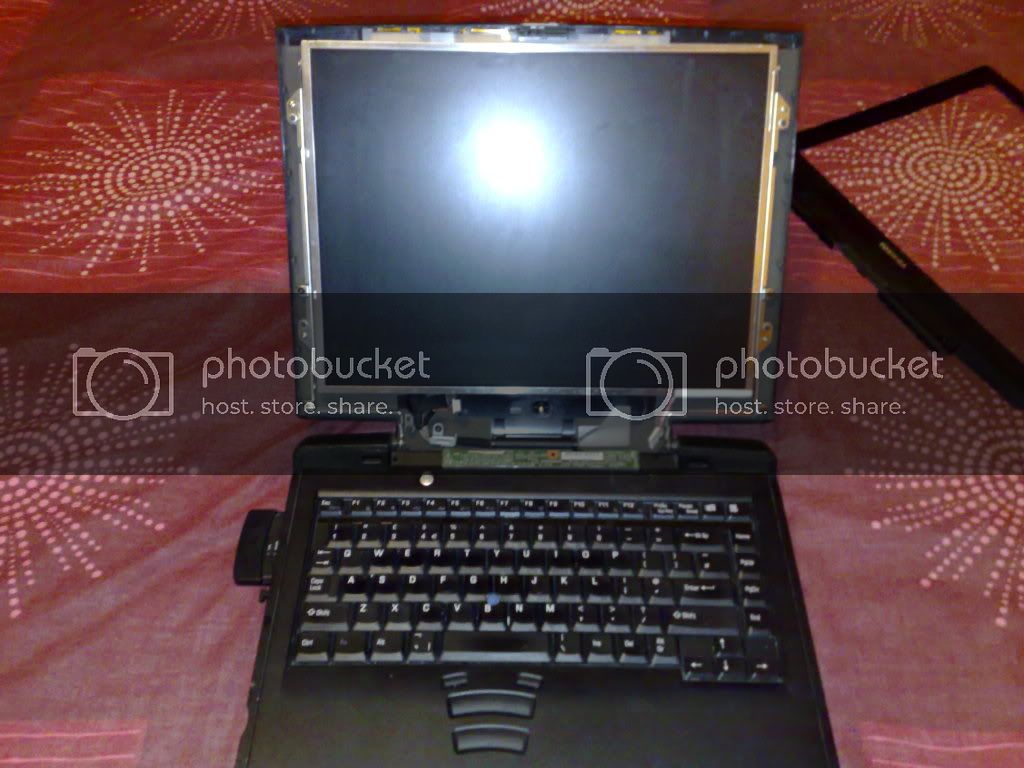
Best regards.
Suttonite
-
November 4th, 2009, 06:01 PM
#10
Hi photo,
Fitted the new inverter, however it's made no difference at all , the screen is still blank on restart. , the screen is still blank on restart.
Any other ideas on what the problem may be, would be much appreciated.
Regards
S
-
November 4th, 2009, 06:56 PM
#11
The other thing it could be is the backlight gone out. You tried a separate monitor and it works, so it's not the video card.
-
November 5th, 2009, 07:16 PM
#12
Originally Posted by photolady
The other thing it could be is the backlight gone out. You tried a separate monitor and it works, so it's not the video card.
Hi photo,
Thanks for replying, i have been thinking about this and maybe you could correct me if i'm wrong.
Firstly there are only three things that can be at fault here?, either the inverter, the backlight or the video card. Now if i turn the pc on, the backlight works fine i.e never flickers or shows any sign of being faulty even if i leave the pc running for 5/6 hours.
Could it be possible that this so called "tried & tested" inverter that i purchased off ebay maybe faulty as mine is, given the age of this type of lappy?. Do these inverters when they fail stop working altogether?.
Also when the laptop has been running and then restarted the screen only comes back on when the pc has cooled down i.e after a few hours.
Sorry for all the questions but i want to get to the bottom of this as i hate things that don't work.
Best regards.
S.
-
November 5th, 2009, 07:37 PM
#13
It could be the inverter is bad. It happens when you buy "tried and tested" off ebay.
If the video card was bad, you hooking up a monitor separately wouldn't show anything. Since you tried that and it worked, showed a screen, that proves it's not the video card.
Where I would go if I need a laptop part is the link below.
http://www.sparepartswarehouse.com/
And they ship worldwide according to their FAQ's.
Thread Information
Users Browsing this Thread
There are currently 1 users browsing this thread. (0 members and 1 guests)
 Posting Permissions
- You may not post new threads
- You may not post replies
- You may not post attachments
- You may not edit your posts
-
Forum Rules
|
|


 Reply With Quote


