|
-
May 11th, 2009, 03:40 PM
#1
SynchMaster 64-bit Driver
so, i'm looking to buy a new pc (from best buy or microcenter). seems all the new ones come with 64-bit vista.
i currently have a 1-1/2 year old 22-inch samsung synchmaster bw226 monitor attached to my 32-bit vista machine.
i've searched samsung's site as well as the web in general but can see nothing resembling a 64-bit driver for it.
could it be that monitors run 32- as well as 64-bit with the same driver? is this possible?
thanks in advance.
edit> would help if i could spell "synchmaster"... 
Last edited by terryZ; May 11th, 2009 at 03:49 PM.
AMD Ryzen 5 5600X CPU. 16GB DDR4-3200MHz RGB RAM. 1TB M.2 NVMe SSD. GeForce RTX 3060 Ti 8GB GPU. Windows 10. ViewSonic & Samsung monitors.
-
May 11th, 2009, 04:02 PM
#2
It is corrected 
-
May 11th, 2009, 04:09 PM
#3
You really don't need monitor drivers at all, I haven't used one in the last 6 or 7 years and I've never missed having one. The Windows default drivers are all you need.
Nick.
-
May 11th, 2009, 07:03 PM
#4
For Samsung 226BW model,
You can try the following, LINK
Cheers.
-
May 12th, 2009, 03:52 PM
#5
 Originally Posted by Shinma

For Samsung 226BW model,
You can try the following, LINK
could i get a link to the page this is on shinma? i'm a bit gun shy about exe files.
AMD Ryzen 5 5600X CPU. 16GB DDR4-3200MHz RGB RAM. 1TB M.2 NVMe SSD. GeForce RTX 3060 Ti 8GB GPU. Windows 10. ViewSonic & Samsung monitors.
-
May 12th, 2009, 05:51 PM
#6
Here you go:
226BW Driver
-
May 13th, 2009, 11:18 AM
#7
thanks all.
i picked up the pc last night. sparks was right ... vista-64 saw the monitor with no problem.
the only problem is cabling. there are vga connectors on both the pc's nvidia GT120 and the syncmaster.
however, the second connectors on each are mis-matched. the samsung has a dvi input and the card has (i believe) an hdmi port. i'm not at home so i'm not sure. but they do not match. that i know.
i used the vga connection last night. seems fine. i play both second life and world of warcraft and was wondering if the vga connection would suffice?
i wonder if any "conversion" cable i could get for the other port pair would generate lag however small.
edit> looks like i'll need to update my hardware signature
AMD Ryzen 5 5600X CPU. 16GB DDR4-3200MHz RGB RAM. 1TB M.2 NVMe SSD. GeForce RTX 3060 Ti 8GB GPU. Windows 10. ViewSonic & Samsung monitors.
-
May 13th, 2009, 11:35 AM
#8
i used the vga connection last night. seems fine.
'
Beauty is in the eyes of the beer holder....Or, it it ain't broke,.....
If you're happy and you know it......it's your meds.
-
May 13th, 2009, 11:37 AM
#9
According to Nvidia, that card should also have a DVI port:
http://www.nvidia.com/object/product...gt_120_us.html
-
May 13th, 2009, 12:01 PM
#10
Originally Posted by photolady
yep, i know. but the monitor's cable does match nvidia's output. go figure.
AMD Ryzen 5 5600X CPU. 16GB DDR4-3200MHz RGB RAM. 1TB M.2 NVMe SSD. GeForce RTX 3060 Ti 8GB GPU. Windows 10. ViewSonic & Samsung monitors.
-
May 13th, 2009, 12:20 PM
#11
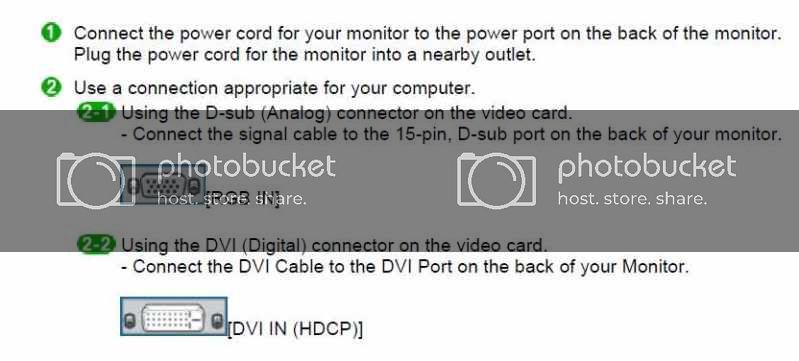
From looking at the user manual for your monitor and the dvi port on the video card, I'm not understanding what you mean by this statement. Both have DVI ports, are you sure you don't have the cable turned upside down?
-
May 13th, 2009, 12:36 PM
#12
yep.
2-1 is the one i used. present on both monitor and video card. it's the one i used.
2-2 is only present on one and not the other (forgot which). the other has a similarly sized connector except that it looks like two matrices separated by a small blank connector-free area.
as i said, i'm not at home otherwise i could be more specific.
AMD Ryzen 5 5600X CPU. 16GB DDR4-3200MHz RGB RAM. 1TB M.2 NVMe SSD. GeForce RTX 3060 Ti 8GB GPU. Windows 10. ViewSonic & Samsung monitors.
-
May 13th, 2009, 04:25 PM
#13
There usually is a subtle difference in the DVI connectors on the card and one the monitor - the card will always have DVI-I, which carries both analogue and digital signals, where the monitor uses DVI-D, which is digital only. You can connect them together with a standard DVI-D cable, as the analogue portion is not needed (it is only there so that you could use a DVI to VGA converter if you needed to).
Nick.
-
May 13th, 2009, 04:56 PM
#14
hmmm. i'll check again when i get home.
but with that pin-less blank area in the center of one of the connectors, i don't know how i could use it with the connector pictured in 2-2.
AMD Ryzen 5 5600X CPU. 16GB DDR4-3200MHz RGB RAM. 1TB M.2 NVMe SSD. GeForce RTX 3060 Ti 8GB GPU. Windows 10. ViewSonic & Samsung monitors.
-
May 13th, 2009, 05:09 PM
#15
Thread Information
Users Browsing this Thread
There are currently 1 users browsing this thread. (0 members and 1 guests)
 Posting Permissions
- You may not post new threads
- You may not post replies
- You may not post attachments
- You may not edit your posts
-
Forum Rules
|
|


 Reply With Quote


