|
-
May 3rd, 2009, 05:06 AM
#1
 [RESOLVED] DVD to AVI [RESOLVED] DVD to AVI
Hi there,
Having had a 'bit of success with joining two AVI files, and seeing the final size, figured it would be a good idea to convert some of my 4.35gb films on the hd to AVI and burn to DVD. Three or four films on one disk, great!
Am trying a selection of freeware programs. Generally, they seems to give terrible quality and be very slow. The initial test was virtually unviewable on my 20" monitor and the subtitles completely unreadable. It also took well over two hours for a 100min DVD film.
Another program is running and says the estimated completion time is four hours!
Is this normal?
Rex
What if the Hokey Cokey IS what it's all about?
-
May 3rd, 2009, 06:31 AM
#2
I mentioned this in your last thread. So far it's given me the best results:
http://www.clonead.co.uk/
Yes it can take a LONG time, depending on your hardware and the application. Some apps are not multithreaded. A faster CPU, more ram and a faster hard drive all help.
-
May 3rd, 2009, 10:16 AM
#3
Again, thanks for your advice.
Have installed AVI.net but damned if I can get any satisfaction.
Load the Video_TS.vob and I get a red 'Aspect Ration outside limits' (or something like) message. Find the actual start of the film VOB, that will load but the Start button is grayed out.
Once again, I don't see what I am doing wrong?
Rex
What if the Hokey Cokey IS what it's all about?
-
May 3rd, 2009, 11:19 AM
#4
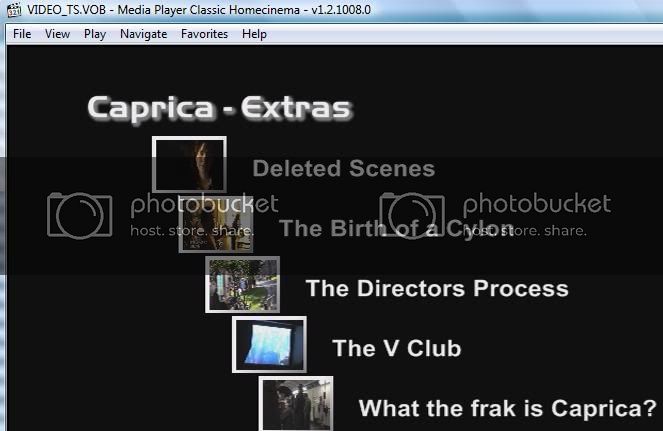
Had a quick look at a dvd ripped to my hard drive and Video_TS.vob was not the movie itself, but the intro screen where you could choose which item to watch (ie main move, extras, outtakes, ads etc.
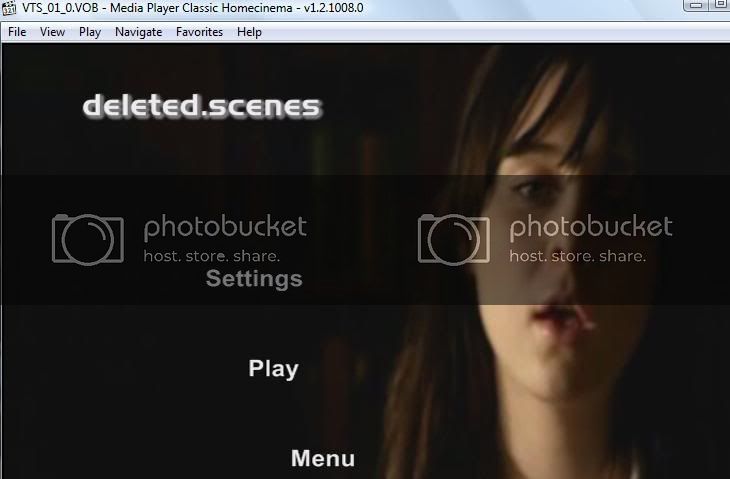
VTS_01_0.VOB/VTS_02_0.VOB etc were the menu intro screens or intro movies you reached after selecting a file on the main page, ie the little intro/title or menu that plays to either introduce the section or to let you have extra choices (audio/subtitles etc)
Have a look for VTS_01_1.VOB and VTS_01_2.VOB etc and see if they are the main movie and will load into avi.net
video_ts.vob, the main menu
vts_01_0.vob, the menu screen or intro you reach from the main menu after selecting the first choice, Deleted Scenes.
The actual scene will be vts_01_1.vob
Last edited by General Winters; May 3rd, 2009 at 11:23 AM.
Current PC
Zoostorm
Windows 7 Home Premium 64bit, (XP Mode virtual pc enabled)
WEI 7.4, 7.6, 7.9, 7.9, 5.9
Intel Core i5-2310, 8GB Ram
Geforce GTX 660 OC
Samsung Syncmaster SA300 23.6" monitor
Folding@home
User Name Sintares
Team guru3d
There is no such thing as overkill. 'Open fire' and 'is it dead?' are the only sane options when threatened.
-
May 3rd, 2009, 02:28 PM
#5
Thanks for the reply. What you have above is what I get also.
As a total newbie to this avi/srt/ssa/vob file types, I am getting completely confused. I have no problems in copying a DVD to my hdd with DVD Fab Decrypter, VOB Blanker, DVD Shrink, etc and kind of know my way around them.
But avi files seem to be a different story. I assume (probably incorrectly) that transferring a film from DVD (numerous vob/ifo files) to avi not only makes the file smaller, but also will give me the menu options as above and have a similar viewing quality to the original. But it seems this is not the case; to date, the viewing quality is c**p. And if I have to wait 4+ hours to go from DVD to avi, then I may as well keep the original as a collection of vob files.
Or am I doing something totally wrong? If so, what?
Rex
What if the Hokey Cokey IS what it's all about?
-
May 3rd, 2009, 05:15 PM
#6
transferring a film from DVD (numerous vob/ifo files) to avi not only makes the file smaller, but also will give me the menu options as above and have a similar viewing quality to the original
Converting to .avi will only give you the movie. No menus. You will lose quality. The files are smaller than the originals, so you shouldn't be surprised.
You can keep the .VOB files and VLC can play them.
-
May 4th, 2009, 03:09 AM
#7
Through trial and error, this is what I have found, so I am no longer suprised.
What has been leading me astray is the fact that the AVI film that I was given, that caused me to write my previous thread, and my efforts to merge two avi with the subtitles, etc, is infact, very good quality. Nothing like the files that I have been playing with by converting DVD to AVI.
If I did not know better, I would say that the film (AVI that I was given) looks like DVD quality at full 22" monitor size.
So I figured that I could convert some others, retain the quality and reduce the size. Taht does not seem to be the case.
Rex
What if the Hokey Cokey IS what it's all about?
-
May 4th, 2009, 09:27 AM
#8
You should check what resolution and bitrate the avi is, and then when ripping your own dvds, make sure you are ripping at a good bitrate (higher bitrates are especially useful when the film is action) and a reasonable resolution.
Some rippers can be preset for mobile media, ipods and mobile phones etc with a smaller resolution to match the smaller screens so make check what the settings are set to.
-
May 5th, 2009, 02:35 AM
#9
It all seems a little complex for my simple mind!
When I start VirtualDUB, there are just too many options (Wave input buffering, Stream data pipeling;too many Colour Video Depth selections; Dynamic Compilation; etc.) great if you know what they all mean, but I have no idea.
If I cannot get DVD quality in a smaller file size, then I may as well keep the original vob files. I don't have a iPlod to play the smaller film, just want to watch it on a 22" monitor or similar.
Rex
What if the Hokey Cokey IS what it's all about?
Thread Information
Users Browsing this Thread
There are currently 1 users browsing this thread. (0 members and 1 guests)
 Posting Permissions
- You may not post new threads
- You may not post replies
- You may not post attachments
- You may not edit your posts
-
Forum Rules
|
|


 Reply With Quote


