|
-
January 4th, 2009, 04:11 PM
#1
making recovery disk
I bought a new Acer laptop which didn't come with any disks. I don't have a Vista disk laying around to repair any problems I may have later. I do know that the restore is on another partition. Can I either get a replacement Vista disk somewhere and use the COA on the bottom or access the partition (need info) and create my own Vista install disk? I am afraid that if I lose my hd I am screwed and will have to buy a whole brand new full Vista disk and that costs quite a bit. And besides I really don't like all of the prorprietary stuff on this thing anyway so all I am really concerned about is the Vista as I really kinda like it.
Break it, then fix it!!
-
January 4th, 2009, 05:59 PM
#2
Acer normally has a program for making a recovery cd/dvd, but since you did not post the model, I can not look under the KB, etc. so see if it is listed.
http://www.acerpanam.com/synapse/for...0%26%20Manuals
Although I did buy a OEM version of Vista and wiped my hdd for my Toshiba laptop after I got the drivers I would need and burned to data CDs. Not that spendy.
http://www.newegg.com/Store/SubCateg...rating-Systems
Read carefully, you may find this very interesting and it works.
http://www.winsupersite.com/showcase...rade_clean.asp
-
January 4th, 2009, 09:20 PM
#3
Well my eyes are now a little more open about Vista. That last link is a good one. As a matter of fact I went to Amazon and bought a Vista secrets book by Paul Thurrott to more enlighten my pea sized brain. Now as far as the secret partition on my Acer 5315 I have found on the Empowering Technology applet that I can make a disk to restore my pc to factory default. Can I extract only the Vista off of this or is it a complete restore of everything? How can I look at the contents of this secret partition?
Break it, then fix it!!
-
January 4th, 2009, 09:53 PM
#4
All I know is that after cleaning up what you do not want and making the disk, somethings might disappear. I hope they do and as for seeing what is on them, I have no idea.
Got a GOOD book, hefty reading though. Read it 3 times and about the 5 time things started to stick.
-
January 4th, 2009, 10:18 PM
#5
Thanks for the advice! I got the book new at Amazon for 1.98 plus 3.99 shipping. Couldn't pass it up. I have not dealt with Vista much so all of this will be a journey for me. I will try to post back later on my progress.
Break it, then fix it!!
-
January 4th, 2009, 10:21 PM
#6
-
January 4th, 2009, 10:48 PM
#7
You can also create Vista Recovery Disc, which is basically Vista OS, excellent for any repairs (you can't reinstall with it, though).
1. Create Vista Recovery Disc.
Option 1:
http://www.c4consulting.com.au/soluc...SOLUCTIONS.htm
Option 2:
Download Vista Recovery Disc iso image: http://neosmart.net/blog/2008/window...disc-download/
Burn it to CD, or DVD: http://neosmart.net/wiki/display/G/B...to+a+CD+or+DVD
2. Boot from created disk.
At first screen click on Repair your computer:

This will bring you to a new screen where the repair process will look for all Windows Vista installations on your computer. When done you will be presented with the System Recovery Options dialog box:
After this, it will present you with a list of options including startup repair, system restore and command prompt:
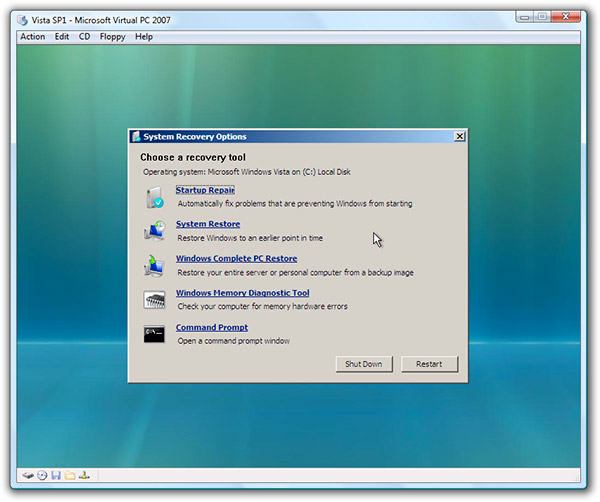
Try System Restore, first.
If that doesn't work, try Startup Repair.
Thread Information
Users Browsing this Thread
There are currently 1 users browsing this thread. (0 members and 1 guests)
 Posting Permissions
- You may not post new threads
- You may not post replies
- You may not post attachments
- You may not edit your posts
-
Forum Rules
|
|


 Reply With Quote


