When i insert a CD or DVD of any kind, it either just restarts or some times an error comes up and THEN it re-starts (I think the error is only linked to running *.exe ie; installing games).
This is one of the errors, i looked around on the net and i think its different depending what program it is, but the issue is the same....
It looks like your autorun function is messed up. You could try running the System File Checker: Start, Run, then enter "sfc /scannow" (without the quotes) in the Run box.
i haven't got a chance to fully do "sfc /scannow" because it asks for the Windows XP CD to load some *.dll files. and this eventually makes my PC re-start.
Ill keep trying it... but is there anything else i can do?
Can you try it in SAFE MODE?
When booting up, hold down the F8 key (or maybe the CTRL key). When done, it should bring you to a menu-one of the selections is SAFE MODE (or SAFE MODE WITH NETWORKING). Choose this & try the sfc /scannow.
Your cd may be toast or have the wrong drivers. Did you do a windows update recently (it may have updated the drivers-and windows don't always update drivers rightly).
Last edited by ralph3124; November 11th, 2008 at 10:44 AM.
Go to Control Panel>System>Advanced>Startup & Recovery>Settings and uncheck "Automatically restart". The next time it happens you'll most likely get a Stop error, which is much easier to troubleshoot. Post back what it says. If it still continues to reboot after that then it points to a hardware problem.
Go to Control Panel>System>Advanced>Startup & Recovery>Settings and uncheck "Automatically restart". The next time it happens you'll most likely get a Stop error, which is much easier to troubleshoot. Post back what it says. If it still continues to reboot after that then it points to a hardware problem.
I took off "Automatically restart". but all that happens is, all my programs start crashing 1 by 1 and it never loads the *.dll files from the windows XD CD, even if i keep pressing "retry", then after a bit of clicking retry, the 'blue screen of death comes up' so i just have to restart PC anyway...
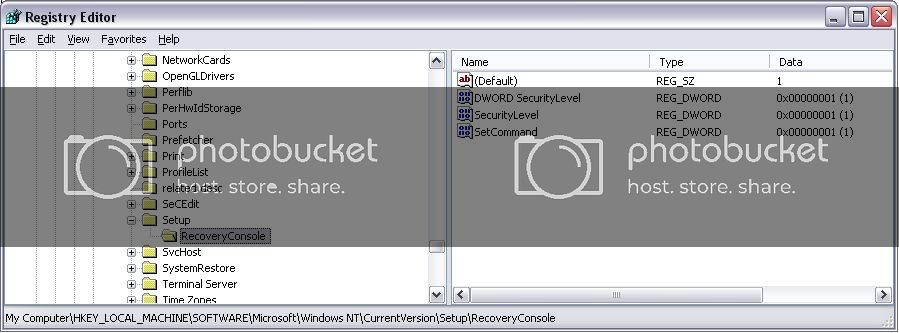
I think i could do a windows repair through the boot menu using the windows CD. but the recovery console keeps asking me for a password and it does not exist... it did the same thing when i was downgrading from Vista, but i managed to sort it out through Regedit;
"HKEY_LOCAL_MACHINE\SOFTWARE\Microsoft\WindowsNT\CurrentVersion\Setup\RecoveryConsole
Set the DWORD SecurityLevel value to 1"
but i tried changing the value again and it just didn't work this time...
sorry for long post... cheers for all the help.
PS; doing it in safe mode has the same effect... re-start...
regedit screen shot of what i had, the second key was made by me, a desperate attempt to get it to work...
Last edited by oooVooo; November 16th, 2008 at 04:20 PM.
If you are getting constant restarts after "automatically restart" has been disabled, then it is almost certainly a hardware problem. The power supply is usually the prime suspect. What are the hardware details of your machine?




 Reply With Quote


 Originally Posted by SuperSparks