|
-
August 19th, 2008, 09:14 PM
#1
[32] Open Office and Vista UAC
After turning on UAC, all my Open Office documents became "Read Only". I could not change any part of it, after doing a "Save as" and opening the document it instantly became " Read Only" again.
Is this is a Vista bug. or there is a setting somewhere to change this?
I searched Google, Open Office help, nothing at all.
Any suggestions would be appreciated.
-
August 19th, 2008, 10:31 PM
#2
This is interesting issue. I'm curious myself, if anyone has any hints...
-
August 19th, 2008, 10:32 PM
#3
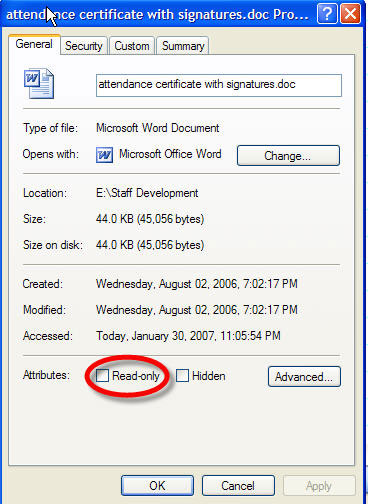
Right click the document and select properties.
Take the check out and apply then OK out.
See if that works.
-
August 20th, 2008, 02:22 AM
#4
Train, the document is not marked as "Read Only" and it shows as "Read Only" in it's title when opened. In fact when I did change the attribute to read only, the check mark was removed the next time I opened the document but it still was read only, and again showed as read only in the title. (not in the attribute box)
-
August 20th, 2008, 12:18 PM
#5
I would guess its a bug with vista because anything that deals with open source microsoft always makes it hard to work with 
-
August 20th, 2008, 01:07 PM
#6
Try this:
Go to the Insert-Index and tables and deselect “Protected Against Manual Changes”. Worked for others. Give it a whirl.
If that does not work for you, the only other recourse would be to copy-paste the doc into a format that MS finds compatible (in other words, you have to play their "MS is King" game....).
Last edited by bistro; August 20th, 2008 at 01:10 PM.
Desktop: Intel i7 960 CPU @ 4.0GHz, EVGA Classified 4-Way SLI mobo, 12GB Corsair Dominator-GT 2000 DDR3 RAM, Crucial RealSSD C300 256GB Solid State Drive, Two WD 2TB SATA drives, 2x EVGA GTX 570 Superclocked graphics cards in SLI, Coolermaster HAF X full tower case, OCZ ZX 1250w PSU, Corsair H100 CPU Cooler
Laptop: MSI GT60-004US, 2x Seagate Momentus XT 750GB SSD Hybrid drives in RAID 0, 16GB DDR3 1600 RAM, GeForce 670M 3GB graphics card, Networks 'Killer' N-1103 WLAN card
-
August 20th, 2008, 01:59 PM
#7
Thanks Bistro, but I can't seem to find the Insert-Index and tables. Please explain.
-
August 20th, 2008, 02:11 PM
#8
 Originally Posted by burgert
Thanks Bistro, but I can't seem to find the Insert-Index and tables. Please explain.
Click Insert in the Writer toolbar, and then open Indexes and Tables; then click on Indexes and Tables in the sub-menu. You'll get this pair of windows; uncheck the highlighted box.

-
August 20th, 2008, 03:27 PM
#9
lgbpop, this only works in a single document, not a global setting.
Thanks for trying to help!
-
August 20th, 2008, 08:17 PM
#10
Do you save all those documents in one particular folder?
If so, you may need to take ownership of that folder.
This is the general way to do so: http://www.mydigitallife.info/2007/0...windows-vista/, but I use registry hack, which adds a command to right click menu: http://www.winmatrix.com/forums/inde...howtopic=13157
-
August 20th, 2008, 08:25 PM
#11
Broni, the same problem exists with all six Open Office functions, it is definitely a Microsoft's and Vista's problem. I will have to disable UAC, it's too much trouble not to.
Thanks for your response.
-
August 20th, 2008, 09:42 PM
#12
Personally, I don't use UAC, if this will give you any comfort
Thread Information
Users Browsing this Thread
There are currently 1 users browsing this thread. (0 members and 1 guests)
 Posting Permissions
- You may not post new threads
- You may not post replies
- You may not post attachments
- You may not edit your posts
-
Forum Rules
|
|


 Reply With Quote


