|
-
May 30th, 2008, 03:03 PM
#1
[XP] Missing isapnp.sys
Laptop starts boot up and displays
windows cannot start etc
file is missing or corrupt system32\drivers\isapnp.sys
Have gone into recovery console and get c prompt but cant seem to find windows
tried chkdsk p and r
tried to get to sys restore through here but says access denied
tried renaming file prior to copying file from xp cd says access denied.
Have attached hdd to another pc - when exploring drive cannot find documents and settings files
Also go to windows\system32 but cannot find drivers file.
Owner urgently needs data from machine so straight reinstall is not an option.
(also does not give repair option in installation menu)
Any and all advice gratefully recieved
TP
-
May 30th, 2008, 04:26 PM
#2
-
May 30th, 2008, 04:46 PM
#3
Yes tried that - but thank you any way
tried renaming file prior to copying file from xp cd says access denied.
Can also only get C prompt in recovery console cannot change into windows
-
May 30th, 2008, 04:51 PM
#4
As the article says, you should rename it, using Command Prompt in Recovery Console, not Windows.
-
May 31st, 2008, 05:49 AM
#5
Sorry obviously not explaining myself very well.
When I go into recovery console I only get a C prompt and cannot change into the windows drectory.
If I type the ren line ito rename the file it says access denied.
When I connect the HDD to another pc and go into system32 I cannot even see the drivers file.
Oddly as well the documeints and settings folder seems to have disappeared as well,
TP
-
May 31st, 2008, 05:59 AM
#6
It is in C:\WINDOWS\system32\drivers
36.3 KB (37,248 bytes)
And when you slave in a hdd, you will not be able see or do anything with the my docs until you take ownership of them.
-
May 31st, 2008, 06:39 AM
#7
Hi Train
Thats the problem I am having there is no Drivers file in system32
In the past when I have attached a HDD have always been able to see the docs.
It is a laptop hdd do I need to change the jumper settings to make these folders visible?
-
May 31st, 2008, 10:26 AM
#8
In my computer, go to tools, Folder optoins, select the View tab.
This on your computer, not the papper hdd.
Set it to Show all hidden files and folders .
The make sure the next 2 down are not checked.
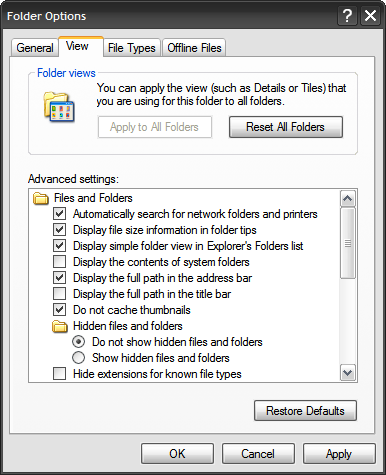
Now you should be able to see what you need to in lapper hdd.
Let us know how you get along.
Thread Information
Users Browsing this Thread
There are currently 1 users browsing this thread. (0 members and 1 guests)
 Posting Permissions
- You may not post new threads
- You may not post replies
- You may not post attachments
- You may not edit your posts
-
Forum Rules
|
|


 Reply With Quote


