|
-
May 3rd, 2008, 02:23 AM
#46
Thanks, looks like a Pentium M, 1.6GHz, 798 MHz, 1 gig RAM. And here's the latest HJT log after I ran the last fix you mentioned:
Logfile of Trend Micro HijackThis v2.0.2
Scan saved at 1:14:03 AM, on 5/3/2008
Platform: Windows XP SP2 (WinNT 5.01.2600)
MSIE: Internet Explorer v6.00 SP2 (6.00.2900.2180)
Boot mode: Normal
Running processes:
C:\WINDOWS\System32\smss.exe
C:\WINDOWS\system32\csrss.exe
C:\WINDOWS\system32\winlogon.exe
C:\WINDOWS\system32\services.exe
C:\WINDOWS\system32\lsass.exe
C:\WINDOWS\system32\Ati2evxx.exe
C:\WINDOWS\system32\svchost.exe
C:\WINDOWS\system32\svchost.exe
C:\WINDOWS\System32\svchost.exe
c:\Program Files\Cisco Systems\Cisco Secure Services Client\ConnectionClient.exe
C:\WINDOWS\system32\svchost.exe
C:\WINDOWS\system32\svchost.exe
C:\WINDOWS\system32\spoolsv.exe
C:\WINDOWS\System32\SCardSvr.exe
C:\Program Files\Cisco Systems\VPN Client\cvpnd.exe
C:\Program Files\NavNT\defwatch.exe
C:\WINDOWS\System32\svchost.exe
C:\Program Files\Tivoli\lcf\bin\w32-ix86\mrt\LCFD.EXE
C:\Program Files\NavNT\rtvscan.exe
C:\WINDOWS\system32\svchost.exe
C:\Program Files\ThreatFire\TFService.exe
C:\WINDOWS\RCSERV.EXE
C:\Program Files\Windows Media Player\WMPNetwk.exe
C:\Program Files\Webroot\Enterprise\Spy Sweeper\commagent.exe
C:\Program Files\Webroot\Enterprise\Spy Sweeper\spysweeper.exe
C:\WINDOWS\system32\Ati2evxx.exe
C:\WINDOWS\Explorer.EXE
C:\WINDOWS\System32\alg.exe
C:\Program Files\ATI Technologies\ATI Control Panel\atiptaxx.exe
C:\Program Files\Apoint\Apoint.exe
C:\Program Files\CyberLink\PowerDVD\DVDLauncher.exe
C:\Program Files\Tivoli\lcf\bin\w32-ix86\mrt\lcfep.exe
C:\Program Files\iPass\iPassConnect\downloader\ipccheck.exe
C:\Program Files\NavNT\vptray.exe
C:\Program Files\Java\jre1.6.0_06\bin\jusched.exe
C:\Program Files\Apoint\HidFind.exe
C:\Program Files\Apoint\Apntex.exe
C:\WINDOWS\system32\NWTRAY.EXE
C:\Program Files\Webroot\Enterprise\Spy Sweeper\SpySweeperUI.exe
C:\Program Files\ThreatFire\TFTray.exe
C:\Program Files\DNA\btdna.exe
C:\Program Files\iPass\iPassConnect\IPassConnectGUI.exe
C:\Program Files\Webroot\Enterprise\Spy Sweeper\SSU.EXE
C:\Program Files\Mozilla Firefox\firefox.exe
C:\Program Files\iPass\iPassConnect\iPassConnectEngine.exe
C:\WINDOWS\system32\wuauclt.exe
C:\Documents and Settings\qurja1\Desktop\HiJackThis.exe
C:\WINDOWS\system32\wbem\wmiprvse.exe
R0 - HKCU\Software\Microsoft\Internet Explorer\Main,Start Page = http://google.com/
R0 - HKLM\Software\Microsoft\Internet Explorer\Main,Start Page = file://c:/windows/homepage.html
R1 - HKCU\Software\Microsoft\Internet Explorer\Main,Window Title = Microsoft Internet Explorer provided by Graco Inc.
R1 - HKCU\Software\Microsoft\Windows\CurrentVersion\Internet Settings,AutoConfigURL = http://proxy:8080
O2 - BHO: SSVHelper Class - {761497BB-D6F0-462C-B6EB-D4DAF1D92D43} - C:\Program Files\Java\jre1.6.0_06\bin\ssv.dll
O2 - BHO: Google Toolbar Helper - {AA58ED58-01DD-4d91-8333-CF10577473F7} - c:\program files\google\googletoolbar4.dll
O2 - BHO: Google Toolbar Notifier BHO - {AF69DE43-7D58-4638-B6FA-CE66B5AD205D} - C:\Program Files\Google\GoogleToolbarNotifier\2.0.301.7164\swg.dll
O3 - Toolbar: &Google - {2318C2B1-4965-11d4-9B18-009027A5CD4F} - c:\program files\google\googletoolbar4.dll
O4 - HKLM\..\Run: [ATIPTA] C:\Program Files\ATI Technologies\ATI Control Panel\atiptaxx.exe
O4 - HKLM\..\Run: [Apoint] C:\Program Files\Apoint\Apoint.exe
O4 - HKLM\..\Run: [DVDLauncher] "C:\Program Files\CyberLink\PowerDVD\DVDLauncher.exe"
O4 - HKLM\..\Run: [lcfep] "C:\Program Files\Tivoli\lcf\bin\w32-ix86\mrt\lcfep.exe"
O4 - HKLM\..\Run: [SwdisUsrPCN.PC7835] "C:\PROGRA~1\Tivoli\lcf\dat\1\cache\lib\w32-ix86\wdusrpcn.exe" "C:\Program Files\Tivoli\swdis\1\wdusrpcn.env"
O4 - HKLM\..\Run: [iPCCheck] "C:\Program Files\iPass\iPassConnect\downloader\ipccheck.exe" /startup
O4 - HKLM\..\Run: [vptray] C:\Program Files\NavNT\vptray.exe
O4 - HKLM\..\Run: [SunJavaUpdateSched] "C:\Program Files\Java\jre1.6.0_06\bin\jusched.exe"
O4 - HKLM\..\Run: [NWTRAY] NWTRAY.EXE
O4 - HKLM\..\Run: [SpySweeperEnterprise] "C:\Program Files\Webroot\Enterprise\Spy Sweeper\\SpySweeperUI.exe"
O4 - HKLM\..\Run: [QuickTime Task] "C:\Program Files\QuickTime\qttask.exe" -atboottime
O4 - HKLM\..\Run: [ThreatFire] C:\Program Files\ThreatFire\TFTray.exe
O4 - HKCU\..\Run: [BitTorrent DNA] "C:\Program Files\DNA\btdna.exe"
O4 - Global Startup: Adobe Reader Speed Launch.lnk = C:\Program Files\Adobe\Acrobat 7.0\Reader\reader_sl.exe
O4 - Global Startup: iPassConnect.lnk = C:\Program Files\iPass\iPassConnect\IPassConnectGUI.exe
O9 - Extra button: (no name) - {08B0E5C0-4FCB-11CF-AAA5-00401C608501} - C:\Program Files\Java\jre1.6.0_06\bin\ssv.dll
O9 - Extra 'Tools' menuitem: Sun Java Console - {08B0E5C0-4FCB-11CF-AAA5-00401C608501} - C:\Program Files\Java\jre1.6.0_06\bin\ssv.dll
O9 - Extra button: Messenger - {FB5F1910-F110-11d2-BB9E-00C04F795683} - C:\Program Files\Messenger\MSMSGS.EXE
O9 - Extra 'Tools' menuitem: Windows Messenger - {FB5F1910-F110-11d2-BB9E-00C04F795683} - C:\Program Files\Messenger\MSMSGS.EXE
O10 - Unknown file in Winsock LSP: c:\windows\system32\nwprovau.dll
O16 - DPF: {17492023-C23A-453E-A040-C7C580BBF700} (Windows Genuine Advantage Validation Tool) - http://go.microsoft.com/fwlink/?linkid=39204
O16 - DPF: {2D8ED06D-3C30-438B-96AE-4D110FDC1FB8} (ActiveScan 2.0 Installer Class) - http://acs.pandasoftware.com/actives.../as2stubie.cab
O16 - DPF: {3BB54395-5982-4788-8AF4-B5388FFDD0D8} (MSN Games – Buddy Invite) - http://zone.msn.com/BinFrameWork/v10...y.cab55579.cab
O16 - DPF: {5736C456-EA94-4AAC-BB08-917ABDD035B3} (ZonePAChat Object) - http://zone.msn.com/binframework/v10...t.cab55579.cab
O16 - DPF: {B8BE5E93-A60C-4D26-A2DC-220313175592} (MSN Games - Installer) - http://cdn2.zone.msn.com/binFramewor...o.cab56649.cab
O16 - DPF: {CAFECAFE-0013-0001-0023-ABCDEFABCDEF} (JInitiator 1.3.1.23) -
O16 - DPF: {D27CDB6E-AE6D-11CF-96B8-444553540000} (Shockwave Flash Object) - https://download.macromedia.com/pub/...sh/swflash.cab
O16 - DPF: {DA2AA6CF-5C7A-4B71-BC3B-C771BB369937} (MSN Games – Game Communicator) - http://zone.msn.com/binframework/v10...y.cab55579.cab
O16 - DPF: {FF3C5A9F-5A99-4930-80E8-4709194C2AD3} (ZPA_Backgammon Object) - http://zone.msn.com/bingame/zpagames...n.cab55579.cab
O17 - HKLM\System\CCS\Services\Tcpip\Parameters: Domain = msp.graco.com
O17 - HKLM\Software\..\Telephony: DomainName = msp.graco.com
O17 - HKLM\System\CS1\Services\Tcpip\Parameters: Domain = msp.graco.com
O17 - HKLM\System\CS1\Services\Tcpip\Parameters: SearchList = msp.graco.com
O17 - HKLM\System\CS2\Services\Tcpip\Parameters: Domain = msp.graco.com
O17 - HKLM\System\CS2\Services\Tcpip\Parameters: SearchList = msp.graco.com
O17 - HKLM\System\CS3\Services\Tcpip\Parameters: Domain = msp.graco.com
O17 - HKLM\System\CS3\Services\Tcpip\Parameters: SearchList = msp.graco.com
O17 - HKLM\System\CCS\Services\Tcpip\Parameters: SearchList = msp.graco.com
O20 - Winlogon Notify: mdc - C:\WINDOWS\SYSTEM32\SsoWindows.dll
O23 - Service: Ati HotKey Poller - ATI Technologies Inc. - C:\WINDOWS\system32\Ati2evxx.exe
O23 - Service: Cisco Secure Services Client - Cisco Systems - c:\Program Files\Cisco Systems\Cisco Secure Services Client\ConnectionClient.exe
O23 - Service: Client Update Service for Novell (cusrvc) - Novell, Inc. - C:\WINDOWS\system32\cusrvc.exe
O23 - Service: Cisco Systems, Inc. VPN Service (CVPND) - Cisco Systems, Inc. - C:\Program Files\Cisco Systems\VPN Client\cvpnd.exe
O23 - Service: DefWatch - Symantec Corporation - C:\Program Files\NavNT\defwatch.exe
O23 - Service: Google Updater Service (gusvc) - Google - C:\Program Files\Google\Common\Google Updater\GoogleUpdaterService.exe
O23 - Service: Tivoli Endpoint (lcfd) - Unknown owner - C:\Program Files\Tivoli\lcf\bin\w32-ix86\mrt\LCFD.EXE
O23 - Service: Norton AntiVirus Client (Norton AntiVirus Server) - Symantec Corporation - C:\Program Files\NavNT\rtvscan.exe
O23 - Service: ThreatFire - PC Tools - C:\Program Files\ThreatFire\TFService.exe
O23 - Service: Tivoli Remote Control Service (TME10RC) - TIVOLI Systems - C:\WINDOWS\RCSERV.EXE
O23 - Service: Webroot CommAgent Service (WebrootCommAgentService) - Webroot Software, Inc. - C:\Program Files\Webroot\Enterprise\Spy Sweeper\commagent.exe
O23 - Service: Webroot Spy Sweeper Engine (WebrootSpySweeperService) - Webroot Software, Inc. - C:\Program Files\Webroot\Enterprise\Spy Sweeper\spysweeper.exe
--
End of file - 8474 bytes
-
May 3rd, 2008, 01:04 PM
#47
Now, it appears to be clean.
Does IE still redirects you?
As for opening new pages, try this:
Download, install, and run LSP-Fix: http://www.cexx.org/lspfix.htm
Restart computer, and see, if it helped.
If not...
Download, install, and run WinSockFix: http://www.softpedia.com/get/Tweak/N...nSockFix.shtml
Restart computer, and check again.
-
May 4th, 2008, 10:02 AM
#48
I tried the 1st program and it didn't find any errors, the second one doesn't seem to work. I downloaded it to my desktop, but when I try to run it I get an error saying the file is not a valid win32 application.
IE does still redirect me, I search for some random topic on Google, click on a link and I inevitably get taken to another search engine site instead of what I clicked on. Some of the rediredt sites are info.com, pages.us.com, shefinds.com, playfulsearchers.com, etc. I never actually get to the site I clicked on. It doesn't happen with Firefox, but there sure seems to still something in there messing with the computer, which is scary.
Thanks
-
May 4th, 2008, 01:47 PM
#49
-
May 4th, 2008, 04:43 PM
#50
Try the following too;
Please download SmitfraudFix (by S!Ri)
Extract the content (a folder named SmitfraudFix) to your Desktop.
Open the SmitfraudFix folder and double-click smitfraudfix.cmd
Select option #1 - Search by typing 1 and press "Enter"; a text file will appear, which lists infected files (if present).
Please copy/paste the content of that report into your next reply.
Note : process.exe is detected by some antivirus programs (AntiVir, Dr.Web, Kaspersky) as a "RiskTool"; it is not a virus, but a program used to stop system processes. Antivirus programs cannot distinguish between "good" and "malicious" use of such programs, therefore they may alert the user.
http://www.beyondlogic.org/consulting/proc...processutil.htm
==
Download
SDFix
and save it to your desktop.
Please then reboot your computer in Safe Mode by doing the
following :- Restart your computer
- After hearing your computer beep once during startup, but before the
Windows icon appears, tap the F8 key continually; - Instead of Windows loading as normal, a menu with options should appear;
- Select the first option, to run Windows in Safe Mode, then press "Enter".
- Choose your usual account.
- In Safe Mode, right click the SDFix.zip folder and choose Extract
All, - Open the extracted folder and double click RunThis.bat to
start the script. - Type Y to begin the script.
- It will remove the Trojan Services then make some repairs to the
registry and prompt you to press any key to Reboot. - Press any Key and it will restart the PC.
- Your system will take longer that normal to restart as the fixtool
will be running and removing files. - When the desktop loads the Fixtool will complete the removal and
display Finished, then press any key to end the script and load
your desktop icons. - Finally open the SDFix folder on your desktop and copy and paste the
contents of the results file Report.txt
-
May 5th, 2008, 12:41 AM
#51
All kinds of fun tonight, I tried the IE Repair suggestion and got a pop-up saying files needed to run it must be copied to the dll cache, and to insert the service pack 2 cd, which I don't have. Tried the manual option, but get the same error message, it says the file IEEXPLORE.exe on the service pack 2 cd is needed and gives me an option to browse for it.
Also tried the smitfraudfix, I unzipped it to a folder and ran the smitfraudfix.cmd file, but I get a red pop-up box saying the process.exe file is missing, even though it's right there in the folder. It says to press any key to continue, and when I do it exits.
Very frustrating, any thoughts?
Thanks
-
May 5th, 2008, 05:18 AM
#52
What about sfdix? Have you tried running smitfraudfix in safe mode? Do you have an XP install CD? How far back can you go with system restore?
-
May 5th, 2008, 09:14 AM
#53
I'm not sure what sfdix is, but I'm not able to boot up in safe mode for some reason, I get to the screen to prompt what mode to use, and go into safe mode, but I get a login box asking for my user name and passwork. I enter those, and get an error message saying the system cannot log me on, and to make sure the user name and domain are correct. I don't have the XP install CD as this is a work laptop, so when I got it XP was already installed.
Not sure about system restore either, how do I check that?
A couple quirky things I've noticed that may or may not be of any value, I usually have to boot up a few times before it works, sometimes it'll just bring up my background picture and then freeze, so I have to hold the power button down until it shuts off, nothing else works. Also, even if I have applications running, if i hit alt-ctrl-del the button for task manager is always greyed out, so I can't get in it to see what's running. Does that mean anything?
Thanks
-
May 5th, 2008, 04:50 PM
#54
 Originally Posted by jokerbob
I'm not sure what sfdix is, but I'm not able to boot up in safe mode for some reason, I get to the screen to prompt what mode to use, and go into safe mode, but I get a login box asking for my user name and passwork. I enter those, and get an error message saying the system cannot log me on, and to make sure the user name and domain are correct. I don't have the XP install CD as this is a work laptop, so when I got it XP was already installed.
Not sure about system restore either, how do I check that?
A couple quirky things I've noticed that may or may not be of any value, I usually have to boot up a few times before it works, sometimes it'll just bring up my background picture and then freeze, so I have to hold the power button down until it shuts off, nothing else works. Also, even if I have applications running, if i hit alt-ctrl-del the button for task manager is always greyed out, so I can't get in it to see what's running. Does that mean anything?
Thanks
SDFix is one of the tools I requested you to run before. Go back a few posts and you will see it  . .
Are you given the option to run as administrator in safe mode?
Go to Start | Run and type in msconfig and hit OK. Select the Launch System Restore button.
The radio button for Restore my computer to an earlier time should be selected then go next.
Select a date that you wish to restore to and select next.
Right click on the link http://www.kellys-korner-xp.com/regs...askmanager.reg and select save as. Save it to your desktop. Double click to run it and then reboot. Check if the task manager works now.
If it is a work computer it probably has limited permissions. Can you get that changed at work?
-
May 8th, 2008, 12:24 AM
#55
Sorry, I bleeped over the SDFix part because I can't start in safe mode. I did look to see if there was an administrator option and there wasn't. On the plus side, the task list button now works in alt-ctrl-del after using the fix you suggested, but IE still redirects me every time I click on a link, so something's still in there.
-
May 8th, 2008, 05:23 AM
#56
Can you please do the following.
===============
Scan with HijackThis and then place a check next to all the following, if present:
R0 - HKLM\Software\Microsoft\Internet Explorer\Main,Start Page = file://c:/windows/homepage.html
O16 - DPF: {CAFECAFE-0013-0001-0023-ABCDEFABCDEF} (JInitiator 1.3.1.23) -
Now, close all instances of Internet Explorer and any other windows you have open except HiJackThis, click "Fix checked".
===============
Download the HostsXpert.
Run it and press "Restore Original Hosts" and press "OK". Exit Program.
Note that if you have a custom host file, this will remove it.
===============
Please use the Internet Explorer browser (or FireFox with IETab), and do an online scan with Kaspersky Online Scanner
Note: If you have used this particular scanner before, you MAY HAVE TO UNINSTALL the program through Add/Remove Programs before downloading the new ActiveX component
Click Yes, when prompted to install its ActiveX component.
(Note.. for Internet Explorer 7 users: If at any time you have trouble with the "Accept" button of the license, click on the "Zoom" tool located at the bottom right of the IE window and set the zoom to 75 %. Once the license has been accepted, reset to 100%.)
The program launches and downloads the latest definition files. - Once the files are downloaded click on Next
- Click on Scan Settings and configure as follows:
- Scan using the following Anti-Virus database:
- Scan Options:
- Click OK and, under select a target to scan, select My Computer
When the scan is done, in the Scan is completed window (below), any infection is displayed.
There is no option to clean/disinfect, however, we need to analyze the information on the report.
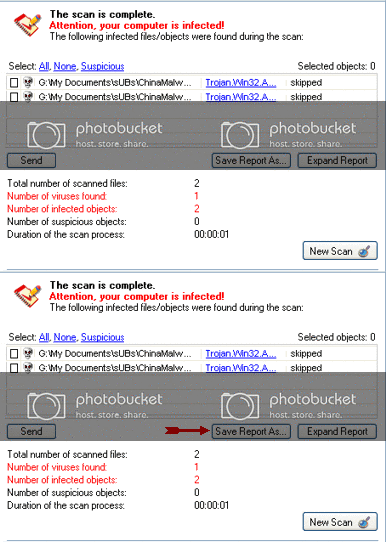
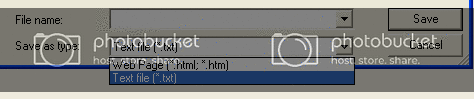
To obtain the report:
Click on: Save Report As (above - red blinking arrow)
Next, in the Save as prompt, Save in area, select: Desktop
In the File name area, use KScan, or something similar
In Save as type, click the drop arrow and select: Text file [*.txt]
Then, click: Save
Please post the Kaspersky Online Scanner Report in your reply.
-
May 8th, 2008, 06:43 PM
#57
I'm striking out on almost all fronts today, I made the HJT changes, but when I try to run the HostsXpert, I get an error message saying "cannot create file c:\windows\system32\drivers\etc\hosts.
I tried thew link to the kapersky site, but the page can't be found, even just going to www.kaspersky.com doesn't work. Is it maybe down?
Thanks
-
May 9th, 2008, 05:46 AM
#58
Have you tried uninstalling IE7 as I suggested earlier? I really think you need access to an XP installation CD and some administrative rights before you can go much further.
Is the Hosts file read-only? If so, change it so you can make alerations to it and try Hostsexpert again. That option is also available within Hostsexpert.
Thread Information
Users Browsing this Thread
There are currently 1 users browsing this thread. (0 members and 1 guests)
 Posting Permissions
- You may not post new threads
- You may not post replies
- You may not post attachments
- You may not edit your posts
-
Forum Rules
|
|


 Reply With Quote


