|
-
May 8th, 2008, 05:23 AM
#38
Can you please do the following.
===============
Scan with HijackThis and then place a check next to all the following, if present:
R0 - HKLM\Software\Microsoft\Internet Explorer\Main,Start Page = file://c:/windows/homepage.html
O16 - DPF: {CAFECAFE-0013-0001-0023-ABCDEFABCDEF} (JInitiator 1.3.1.23) -
Now, close all instances of Internet Explorer and any other windows you have open except HiJackThis, click "Fix checked".
===============
Download the HostsXpert.
Run it and press "Restore Original Hosts" and press "OK". Exit Program.
Note that if you have a custom host file, this will remove it.
===============
Please use the Internet Explorer browser (or FireFox with IETab), and do an online scan with Kaspersky Online Scanner
Note: If you have used this particular scanner before, you MAY HAVE TO UNINSTALL the program through Add/Remove Programs before downloading the new ActiveX component
Click Yes, when prompted to install its ActiveX component.
(Note.. for Internet Explorer 7 users: If at any time you have trouble with the "Accept" button of the license, click on the "Zoom" tool located at the bottom right of the IE window and set the zoom to 75 %. Once the license has been accepted, reset to 100%.)
The program launches and downloads the latest definition files. - Once the files are downloaded click on Next
- Click on Scan Settings and configure as follows:
- Scan using the following Anti-Virus database:
- Scan Options:
- Click OK and, under select a target to scan, select My Computer
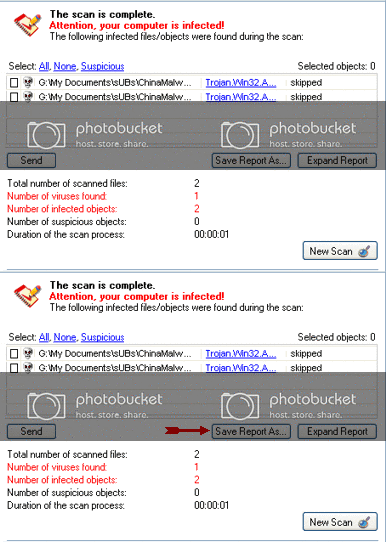
When the scan is done, in the Scan is completed window (below), any infection is displayed.
There is no option to clean/disinfect, however, we need to analyze the information on the report.
To obtain the report:
Click on: Save Report As (above - red blinking arrow)
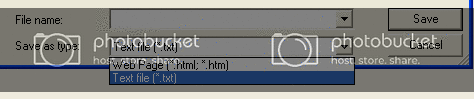
Next, in the Save as prompt, Save in area, select: Desktop
In the File name area, use KScan, or something similar
In Save as type, click the drop arrow and select: Text file [*.txt]
Then, click: Save
Please post the Kaspersky Online Scanner Report in your reply.
Thread Information
Users Browsing this Thread
There are currently 1 users browsing this thread. (0 members and 1 guests)
 Posting Permissions
- You may not post new threads
- You may not post replies
- You may not post attachments
- You may not edit your posts
-
Forum Rules
|
|


 Reply With Quote

