|
-
April 9th, 2008, 10:40 PM
#1
Computer Won't Turn On
Hi,
I went to turn on the computer and nothing. It would not power up. I checked all of my wires and plugged in the computer to another outlet with a different power cord. Still nothing. The green LED comes on on the mother board so I am at a loss as to what to check next. Any help would be appreciated!
-
April 10th, 2008, 09:56 AM
#2
I'd love to help, but just posting that your computer won't power up tells us nothing about it, leaving us clueless.
-
April 10th, 2008, 10:09 AM
#3
Post teh make and model of the computer.
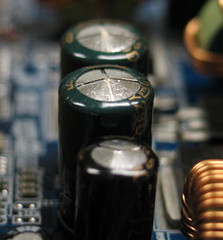
Have you checked for bad caps?
http://www.badcaps.net/ and ddo not forget the graphics to the right either.
-
April 10th, 2008, 05:58 PM
#4
My apologies.
CPU- Pentium 4 2.66ghz
Motherboard- ASUS P4T533
Power supply -Enermax
Operating System-Windows M.E.
Memory-512kb RIMM
Chipset-Intel 850E Northbridge
Hard Drives (2) Western Digital 20 and 40gb
Generic ATX case
Video Card-Radeon 7500
I hope this helps. Let me know if you need something else
-
April 10th, 2008, 08:21 PM
#5
Not a bad setup.
If you have checked real close and do not find any damaged capacitors, then the next item would be to replace the power supply. They do go bad.
-
April 11th, 2008, 12:19 AM
#6
Thanks for the reply!
I think I had better purchase a magnifying glass and get busy. I'll let you know.
-
April 11th, 2008, 06:03 AM
#7
-
April 12th, 2008, 11:25 AM
#8
I have another computer so I took the power supply out of the one that won't start up and put it into the one that works and the computer starts so I am assuming that the power supply is good. I took the power supply from the one that works and put it into the computer that wouldn't start up and it would not start up so I am assuming I have a different problem. So then I looked at the pictures of the caps you provided (wow, what a mess!)and read the info for the site you suggested. I can find no oozing material or bulging caps (which I understand doesn't mean I still don't have bad caps) and none of them are bent over. On my mother board there is a green LED that comes on when I turn on the power switch. I am assuming that means there is power to the mother board.
Thanks
-
April 18th, 2008, 12:18 AM
#9
Bad MB. I wish it had been bad caps.
-
April 18th, 2008, 01:17 AM
#10
You may try clearing the cmos remove battery if you can't find jumper with power cord unpluged. Then try to jump start it by shorting across the power on pin's
-
April 18th, 2008, 09:49 AM
#11
Already tried those but thanks for the reply!
Thread Information
Users Browsing this Thread
There are currently 1 users browsing this thread. (0 members and 1 guests)
 Posting Permissions
- You may not post new threads
- You may not post replies
- You may not post attachments
- You may not edit your posts
-
Forum Rules
|
|


 Reply With Quote