|
-
February 24th, 2008, 08:13 PM
#1
Windows Vista Access
I have now for the first time used Vista and my feelings are mixed.
The first thing I did was to install Power Desk because I do not like the Explorer at all. It seems to me Explorer is getting worse and navigation is confusing (Why did Billy have to change it). Power Desk works fine and gives me the view I am used to and navigation, of course, is much easier.
However, there is one big change that puzzles me and I am constantly fighting with it: I could not access my OWN FOLDERS because one gets this annoying message box that access is denied: to my own folders? give me a break. The only solution is to access Properties > Security and then Permissions > Advanced and then give Full Control to EVERYONE and apply it. This then gives access to a folder. And this happens although I as an Administrator have full control etc.
There is no real help or support to explain this behavior. I checked it and could not find anything. Any opinions here?
I am sorry for my ignorance in this case.
-
February 25th, 2008, 01:02 AM
#2
Is it upgrade, new computer, fresh install, or....?
-
February 25th, 2008, 11:08 AM
#3
It is a new laptop with preinstalled Vista Home Premium.
I found out that one can shut off UAC but this wil compromise security, especially in IE. How serious is this to take. My experinece with XP was that - expect for spam email - nothing ever happened when my anivirus was updated which I do every day. Also, the firewall, Zonealarm is always on.
-
February 25th, 2008, 11:24 AM
#4
I leave it active, we can use all the help we can get in protecting out computers in my book.
-
February 25th, 2008, 11:42 AM
#5
Which folders are you trying to access? Not everything is quite as it seems in Vista, and some "folders" aren't real, but are put there to cope with badly written legacy software.
Nick.
-
February 25th, 2008, 11:54 AM
#6
Those not real folders are called junction points.
At the CMD prompt run Dir /AL /s
to see all of them.
The /AL is in capital letters for easy reading. Small letters can be used.
-
February 25th, 2008, 01:53 PM
#7
The folders I was lokking at are My Documents, Cookies, Nethood, practically almost all under User\Myname\XXX.
-
February 25th, 2008, 04:30 PM
#8
Yes they are junctions.
And to see what juntions that you have on your computer:
Start, Run {type in} cmd and hit enter
At the prompt {type in} dir /al /s
It will look like this
C:\User\your name> dir /al /s
Now hit enter. And you will see a list of your junctions.
-
February 25th, 2008, 05:10 PM
#9
In Windows Explorer, the Junctions (which you cannot access), are shown with the little arrow in the icon. All the others are your real folders.
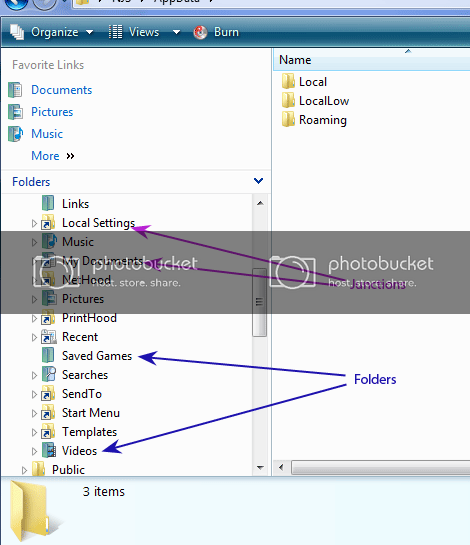
Nick.
-
February 26th, 2008, 12:33 AM
#10
I did not know that the "blocked folders" are Junctiions and it is not clear to me what purpose they serve. However, the situation is that I have now acceess to these "junction" folders by allowing "EVERYONE" to have FULL CONTROL. I could take that away again by accessing security and edit permissions. There is one thing, I got rid of these awfull shortcut arrows through a trick. Another thing is I copied all my documents from another desktop PC into My Documents rather than into Documents. Consequence was that eveything is in both folders. So, for what then is My Documents good anyways when it is a "junction". In a way it does not make sense to me.
Last edited by Desertfox; February 26th, 2008 at 12:38 AM.
-
February 26th, 2008, 02:24 AM
#11
Actually the My documents folder is not really needed, even though lot of folks use it. But, the sad part is, a lot of programs look for it during install and will not complete the install if it is not there. 
So, they made the junction to satisfy those programs.
-
February 26th, 2008, 11:14 AM
#12

TRAIN,
your explanation makes sense. I guess I leave the access as I have set it up as is but I will not remove those "junction" folders. My comment is that this was not necessary to done be MS. I am not using Explorer for my file management but I use PowerDesk which I have had for almost 9 nine years because of its versatility. I guess, I now can deal with it. Thanks to all who helped here . .
-
February 26th, 2008, 01:02 PM
#13
I know this ends up being something we have to live with.
Lots of bad programming and not just M$ either.
-
August 15th, 2008, 04:31 PM
#14
This folder situation is very annoying.
If i try to delete the identical 'fake' documents folder, the real folders dissapear too, but when i try to make it a hidden file, it just doesn't hide? I've noticed that when you click hide on a file it doesn't work either, whether it be for fake files or otherwise. Either that or you click hide and then refresh, and it takes a minute or so to hide itself?? On XP it used to hide immediatly. Does anyone have a solution to that?
Thread Information
Users Browsing this Thread
There are currently 1 users browsing this thread. (0 members and 1 guests)
 Posting Permissions
- You may not post new threads
- You may not post replies
- You may not post attachments
- You may not edit your posts
-
Forum Rules
|
|


 Reply With Quote


