|
-
January 20th, 2008, 02:41 PM
#1
missing wpa.bak file
Trying to find the file wpa.bak in system32 but it is not there and also did a search for it and not to be found...Where could it be?
-
January 20th, 2008, 03:30 PM
#2
kspeel--Is it missing or hidden? It should be in your Windows\System32 folder along with wpa.dbl. See here
http://discussions.virtualdr.com/sho...hlight=wpa.dbl
If you do not know how to unhide files, post back.
Jim
WIN7 Ultimate SP1 64bit, IE 11, NTFS,
cable, MS Security Essentials, Windows 7 firewall
-
January 20th, 2008, 04:12 PM
#3
in folders click on properties and and if the hidden files tab is unchecked than you can see the hidden files ...Correct?
Last edited by kspeel; January 20th, 2008 at 04:26 PM.
-
January 20th, 2008, 05:09 PM
#4
I have hidden and system files unchecked.
-
January 20th, 2008, 05:29 PM
#5
Uncheck "Hide protected operating system files" as well.
Nick.
-
January 20th, 2008, 05:44 PM
#6
Where do i find that...Been working with windows like since I been born..Well make that dos 5.0 but feel kinda stupid askin that
-
January 20th, 2008, 06:20 PM
#7
In Folder Options:
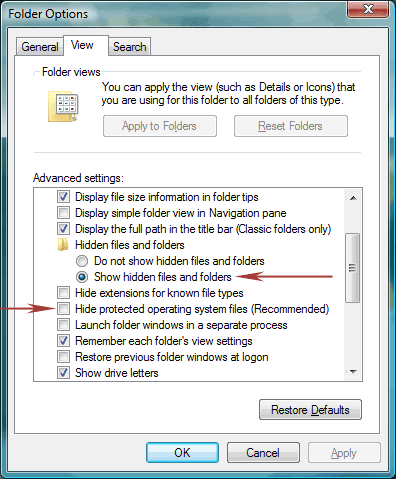
Nick.
-
January 20th, 2008, 07:29 PM
#8
is this in control panel?
-
January 20th, 2008, 08:43 PM
#9
kspeel--There are two arrows in SuperSparks' graphic. They are in the same Windows Tools|Folder Options|View window. The line for the top one needs to be checked. The bottom one, not checked. Do not forget to click the Apply|OK buttons if you make any changes.
Last edited by Welshjim; January 20th, 2008 at 08:51 PM.
Jim
WIN7 Ultimate SP1 64bit, IE 11, NTFS,
cable, MS Security Essentials, Windows 7 firewall
-
January 20th, 2008, 09:24 PM
#10
Open My computer, go to Tools in the Menu and select folder options.
Select the View tab.
Now needs to be made to match SuperSparks'. May have to scroll down just a tad, but they are there.
-
January 20th, 2008, 11:08 PM
#11
-
January 21st, 2008, 12:09 PM
#12
Can you post a screenshot of what you do have, please?
Nick.
-
January 21st, 2008, 02:09 PM
#13
kspeel--FWIW--You may want to read this article.
http://windows.ittoolbox.com/documen...hard-disk-2263
Note it says "You may have a wpa.bak file on your system if not, do not worry too much it is a backup of the original file"
Do you have a specific problem which you hope to solve by finding it?
Jim
WIN7 Ultimate SP1 64bit, IE 11, NTFS,
cable, MS Security Essentials, Windows 7 firewall
-
January 21st, 2008, 08:55 PM
#14
I def have the same thing that the above says to do...looked on puter today at work and that file was missing...as you might figure trying to install xp on daughters puter and have to activate it and tryin to get around it
-
January 22nd, 2008, 06:53 AM
#15
 Originally Posted by kspeel
Trying to find the file wpa.bak in system32 but it is not there and also did a search for it and not to be found...Where could it be?
Simply copy "C:\Windows\System32\wpa.dbl" to "C:\Windows\System32\wpa.bak"
?
Thread Information
Users Browsing this Thread
There are currently 1 users browsing this thread. (0 members and 1 guests)
 Posting Permissions
- You may not post new threads
- You may not post replies
- You may not post attachments
- You may not edit your posts
-
Forum Rules
|
|


 Reply With Quote


