|
-
December 6th, 2007, 05:03 AM
#1
[XP] Two dead motherboards...what's next?
Hi people it's been a while,
I seem to have a problem with motherboards in my Fujitsu Siemens tower. The original motherboard lasted 18 months and died with noticeable damage to resistors? (I think) in the area around the processor. The computer was under load doing a lot of 3d rendering at that time if this makes any difference. I replaced this motherboard with a Gigabyte P4 Titan series - GA-81PE1000. This motherboard ran for 18 months and died, it had been under no pressure it was being used purely for internet gaming (the basic kind). This time I can see no physical damage but it's definitely dead.
I am not sure what is going on but I have a strong suspicion that my P4 3.02 processor (an early one) might just be too much for the motherboards recommended? Most processors at the time were around 2.5.
What I am really asking is should I give up on my processor too? and if so what you guys would recommend? ( I am on a tight budget).
BTW the processor has some strange exhaust system attached to the heat sink, I assume the fan, which is halfway up the exhaust pipe is supposed to take the heat directly out of the tower, I am not convinced this works as expected, although I have always kept it clean and free of dust.
Just prior to the second motherboard giving up the processor temperature increased from a kind of normal 65C to 80C if this helps?
Any advice is always gratefully received 
Virtual Patient
Fujitsu Siemens P4 3.02, 512mb ram, XP Home, 128 radeon
-
December 6th, 2007, 11:34 AM
#2
65 C for the CPU is borderline toasty. Is the CPU's heatsink also cleaned of any dust? Also, check that the heatsink is correctly oriented(no air gaps between its bottom surface and the top surface of the CPU die and securely mounted(both of the metal straps that secure it to the MB are not broken or loose). If those check out ok, then it's possible that the CPU's exhaust setup is not working properly. And that can result in a high system temperature, which is more likely to cause the MB to prematurely failure.
-
December 6th, 2007, 02:20 PM
#3
65C is panic time.
I get awful curious at 60C to boot.
Anything less than that at full load does not bother me.
Do you have case fans, one in the front low, blowing in cooler air?
One in the rear high, near the ps, blowing the heated air out?
Have you removed the front bezel and cleaned all the dust and junk out frombehind it?
-
December 6th, 2007, 06:21 PM
#4
Thanks as always for the prompt replies.
The heatsink was always kept clean and free of dust, the metal straps secure and unbroken, and yes I cleaned all vents front and back to ensure air flow. The only fans in the tower are the one in the power supply and the one in the exhaust pipe.
Ok, so I think I might go with yet another motherboard, can I ask for your recommendations for how to keep this one cool without the exhaust pipe? and
which is best out of thermal tape or paste when I reseat the processor?
Virtual Patient
p.s. if this posts twice again I honestly tried for it not to... it tells me I haven't logged in 
-
December 6th, 2007, 06:33 PM
#5
As for paste, which a lot of us prefer is Arctic Silver 5
http://www.arcticsilver.com/as5.htm
And the Route to Product Instructions for Arctic Silver 5 will give the instructions on how to use the paste depending on the brand of cpu.
http://www.arcticsilver.com/arctic_s...structions.htm
Most cases I have seen have a place to mount a fan low and in the front.
Just have to looks and you should see it or them as the case may be.
This one has a place upper 5 1/4 bays and the lower 3 1/2 bays.
And it has 2 places on the other side panel also.
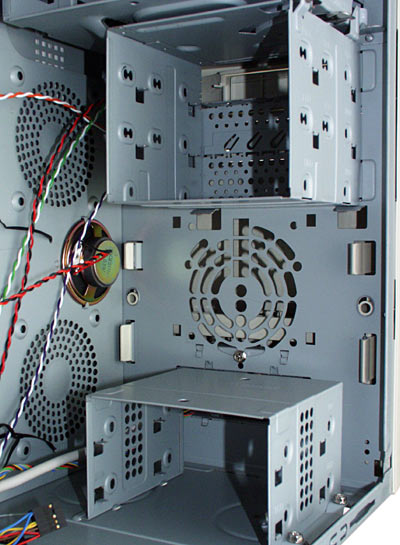
Basically, you want to flow threw the case like this.

Hope this helps, and there are other mods [modifications] that can be made to help keep the case cool.
-
December 6th, 2007, 06:41 PM
#6

Thank you for your help and advice all I got to do now is wait for the expensive festive season to be over and I'm off to get a new motherboard and fans
Virtual Patient
-
December 6th, 2007, 07:03 PM
#7
Understand the reasoning for sure.
Need more help, just hit us with a post.
Someone will jump in.
Thread Information
Users Browsing this Thread
There are currently 1 users browsing this thread. (0 members and 1 guests)
 Posting Permissions
- You may not post new threads
- You may not post replies
- You may not post attachments
- You may not edit your posts
-
Forum Rules
|
|


 Reply With Quote


