|
-
August 14th, 2007, 12:27 AM
#1
Text Small on Monitors 1440x900
I like my new widescreen monitor, but the text is small...
How can it be enlarged without affecting normal settings?
-
August 14th, 2007, 02:13 AM
#2
What operating system? Usually to increase text size it's done through "Display Properties" by right clicking anywhere on the desktop and chosing properties, then chosing the Appearance tab, then clicking on the Advanced button at the bottom. Depending what you want to increase the font size of, you chose items in the drop down menu.
-
August 14th, 2007, 06:11 AM
#3
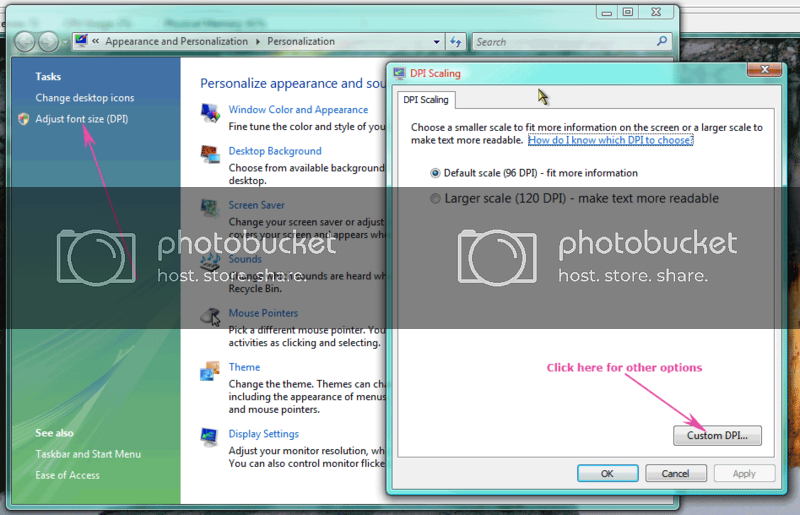
You could also try altering the DPI setting [see image] and see if it helps

-
August 14th, 2007, 06:27 AM
#4
To do what ‘104456’ is suggesting, right-click any blank space on your Desktop and select Properties. Click the Settings tab then the Advanced button. In the DPI setting pull-down, select the “Large size (120 DPI)” option then click Apply | OK.
If that still isn’t big enough, get back to the DPI setting pull-down, select “Custom setting...” and you can specify something larger. I know one guy that runs his at something close to 200%.
Note that when you run oversize like this though, some programs don’t display quite right. The wording and/or buttons may be partially hidden off the edges of the program windows.
-
August 14th, 2007, 09:20 AM
#5
FWIW, I didn't like either the 96 or 120 and tried splitting the difference (Custom setting of 108) on our new laptop. It works very well, the wife is happy.
-
August 14th, 2007, 09:53 AM
#6
If you have Vista, then right-click the desktop and choose Personalize, then in the left hand pane, click "Adjust font size (DPI)".
Nick.
-
August 20th, 2007, 09:16 AM
#7
Thanks, but I just use the text enlarger located in IE7 toolbar.
-
August 20th, 2007, 01:01 PM
#8
If you have a scroll wheel mouse, hold the Ctrl key and then scroll the wheel. That will change the size do you will not have to go into the IE7 toolbar.
Works with other versions of IE also.
Thread Information
Users Browsing this Thread
There are currently 1 users browsing this thread. (0 members and 1 guests)
 Posting Permissions
- You may not post new threads
- You may not post replies
- You may not post attachments
- You may not edit your posts
-
Forum Rules
|
|


 Reply With Quote


