|
-
May 14th, 2007, 05:07 PM
#1
PC Keeps freezing up
This Pentium 4 2.5, 512, 40 + 80GB machine keeps freezing. Either on startup or as I get into Windows and start doing something.
I have switched out the ribbon cables, Unhooked floppy, other hard drive, CD drives and tried to get it to run and get the same thing.
I have switched out the ram.
I have tried to install Windows on the second drive because I thought it may have been a virus and it freezes 10 minutes into the installation. So it's not a bug.
I cleaned out all the dust with a compressor.
I reset the bios.
I am now taking out the battery and letting that sit for awhile.
I swapped out the video card.
The only thing that I have not done is swap out the keyboard and mouse thinking that those ports may be bad.
All capacitors look good. Flat on top that is. Some do have a slight curve on top of them but that may be the manufacturer making them with a slight curve on top. There are 9 of them with a very slight curve. Are some capacitors just like this? Some are real flat though.
I will try after the battery is out for awhile and then I will try again.
I will swap out the mouse and keyboard as well.
Don't know what else to try. Any ideas?
3 hours into this now.
Note: My questions may be to help others 
Thanks, JB
-
May 14th, 2007, 05:20 PM
#2
Some do have a slight curve on top of them but that may be the manufacturer making them with a slight curve on top. There are 9 of them with a very slight curve.
That's a bad sign right there. The tops should be flat, almost concave in fact. Any bulging at all indicates failure - actual or imminent.
-
May 14th, 2007, 10:12 PM
#3
This is what I discovered. The heatsink was impacted with dust. Couldn't even see the vanes under the fan. There are 9 capacitors right up next to the processor that have rounded tops. Any capacitors that are at least 1/2" away from the cpu are fine and flat on top.
Is it possible that the cpu got hot and cooked the capacitors that are right up against the cpu because these are the only ones that look this way?
Note: My questions may be to help others
Thanks, JB
-
May 14th, 2007, 10:13 PM
#4
Those are normally the ones to go.
-
May 14th, 2007, 10:17 PM
#5
It's so funny that I noticed that. Takes a flashlight and some good glasses though. So would the hot dusty processor actually cause this blowing of these capacitors or am I just making this up?
Note: My questions may be to help others
Thanks, JB
-
May 14th, 2007, 10:29 PM
#6
Bad caps from the get go has been my experience.
-
May 15th, 2007, 10:57 AM
#7
Bulging Capacitors:
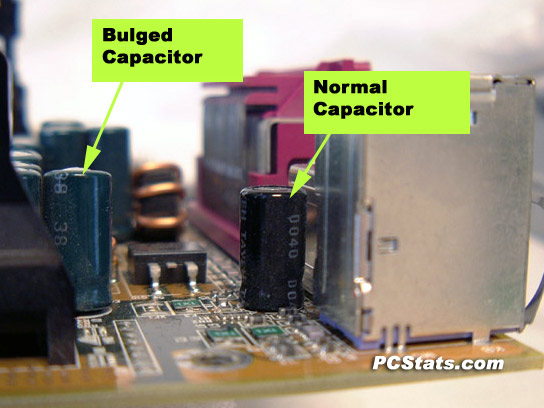
If they look anything like that, then it's time for a new mobo.
Nick.
Thread Information
Users Browsing this Thread
There are currently 1 users browsing this thread. (0 members and 1 guests)
 Posting Permissions
- You may not post new threads
- You may not post replies
- You may not post attachments
- You may not edit your posts
-
Forum Rules
|
|


 Reply With Quote


