|
-
April 28th, 2007, 12:35 PM
#1
PC wont boot
E Machines 380
2.2 Ghz Celeron
256MB Ram
Have changed PSU When plugged in CPU fan spins up without pressing power button, when pressed nothing PC wont boot
Have tried disconnecting everything except HDD still the same.
Any suggestions?
Thanks for any and all help.
-
April 28th, 2007, 12:55 PM
#2
First of all try clearing the CMOS in case it got scrambled. There should be a jumper on the motherboard to do that, if there isn't or you can't find it then pulling the motherboard battery out for a few minutes will achieve the same result (unplug the power lead as well).
Nick.
-
April 28th, 2007, 01:17 PM
#3
Tried that still the same.
Did also have various flickering lights at one point.
All 3 keyboard lights flashing rapidly in unison
Power switch light flickering
At one point HDD light orange flickering very fast but has since stopped.
Should I bury it now?
-
April 28th, 2007, 05:12 PM
#4
Check the motherboard for leaking or bulging capacitors, it was a common problem with mobos of a certain age:
Leaking Capacitors:

Bulging Capacitors:
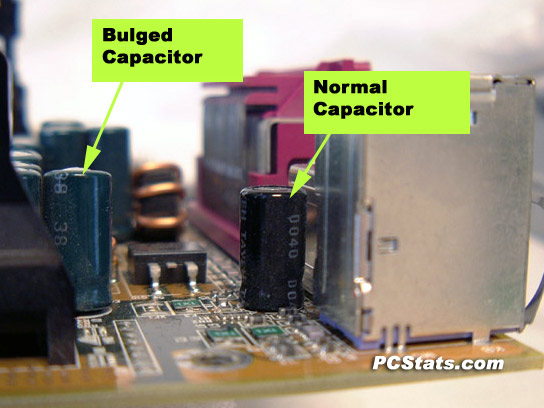
Nick.
-
April 28th, 2007, 05:25 PM
#5
All capacitors look good
Inside was very dusty however, wonder if this has shorted mobo.
Even with HDD disconnected pc will not boot
CPU fan spins up without turning on pc.
Have attached HDD to external caddy and good PC - not recognised does not make any sound or signs of movement - no vibration.
Is there a way to test mobo?
-
April 28th, 2007, 05:47 PM
#6
Unplug the push-button Start switch from the mobo (follow the leads back from the front panel if necessary). You shouldn't get any power to anything. Then use a small screwdriver to momentarily short (connect) the two pins on the mobo for the Start switch. If the computer starts up the Start switch is bad. I see this every once in a while.
-
April 29th, 2007, 11:03 AM
#7
Did the original PSU die? It's starting to look like it might have taken the mobo and hard disk with it, which cheap power supplies have a nasty tendency to do 
Nick.
-
May 1st, 2007, 09:20 AM
#8
Sorry for not getting back sooner
Think you may be right.
Have tried new PSU which as soon as power lead plugged in spins up CPU fan.
Light around on switch flashes but no response from pc when button pressed.
CD draw will not open.
Just cant get my head round why CPU fan spins up - suspect there may be a short somewhere
-
May 1st, 2007, 10:28 AM
#9
If the old power supply was a Bestec, it probably fried the motherboard when it died. This is a known issue with E-Machines. You can get a new power supply for about $40 and a new motherboard for about $55.
-
May 1st, 2007, 10:33 AM
#10
Yep, the fan spinning up like that is a very bad sign. I fear that PC has gone to the great network in the sky
Nick.
-
May 1st, 2007, 10:34 AM
#11
Correct the PSU is a Bestec think it cooked the HDD as well as I can't get it to even spin up.
In the scheme of things probably only good for parts - rather than mess about fitting new Mobo PSU and HDD. Can probably pick up a new pc for the same price.
-
May 1st, 2007, 03:19 PM
#12
Just cant get my head round why CPU fan spins up - suspect there may be a short somewhere
What did you find out about the power switch?? They're every bit as crappy as the power switches on eMachines' monitors. If it's broken in the start position, you'll get the situation you describe.
Don't trash the whole computer until you have eliminated a 50¢ switch as the cause of the problem.
-
May 1st, 2007, 05:01 PM
#13
Tried disconnecting switch and shorting with screwdriver but alas no signs of life. Think it has ceased to be!
Thread Information
Users Browsing this Thread
There are currently 1 users browsing this thread. (0 members and 1 guests)
 Posting Permissions
- You may not post new threads
- You may not post replies
- You may not post attachments
- You may not edit your posts
-
Forum Rules
|
|


 Reply With Quote


