|
-
April 30th, 2006, 10:28 PM
#1
someone please help--- 911!!!
help please !!! New build - no post when power up. I get PSU going, all fans going, can hear my sata hdd goign, my dvd drive the light on front just slowly flashes and the drawer won't open.....help please.
I am using a pentium D dual processor on a P5wd2 Mobo by asus, corsair memory 2x1gb in channel a1 and a2.....my sata drive has the molex going to if for power and then a red sata cable and another similar looking black tipped cable that has 3 wires out of it. My dvd is attached to the ide cable and then to the primary ide slot on mobo.
all mobo power connections ar ehooked up properly to psu....what could this be??
Do you think i got bad processor or the contacts got messed up or is it something else??
HELP!!
-
April 30th, 2006, 10:41 PM
#2
Are your jumper settings set to the right spec's on ther motherboard??
Windows 10 Home 64 Intel® Core™ i5-8265U (1.6 GHz base frequency, up to 3.9 GHz, 6 MB cache, 4 cores)
17.3" diagonal HD+ SVA BrightView WLED-backlit (1600 x 900) 256 GB - 5400 rpm SATA
Windows 10 //21H1 (OS Build 19044..2251) 64bit //Google Chrome 118.0.5993.89 (Official Build) (64-bit)/ 16GB Memory/ AMD Radeon HD 7700 series Video Card//N68C-GS FX2.00 gigahertz AMD Athlon 64 X2 Dual Core /[/B]
-
April 30th, 2006, 10:56 PM
#3
which jumpers do you mean - the only jumpers i see are the chassis intrusion ones and one that will reset th CLRTC ram - whichis in normal position
-
May 1st, 2006, 11:50 AM
#4
Check that everything is firmly seated, cables, cards, RAM, etc., especially the graphics card. If that doesn't help, disconnect everything except the CPU, RAM and graphics card, and try to boot the PC. If it's still no go, take the mobo out of the case and lay it on some insulating material to make sure that it can't be shorting on anything.
Nick.
-
May 2nd, 2006, 10:04 PM
#5
Check PSU voltage output at ALL connector ends, output values should be right on the PSU.
Good luck and please post back with results! 
-
May 3rd, 2006, 08:27 AM
#6
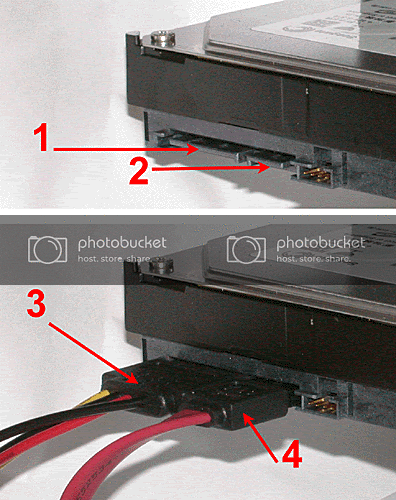
another similar looking black tipped cable that has 3 wires out of it
What is this third (3rd) wire you are talking about? SATA installation should only have two connectors. The power and the SATA cable to the motherboard.
-
May 3rd, 2006, 09:02 AM
#7
Photolady beat me to it.  A lot of earlier SATA HDDs had both the new SATA and standard Molex power connectors so they'd be able to be used on mobos without SATA capability, if a SATA controller was added. You're only supposed to use one power connector or the other--not both. A lot of earlier SATA HDDs had both the new SATA and standard Molex power connectors so they'd be able to be used on mobos without SATA capability, if a SATA controller was added. You're only supposed to use one power connector or the other--not both.
-
May 3rd, 2006, 09:32 AM
#8
And you should be aware too, that connecting two power connections to your drive, could render them useless. Sometimes it doesn't blow the drive, then other times it does.
I had a computer in my shop that came to me all misconfigured. Two power adapters, heatsinkfan loose, and no extra molex connected to motherboard. Luckily for this client, the drives were ok. I'd hate to think you spent so much money on these systems to lose the harddrives.
His system cost him $2000.
-
May 3rd, 2006, 05:42 PM
#9
i know it sounds crazzy but some asus mobos have been known to have the plastic shielding on the ide bus conecters the wrong way round so you pop your cable in and end up pushing a pin out the mobo i would defuinatly check that as well.
-
May 12th, 2006, 09:49 PM
#10
thanks for all the input everyone....ya know what i ended up doing? Returning the mobo and getting new one and everything is fine now. I am up and running....
The odd thing was (and i don't know if this was even a problem or not) but the socket on the mobo was a little tiny bit disfigured, it was slightly concave on one side/edge and the new one is not that way.
Could that have been an issue ...or not?
-
May 12th, 2006, 10:01 PM
#11
Which socket? The cpu or other?
-
May 14th, 2006, 08:48 PM
#12
-
May 15th, 2006, 07:55 AM
#13
Yes, that could have been the problem. I've seen this problem before and caused the same issues you had.
Thread Information
Users Browsing this Thread
There are currently 1 users browsing this thread. (0 members and 1 guests)
 Posting Permissions
- You may not post new threads
- You may not post replies
- You may not post attachments
- You may not edit your posts
-
Forum Rules
|
|


 Reply With Quote