|
-
March 8th, 2006, 02:33 PM
#1
High CPU Usage
Task Manager shows that my System Idle Process is running in 80s and 90s.
As soon as I open a program CPU of that particular program goes sky high. For instance at the moment I am listening some music via WMP and the CPU is running between 10-15. But if I try to open another program CPU will rocket. And obviously it will take long time to open.
This behavior has only started recently. No software were installed apart from windows critical updates.
I have Windows Defender, Spy Bot Search and Destroy, Spywareblaster, Ad-Aware se Personal, Crap Cleaner and Avg 7.1.375. They all are updated and checked.
Dunedin from XP Forum tried to help me tremendously hard for me but no vail. So I am over here.
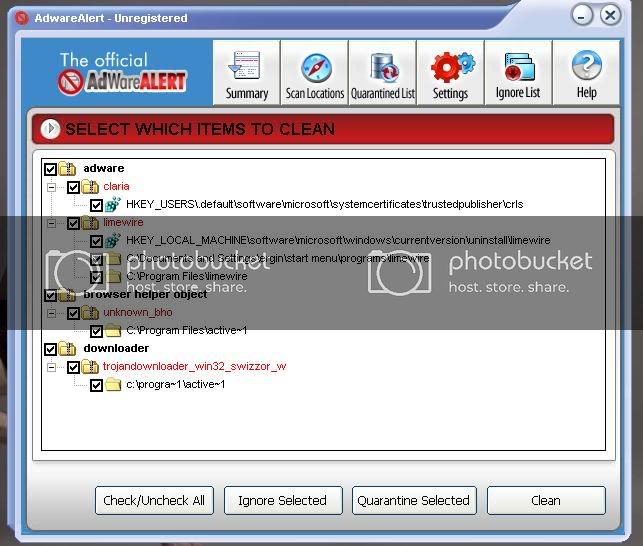
Adware Alert found below but ubless I pay it will not remove them.
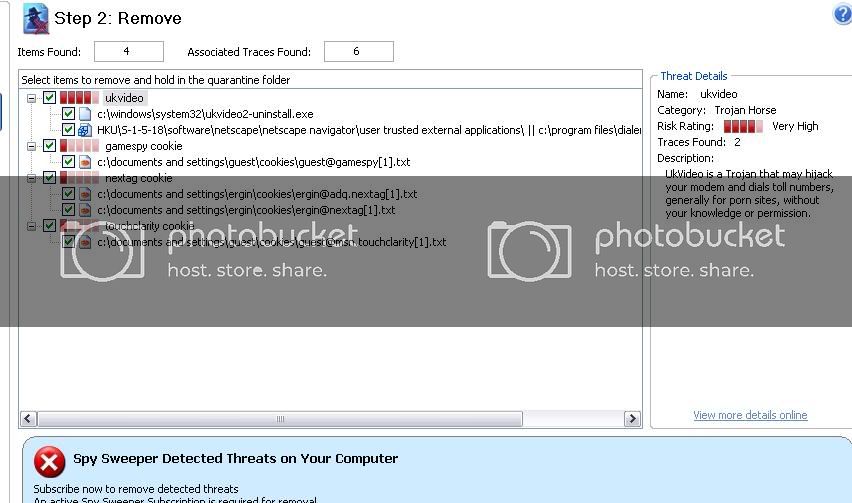
Downloaded SpySweeper, run it and found below. But unless you buy it it will not remove them
I tried Panda (please see below)It will not remove anything unless you buy it.
Incident Status Location
Spyware:Cookie/FastClick Not disinfected C:\Documents and Settings\Administrator\Application Data\Mozilla\Firefox\Profiles\twh8rmwy.default\cookies.txt[]
Spyware:Cookie/FastClick Not disinfected C:\Documents and Settings\Guest\Application Data\Mozilla\Firefox\Profiles\083ybjjh.default\cookies.txt[]
Spyware:Cookie/Server.iad.Liveperson Not disinfected C:\Documents and Settings\Guest\Application Data\Mozilla\Firefox\Profiles\083ybjjh.default\cookies.txt[82763522]
Dialerialer.Gen Not disinfected C:\WINDOWS\system32\UKVideo2-uninstall.exe
PestPetrol only found "limewire" and "Adware.sqwire". This program will not remove anything either unless it is purchased.
I downloaded, updated Ewido and did a full scan.
Here is the full result.
ewido anti-malware - Scan report
---------------------------------------------------------
+ Created on: 18:24:42, 08/03/2006
+ Report-Checksum: F8028C8B
+ Scan result:
:mozilla.8:C:\Documents and Settings\Administrator\Application Data\Mozilla\Firefox\Profiles\twh8rmwy.default\cookies.txt -> TrackingCookie.Fastclick : Cleaned with backup
:mozilla.9:C:\Documents and Settings\Administrator\Application Data\Mozilla\Firefox\Profiles\twh8rmwy.default\cookies.txt -> TrackingCookie.Fastclick : Cleaned with backup
:mozilla.8:C:\Documents and Settings\Guest\Application Data\Mozilla\Firefox\Profiles\083ybjjh.default\cookies.txt -> TrackingCookie.Fastclick : Cleaned with backup
:mozilla.9:C:\Documents and Settings\Guest\Application Data\Mozilla\Firefox\Profiles\083ybjjh.default\cookies.txt -> TrackingCookie.Fastclick : Cleaned with backup
:mozilla.11:C:\Documents and Settings\Guest\Application Data\Mozilla\Firefox\Profiles\083ybjjh.default\cookies.txt -> TrackingCookie.Trafficmp : Cleaned with backup
:mozilla.12:C:\Documents and Settings\Guest\Application Data\Mozilla\Firefox\Profiles\083ybjjh.default\cookies.txt -> TrackingCookie.Trafficmp : Cleaned with backup
:mozilla.13:C:\Documents and Settings\Guest\Application Data\Mozilla\Firefox\Profiles\083ybjjh.default\cookies.txt -> TrackingCookie.Trafficmp : Cleaned with backup
:mozilla.14:C:\Documents and Settings\Guest\Application Data\Mozilla\Firefox\Profiles\083ybjjh.default\cookies.txt -> TrackingCookie.Trafficmp : Cleaned with backup
:mozilla.15:C:\Documents and Settings\Guest\Application Data\Mozilla\Firefox\Profiles\083ybjjh.default\cookies.txt -> TrackingCookie.Trafficmp : Cleaned with backup
:mozilla.26:C:\Documents and Settings\Guest\Application Data\Mozilla\Firefox\Profiles\083ybjjh.default\cookies.txt -> TrackingCookie.2o7 : Cleaned with backup
:mozilla.38:C:\Documents and Settings\Guest\Application Data\Mozilla\Firefox\Profiles\083ybjjh.default\cookies.txt -> TrackingCookie.Specificclick : Cleaned with backup
:mozilla.39:C:\Documents and Settings\Guest\Application Data\Mozilla\Firefox\Profiles\083ybjjh.default\cookies.txt -> TrackingCookie.Specificclick : Cleaned with backup
:mozilla.40:C:\Documents and Settings\Guest\Application Data\Mozilla\Firefox\Profiles\083ybjjh.default\cookies.txt -> TrackingCookie.Pointroll : Cleaned with backup
:mozilla.41:C:\Documents and Settings\Guest\Application Data\Mozilla\Firefox\Profiles\083ybjjh.default\cookies.txt -> TrackingCookie.Pointroll : Cleaned with backup
:mozilla.42:C:\Documents and Settings\Guest\Application Data\Mozilla\Firefox\Profiles\083ybjjh.default\cookies.txt -> TrackingCookie.Pointroll : Cleaned with backup
:mozilla.43:C:\Documents and Settings\Guest\Application Data\Mozilla\Firefox\Profiles\083ybjjh.default\cookies.txt -> TrackingCookie.Pointroll : Cleaned with backup
:mozilla.44:C:\Documents and Settings\Guest\Application Data\Mozilla\Firefox\Profiles\083ybjjh.default\cookies.txt -> TrackingCookie.Adtech : Cleaned with backup
:mozilla.45:C:\Documents and Settings\Guest\Application Data\Mozilla\Firefox\Profiles\083ybjjh.default\cookies.txt -> TrackingCookie.Adtech : Cleaned with backup
:mozilla.50:C:\Documents and Settings\Guest\Application Data\Mozilla\Firefox\Profiles\083ybjjh.default\cookies.txt -> TrackingCookie.Casalemedia : Cleaned with backup
:mozilla.51:C:\Documents and Settings\Guest\Application Data\Mozilla\Firefox\Profiles\083ybjjh.default\cookies.txt -> TrackingCookie.Casalemedia : Cleaned with backup
:mozilla.52:C:\Documents and Settings\Guest\Application Data\Mozilla\Firefox\Profiles\083ybjjh.default\cookies.txt -> TrackingCookie.Casalemedia : Cleaned with backup
:mozilla.57:C:\Documents and Settings\Guest\Application Data\Mozilla\Firefox\Profiles\083ybjjh.default\cookies.txt -> TrackingCookie.Sexcounter : Cleaned with backup
:mozilla.58:C:\Documents and Settings\Guest\Application Data\Mozilla\Firefox\Profiles\083ybjjh.default\cookies.txt -> TrackingCookie.Sexcounter : Cleaned with backup
:mozilla.74:C:\Documents and Settings\Guest\Application Data\Mozilla\Firefox\Profiles\083ybjjh.default\cookies.txt -> TrackingCookie.Tacoda : Cleaned with backup
:mozilla.75:C:\Documents and Settings\Guest\Application Data\Mozilla\Firefox\Profiles\083ybjjh.default\cookies.txt -> TrackingCookie.Tacoda : Cleaned with backup
:mozilla.77:C:\Documents and Settings\Guest\Application Data\Mozilla\Firefox\Profiles\083ybjjh.default\cookies.txt -> TrackingCookie.Tribalfusion : Cleaned with backup
:mozilla.85:C:\Documents and Settings\Guest\Application Data\Mozilla\Firefox\Profiles\083ybjjh.default\cookies.txt -> TrackingCookie.Zedo : Cleaned with backup
:mozilla.86:C:\Documents and Settings\Guest\Application Data\Mozilla\Firefox\Profiles\083ybjjh.default\cookies.txt -> TrackingCookie.Zedo : Cleaned with backup
:mozilla.87:C:\Documents and Settings\Guest\Application Data\Mozilla\Firefox\Profiles\083ybjjh.default\cookies.txt -> TrackingCookie.Zedo : Cleaned with backup
:mozilla.88:C:\Documents and Settings\Guest\Application Data\Mozilla\Firefox\Profiles\083ybjjh.default\cookies.txt -> TrackingCookie.Falkag : Cleaned with backup
:mozilla.89:C:\Documents and Settings\Guest\Application Data\Mozilla\Firefox\Profiles\083ybjjh.default\cookies.txt -> TrackingCookie.Falkag : Cleaned with backup
:mozilla.90:C:\Documents and Settings\Guest\Application Data\Mozilla\Firefox\Profiles\083ybjjh.default\cookies.txt -> TrackingCookie.Falkag : Cleaned with backup
:mozilla.93:C:\Documents and Settings\Guest\Application Data\Mozilla\Firefox\Profiles\083ybjjh.default\cookies.txt -> TrackingCookie.Liveperson : Cleaned with backup
:mozilla.94:C:\Documents and Settings\Guest\Application Data\Mozilla\Firefox\Profiles\083ybjjh.default\cookies.txt -> TrackingCookie.Liveperson : Cleaned with backup
:mozilla.95:C:\Documents and Settings\Guest\Application Data\Mozilla\Firefox\Profiles\083ybjjh.default\cookies.txt -> TrackingCookie.Liveperson : Cleaned with backup
::Report End
As you will see I think they were all cookies.
I would appreciate your help if you can please.
Thank you.
Also please find my HijackThis Log.
Logfile of HijackThis v1.99.1
Scan saved at 20:41:47, on 08/03/2006
Platform: Windows XP SP2 (WinNT 5.01.2600)
MSIE: Internet Explorer v6.00 SP2 (6.00.2900.2180)
Running processes:
C:\WINDOWS\System32\smss.exe
C:\WINDOWS\system32\winlogon.exe
C:\WINDOWS\system32\services.exe
C:\WINDOWS\system32\lsass.exe
C:\WINDOWS\system32\svchost.exe
C:\Program Files\Windows Defender\MsMpEng.exe
C:\WINDOWS\System32\svchost.exe
C:\WINDOWS\system32\spoolsv.exe
C:\WINDOWS\Explorer.EXE
C:\Program Files\Creative\ShareDLL\CtNotify.exe
C:\PROGRA~1\Grisoft\AVGFRE~1\avgemc.exe
C:\PROGRA~1\Grisoft\AVGFRE~1\avgcc.exe
C:\Program Files\Google\Gmail Notifier\G001-1.0.25.0\gnotify.exe
C:\Program Files\Ahead\InCD\InCD.exe
C:\Program Files\Zone Labs\ZoneAlarm\zlclient.exe
C:\Program Files\Windows Defender\MSASCui.exe
C:\WINDOWS\system32\RUNDLL32.EXE
C:\Program Files\MWSnap\MWSnap.exe
C:\WINDOWS\system32\devldr32.exe
C:\PROGRA~1\Grisoft\AVGFRE~1\avgamsvr.exe
C:\Program Files\Creative\ShareDLL\MediaDet.Exe
C:\PROGRA~1\Grisoft\AVGFRE~1\avgupsvc.exe
C:\WINDOWS\System32\CTsvcCDA.EXE
C:\Program Files\Executive Software\DiskeeperLite\DKService.exe
C:\Program Files\Common Files\EPSON\EBAPI\SAgent2.exe
C:\WINDOWS\System32\E_S00RP2.EXE
C:\Program Files\ewido anti-malware\ewidoctrl.exe
C:\Program Files\ewido anti-malware\ewidoguard.exe
C:\WINDOWS\system32\LckFldService.exe
C:\WINDOWS\system32\nvsvc32.exe
C:\WINDOWS\System32\svchost.exe
C:\WINDOWS\system32\ZoneLabs\vsmon.exe
C:\WINDOWS\System32\MsPMSPSv.exe
C:\WINDOWS\system32\fxssvc.exe
C:\Program Files\Active CPU\acpu.exe
C:\Program Files\Internet Explorer\iexplore.exe
C:\Program Files\MSN Messenger\msnmsgr.exe
C:\DOCUME~1\ergin\LOCALS~1\Temp\Temporary Directory 1 for hijackthis.zip\HijackThis.exe
R0 - HKCU\Software\Microsoft\Internet Explorer\Main,Start Page = http://news.google.co.uk/
R1 - HKLM\Software\Microsoft\Internet Explorer\Main,Default_Page_URL = http://www.freeserve.com/
R0 - HKLM\Software\Microsoft\Internet Explorer\Main,Start Page = http://news.google.co.uk/
R0 - HKCU\Software\Microsoft\Internet Explorer\Main,Local Page =
O1 - Hosts: 62.189.6.85 _sip._tls.sip5.phoneserve.com
O1 - Hosts: 62.189.6.85 _sip._ssl.sip5.phoneserve.com
O1 - Hosts: 62.189.6.86 _sip._tls.sip6.phoneserve.com
O1 - Hosts: 62.189.6.86 _sip._ssl.sip6.phoneserve.com
O1 - Hosts: 62.189.6.93 _sip._tls.sip7.phoneserve.com
O1 - Hosts: 62.189.6.93 _sip._ssl.sip7.phoneserve.com
O1 - Hosts: 62.189.6.78 _sip._tls.sip1.callserve.com
O1 - Hosts: 62.189.6.78 _sip._ssl.sip1.callserve.com
O1 - Hosts: 62.189.6.79 _sip._tls.sip2.callserve.com
O1 - Hosts: 62.189.6.79 _sip._ssl.sip2.callserve.com
O2 - BHO: AcroIEHlprObj Class - {06849E9F-C8D7-4D59-B87D-784B7D6BE0B3} - C:\Program Files\Adobe\Acrobat 7.0\ActiveX\AcroIEHelper.dll
O2 - BHO: Popup Manager - {08E74C67-99A6-45C7-94DA-A397A8FD8082} - (no file)
O2 - BHO: (no name) - {53707962-6F74-2D53-2644-206D7942484F} - C:\PROGRA~1\SPYBOT~1\SDHelper.dll
O2 - BHO: Google Toolbar Helper - {AA58ED58-01DD-4d91-8333-CF10577473F7} - c:\program files\google\googletoolbar1.dll
O3 - Toolbar: &Google - {2318C2B1-4965-11d4-9B18-009027A5CD4F} - c:\program files\google\googletoolbar1.dll
O4 - HKLM\..\Run: [Disc Detector] C:\Program Files\Creative\ShareDLL\CtNotify.exe
O4 - HKLM\..\Run: [NeroCheck] C:\WINDOWS\system32\NeroCheck.exe
O4 - HKLM\..\Run: [AVG7_EMC] C:\PROGRA~1\Grisoft\AVGFRE~1\avgemc.exe
O4 - HKLM\..\Run: [AVG7_CC] C:\PROGRA~1\Grisoft\AVGFRE~1\avgcc.exe /STARTUP
O4 - HKLM\..\Run: [{0228e555-4f9c-4e35-a3ec-b109a192b4c2}] C:\Program Files\Google\Gmail Notifier\G001-1.0.25.0\gnotify.exe
O4 - HKLM\..\Run: [InCD] C:\Program Files\Ahead\InCD\InCD.exe
O4 - HKLM\..\Run: [Zone Labs Client] C:\Program Files\Zone Labs\ZoneAlarm\zlclient.exe
O4 - HKLM\..\Run: [Windows Defender] "C:\Program Files\Windows Defender\MSASCui.exe" -hide
O4 - HKLM\..\Run: [NvCplDaemon] RUNDLL32.EXE C:\WINDOWS\system32\NvCpl.dll,NvStartup
O4 - HKLM\..\Run: [nwiz] nwiz.exe /install
O4 - HKLM\..\Run: [NvMediaCenter] RUNDLL32.EXE C:\WINDOWS\system32\NvMcTray.dll,NvTaskbarInit
O4 - HKCU\..\Run: [EPSON Stylus C60 Series] C:\WINDOWS\System32\spool\DRIVERS\W32X86\3\E_S10IC2.EXE /A "C:\WINDOWS\System32\E_S186.tmp"
O4 - HKCU\..\Run: [MWSnap] "C:\Program Files\MWSnap\MWSnap.exe"
O4 - Startup: SeePrompt.lnk = C:\Program Files\See-Prompt\SeePrompt.exe
O8 - Extra context menu item: &Add animation to IncrediMail Style Box - C:\PROGRA~1\INCRED~1\bin\resources\WebMenuImg.htm
O8 - Extra context menu item: &Google Search - res://c:\program files\google\GoogleToolbar1.dll/cmsearch.html
O8 - Extra context menu item: &Translate English Word - res://c:\program files\google\GoogleToolbar1.dll/cmwordtrans.html
O8 - Extra context menu item: Backward Links - res://c:\program files\google\GoogleToolbar1.dll/cmbacklinks.html
O8 - Extra context menu item: Cached Snapshot of Page - res://c:\program files\google\GoogleToolbar1.dll/cmcache.html
O8 - Extra context menu item: Similar Pages - res://c:\program files\google\GoogleToolbar1.dll/cmsimilar.html
O8 - Extra context menu item: Translate Page into English - res://c:\program files\google\GoogleToolbar1.dll/cmtrans.html
O14 - IERESET.INF: START_PAGE_URL=http://www.freeserve.com/
O16 - DPF: Yahoo! Backgammon - http://download.games.yahoo.com/game...ts/y/at0_x.cab
O16 - DPF: {04E214E5-63AF-4236-83C6-A7ADCBF9BD02} (HouseCall Control) - http://housecall60.trendmicro.com/housecall/xscan60.cab
O16 - DPF: {0A5FD7C5-A45C-49FC-ADB5-9952547D5715} (Creative Software AutoUpdate) - http://www.creative.com/SU/ocx/CTSUEng.cab
O16 - DPF: {0E5F0222-96B9-11D3-8997-00104BD12D94} (sys Class) - http://www.pcpitstop.com/pcpitstop/PCPitStop.CAB
O16 - DPF: {17492023-C23A-453E-A040-C7C580BBF700} (Windows Genuine Advantage Validation Tool) - http://go.microsoft.com/fwlink/?linkid=39204
O16 - DPF: {48C20DEE-B00A-11D4-9B2F-0060975D990E} (Hi2Lobby Class) - http://212.122.148.211/lobby/atlclient.cab
O16 - DPF: {4D7F48C0-CB49-4EA6-97D4-04F4EACC2F3B} (InstallShield Setup Player 2K2) - http://sib1.od2.com/common/Member/Cl.../OCI/setup.exe
O16 - DPF: {4E62C4DE-627D-4604-B157-4B7D6B09F02E} (AccountTracking Profile Manager Class) - http://moneymanager.egg.com/activex/accounttracking.cab
O16 - DPF: {4F1E5B1A-2A80-42CA-8532-2D05CB959537} (MSN Photo Upload Tool) - http://by101fd.bay101.hotmail.msn.co...s/MsnPUpld.cab
O16 - DPF: {56393399-041A-4650-94C7-13DFCB1F4665} (PSFormX Control) - http://www.my-etrust.com/Support/Pes...r/pestscan.cab
O16 - DPF: {6414512B-B978-451D-A0D8-FCFDF33E833C} (WUWebControl Class) - http://update.microsoft.com/windowsu...?1120066434830
O16 - DPF: {6CB5E471-C305-11D3-99A8-000086395495} - http://toolbar.google.com/data/en/de.../GoogleNav.cab
O16 - DPF: {6E5A37BF-FD42-463A-877C-4EB7002E68AE} (Housecall ActiveX 6.5) - http://eu-housecall.trendmicro-europ...vex/hcImpl.cab
O16 - DPF: {7380B862-BA18-4529-8972-C66B82AA5D1D} (AccountTracking Class) - http://moneymanager.egg.com/customer...nttracking.cab
O16 - DPF: {78960E0E-0B0C-11D4-8997-00104BD12D94} (AV Class) - http://www.pcpitstop.com/antivirus/PCPAV.CAB
O16 - DPF: {8EDAD21C-3584-4E66-A8AB-EB0E5584767D} - http://toolbar.google.com/data/GoogleActivate.cab
O16 - DPF: {B38870E4-7ECB-40DA-8C6A-595F0A5519FF} (MsnMessengerSetupDownloadControl Class) - http://messenger.msn.com/download/Ms...Downloader.cab
O16 - DPF: {BB21F850-63F4-4EC9-BF9D-565BD30C9AE9} (ASquaredScanForm Element) - http://www.windowsecurity.com/trojanscan/axscan.cab
O16 - DPF: {C2FCEF52-ACE9-11D3-BEBD-00105AA9B6AE} (Symantec RuFSI Registry Information Class) - http://security.symantec.com/sscv6/S.../bin/cabsa.cab
O16 - DPF: {CE28D5D2-60CF-4C7D-9FE8-0F47A3308078} (ActiveDataInfo Class) - https://www-secure.symantec.com/tech...a/SymAData.dll
O16 - DPF: {E77C0D62-882A-456F-AD8F-7C6C9569B8C7} (ActiveDataObj Class) - https://www-secure.symantec.com/tech...ActiveData.cab
O17 - HKLM\System\CS1\Services\Tcpip\..\{0EC4A2F7-74B8-4E0B-878A-D7853CAE135A}: NameServer = 212.175.13.113,212.175.13.114
O18 - Protocol: msnim - {828030A1-22C1-4009-854F-8E305202313F} - "C:\PROGRA~1\MSNMES~1\msgrapp.dll" (file missing)
O20 - Winlogon Notify: WRNotifier - WRLogonNTF.dll (file missing)
O23 - Service: AVG7 Alert Manager Server (Avg7Alrt) - GRISOFT, s.r.o. - C:\PROGRA~1\Grisoft\AVGFRE~1\avgamsvr.exe
O23 - Service: AVG7 Update Service (Avg7UpdSvc) - GRISOFT, s.r.o. - C:\PROGRA~1\Grisoft\AVGFRE~1\avgupsvc.exe
O23 - Service: Creative Service for CDROM Access - Creative Technology Ltd - C:\WINDOWS\System32\CTsvcCDA.EXE
O23 - Service: Diskeeper - Executive Software International, Inc. - C:\Program Files\Executive Software\DiskeeperLite\DKService.exe
O23 - Service: EPSON Printer Status Agent2 (EPSONStatusAgent2) - SEIKO EPSON CORPORATION - C:\Program Files\Common Files\EPSON\EBAPI\SAgent2.exe
O23 - Service: EPSON V3 Service2(02) (EPSON_PM_RPCV2_02) - SEIKO EPSON CORPORATION - C:\WINDOWS\System32\E_S00RP2.EXE
O23 - Service: ewido security suite control - ewido networks - C:\Program Files\ewido anti-malware\ewidoctrl.exe
O23 - Service: ewido security suite guard - ewido networks - C:\Program Files\ewido anti-malware\ewidoguard.exe
O23 - Service: InstallDriver Table Manager (IDriverT) - Macrovision Corporation - C:\Program Files\Common Files\InstallShield\Driver\1050\Intel 32\IDriverT.exe
O23 - Service: LckFldService - Unknown owner - C:\WINDOWS\system32\LckFldService.exe
O23 - Service: NVIDIA Display Driver Service (NVSvc) - NVIDIA Corporation - C:\WINDOWS\system32\nvsvc32.exe
O23 - Service: TrueVector Internet Monitor (vsmon) - Zone Labs, LLC - C:\WINDOWS\system32\ZoneLabs\vsmon.exe
Last edited by hmmm; March 8th, 2006 at 02:47 PM.
-
March 9th, 2006, 09:01 PM
#2
And the award for longest post goes to.....
I would go to www.lavasoft.de and grab ad-aware for free. Also try the microsoft MSRT or AntiSpyware apps at www.microsoft.com
-
March 9th, 2006, 10:50 PM
#3
With AdAware, nasties aren't directly deleted. They're put into a quarantine folder, then the next step is to delete the quarantine folder. I leave my quarantine folder untouched for a few days; if everything runs OK then I delete it. This way, you have the option of restoring something if need be. Also, there's a utility called AdAwareCloak that can be activated before running a scan. Majorgeeks.com may still have it; Lavasoft no longer offers it or supports it. Too bad, too, it helped a lot with some nasties that would otherwise shut down malware scanners. If you can't find it, I have a ZIP copy available around here somewhere in the forum that you're welcome to download.
-
March 10th, 2006, 03:23 AM
#4
Thank you for your answers Guys,
ProfessorU, If you read the begining of my post you'll see that I have all these programs and plus.....
lgbpop, I am afraid I was not able to find AdAwareClock.
I am sorry to give so much info regarding my problem, I suppose people get bored and DO NOT read it. Basically I have "ukvideo2, Swizzor, and I would love to have your help to remove them.
Thank you.
-
March 10th, 2006, 05:38 AM
#5
Delete this file manually; C:\WINDOWS\system32\UKVideo2
==
Download CCleaner and install, then run it.
- Uncheck "Cookies" under "Internet Explorer".
- Click on Run Cleaner in the lower right-hand corner. This can take quite a while to run.
- Close when finished.
-
March 10th, 2006, 07:59 AM
#6
Thank you for your answer Cruncie,
As you may notice at the top of my original thread I have already mentioned that I use CrapCleaner too.
I deleted UKVideo2 and run CrapCleaner as you required. For the time being I left UKVideo2 in my Recycle Bin.
Thank you.
Last edited by hmmm; March 10th, 2006 at 08:08 AM.
-
March 10th, 2006, 09:06 AM
#7
I've attached the AdAware Cloak below. Download and extract to your desktop; in Safe mode, activate the cloak then run AdAware and see if that helps any.
-
March 10th, 2006, 09:31 AM
#8
 Originally Posted by hmmm
Task Manager shows that my System Idle Process is running in 80s and 90s.
It is normal for the system idle process to go that high. Mine is currently at 99%. Screenshot included.
Can run silent runners if you wish to see if anything untoward can be seen running?
Go here and download then run Silent Runners.vbs. It generates a log. Please post the information back in this thread.
If you have a script blocking program, please allow the file to run. It is not malicious.
-
March 10th, 2006, 11:33 AM
#9
Thank you very much Cruncie,
Here is the log of Silent Runner.
"Silent Runners.vbs", revision 43, http://www.silentrunners.org/
Operating System: Windows XP SP2
Output limited to non-default values, except where indicated by "{++}"
Startup items buried in registry:
---------------------------------
HKCU\SOFTWARE\Microsoft\Windows\CurrentVersion\Run\ {++}
"EPSON Stylus C60 Series" = "C:\WINDOWS\System32\spool\DRIVERS\W32X86\3\E_S10IC2.EXE /A "C:\WINDOWS\System32\E_S186.tmp"" ["SEIKO EPSON CORPORATION"]
"MWSnap" = ""C:\Program Files\MWSnap\MWSnap.exe"" ["Mirek Wojtowicz"]
HKLM\SOFTWARE\Microsoft\Windows\CurrentVersion\Run\ {++}
"Disc Detector" = "C:\Program Files\Creative\ShareDLL\CtNotify.exe" ["Creative Technology Ltd."]
"NeroCheck" = "C:\WINDOWS\system32\NeroCheck.exe" ["Ahead Software Gmbh"]
"AVG7_EMC" = "C:\PROGRA~1\Grisoft\AVGFRE~1\avgemc.exe" ["GRISOFT, s.r.o."]
"AVG7_CC" = "C:\PROGRA~1\Grisoft\AVGFRE~1\avgcc.exe /STARTUP" ["GRISOFT, s.r.o."]
"{0228e555-4f9c-4e35-a3ec-b109a192b4c2}" = "C:\Program Files\Google\Gmail Notifier\G001-1.0.25.0\gnotify.exe" ["Google Inc."]
"InCD" = "C:\Program Files\Ahead\InCD\InCD.exe" [null data]
"Zone Labs Client" = "C:\Program Files\Zone Labs\ZoneAlarm\zlclient.exe" ["Zone Labs, LLC"]
"Windows Defender" = ""C:\Program Files\Windows Defender\MSASCui.exe" -hide" [MS]
"NvCplDaemon" = "RUNDLL32.EXE C:\WINDOWS\system32\NvCpl.dll,NvStartup" [MS]
"nwiz" = "nwiz.exe /install" ["NVIDIA Corporation"]
"NvMediaCenter" = "RUNDLL32.EXE C:\WINDOWS\system32\NvMcTray.dll,NvTaskbarInit" [MS]
"Google Desktop Search" = ""C:\Program Files\Google\Google Desktop Search\GoogleDesktop.exe" /startup" [null data]
HKLM\Software\Microsoft\Windows\CurrentVersion\Explorer\Browser Helper Objects\
{06849E9F-C8D7-4D59-B87D-784B7D6BE0B3}\(Default) = "AcroIEHlprObj Class" [from CLSID]
-> {CLSID}\InProcServer32\(Default) = "C:\Program Files\Adobe\Acrobat 7.0\ActiveX\AcroIEHelper.dll" ["Adobe Systems Incorporated"]
{53707962-6F74-2D53-2644-206D7942484F}\(Default) = (no title provided)
-> {CLSID}\InProcServer32\(Default) = "C:\PROGRA~1\SPYBOT~1\SDHelper.dll" ["Safer Networking Limited"]
{AA58ED58-01DD-4d91-8333-CF10577473F7}\(Default) = "Google Toolbar Helper" [from CLSID]
-> {CLSID}\InProcServer32\(Default) = "c:\program files\google\googletoolbar1.dll" ["Google Inc."]
HKLM\Software\Microsoft\Windows\CurrentVersion\Shell Extensions\Approved\
"{42071714-76d4-11d1-8b24-00a0c9068ff3}" = "Display Panning CPL Extension"
-> {CLSID}\InProcServer32\(Default) = "deskpan.dll" [file not found]
"{88895560-9AA2-1069-930E-00AA0030EBC8}" = "HyperTerminal Icon Ext"
-> {CLSID}\InProcServer32\(Default) = "C:\WINDOWS\System32\hticons.dll" ["Hilgraeve, Inc."]
"{0006F045-0000-0000-C000-000000000046}" = "Microsoft Outlook Custom Icon Handler"
-> {CLSID}\InProcServer32\(Default) = "C:\PROGRA~1\MICROS~2\Office\OLKFSTUB.DLL" [MS]
"{59850401-6664-101B-B21C-00AA004BA90B}" = "Microsoft Office Binder Unbind"
-> {CLSID}\InProcServer32\(Default) = "C:\PROGRA~1\MICROS~2\Office\1033\UNBIND.DLL" [MS]
"{1530F7EE-5128-43BD-9977-84A4B0FAD7DF}" = "PhotoToys"
-> {CLSID}\InProcServer32\(Default) = "C:\WINDOWS\System32\phototoys.dll" [MS]
"{F0CB00CD-5A07-4D91-97F5-A8C92CDA93E4}" = "Shell Extensions for RealOne Player"
-> {CLSID}\InProcServer32\(Default) = "C:\Program Files\Real\RealPlayer\rpshell.dll" ["RealNetworks, Inc."]
"{9F97547E-4609-42C5-AE0C-81C61FFAEBC3}" = "AVG7 Shell Extension"
-> {CLSID}\InProcServer32\(Default) = "C:\Program Files\Grisoft\AVG Free\avgse.dll" ["GRISOFT, s.r.o."]
"{9F97547E-460A-42C5-AE0C-81C61FFAEBC3}" = "AVG7 Find Extension"
-> {CLSID}\InProcServer32\(Default) = "C:\Program Files\Grisoft\AVG Free\avgse.dll" ["GRISOFT, s.r.o."]
"{e57ce731-33e8-4c51-8354-bb4de9d215d1}" = "Universal Plug and Play Devices"
-> {CLSID}\InProcServer32\(Default) = "C:\WINDOWS\system32\upnpui.dll" [MS]
"{640167b4-59b0-47a6-b335-a6b3c0695aea}" = "Portable Media Devices"
-> {CLSID}\InProcServer32\(Default) = "C:\WINDOWS\system32\Audiodev.dll" [MS]
"{cc86590a-b60a-48e6-996b-41d25ed39a1e}" = "Portable Media Devices Menu"
-> {CLSID}\InProcServer32\(Default) = "C:\WINDOWS\system32\Audiodev.dll" [MS]
"{e82a2d71-5b2f-43a0-97b8-81be15854de8}" = "ShellLink for Application References"
-> {CLSID}\InProcServer32\(Default) = "C:\WINDOWS\system32\dfshim.dll" [MS]
"{E37E2028-CE1A-4f42-AF05-6CEABC4E5D75}" = "Shell Icon Handler for Application References"
-> {CLSID}\InProcServer32\(Default) = "C:\WINDOWS\system32\dfshim.dll" [MS]
"{21569614-B795-46b1-85F4-E737A8DC09AD}" = "Shell Search Band"
-> {CLSID}\InProcServer32\(Default) = "C:\WINDOWS\system32\browseui.dll" [MS]
"{23170F69-40C1-278A-1000-000100020000}" = "7-Zip Shell Extension"
-> {CLSID}\InProcServer32\(Default) = "C:\Program Files\7-Zip\7-zip.dll" ["Igor Pavlov"]
"{A70C977A-BF00-412C-90B7-034C51DA2439}" = "NvCpl DesktopContext Class"
-> {CLSID}\InProcServer32\(Default) = "C:\WINDOWS\system32\nvcpl.dll" ["NVIDIA Corporation"]
"{FFB699E0-306A-11d3-8BD1-00104B6F7516}" = "Play on my TV helper"
-> {CLSID}\InProcServer32\(Default) = "C:\WINDOWS\system32\nvcpl.dll" ["NVIDIA Corporation"]
"{1CDB2949-8F65-4355-8456-263E7C208A5D}" = "Desktop Explorer"
-> {CLSID}\InProcServer32\(Default) = "C:\WINDOWS\system32\nvshell.dll" ["NVIDIA Corporation"]
"{1E9B04FB-F9E5-4718-997B-B8DA88302A47}" = "Desktop Explorer Menu"
-> {CLSID}\InProcServer32\(Default) = "C:\WINDOWS\system32\nvshell.dll" ["NVIDIA Corporation"]
"{1E9B04FB-F9E5-4718-997B-B8DA88302A48}" = "nView Desktop Context Menu"
-> {CLSID}\InProcServer32\(Default) = "C:\WINDOWS\system32\nvshell.dll" ["NVIDIA Corporation"]
HKLM\Software\Microsoft\Windows\CurrentVersion\Explorer\ShellExecuteHooks\
INFECTION WARNING! "{091EB208-39DD-417D-A5DD-7E2C2D8FB9CB}" = "Microsoft AntiMalware ShellExecuteHook"
-> {CLSID}\InProcServer32\(Default) = "C:\PROGRA~1\WIFD1F~1\MpShHook.dll" [MS]
HKLM\SOFTWARE\Microsoft\Windows NT\CurrentVersion\Windows\
INFECTION WARNING! "AppInit_DLLs" = "C:\PROGRA~1\Google\GOOGLE~1\GOEC62~1.DLL" [null data]
HKLM\System\CurrentControlSet\Control\Session Manager\
INFECTION WARNING! "BootExecute" = "autocheck autochk * SsiEfr.e" [file not found], [MS], [file not found], [file not found]
HKLM\Software\Microsoft\Windows NT\CurrentVersion\Winlogon\Notify\
INFECTION WARNING! WRNotifier\DLLName = "WRLogonNTF.dll" [file not found]
HKLM\Software\Classes\*\shellex\ContextMenuHandlers\
7-Zip\(Default) = "{23170F69-40C1-278A-1000-000100020000}"
-> {CLSID}\InProcServer32\(Default) = "C:\Program Files\7-Zip\7-zip.dll" ["Igor Pavlov"]
AVG7 Shell Extension\(Default) = "{9F97547E-4609-42C5-AE0C-81C61FFAEBC3}"
-> {CLSID}\InProcServer32\(Default) = "C:\Program Files\Grisoft\AVG Free\avgse.dll" ["GRISOFT, s.r.o."]
HKLM\Software\Classes\Directory\shellex\ContextMenuHandlers\
7-Zip\(Default) = "{23170F69-40C1-278A-1000-000100020000}"
-> {CLSID}\InProcServer32\(Default) = "C:\Program Files\7-Zip\7-zip.dll" ["Igor Pavlov"]
LockFolder\(Default) = "{4852341A-43E6-4994-B29B-E82904992884}"
-> {CLSID}\InProcServer32\(Default) = "C:\Program Files\FolderAccess\LckFldMenu.dll" ["Topdownloads Network"]
HKLM\Software\Classes\Folder\shellex\ContextMenuHandlers\
AVG7 Shell Extension\(Default) = "{9F97547E-4609-42C5-AE0C-81C61FFAEBC3}"
-> {CLSID}\InProcServer32\(Default) = "C:\Program Files\Grisoft\AVG Free\avgse.dll" ["GRISOFT, s.r.o."]
Active Desktop and Wallpaper:
-----------------------------
Active Desktop is disabled at this entry:
HKCU\Software\Microsoft\Windows\CurrentVersion\Explorer\ShellState
HKCU\Control Panel\Desktop\
"Wallpaper" = "C:\Documents and Settings\ergin\Local Settings\Application Data\Microsoft\Wallpaper1.bmp"
Enabled Screen Saver:
---------------------
HKCU\Control Panel\Desktop\
"SCRNSAVE.EXE" = "C:\WINDOWS\System32\logon.scr" [MS]
Startup items in "ergin" & "All Users" startup folders:
-------------------------------------------------------
C:\Documents and Settings\ergin\Start Menu\Programs\Startup
"SeePrompt" -> shortcut to: "C:\Program Files\See-Prompt\SeePrompt.exe" ["The Computer Man (UK)"]
Enabled Scheduled Tasks:
------------------------
"MP Scheduled Scan" -> launches: "C:\Program Files\Windows Defender\MpCmdRun.exe Scan -ScanType config -Privileges restricted" [MS]
Winsock2 Service Provider DLLs:
-------------------------------
Namespace Service Providers
HKLM\System\CurrentControlSet\Services\Winsock2\Parameters\NameSpace_Catalog5\Catalog_Entries\ {++}
000000000001\LibraryPath = "%SystemRoot%\System32\mswsock.dll" [MS]
000000000002\LibraryPath = "%SystemRoot%\System32\winrnr.dll" [MS]
000000000003\LibraryPath = "%SystemRoot%\System32\mswsock.dll" [MS]
000000000004\LibraryPath = "%SystemRoot%\System32\nwprovau.dll" [MS]
Transport Service Providers
HKLM\System\CurrentControlSet\Services\Winsock2\Parameters\Protocol_Catalog9\Catalog_Entries\ {++}
0000000000##\PackedCatalogItem (contains) DLL [Company Name], (at) ## range:
%SystemRoot%\system32\mswsock.dll [MS], 01 - 03, 06 - 26
%SystemRoot%\system32\rsvpsp.dll [MS], 04 - 05
Toolbars, Explorer Bars, Extensions:
------------------------------------
Toolbars
HKCU\Software\Microsoft\Internet Explorer\Toolbar\ShellBrowser\
"{2318C2B1-4965-11D4-9B18-009027A5CD4F}" = "&Google" [from CLSID]
-> {CLSID}\InProcServer32\(Default) = "c:\program files\google\googletoolbar1.dll" ["Google Inc."]
HKCU\Software\Microsoft\Internet Explorer\Toolbar\WebBrowser\
"{2318C2B1-4965-11D4-9B18-009027A5CD4F}" = "&Google" [from CLSID]
-> {CLSID}\InProcServer32\(Default) = "c:\program files\google\googletoolbar1.dll" ["Google Inc."]
HKLM\Software\Microsoft\Internet Explorer\Toolbar\
"{2318C2B1-4965-11D4-9B18-009027A5CD4F}" = "&Google" [from CLSID]
-> {CLSID}\InProcServer32\(Default) = "c:\program files\google\googletoolbar1.dll" ["Google Inc."]
Miscellaneous IE Hijack Points
------------------------------
C:\WINDOWS\INF\IERESET.INF (used to "Reset Web Settings")
Added lines (compared with English-language version):
[Strings]: START_PAGE_URL=http://www.freeserve.com/
Missing lines (compared with English-language version):
[Strings]: 1 line
HOSTS file
----------
C:\WINDOWS\System32\drivers\etc\HOSTS
maps: 11 domain names to IP addresses,
10 of the IP addresses are *not* localhost!
Running Services (Display Name, Service Name, Path {Service DLL}):
------------------------------------------------------------------
AVG7 Alert Manager Server, Avg7Alrt, "C:\PROGRA~1\Grisoft\AVGFRE~1\avgamsvr.exe" ["GRISOFT, s.r.o."]
AVG7 Update Service, Avg7UpdSvc, "C:\PROGRA~1\Grisoft\AVGFRE~1\avgupsvc.exe" ["GRISOFT, s.r.o."]
Creative Service for CDROM Access, Creative Service for CDROM Access, "C:\WINDOWS\System32\CTsvcCDA.EXE" ["Creative Technology Ltd"]
Diskeeper, Diskeeper, ""C:\Program Files\Executive Software\DiskeeperLite\DKService.exe"" ["Executive Software International, Inc."]
EPSON Printer Status Agent2, EPSONStatusAgent2, "C:\Program Files\Common Files\EPSON\EBAPI\SAgent2.exe" ["SEIKO EPSON CORPORATION"]
EPSON V3 Service2(02), EPSON_PM_RPCV2_02, "C:\WINDOWS\System32\E_S00RP2.EXE" ["SEIKO EPSON CORPORATION"]
Fax, Fax, "C:\WINDOWS\system32\fxssvc.exe" [MS]
LckFldService, LckFldService, "C:\WINDOWS\system32\LckFldService.exe" [null data]
NVIDIA Display Driver Service, NVSvc, "C:\WINDOWS\system32\nvsvc32.exe" ["NVIDIA Corporation"]
SAP Agent, NwSapAgent, "C:\WINDOWS\System32\svchost.exe -k netsvcs" {"C:\WINDOWS\System32\ipxsap.dll" [MS]}
TrueVector Internet Monitor, vsmon, "C:\WINDOWS\system32\ZoneLabs\vsmon.exe -service" ["Zone Labs, LLC"]
Windows Defender Service, WinDefend, ""C:\Program Files\Windows Defender\MsMpEng.exe"" [MS]
Windows User Mode Driver Framework, UMWdf, "C:\WINDOWS\system32\wdfmgr.exe" [MS]
WMDM PMSP Service, WMDM PMSP Service, "C:\WINDOWS\System32\MsPMSPSv.exe" [MS]
Print Monitors:
---------------
HKLM\System\CurrentControlSet\Control\Print\Monitors\
EPSON V3 2KMonitor352\Driver = "E_SL2352.DLL" ["SEIKO EPSON CORPORATION"]
Microsoft Shared Fax Monitor\Driver = "FXSMON.DLL" [MS]
----------
+ This report excludes default entries except where indicated.
+ To see *everywhere* the script checks and *everything* it finds,
launch it from a command prompt or a shortcut with the -all parameter.
+ The search for DESKTOP.INI DLL launch points on all local fixed drives
took 51 seconds.
+ The search for all Registry CLSIDs containing dormant Explorer Bars
took 22 seconds.
---------- (total run time: 104 seconds)
-
March 10th, 2006, 12:42 PM
#10
Lgbpop, thank you for AAWclock. I run it as you advised. I am afraid it did not find anything.
With Cruncie's advise I deleted UKVideo2 but unfortunatelly it did not help my high CPU problem.
As you will see from above, I posted Silent Runner Log for Cruncie's inspection. I sincerely hope that you guys can find something in it.
Thank you for all your help.
-
March 10th, 2006, 10:29 PM
#11
Not seeing anything in the silent runners log either  . .
It may well be a legitimate program causing the problem.
-
March 11th, 2006, 04:17 AM
#12
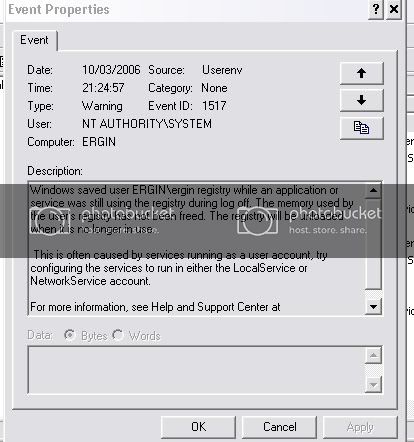
Thank you Cruncie, one last thought, my Evet Viewer is full of with this Userenv errors.....what do you think? Also AdwareAlert had shown "Swizzor".....Ohhhh I don't know....it is so frustrating...
Thank you.
-
March 11th, 2006, 10:52 AM
#13
http://support.microsoft.com/default...b;en-us;810616
Where is Adwarealert finding swizzor? Can you delete it manually? Personally I have no faith in Adwarealert as it appears on spywarewarriors list of rogue malware removal programs, although from some time in 2005 the problem of false positives was resolved. Which version do you have?
-
March 11th, 2006, 01:01 PM
#14
Cruncie,
In my original post I have included a screen shot of AdwareAlert, which was indicating that I had Swizzorand Claria. But none of the other scans showed these. Also I can not find it in my hard drive either. Like you said this program is not very legit, I think......
Thank you for the link you gave me in your last post. I am very greatful to you that you have spend your time for me.
I hall check my hardware again and see if I can spot something peculiar about this CPU problem.
Take Care.
Thread Information
Users Browsing this Thread
There are currently 1 users browsing this thread. (0 members and 1 guests)
 Posting Permissions
- You may not post new threads
- You may not post replies
- You may not post attachments
- You may not edit your posts
-
Forum Rules
|
|


 Reply With Quote


