|
-
February 15th, 2006, 08:41 PM
#16
No, I'd say not in that case, substituting a different PSU is a pretty good way of confirming if it's that or not.
I think the next thing to do is have a careful look at the mobo for any bulging or leaking capacitors:
Leaking Capacitors:

Bulging Capacitors:
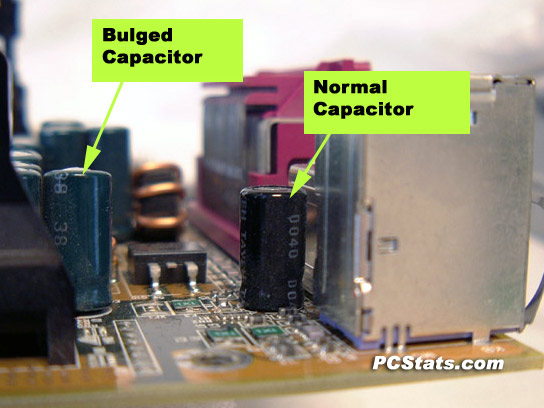
Nick.
-
February 16th, 2006, 03:41 AM
#17
ty again SuperSparks,
I will try to get a good look at the board later today.
VP
-
February 17th, 2006, 02:08 PM
#18
ok .... I've been looking at the motherboard in more detail and can see some form of corrosion or damage to some capacitors. A picture of the entire mb can be found at this link
http://www.fujitsu-siemens.co.uk/rl/...25C[1].pdf
The capacitors in question are those alongside the processor shown blue in the image. I did try getting an image to post here ... but all my decent software is on the dead puter. My cam won't even download to this one 
In your experience, is it cheaper to replace the motherboard than to get a shop to replace the damaged items?
All advice gratefully received 
VP
-
February 17th, 2006, 02:40 PM
#19
In my view it's probably better to replace the entire mobo. Getting the capactitors changed is a rather specialised job, as it requires "through soldering" techniques for the multi-layer board. Therefore there aren't many places that will do it - in fact I don't know of anyone in the UK.
Nick.
-
February 17th, 2006, 02:48 PM
#20
Thanks for the quick reply SuperSparks - looks like I better start shopping, I kinda thought it was a bit of a specialist job.
VP
an afterthought .... what's the chance of the processor being dead now too?
-
February 18th, 2006, 09:20 AM
#21
Pretty low. Replacing the motherboard generally fixes the issue (and it's a very common issue these days).
Safe computing is a habit, not a toolkit.
-
February 18th, 2006, 03:36 PM
#22
Thanks Tuttle, that's useful to know ty
VP
-
March 5th, 2006, 03:21 PM
#23
hi again peeps,
motherboard replaced ... processor was fine and thanks to the nice guys in the shop all my data was saved
VP
-
March 5th, 2006, 03:25 PM
#24
Excellent! I'm glad you got it all sorted out. Thanks for posting back and letting us know
Nick.
Thread Information
Users Browsing this Thread
There are currently 1 users browsing this thread. (0 members and 1 guests)
 Posting Permissions
- You may not post new threads
- You may not post replies
- You may not post attachments
- You may not edit your posts
-
Forum Rules
|
|


 Reply With Quote


