|
-
February 10th, 2006, 02:22 AM
#1
 [RESOLVED] computer turns on for 2 secs [RESOLVED] computer turns on for 2 secs
Hi
I was just watching a movie on my computer, and then it just turns off by itself. I tried turning it on again, but the fans and everything turns on for 2 seconds and it turns off. The day before I noticed a smell from my computer (almost like a burning smell) I let it rest for a day.
The motherboard lights turn on.
I have a 1 yr old 550W power supply.
I narrowed it down to two possible problems:
1) bad power supply (but how come the motherboard lights turn on)
2) overheated cpu (I reseated the heatsink fan after scraping some thermal paste from the sides and spreading it onto the middle area)
not sure what could be wrong, and I really don't want to go out and buy a new power supply if that's not the problem you know?
please help
-
February 10th, 2006, 06:05 AM
#2
the power supply will be the first thing to look into, check and see if the PSU cooling fan is running when you switch on the PC
Ahmed
-
February 10th, 2006, 11:10 AM
#3
I have a 1 yr old 550W power supply.
Ditto on the above, you can test it with this guide: http://www.ochardware.com/articles/psuvolt/psuvolt.html and a Multimeter, what make is this PSU?
Liam
Desktop:I5 2500K|Asus P8Z68-V|8GB Corsair Vengeance|1280MB Nvidia 560 TI PE|1TB Seagate/60GB OCZ SSD|LG Blu-ray Writer|Corsair 750W
27" iMac:I5 2500S|12GB Crucial DDR3|ATI 1GB 6970|1TB|Superdrive|Mighty Mouse 
-
February 10th, 2006, 02:38 PM
#4
Check the motherboard for leaking or bulging capacitors, it was a common problem with mobos of a certain age, and that burning smell is often associated with one failing:
Leaking Capacitors:

Bulging Capacitors:
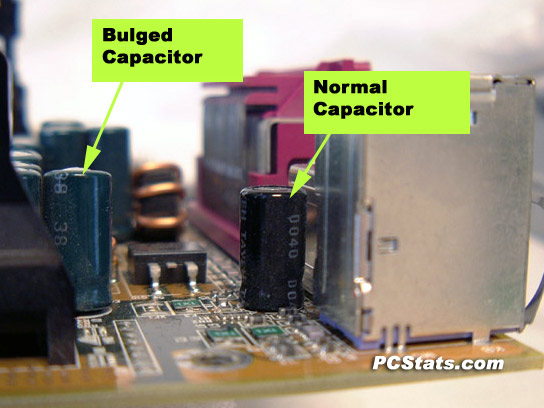
Nick.
-
February 10th, 2006, 04:19 PM
#5
when i turn the computer on, my power supply fan/light and my cpu fan both spin for two seconds, then just stops. Two red motherboard lights remain on.
I'll see if I could get a multimeter to test the power supply, but I'd rather just buy a power supply.
I'll reply again with any leaking or bulging capacitors on my motherboard.
If I find any, this means I have to buy a new motherboard huh?
Thanks for the replies...
-
February 10th, 2006, 08:42 PM
#6
 Originally Posted by vtgyrlz619
If I find any, this means I have to buy a new motherboard huh?
It is possible to get motheboards repaired, it's not a particularly easy job, as it requires a specialised soldering technique, and I'm not sure how much it costs. Here's a good site:
http://www.badcaps.net/
Nick.
-
February 10th, 2006, 11:58 PM
#7
from what i could see, i know there are no leaks, but the buldges are harder to identify =oT but nothing that i could see...
im going to borrow a power supply from a friend and test that tomorrow..
-
February 11th, 2006, 12:02 AM
#8
I reseated the heatsink fan after scraping some thermal paste from the sides and spreading it onto the middle area
If the PSU gets you going again, buy some fresh thermal paste! Used paste is like putting used motor oil in your car. Fine in a pinch, but don't make a habit of it.
-
February 11th, 2006, 03:20 AM
#9
Some sort of internal short can cause the power to switch off like that, try running your machine with the hard drive, optical drives and floppy drive disconnected. Then try removing any other device connected to the power supply molexs apart grom the motherboard.
Qualifications:
I have read:
Windows 3.11 for Dummies
Windows 95 for Dummies (Second Chapter)
Fed up with UK 0870 Phone Numbers
Backup Boogaloo, you know it makes sense to do.
-
February 12th, 2006, 12:19 AM
#10
ok so i borrowed an enermax 300watts power supply from a friend, and I just connected the power supply to the motherboard, cpu, and hard drive... the cpu fan and power supply starts up after pressing the on button 3 times, but nothing appears on the screen... im not sure if anything is supposed to show up on the monitor if the hard drive is not connected, but i tried jus power supply, cpu and mobo, it starts up but nothing on the screen... dead harddrive?
-
February 12th, 2006, 04:11 AM
#11
You should still get something on your screen. Are you sure that you've plugged in the monitor correctly, also check that there are no bent pins no the monitor lead.
Qualifications:
I have read:
Windows 3.11 for Dummies
Windows 95 for Dummies (Second Chapter)
Fed up with UK 0870 Phone Numbers
Backup Boogaloo, you know it makes sense to do.
-
February 12th, 2006, 04:55 AM
#12
Sounds like a leaking/bulged capacitor to me espeically since it dosen't POST now as well. RMA the mainboard if possible, if not, you'll need to purchase a new mainboard. What is the model of the mainboard anyway?
Last edited by NEM1S1S; February 12th, 2006 at 04:58 AM.
-
February 12th, 2006, 02:09 PM
#13
the motherboard is a DFI Lanparty Pro875
-
February 13th, 2006, 03:43 AM
#14
ok so new scenario, i got an enermax 300w power supply (from a friend) and this works fine for his computer, then when I hook it up to my computer, it won't turn on until the third press of the ON button.
I know for sure that my old 550w power supply is dead because it doesnt turn on for more then 2 seconds even on my friend's computer (I hooked it up to another computer to test it).
so i thought by replacing the power supply, everything would work, but even with this power supply replacement, nothing appears on my computer. so i thought it was a hard drive problem, but i hooked up my hard drive to another computer and it worked fine.
how do i know if this is a motherboard problem or a cpu problem?
(with the power supply replacement, everything turns on except for the hard drive)
-
February 13th, 2006, 01:23 PM
#15
Unfortunately there is no way of telling whether it's mobo or CPU, all you can do to test is to subtitute the CPU for a known working one. Having said that, given the scenario that you describe, it sounds like the failing PSU has taken something else out with it (they have a nasty tendency to do that), and it's a lot more likely to be the mobo than the CPU.
Nick.
Thread Information
Users Browsing this Thread
There are currently 1 users browsing this thread. (0 members and 1 guests)
 Posting Permissions
- You may not post new threads
- You may not post replies
- You may not post attachments
- You may not edit your posts
-
Forum Rules
|
|


 Reply With Quote


