|
-
September 16th, 2003, 03:11 AM
#1
Floppy drive as B:\
just built a system with a Asus VX97 mainboard. When you go to Command prompt in DOS, to get access to the Floppy Drive, you need type B:\ not A:\. Similarly in Windows GUI....the thing is, there is no other Floppy media attached to the motherboard, I cleared BIOS, flashed BIOS to v0204, checked all the usual stuff...I can't work this one out.
-
September 16th, 2003, 03:19 AM
#2
 RE: Troubleshooting RE: Troubleshooting
Be sure to try to have the floppy on the cable head farthest from the mainboard and set the Default settings in the BIOS using the appropriate 'F' key and exit saving changes.
I apologise for stating something you already know.
-
September 16th, 2003, 10:10 AM
#3
Try Styx's suggestions.
If no luck, then just use it as B if it's working ok like that.
-
September 16th, 2003, 03:39 PM
#4
The problem with that Ski is that B is not bootable. I would guess that it is connected to the wrong connector on the floppy connector.
Another situation where this occurs is when you have a device such as an Iomega Internal Atapi ZIP drive installed. This can act as A drive which would shift your floppy letter to B.
------------------
My
Two Cents
Dennis
Visit Politalk
-
September 16th, 2003, 04:12 PM
#5
also may want to check the bios for the swap floppy option
ah the bios defaults would fix that tho wouldnt it. yet he would be able to use the option to fix the problem if all else failed
Last edited by bchzd1; September 16th, 2003 at 04:16 PM.
-
September 16th, 2003, 07:31 PM
#6
Originally posted by bchzd1
ah the bios defaults would fix that tho wouldnt it.
Not always, sometimes that will not revert.
-
September 16th, 2003, 09:56 PM
#7
Also if you boot from a bootable CD that is emulating a floppy, then the pysical floppy becomes B: as the virtual (emulated) floppy is A:
-
September 17th, 2003, 10:49 AM
#8
The problem with that Ski is that B is not bootable.
You're right, Eeyore. Forgot about that. Thanks for the heads up.
-
September 17th, 2003, 07:34 PM
#9
I am not sure if this is pertinent to your problem but in the olden days (286, 386 machines) when there would be 2 floppy drives fitted to a machine - a 5 1/4 and a 3 1/2 inch drive there would be a cable coming from the motherboard floppy drive controller. with two connectors on it. The first connector is for the B: drive and then there would be a twist in the cable where two pins are swopped over. The connector after this twist is for the A: drive
Hope this helps
Mark
-
September 17th, 2003, 10:25 PM
#10
Floppy cable orientation:
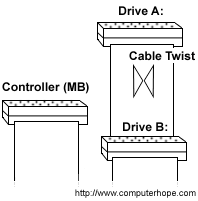
Keep red line on ribbon cable orientated to pin 1 of flop
and mobo jacks.
Good luck.
-
September 22nd, 2003, 01:06 AM
#11
I placed the connector at the end of the Floppy ribbon cable to the Floppy Drive and it worked. thanks.
Thread Information
Users Browsing this Thread
There are currently 1 users browsing this thread. (0 members and 1 guests)
 Posting Permissions
- You may not post new threads
- You may not post replies
- You may not post attachments
- You may not edit your posts
-
Forum Rules
|
|


 Reply With Quote


