|
-
May 18th, 2013, 12:31 PM
#1
Monitor Repair
About a year ago my monitor died a sad death. It was a Samsung SyncMaster 932B. I ran a thread here to determine the problem, and, as I recall, the consensus was edge lighting. I replaced it with a Samsung SyncMaster SA300.
When all is said and done, I think I prefer the old 932B, primarily because of the aspect ratio. It was the older style, almost square, ~4:3. The SA300 is a wide screen.
I'd like to make a last check before I send the 932B off to monitor heaven. Is there any reasonable and practical was to fix it?
-
May 18th, 2013, 12:47 PM
#2
Biostar TA790GX A2+ 6.0
AMD Phenom X4 9750 CPU.
4 Gig DDR2 Memory.
ATI HD 5450 PCIe Video
ATI HD 5450 PCIe Video
500 Watt P.S.
LG W2241T Widescreen 22" LCD
ViewSonic VA721 17" LCD
Envision 17" LCD
2 LG DVD Drives
Floppy Disk Drive
Maxtor 120 Gig Windows 7 Home Premium 32 bit
Gateway NV5378-U Windows 7 Home Premium 64 bit
Acer Aspire V3-731 Windows 7 Home Premium 64 bit
-
May 19th, 2013, 12:50 AM
#3
I'm ashamed to say that I never thought to Google the problem. Thank you very much.
I found one thread which was very helpful. I opened the monitor and found that there are 3 bad capacitors. Guess that has a detrimental affect.
I have a rebuild kit, 7 capacitors, on the way. Then the fun begins.
Thanks for your help.
-
May 19th, 2013, 01:13 AM
#4
Please let us know if your repair is successful.
-
May 19th, 2013, 07:48 AM
#5
Nothing to be ashamed about--if we all remembered everything all of the time we wouldn't be human. Glad you found something that helped. Hope it works, Good luck!
Biostar TA790GX A2+ 6.0
AMD Phenom X4 9750 CPU.
4 Gig DDR2 Memory.
ATI HD 5450 PCIe Video
ATI HD 5450 PCIe Video
500 Watt P.S.
LG W2241T Widescreen 22" LCD
ViewSonic VA721 17" LCD
Envision 17" LCD
2 LG DVD Drives
Floppy Disk Drive
Maxtor 120 Gig Windows 7 Home Premium 32 bit
Gateway NV5378-U Windows 7 Home Premium 64 bit
Acer Aspire V3-731 Windows 7 Home Premium 64 bit
-
May 19th, 2013, 08:25 AM
#6
Thanks for the encouragement. The repair kit is cheap enough, and comes with 7 capacitors. I'll be replacing all 7, even though only 3 are visibly bad. Apparently Samsung used some capacitors which are not well thought of, CapXon brand name, I believe. While I have the monitor open I'll replace all I can. I don't really want to open it again in a couple months.
I just tried uploading an image of the board, but was unable. Apparently my image files are too large.
-
May 19th, 2013, 09:13 AM
#7
Save the image as a .jpg file and it might be small enough. Paint can convert them.
-
May 19th, 2013, 12:09 PM
#8
 Originally Posted by jdc2000

Save the image as a .jpg file and it might be small enough. Paint can convert them.
The file is already a .jpg file, size=786.3Kb. I suspect it's larger than the size limitation for this forum. What is the size limit, BTW? Or is there a total upload limitation, a total of all files uploaded?
I just tried again to upload the file, and got the message, "Exceeds your quota by 725.7 Kb".
-
May 19th, 2013, 01:20 PM
#9
I'm not sure what the maximums are but you could instead upload the jpg here..
http://tinypic.com/
and just embed the picture in your next post. There are no limits in size for that.
-
May 19th, 2013, 02:30 PM
#10
Think I'll try through Photobucket since I already have an account there. The picture isn't too much, really. It just shows the board and the bad caps.
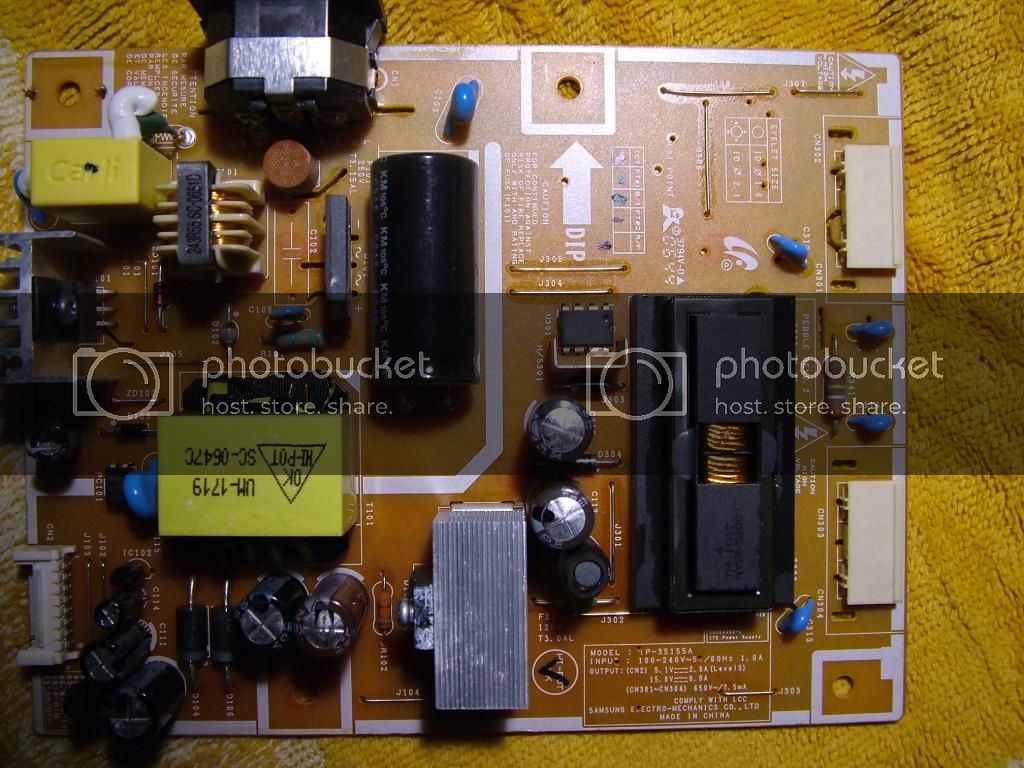
There. That seems to work. If this is in any way against forum policy, please let me know.
-
May 22nd, 2013, 12:56 PM
#11
I have replaced a lot of Caps in both monitors and computers. just make sure that you have the in the right orientation. slow and easy.
common sense isn't all that common
-
May 22nd, 2013, 01:36 PM
#12
Slow and easy it will be as I feel my way along on this one. I'll have to be very careful about the orientation (+/-) and the location. Then there is the rather precise soldering. It will be a learning experience on what is otherwise a dead monitor.
I have parts somewhere in the mail, scheduled to arrive in a day or so. I may get to it this weekend or next week. I appreciate all the support.
Thread Information
Users Browsing this Thread
There are currently 1 users browsing this thread. (0 members and 1 guests)
 Posting Permissions
- You may not post new threads
- You may not post replies
- You may not post attachments
- You may not edit your posts
-
Forum Rules
|
|


 Reply With Quote


