|
-
April 29th, 2013, 12:57 PM
#31
Intel Intel Core 2 Duo T5850 / 2.16 GHz processor specs ( mobile )Maximum.
SLA4C (Intel Core 2 Duo T5850)
If your CPU is consistently running at temperatures close to the maximum, or periodically shuts down by itself, use the following methods to rectify the problem: - Verify that there is unrestricted airflow to and from the CPU's heatsink and fan.
- Move the computer away from other sources of heat, or to colder place.
- Clean the CPU's heatsink and fan. Also clean other fans that are usually attached to your computer case.
- Make sure that you use thermal paste when you install the CPU's heatsink.
- Replace CPU's heatsink/fan with a more powerful one.
- Add more fans to your case.
- Replace the computer case with a case, that provides better airflow and more extensive cooling capabilities.
Tip: Restricting any of the laptop's vents, (such as when using it on soft surfaces like blankets or pillows), can cause it to overheat and shutdown ... so that it doesn't start a fire.
Last edited by SpywareDr; April 29th, 2013 at 01:00 PM.
-
April 29th, 2013, 01:08 PM
#32
It's a good idea to run a laptop on one of these (with fans).
http://www.tigerdirect.com/applicati...0cooling%20pad
Biostar TA790GX A2+ 6.0
AMD Phenom X4 9750 CPU.
4 Gig DDR2 Memory.
ATI HD 5450 PCIe Video
ATI HD 5450 PCIe Video
500 Watt P.S.
LG W2241T Widescreen 22" LCD
ViewSonic VA721 17" LCD
Envision 17" LCD
2 LG DVD Drives
Floppy Disk Drive
Maxtor 120 Gig Windows 7 Home Premium 32 bit
Gateway NV5378-U Windows 7 Home Premium 64 bit
Acer Aspire V3-731 Windows 7 Home Premium 64 bit
-
April 29th, 2013, 04:21 PM
#33
Here are a few examples of what I frequently find when disassembling a laptop that is shutting down because of overheating:
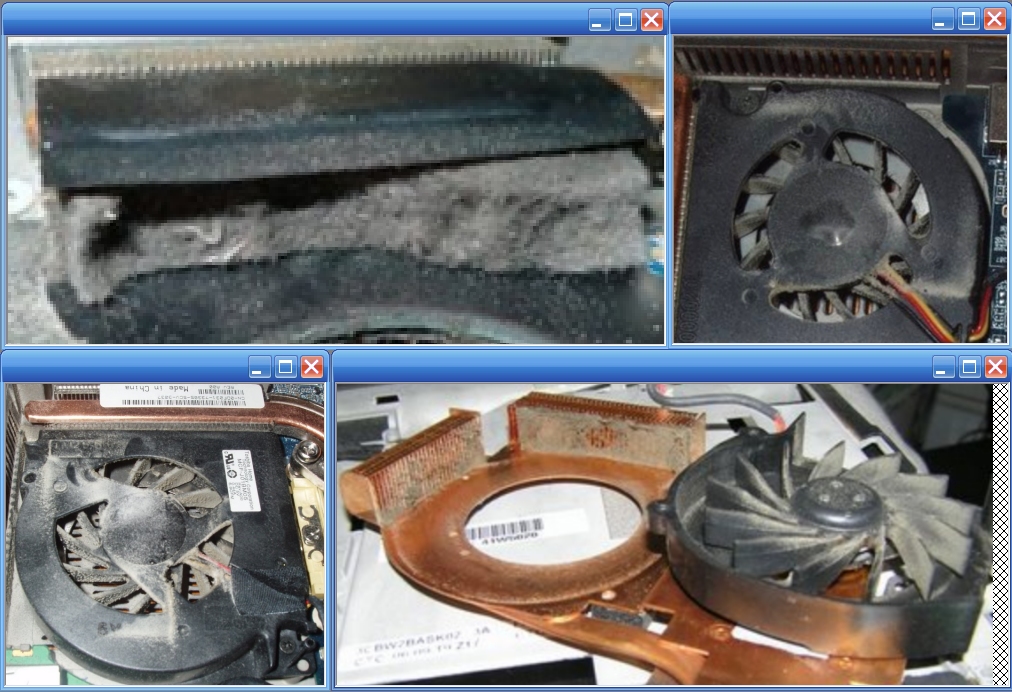
As you can see, it's often hard to tell how dirty the fan(s)/vents really are from the outside of a laptop.
And, a blast of compressed air from the outside in, will probably NOT completely solve the problem.
The solution? Disassemble, clean, reassemble.
-
April 29th, 2013, 07:33 PM
#34
I use a cooler pad, but it only has one fan, and I don't plug it in all the time. It is probably dirty, I have never cleaned
it, because it is a laptop, not sure how to take it apart. I found the manual, so I will open it up and clean it. I have done lots
repairs and replacements on my desktop. I replaced a mobo and heatsink fan, also processor.
I guess I will learn how to take a laptop apart now.
Thanks to all of you for the help, I really appreciate all the time you spent helping me.
I will let you know when I get it cleaned.....
-
April 29th, 2013, 07:52 PM
#35
Make sure to keep track of which screw goes where. If anything, you could get a piece of printer paper and tape the screws in their corresponding location. Some screws may be the same thread size, but different lengths.
-
May 13th, 2013, 10:48 PM
#36
Thanks to all that helped me. I got it cleaned out, it was dirty. So far it is booting up everytime, so I am sure overheating was the problem.
I appreciate all the help and the time that was spent helping.
I wanted to let you all know, you solved my problem.....
-
May 14th, 2013, 07:08 AM
#37
Excellent news! Thanks for letting us know. 
Thread Information
Users Browsing this Thread
There are currently 1 users browsing this thread. (0 members and 1 guests)
 Posting Permissions
- You may not post new threads
- You may not post replies
- You may not post attachments
- You may not edit your posts
-
Forum Rules
|
|


 Reply With Quote


