|
-
May 16th, 2011, 12:16 AM
#1
Keeping Multiple Libraries Open
I think I was able to keep multiple libraries open at the same time and when I hovered over the library icon, I could pick an open library. This was helpful when I worked with photo libraries and my SD card when I worked with PhotoShop.
Now when I hover over the library icon, only the last library I opened shows. Can mulitple libraries stay opened at the same time so I can hover over the icon and click on an opened library? I don't recall changing any settings.
Thanks,
Mike
-
May 16th, 2011, 06:08 AM
#2
 Originally Posted by mike2rc

Can mulitple libraries stay opened at the same time so I can hover over the icon and click on an opened library?
Yes. For example:
(Click image for larger view)
Originally Posted by mike2rc
I don't recall changing any settings.
First thing I'd try is using Windows' "System Restore" to roll Windows back to a previous state when your computer was functioning correctly:
-
May 16th, 2011, 10:26 AM
#3
Right-click the Aero Peek button, and make sure "Peek at Desktop" is checked:
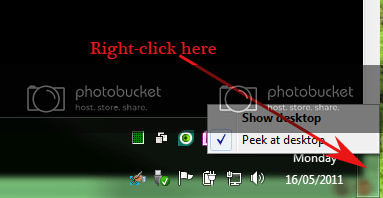
Nick.
-
May 16th, 2011, 11:34 AM
#4
Jim
WIN7 Ultimate SP1 64bit, IE 11, NTFS,
cable, MS Security Essentials, Windows 7 firewall
-
May 16th, 2011, 03:20 PM
#5
Yes, that's the way my libraries stayed as the screen shot shows! Also, Snap is checked but still when I open a new library, the previous one closes. Is there a setting much like the old folder setting for libraries?
I would most likely have to restore back 2 weeks and reinstall/change anything I've down since then. During that time I didn't change any library settings that I know of.
Thanks,
Mike
-
May 16th, 2011, 06:56 PM
#6
If you have a more recent backup, restoring it may solve the problem.
Thread Information
Users Browsing this Thread
There are currently 1 users browsing this thread. (0 members and 1 guests)
 Posting Permissions
- You may not post new threads
- You may not post replies
- You may not post attachments
- You may not edit your posts
-
Forum Rules
|
|


 Reply With Quote


