|
-
October 5th, 2010, 10:57 AM
#1
half pages from quick launch
when i open a program from quick launch they only open half page if i open from an icon or task bar they open full. if i open a program like vrdr from quick launch it is half and any page i open from there is half this is just in ie 8 and i have tried all suggestions from here and goole . i have everything set to open maximized but i just cant make it work, any help appreciated
dont know why picture came out so large
ScreenShot002.jpg
Last edited by frebo; October 5th, 2010 at 11:01 AM.
If I Ain't Crappie Fishin', I'm Thinkin' About It
listen with your eyes---its the only way to believe what you hear...
-
October 5th, 2010, 12:09 PM
#2
Try deleting the icon in the quick tray and adding it new again. Seems like the one you're using might be corrupt.
-
October 5th, 2010, 12:22 PM
#3
frebo--Can you maximize or change the size of the window before you close it--either by dragging the sides and bottom, or by clicking the middle icon at the top right of the window, just to the left of the X (Close)?
If that does not help, here is something I wrote some time ago about browser window size.
"Open a browser window. Now open a second as a New Window. (In other words do not close the first window.) Size the second window as you want it. Now close the first window. Finally, close the second window. (Some people say to hold down Shift or Control when you do, but I have never found this to make a difference.)
Now the next time you open a browser window it should open to the size you chose in the above."
dont know why picture came out so large
I think you used a graphics editor as part of the process to post the image here. In the editor there is a setting to change the size of the image. Try using it before posting an image.
Jim
WIN7 Ultimate SP1 64bit, IE 11, NTFS,
cable, MS Security Essentials, Windows 7 firewall
-
October 5th, 2010, 05:28 PM
#4
jim i can manually maximize it by dragging and i have tried all the suggestions, as i said it only does it from quick launch, desktop icons and web browsing they open correct, if i open from quick launch and the browse from there then i have to maximize
i going to try photoladys suggestion, thanks photolady
If I Ain't Crappie Fishin', I'm Thinkin' About It
listen with your eyes---its the only way to believe what you hear...
-
October 5th, 2010, 05:57 PM
#5
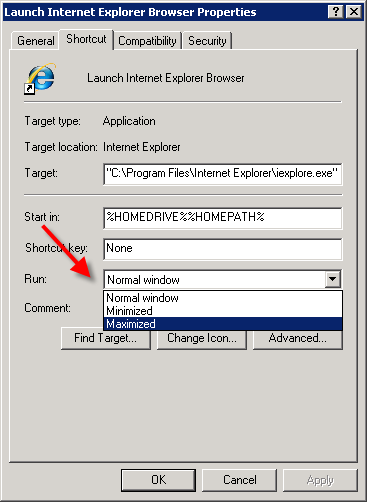
R-click the Quick launch Icon and select properties.
In the drop down select Maximized.
-
October 5th, 2010, 06:27 PM
#6
thanks train had already done that, it baffles me, its every program in quick launch, i can move the program back to the desktop and it will open maximized
If I Ain't Crappie Fishin', I'm Thinkin' About It
listen with your eyes---its the only way to believe what you hear...
-
October 6th, 2010, 03:16 AM
#7
Same behavior in Safe Mode with Networking?
-
October 6th, 2010, 10:30 AM
#8
I don'#t really know why you bother with QuickLaunch at all. The idea in Win7 is that you right-click on whatever program shortcut you want to have readily available and select "Pin to Taskbar". It's a much better idea than QL was.
Nick.
Thread Information
Users Browsing this Thread
There are currently 1 users browsing this thread. (0 members and 1 guests)
 Posting Permissions
- You may not post new threads
- You may not post replies
- You may not post attachments
- You may not edit your posts
-
Forum Rules
|
|


 Reply With Quote


