|
-
September 11th, 2010, 10:20 PM
#1
 [RESOLVED] Computer Not Working [RESOLVED] Computer Not Working
So, today, I decided to reapply thermal paste to a computer that is about 9 years old.
I unplugged everything. After I removed the heatsink, I cleaned both the heatsink and the cpu with rubbing alcohol. Put thermal paste on the CPU and put the heatsink back on.
I plug the power supply back into the computer. Right when I do this, the computer comes on with out me pushing the power button in the front. Nothing comes on the screen. The CPU fan comes on but the fan that is in the back does not.
What happened? Every time I plugged the power supply back in, it comes on.
Originally wanted Millenium Falcon as nick but there is character limitation.
Falcon Speed = Millenium Falcon = Light Speed
-
September 12th, 2010, 12:02 AM
#2
Sounds like you either crossed a wire or made a plug somewhere on the motherboard loose as you were re-applying the paste. Check to make sure all the connectors on the motherboard are plugged in securely.
Also, check to make sure you plugged the CPU fan back in correctly, some of them have 2 pins but are designed to plug into a 3 pin port, they are easy to plug into the wrong set of 2 pins.
"A train station is where a train stops. A bus station is where a bus stops. On my desk I have a workstation..." - William Faulkner
-
September 12th, 2010, 12:09 AM
#3
Check your BIOS to see if you have the power management set for off state when power is applied. If it's set to come on when power is restored, that's what causes it to go on automatically.
-
September 12th, 2010, 12:31 AM
#4
During the process of the mentioned work you may have disturbed one of the other components on the Motherboard.
Was the CPU removed? Is there a possibility that muck from cleaning has found it's way behind the CPU onto the pins?
1/ With the Age of the PC.. The CMOS Battery may be Dead.. replace, and you may need to RESETthe CMOS - I find these batterys can have a life as short as 12mths and as long as 12yrs
2/ Try reseating the RAM and the CPU
3/ Try reseating all other Plug in Boards, and Power Connectors
-
September 12th, 2010, 05:49 AM
#5
 Originally Posted by photolady

Check your BIOS to see if you have the power management set for off state when power is applied. If it's set to come on when power is restored, that's what causes it to go on automatically.
I can't. I can't see anything on the screen. The hard drive, optical drives and the CPU fan are about the only thing running.
Originally Posted by und3rtak3r
Was the CPU removed? Is there a possibility that muck from cleaning has found it's way behind the CPU onto the pins?
This version of the CPU has a small hole in the back of it. I am not sure what it is for but thermal paste did get into it but it was like that before. However, I wondered when I was cleaning it, rubbing alcohol got into it too?
Originally Posted by und3rtak3r
1/ With the Age of the PC.. The CMOS Battery may be Dead.. replace, and you may need to RESETthe CMOS - I find these batterys can have a life as short as 12mths and as long as 12yrs
2/ Try reseating the RAM and the CPU
3/ Try reseating all other Plug in Boards, and Power Connectors
It is not the battery. I took it out and left it out for 30 minutes. I reset the jumpers as well too. I reseat the RAM and the CPU. I basically took the entire thing apart and reput it back together one by one.
I even swapped out with another graphic card too.
At this point, the power is controlled from the power button which is correct. However, the hard drive, optical drives and the CPU fan are about the only thing running. All the other system fans are not operating. One thing I learned from this is "IF IT IS NOT BROKEN, DON'T FIX IT!".
Anyway, what else could be the problem?
Last edited by Falcon Speed; September 12th, 2010 at 05:53 AM.
Originally wanted Millenium Falcon as nick but there is character limitation.
Falcon Speed = Millenium Falcon = Light Speed
-
September 12th, 2010, 05:57 AM
#6
BTW... Before I apply the new thermal paste, I should have done a complete shutdown instead of hibernate. I wonder if this has anything to do with it?
Originally wanted Millenium Falcon as nick but there is character limitation.
Falcon Speed = Millenium Falcon = Light Speed
-
September 12th, 2010, 07:50 AM
#7
If you took the pc apart while it was turned on then Heck Yes that would have someting to do with it.
Set put on the curb and maybe some little kid will hall it off and use it for target pratice
If you're happy and you know it......it's your meds.
-
September 12th, 2010, 10:09 AM
#8
I should have done a complete shutdown instead of hibernate.
You didn't?!!!
-
September 12th, 2010, 10:10 AM
#9
NEVER NEVER NEVER work on a PC with the power on. 
Biostar TA790GX A2+ 6.0
AMD Phenom X4 9750 CPU.
4 Gig DDR2 Memory.
ATI HD 5450 PCIe Video
ATI HD 5450 PCIe Video
500 Watt P.S.
LG W2241T Widescreen 22" LCD
ViewSonic VA721 17" LCD
Envision 17" LCD
2 LG DVD Drives
Floppy Disk Drive
Maxtor 120 Gig Windows 7 Home Premium 32 bit
Gateway NV5378-U Windows 7 Home Premium 64 bit
Acer Aspire V3-731 Windows 7 Home Premium 64 bit
-
September 12th, 2010, 10:34 AM
#10
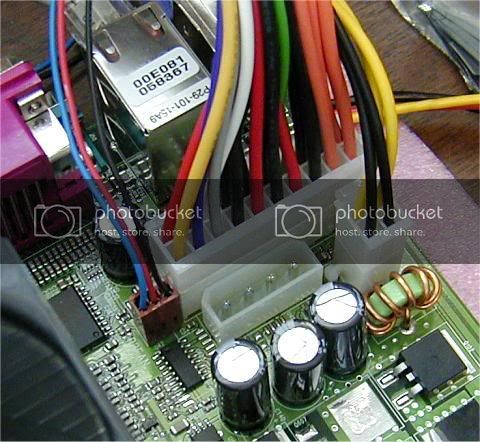
Did you make certain that you plugged the 4-pin 12 volt connector, or 8-pin EPS 12 v connector? If you don't hook that up then you get exactly what you are experiencing, where the fans and drives run, but nothing else happens.

Nick.
-
September 12th, 2010, 12:03 PM
#11
The Fact you had the machine in Hibernate You MAY have a hope
1/ You only removed and refitted the CMOS Battery: DID YOU TEST IT? was it good to a little over 3V?
IF the answer is yes to #1.. then Remove the power lead.. remove the CMOS battery again.. go to bed.. Reseat the Ram tomorrow morning.. if you have 2 sticks of RAM keep one out.. in case one is fritzed.. re-install the CMOS Battery..Plug the power back in.. and cross your fingers..
Works ... yes.. great.. No.. Fritzed MoBo.. Experience points gained (the ones I hate)
Originally Posted by Falcon Speed
. One thing I learned from this is "IF IT IS NOT BROKEN, DON'T FIX IT!".
Anyway, what else could be the problem?
You will be shocked at how often .. just blowing the dust out of a PC brings your type of issues to my desk.. so don't kick yourself too hard..
-
September 12th, 2010, 12:50 PM
#12
Originally Posted by Steve R Jones
If you took the pc apart while it was turned on then Heck Yes that would have someting to do with it.
I didn't take it apart while it was on. I hibernate and then unplugged the power supply.
Originally Posted by photolady
You didn't?!!!
I thought this was just a simple heatsink out - apply paste - heatsink in and power back on.
Originally Posted by SuperSparks
Did you make certain that you plugged the 4-pin 12 volt connector, or 8-pin EPS 12 v connector? If you don't hook that up then you get exactly what you are experiencing, where the fans and drives run, but nothing else happens.
It was working fine before I removed the heatsink. So the first time around, all I removed was the heatsink. I did not remove the 4-pin connector.
Last edited by Falcon Speed; September 12th, 2010 at 12:54 PM.
Originally wanted Millenium Falcon as nick but there is character limitation.
Falcon Speed = Millenium Falcon = Light Speed
-
September 12th, 2010, 02:37 PM
#13
Parts of the motherboard are still powered up during hibernate, as indeed they are when the PC is powered off but the PSU switch is still on (the standby transformer is on all the time that switch is on). It is safest to unplug the power lead, to be on the safe side, though I have to confess to having forgotten to do so more than once
I would double check that 12 v connector though, you may have knocked it loose.
Nick.
-
September 12th, 2010, 02:48 PM
#14
One thing you mentioned may,or may not have caused the problem. You said you used "rubbing" alcohol to clean the CPU. Rubbing alcohol contains oil compounds. It leaves an oily substance on whatever it's used on. Fine for the skin,but "NOT" fine for electronics! You should always use at least 90% Isopropyl alcohol which contains no oil(s)...
Stupid question? No such thing!
Virtual Dr. to the rescue!
Just ask. Bookmark your post for easy reference.
==================================
-
September 12th, 2010, 02:55 PM
#15
Originally Posted by SuperSparks
Parts of the motherboard are still powered up during hibernate, as indeed they are when the PC is powered off but the PSU switch is still on (the standby transformer is on all the time that switch is on). It is safest to unplug the power lead, to be on the safe side, though I have to confess to having forgotten to do so more than once
I see. I did not know that. I did do this several times in the past but when I blow dust every 6 months.
Originally Posted by Ridgerunr
One thing you mentioned may,or may not have caused the problem. You said you used "rubbing" alcohol to clean the CPU. Rubbing alcohol contains oil compounds. It leaves an oily substance on whatever it's used on. Fine for the skin,but "NOT" fine for electronics! You should always use at least 90% Isopropyl alcohol which contains no oil(s)...
Sorry, I did not mean rubbing alcohol. I actually used 90% Isopropyl alcohol. I thought they were the same but the label did said 91% Isopropyl alcohol. I just checked the expiration date but just realized it expired since last year.
I am going to try und3rtak3r's suggestion and go and get a new battery. If it does not work after this, the thing is going into the trash. BTW... Recently, I just need to get rid of lots of old computer parts. Is there a place to take it to because I just feel it is such a waste to throw all those metal away.
Last edited by Falcon Speed; September 12th, 2010 at 02:58 PM.
Originally wanted Millenium Falcon as nick but there is character limitation.
Falcon Speed = Millenium Falcon = Light Speed
Thread Information
Users Browsing this Thread
There are currently 1 users browsing this thread. (0 members and 1 guests)
 Posting Permissions
- You may not post new threads
- You may not post replies
- You may not post attachments
- You may not edit your posts
-
Forum Rules
|
|


 Reply With Quote


