|
-
January 22nd, 2010, 08:34 PM
#1
PC Freezing: HW or SW?
What is the more likely cause of a PC freezing?
My father-in-law asked if I could take a look at his PC, he said it frequently locks up at different times. Sometimes, after a boot, sometimes after it has run for awhile. When it locks up, I've been able to hold the on/off (power) button in and it restarts.
Just trying to decide if I should try an XP re-install or start looking for new hardware.
Any tests I can perform?
WinXP/98 dualboot - P4 2.4b 533FSB
Asus P4PE/L MoBo
512MB Corsair DDR PC2700
HDD1 - 160gig Seagate HDD2 - 60gig Maxtor
Antec SOHO File Server w/400 watt PSU
-
January 22nd, 2010, 09:11 PM
#2
Start with the usual diags. Hard drive (ex. Seatools) and ram (Memtest86+) diags to start. You need to make sure the hardware is good before you waste time fixing software.
-
January 22nd, 2010, 09:49 PM
#3
And take a couple cans of canned air. If he has a video card and if it is overheating, yep LOCK UP time.
-
January 23rd, 2010, 11:41 AM
#4
This sounds like it could be overheating. I would try monitoring your temps for a bit. These are all excelent freeware utilities. I particularly like Real Temp and HWMonitor. OCCT is superb for stress testing - if the PC can handle that, it can handle anything 
Real Temp
HWMonitor
OCCT
PC Wizard
Speedfan
Nick.
-
January 25th, 2010, 02:14 AM
#5

Something is horribly wrong.
I ran memtest86+: it finished with no errors.
I also removed the Video card (and ran directly from the on-board video).
Blasted it very good with air and cleaned everything out (wasn't too dusty (I was surprised).
Rebooted a couple times and it froze doing various things. (I was trying to backup all of my data to another drive and it froze at various points, no consistancy, also when I ctrl-prntscrn'd the HWMonitor results. Locked up good. I couldn't shut it off holding in the power button. had to unplug it! ).
I also upgraded the BIOS to the latest version and installed a brand new battery.
Still froze.
A couple times it crashed on the reboot and gave me a message:
"Overclocking failed! Please enter Setup to reconfigure your system.
Press F1 to Run Setup
Press F2 to load default values and continue."
believe me, it is NOT overclocked. I loaded the defaluts and only changed the boot sequence to boot from a CD. I received this message before and after the bios upgrade.
I also tried to re-install XP, from a Slipstream version I've run several times before flawlessly. Both times, it crapped out during the first couple minutes, informing me that a file was corrupt. (I seriously doubt it and even burned a new ISO and tried it just to make sure.)
I tried to run Real Temp, but it said the "Processor was not supported".
I checked the components by hand and nothing felt hot, just warm.
I did run HWMonitor.

nothing looked unreasonable.
Any suggestions? I'm stumped. I've been at this all day and I'm ready to throw it out the window!
suggestions? please!
I really need help
WinXP/98 dualboot - P4 2.4b 533FSB
Asus P4PE/L MoBo
512MB Corsair DDR PC2700
HDD1 - 160gig Seagate HDD2 - 60gig Maxtor
Antec SOHO File Server w/400 watt PSU
-
January 25th, 2010, 02:24 AM
#6
It might be time to check the motherboard for leaking or bulging capacitors.
-
January 25th, 2010, 05:37 AM
#7
I'd also test the hard drive:
-
January 25th, 2010, 11:33 AM
#8
both of those make sense.
Memory appears to be good, per Memtest.
Powersupply is still powering it and the numbers appear stable on HWMonitor, so I assumed it's still ok.
CPU? (do they "go" bad?) has never been moved or overclocked
I removed the video card, so it's not a consideration
the fans are all working and in fact the case has been open the whole time. also blew at a minimal amount of dust, so don't think that's the problem either.
I was leaning to mobo, but I'll check HDD to (but some of the problem have been before Post and had issues with Setup and evening trying to run a Ghost.
mobo seems most likely. are there any system checks I can perform? (I'll inspect the capacitors, but not really sure what I'm looking for (just something that looks swelled / irregular?)
new mobo I can handle, this inconsistancy and freezing is driving me nuts! I probably rebooted 25 - 30 times yesterday! NO FUN.
Can anyone recommend a good socket 478 mobo, with AGP, DDR, & IDE?
WinXP/98 dualboot - P4 2.4b 533FSB
Asus P4PE/L MoBo
512MB Corsair DDR PC2700
HDD1 - 160gig Seagate HDD2 - 60gig Maxtor
Antec SOHO File Server w/400 watt PSU
-
January 25th, 2010, 11:42 AM
#9
The overclocking failed message is almost certainly because the PC crashed at a particular moment during boot up, it's a red herring in this case, I think.
CPUs do go bad, but it is very rare - my experience is that it will be the motherboard rather than the CPU more than 95% of the time.
Leaking Capacitors:
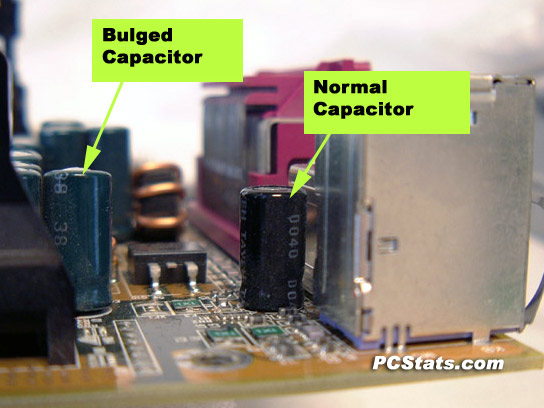
Bulging Capacitors:
Nick.
-
January 25th, 2010, 01:11 PM
#10
Thanks SuperSparks!
You confirmed what I thought about CPU vs mobo. (by process of elimination, I can't figure out what else it could be)
Also, Thanks for the pictures. I was really searching in the dark for what a blown capacitor would look like.
I'll take a look at the HDD tonite, but I'm inclined to believe a mobo going bad.
WinXP/98 dualboot - P4 2.4b 533FSB
Asus P4PE/L MoBo
512MB Corsair DDR PC2700
HDD1 - 160gig Seagate HDD2 - 60gig Maxtor
Antec SOHO File Server w/400 watt PSU
-
January 25th, 2010, 09:20 PM
#11
Well, I'm in the process of running the Hitachi Drive Fitness Test (burning the ISO now), but I think bulging capacitors is the culprit.
Mine haven't burst yet, but 4 of the 6 capacitors next to the CPU are definately domed on top.
so..............
Can anyone recommend a good make & model for:
socket 478, with AGP8x, DDR, and IDE support?
I've been looking, but it's harder than I thought to find that combo.
Thanks Again! I feel much better today. 
WinXP/98 dualboot - P4 2.4b 533FSB
Asus P4PE/L MoBo
512MB Corsair DDR PC2700
HDD1 - 160gig Seagate HDD2 - 60gig Maxtor
Antec SOHO File Server w/400 watt PSU
-
January 25th, 2010, 09:24 PM
#12
They don't have to burst. "Domed" is still bad.
Thread Information
Users Browsing this Thread
There are currently 1 users browsing this thread. (0 members and 1 guests)
 Posting Permissions
- You may not post new threads
- You may not post replies
- You may not post attachments
- You may not edit your posts
-
Forum Rules
|
|


 Reply With Quote


