[Excel] Help with a simple table
Results 1 to 5 of 5

Thread: [Excel] Help with a simple table

  1. #1
    Join Date
    Nov 2007
    Posts
    202

    Question [Excel] Help with a simple table

    Hi,

    I'm reading an ebook about Excel and it has excercises in it.
    But the following excercise is confusing for me. Here's what it says:

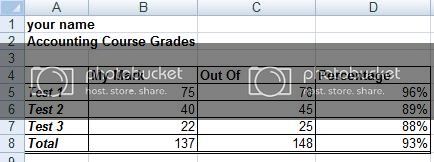
    1. "Recreate the following data set. Be sure to copy the font and border formatting as shown in the graphic.*Did that, see atached file please*"

    2. *This is the confusing part*"Enter the appropriate formulas/functions to complete the empty cells for totals and percentages, and ensure that the number format is set to 'no decimal places'"

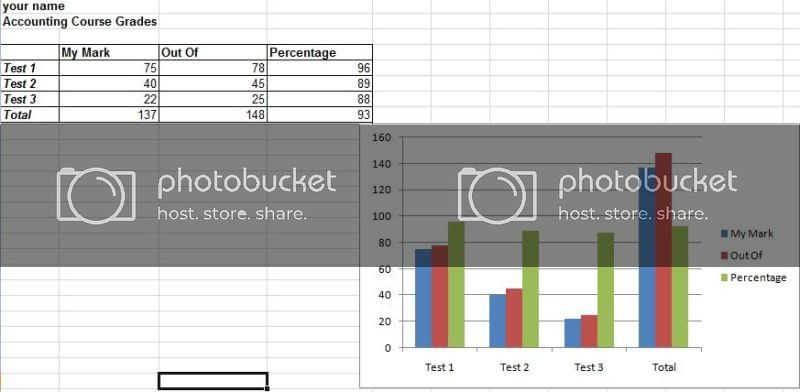
    3. *This part as not confusing, but the question is 'All of the data?'* "Make a column chart to illustrate the data"

    Thank you.

    Regards.
    Attached Files Attached Files

  2. #2
    Join Date
    Aug 2001
    Location
    Belfast, Ulster.
    Posts
    1,862
    I think it just wants you to enter the correct formula for calculating the sum of My Mark etc and the formula for showing the percentage.

    Eg
    My Mark, to show the sum of the data is =SUM(B5:B7)
    Out Of, =SUM(C5:C7)

    For the percentage its simply MyMark/OutOf, the cell is formatted as number-percentage already so that would be simply =B5/C5, and =B6/C6 etc etc

    For the other data, make sure formatting is number and no decimal places, eg Format Cells - number tab - number - decimal places 0

    Last edited by General Winters; July 27th, 2009 at 12:37 PM.

  3. #3
    Join Date
    Nov 2007
    Posts
    202
    Ok, thanks GW.

  4. #4
    Join Date
    Aug 2001
    Location
    Belfast, Ulster.
    Posts
    1,862
    With the percentage column formatted as number - percent, it does not show up too well on a chart.

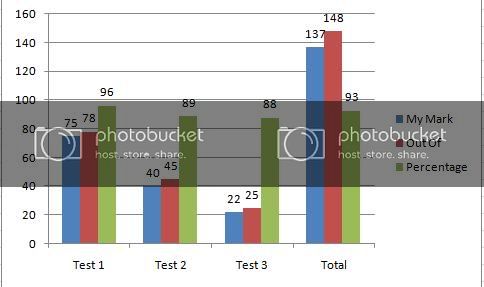
    If you change that column to a format - number - number, then you can have the values calculated as for example, =(B5/C5)*100 etc instead of the straight B5/C5 then it shows up properly in a chart.


    Then maybe add data labels to the chart for easier reading.

    Last edited by General Winters; July 27th, 2009 at 01:04 PM.

  5. #5
    Join Date
    Nov 2007
    Posts
    202
    I see now.
    Great thanks again!

Thread Information

Users Browsing this Thread

There are currently 1 users browsing this thread. (0 members and 1 guests)

Posting Permissions

  • You may not post new threads
  • You may not post replies
  • You may not post attachments
  • You may not edit your posts
  •