|
-
January 14th, 2009, 07:25 PM
#1
Lost the Mouse
Hi,
I downloaded a hardware upgrade from Windows Upgrade and ran it. I was instructed to restart the computer and when I did I had no mouse. I changed the mouse to another one and still no mouse. I don't remember what the hardware download was. I also don't know how to manuver around the computer with the keyboard to try an get rid of that upgrade if that's what the problem is. I use Windows XP Home SP3, Pentium 266 chip. 1gig memory. Any help would be really appreciated!
Thanks.
-
January 14th, 2009, 09:29 PM
#2
State mouse in use.
If using a serial mouse,
You can see if removing /FASTDETECT from your BOOT.INI assists.
Use arrow keys and Enter key to maneuver.
Last edited by Shinma; January 14th, 2009 at 09:33 PM.
Cheers.
-
January 14th, 2009, 10:11 PM
#3
This should cure you of using Microsoft drivers for your hardware instead of the hardware mfrs' recommended drivers.
-
January 14th, 2009, 10:15 PM
#4
Why M$ does it in the first place?
-
January 15th, 2009, 12:43 AM
#5
Sorry, serial mouse (little green plug).
Okay, I am assuming I start up the computer and go to "start" then "run" type in MSCONFIG then "okay" then go to the "boot.ini" tab. Then what? Or am I not doing it right? Can I go to "system restore"?
-
January 15th, 2009, 01:56 AM
#6
My Computer > C: > BOOT.INI
Delete /fastdetect from line.
Cheers.
-
January 15th, 2009, 05:54 AM
#7
 Originally Posted by pipercub

Sorry, serial mouse (little green plug).
Serial port

PS/2 ports

(Keyboard left, Mouse right)
-
January 15th, 2009, 11:18 AM
#8
Go into the BIOS Setup and make sure that the PS/2 port hasn't been disabled.
Nick.
-
January 15th, 2009, 09:15 PM
#9
Yes, ps/2 mouse.
When you tell me to go to "My Computer" is that after I start up XP and am at the desktop screen or is that somewhere else I should be? I don't know how to get the "C:" prompt from there.
-
January 16th, 2009, 01:24 AM
#10
You stated PS/2 mouse, not a serial mouse.
Not applicable for BOOT.INI modification.
Cheers.
-
January 16th, 2009, 11:34 AM
#11
My mistake. I apologise! The mouse is plugged into the "green" plugin on the motherboard.
-
January 16th, 2009, 07:41 PM
#12
My apologies for not giving accurate info.
I installed a USB mouse.
Thanks for all the responces!
-
January 16th, 2009, 07:45 PM
#13
Try a different port then.
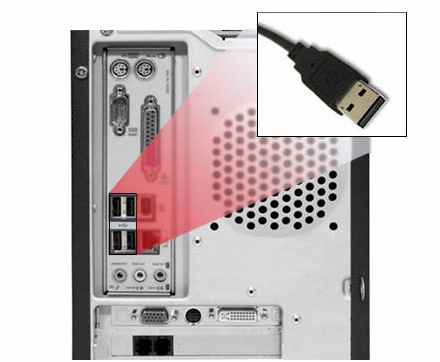
A Quick reference to Computer Cables and Connections.
http://www.pirainoenterprises.com/im...n/usb_port.jpg
-
January 16th, 2009, 07:51 PM
#14
Again I apologise. The USB mouse works just fine!
Patience is a virtue and I need to learn that.
Thread Information
Users Browsing this Thread
There are currently 1 users browsing this thread. (0 members and 1 guests)
 Posting Permissions
- You may not post new threads
- You may not post replies
- You may not post attachments
- You may not edit your posts
-
Forum Rules
|
|


 Reply With Quote


