|
-
October 12th, 2008, 01:06 AM
#16
 Originally Posted by crunchie

I noticed that combofix has been run 4 times. Any reason?
===============
1. Please open Notepad- Click Start , then Run
- Type notepad.exe in the Run Box.
2. Now copy/paste the entire content of the codebox below into the Notepad window:
KillAll::
File::
C:\WINDOWS\system32\wini104552502.exe
C:\WINDOWS\system32\obmrgpab.exe
Folder::
C:\Program Files\guhaqdc
C:\Documents and Settings\All Users\Application Data\vutmtmnk
Note: the above code was created specifically for this user. If you are not this user, do NOT follow these directions as they could damage the workings of your system.
3. Save the above as CFScript.txt
4. Physically disconnect from the internet.
5. Now STOP all your monitoring programs (Antivirus/Antispyware, Guards and Shields) as they could easily interfere with ComboFix.
6. Then drag the CFScript.txt into ComboFix.exe as depicted in the animation below. This will start ComboFix again.
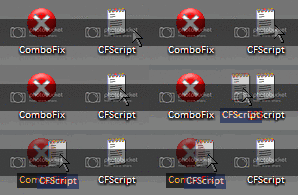
7. After reboot, (in case it asks to reboot), please post the following reports/logs into your next replyafter you re-enable all the programs that were disabled during the running of ComboFix:- Combofix.txt
- A new HijackThis log.
Please take note:
CF disconnects your machine from the internet. The connection is automatically restored before CF completes its run. If CF runs into difficulty and terminates prematurely, the connection can be manually restored by restarting your machine.
-
October 12th, 2008, 02:27 AM
#17
Well I'm not sure why it's been run 4 times, but I have had to exit it a few times because it wasn't running properly, so I rebooted and then it ran fine. I came here for help about one whole year ago on a Virtumonde problem, I used ComboFix in the process of removing it.
Anyways, here are the logs:
ComboFix 08-10-11.02 - CHRISTIAN 2008-10-12 16:59:08.5 - NTFSx86
Running from: C:\Documents and Settings\CHRISTIAN\Desktop\ComboFix.exe
Command switches used :: C:\Documents and Settings\CHRISTIAN\Desktop\CFScript.txt
* Created a new restore point
WARNING -THIS MACHINE DOES NOT HAVE THE RECOVERY CONSOLE INSTALLED !!
FILE ::
C:\WINDOWS\system32\obmrgpab.exe
C:\WINDOWS\system32\wini104552502.exe
.
((((((((((((((((((((((((((((((((((((((( Other Deletions )))))))))))))))))))))))))))))))))))))))))))))))))
.
C:\Documents and Settings\All Users\Application Data\vutmtmnk
C:\Program Files\guhaqdc
C:\WINDOWS\system32\obmrgpab.exe
C:\WINDOWS\system32\wini104552502.exe
.
((((((((((((((((((((((((( Files Created from 2008-09-12 to 2008-10-12 )))))))))))))))))))))))))))))))
.
2008-10-11 17:46 . 2008-10-11 17:46 <DIR> d-------- C:\Program Files\Malwarebytes' Anti-Malware
2008-10-11 17:46 . 2008-10-11 17:46 <DIR> d-------- C:\Documents and Settings\CHRISTIAN\Application Data\Malwarebytes
2008-10-11 17:46 . 2008-10-11 17:46 <DIR> d-------- C:\Documents and Settings\All Users\Application Data\Malwarebytes
2008-10-11 17:46 . 2008-09-10 00:08 38,528 --a------ C:\WINDOWS\system32\drivers\mbamswissarmy.sys
2008-10-11 17:46 . 2008-09-10 00:08 17,200 --a------ C:\WINDOWS\system32\drivers\mbam.sys
2008-10-11 17:12 . 2004-08-04 16:00 4,224 --a------ C:\WINDOWS\system32\drivers\beep.sys
2008-10-11 17:12 . 2004-08-04 16:00 4,224 --a--c--- C:\WINDOWS\system32\dllcache\beep.sys
2008-09-12 18:54 . 2008-09-12 19:27 22,040 --a------ C:\Documents and Settings\Guest\Application Data\data.dat
.
(((((((((((((((((((((((((((((((((((((((( Find3M Report ))))))))))))))))))))))))))))))))))))))))))))))))))))
.
2008-10-12 06:13 81,984 ----a-w C:\WINDOWS\system32\bdod.bin
2008-10-11 00:20 --------- d-----w C:\Program Files\SwiftKit
2008-10-10 08:26 --------- d-----w C:\Program Files\Incomplete
2008-10-10 08:15 --------- d-----w C:\Program Files\LimeWire
2008-10-10 07:41 --------- d-----w C:\Program Files\Steam
2008-10-10 07:20 24 ----a-w C:\Documents and Settings\CHRISTIAN\jagex_runescape_preferences.dat
2008-10-03 13:58 22,040 ----a-w C:\Documents and Settings\CHRISTIAN\Application Data\data.dat
2008-09-22 08:20 --------- d-----w C:\Documents and Settings\CHRISTIAN\Application Data\Vidalia
2008-09-22 08:20 --------- d-----w C:\Documents and Settings\CHRISTIAN\Application Data\tor
2008-09-07 09:34 --------- d-----w C:\Documents and Settings\CHRISTIAN\Application Data\IcoFX
2008-09-07 08:15 --------- d-----w C:\Program Files\IcoFX 1.6
2008-09-07 03:30 --------- d-----w C:\Documents and Settings\All Users\Application Data\Microsoft Help
2008-09-07 01:48 --------- d-----w C:\Program Files\Microsoft Visual Studio 9.0
2008-09-07 01:48 --------- d-----w C:\Program Files\Microsoft Synchronization Services
2008-09-07 01:48 --------- d-----w C:\Program Files\Microsoft SQL Server Compact Edition
2008-09-07 01:48 --------- d-----w C:\Program Files\Microsoft SQL Server
2008-09-07 01:39 --------- d-----w C:\Program Files\Microsoft SDKs
2008-09-07 01:36 --------- d-----w C:\Program Files\Reference Assemblies
2008-09-07 01:36 --------- d-----w C:\Program Files\MSBuild
2008-08-28 12:02 --------- d-----w C:\Program Files\Vidalia Bundle
2008-08-26 14:30 --------- d-----w C:\Program Files\Devious Codeworks
2008-07-30 12:10 94,923 ----a-w C:\WINDOWS\IRC scanner Uninstaller.exe
2008-07-30 11:13 720,896 ----a-w C:\WINDOWS\iun6002.exe
2008-07-29 11:10 73,720 ----a-w C:\WINDOWS\system32\dxva2.dll
2008-07-29 11:10 493,048 ----a-w C:\WINDOWS\system32\evr.dll
2008-07-29 11:10 26,112 ----a-w C:\WINDOWS\system32\TsWpfWrp.exe
2008-07-29 10:35 326,160 ----a-w C:\WINDOWS\system32\PresentationHost.exe
2008-07-29 09:59 781,344 ----a-w C:\WINDOWS\system32\PresentationNative_v0300.dll
2008-07-29 09:59 43,544 ----a-w C:\WINDOWS\system32\PresentationHostProxy.dll
2008-07-29 09:59 161,296 ----a-w C:\WINDOWS\system32\UIAutomationCore.dll
2008-07-29 09:59 105,016 ----a-w C:\WINDOWS\system32\PresentationCFFRasterizerNative_v0300.dll
2008-07-29 09:24 97,800 ----a-w C:\WINDOWS\system32\infocardapi.dll
2008-07-29 09:24 622,080 ----a-w C:\WINDOWS\system32\icardagt.exe
2008-07-29 09:24 11,264 ----a-w C:\WINDOWS\system32\icardres.dll
2008-07-25 01:16 96,760 ----a-w C:\WINDOWS\system32\dfshim.dll
2008-07-25 01:16 83,968 ----a-w C:\WINDOWS\system32\mscories.dll
2008-07-25 01:16 282,112 ----a-w C:\WINDOWS\system32\mscoree.dll
2008-07-25 01:16 158,720 ----a-w C:\WINDOWS\system32\mscorier.dll
2008-07-18 12:10 94,920 ----a-w C:\WINDOWS\system32\cdm.dll
2008-07-18 12:10 53,448 ----a-w C:\WINDOWS\system32\wuauclt.exe
2008-07-18 12:10 45,768 ----a-w C:\WINDOWS\system32\wups2.dll
2008-07-18 12:10 36,552 ----a-w C:\WINDOWS\system32\wups.dll
2008-07-18 12:09 563,912 ----a-w C:\WINDOWS\system32\wuapi.dll
2008-07-18 12:09 325,832 ----a-w C:\WINDOWS\system32\wucltui.dll
2008-07-18 12:09 205,000 ----a-w C:\WINDOWS\system32\wuweb.dll
2008-07-18 12:09 1,811,656 ----a-w C:\WINDOWS\system32\wuaueng.dll
2008-04-07 10:14 32 ----a-w C:\Documents and Settings\All Users\Application Data\ezsid.dat
2007-12-11 14:26 34,665 ----a-w C:\Program Files\rsdeadst7.png
2007-05-20 11:30 652 --sha-w C:\WINDOWS\system32\2 rehctiwS dlroW.dat
2008-02-18 10:02 457 --sh--w C:\WINDOWS\system32\boothide.reg
2008-02-18 10:02 172 --sh--w C:\WINDOWS\system32\bootrun.reg
2007-08-06 07:52 641 --sha-w C:\WINDOWS\system32\vmw2divepacsenur.dat
2007-08-06 08:27 1,499 --sha-w C:\WINDOWS\system32\VMW_setiS_sratS_onroP.dat
2007-08-06 10:45 2,376 --sha-w C:\WINDOWS\system32\VMW_tuO_yaD_giB_seinniV.dat
.
Code:
<pre>
----a-w         7,126,528 2002-05-25 06:17:22  C:\Documents and Settings\CHRISTIAN\My Documents\WHOLE\N64ROM\GBColor (with all pokemon roms) (Works great) .exe
</pre>
((((((((((((((((((((((((((((((((((((( Reg Loading Points ))))))))))))))))))))))))))))))))))))))))))))))))))
.
.
*Note* empty entries & legit default entries are not shown
REGEDIT4
[HKEY_CURRENT_USER\SOFTWARE\Microsoft\Windows\CurrentVersion\Run]
"TOSCDSPD"="C:\Program Files\TOSHIBA\TOSCDSPD\toscdspd.exe" [2004-12-30 65536]
"ctfmon.exe"="C:\WINDOWS\system32\ctfmon.exe" [2008-04-14 15360]
"winsh"="C:\WINDOWS\system32\obmrgpab.exe" [N/A]
[HKEY_LOCAL_MACHINE\SOFTWARE\Microsoft\Windows\CurrentVersion\Run]
"LaunchApp"="launchapp" [X]
"SynTPEnh"="C:\Program Files\Synaptics\SynTP\SynTPEnh.exe" [2006-04-07 761946]
"SmoothView"="C:\Program Files\TOSHIBA\TOSHIBA Zooming Utility\SmoothView.exe" [2005-04-27 122880]
"ATIPTA"="C:\Program Files\ATI Technologies\ATI Control Panel\atiptaxx.exe" [2005-12-12 344064]
"PadTouch"="C:\Program Files\TOSHIBA\Touch and Launch\PadExe.exe" [2005-12-06 1077322]
"DDWMon"="C:\Program Files\TOSHIBA\TOSHIBA Direct Disc Writer\\ddwmon.exe" [2006-04-26 299008]
"LtMoh"="C:\Program Files\ltmoh\Ltmoh.exe" [2005-12-16 188416]
"Toshiba Hotkey Utility"="C:\Program Files\Toshiba\Windows Utilities\Hotkey.exe" [2006-05-25 1773568]
"TkBellExe"="C:\Program Files\Common Files\Real\Update_OB\realsched.exe" [2007-06-30 180269]
"D-Link AirPlus G"="C:\Program Files\D-Link\AirPlus G\AirGCFG.exe" [2005-11-23 1544192]
"ANIWZCS2Service"="C:\Program Files\ANI\ANIWZCS2 Service\WZCSLDR2.exe" [2005-10-19 49152]
"COMODO Firewall Pro"="C:\Program Files\Comodo\Firewall\CPF.exe" [2007-11-18 1115728]
"flockbox"="E:\My Lockbox\flockbox.exe" [N/A]
"BitDefender Antiphishing Helper"="C:\Program Files\BitDefender\BitDefender 2008\IEShow.exe" [2007-10-09 61440]
"BDAgent"="C:\Program Files\BitDefender\BitDefender 2008\bdagent.exe" [2008-09-16 368640]
"SunJavaUpdateSched"="C:\Program Files\Java\jre1.6.0_02\bin\jusched.exe" [2007-07-12 132496]
"LogitechQuickCamRibbon"="C:\Program Files\Logitech\QuickCam10\QuickCam10.exe" [2007-02-08 774168]
"LogitechCommunicationsManager"="C:\Program Files\Common Files\LogiShrd\LComMgr\Communications_Helper.exe" [2007-02-08 488984]
"NDSTray.exe"="NDSTray.exe" [N/A]
"TPSMain"="TPSMain.exe" [2005-06-01 C:\WINDOWS\system32\TPSMain.exe]
"AGRSMMSG"="AGRSMMSG.exe" [2006-03-18 C:\WINDOWS\agrsmmsg.exe]
"RTHDCPL"="RTHDCPL.EXE" [2006-05-18 C:\WINDOWS\RTHDCPL.exe]
"BluetoothAuthenticationAgent"="bthprops.cpl" [2008-04-14 C:\WINDOWS\system32\bthprops.cpl]
C:\Documents and Settings\All Users\Start Menu\Programs\Startup\
Privoxy.lnk - C:\Program Files\Vidalia Bundle\Privoxy\privoxy.exe [2006-11-21 250368]
RAMASST.lnk - C:\WINDOWS\system32\RAMASST.exe [2006-05-13 155648]
[HKEY_LOCAL_MACHINE\software\microsoft\windows nt\currentversion\drivers32]
"vidc.iv41"= ir41_32.dll
[HKEY_LOCAL_MACHINE\software\microsoft\security center]
"AntiVirusDisableNotify"=dword:00000001
"UpdatesDisableNotify"=dword:00000001
[HKEY_LOCAL_MACHINE\software\microsoft\security center\Monitoring\SymantecFirewall]
"DisableMonitoring"=dword:00000001
[HKLM\~\services\sharedaccess\parameters\firewallpolicy\standardprofile]
"EnableFirewall"= 0 (0x0)
[HKLM\~\services\sharedaccess\parameters\firewallpolicy\standardprofile\AuthorizedApplications\List]
"C:\\Program Files\\TOSHIBA\\ConfigFree\\CFXFER.exe"=
"C:\\Program Files\\LimeWire\\LimeWire.exe"=
"%windir%\\Network Diagnostic\\xpnetdiag.exe"=
"%windir%\\system32\\sessmgr.exe"=
"C:\\Program Files\\MSN Messenger\\msnmsgr.exe"=
"C:\\Program Files\\MSN Messenger\\livecall.exe"=
"C:\\Program Files\\Skype\\Phone\\Skype.exe"=
[HKLM\~\services\sharedaccess\parameters\firewallpolicy\standardprofile\GloballyOpenPorts\List]
"12193:TCP"= 12193:TCP:BitComet 12193 TCP
"12193:UDP"= 12193:UDP:BitComet 12193 UDP
R0 MPRIFL;MPRIFL;C:\WINDOWS\system32\DRIVERS\MPRIFL.SYS [2007-04-17 17264]
R3 BoiHwsetup;Access 32bits INT15 routine;C:\WINDOWS\system32\drivers\BoiHwSetup.sys [2005-06-11 5504]
R3 qkbfiltr;Quanta HotKey Keyboard Filter Driver;C:\WINDOWS\system32\drivers\qkbfiltr.sys [2006-01-13 31872]
R3 qmofiltr;Quanta HotKey Mouse Filter Driver;C:\WINDOWS\system32\drivers\qmofiltr.sys [2005-05-06 7936]
S2 AKEProtect;AKEProtect;C:\Program Files\Anti Keylogger Elite\AKEProtect.sys [ ]
S2 ssoftnt4;ssoftnt4;C:\WINDOWS\system32\Drivers\ssoftnt4.sys [ ]
S3 CV2K1;CommView Network Monitor;C:\WINDOWS\system32\DRIVERS\cv2k1.sys [ ]
S3 tap0801;Smarthide TAP driver;C:\WINDOWS\system32\DRIVERS\tap0801.sys [2008-02-04 55808]
[HKEY_LOCAL_MACHINE\software\microsoft\windows nt\currentversion\svchost]
bdx REG_MULTI_SZ scan
[HKEY_CURRENT_USER\software\microsoft\windows\currentversion\explorer\mountpoints2\{46d389a0-36be-11dd-9379-00163654f04d}]
\Shell\AutoRun\command - E:\LaunchU3.exe -a
[HKEY_CURRENT_USER\software\microsoft\windows\currentversion\explorer\mountpoints2\{a7140118-ec42-11dc-92e2-00173f162b7e}]
\Shell\AutoRun\command - E:\LaunchU3.exe -a
[HKEY_LOCAL_MACHINE\software\microsoft\active setup\installed components\{3362C6F3-CCC8-B7BD-0400-080303050000}]
C:\WINDOWS\system32\scvhost.exe
[HKEY_LOCAL_MACHINE\software\microsoft\active setup\installed components\{F61DE146-5ABB-25AE-E095-721261669916}]
C:\Program Files\NetMeeting\cb35.exe s
.
Contents of the 'Scheduled Tasks' folder
2008-10-12 C:\WINDOWS\Tasks\MP Scheduled Scan.job
- C:\Program Files\Windows Defender\MpCmdRun.exe [2006-11-03 19:20]
.
**************************************************************************
catchme 0.3.1361 W2K/XP/Vista - rootkit/stealth malware detector by Gmer, http://www.gmer.net
Rootkit scan 2008-10-12 17:10:44
Windows 5.1.2600 Service Pack 3 NTFS
scanning hidden processes ...
scanning hidden autostart entries ...
scanning hidden files ...
scan completed successfully
hidden files: 0
**************************************************************************
.
------------------------ Other Running Processes ------------------------
.
C:\WINDOWS\system32\ati2evxx.exe
C:\Program Files\Windows Defender\MsMpEng.exe
C:\Program Files\Common Files\LogiShrd\LVMVFM\LVPrcSrv.exe
C:\Program Files\TOSHIBA\ConfigFree\CFSvcs.exe
C:\Program Files\Comodo\Firewall\cmdagent.exe
C:\WINDOWS\system32\DVDRAMSV.exe
C:\WINDOWS\system32\TODDSrv.exe
C:\WINDOWS\system32\wdfmgr.exe
C:\Program Files\Common Files\BitDefender\BitDefender Communicator\xcommsvr.exe
C:\Program Files\Common Files\BitDefender\BitDefender Update Service\livesrv.exe
C:\Program Files\BitDefender\BitDefender 2008\vsserv.exe
C:\WINDOWS\system32\ati2evxx.exe
C:\Program Files\TOSHIBA\ConfigFree\NDSTray.exe
C:\Program Files\TOSHIBA\TOSHIBA Direct Disc Writer\DDWMon.exe
C:\WINDOWS\system32\rundll32.exe
C:\WINDOWS\system32\TPSBattM.exe
C:\Program Files\Common Files\LogiShrd\LComMgr\LVComSX.exe
C:\Program Files\Common Files\LogiShrd\LQCVFX\COCIManager.exe
.
**************************************************************************
.
Completion time: 2008-10-12 17:20:58 - machine was rebooted
ComboFix-quarantined-files.txt 2008-10-12 06:20:45
ComboFix2.txt 2008-10-12 03:05:25
Pre-Run: 14,452,826,112 bytes free
Post-Run: 14,414,499,840 bytes free
205 --- E O F --- 2008-10-10 23:04:45
-
October 12th, 2008, 02:27 AM
#18
Here's the HJT log:
Logfile of Trend Micro HijackThis v2.0.2
Scan saved at 5:22:57 PM, on 12/10/2008
Platform: Windows XP SP3 (WinNT 5.01.2600)
MSIE: Internet Explorer v6.00 SP3 (6.00.2900.5512)
Boot mode: Normal
Running processes:
C:\WINDOWS\System32\smss.exe
C:\WINDOWS\system32\winlogon.exe
C:\WINDOWS\system32\services.exe
C:\WINDOWS\system32\lsass.exe
C:\WINDOWS\system32\Ati2evxx.exe
C:\WINDOWS\system32\svchost.exe
C:\Program Files\Windows Defender\MsMpEng.exe
C:\WINDOWS\System32\svchost.exe
C:\WINDOWS\system32\spoolsv.exe
c:\program files\common files\logishrd\lvmvfm\LVPrcSrv.exe
C:\Program Files\TOSHIBA\ConfigFree\CFSvcs.exe
C:\Program Files\Comodo\Firewall\cmdagent.exe
C:\WINDOWS\system32\DVDRAMSV.exe
C:\WINDOWS\system32\svchost.exe
C:\WINDOWS\system32\TODDSrv.exe
C:\Program Files\Common Files\BitDefender\BitDefender Communicator\xcommsvr.exe
C:\Program Files\Common Files\BitDefender\BitDefender Update Service\livesrv.exe
C:\Program Files\BitDefender\BitDefender 2008\vsserv.exe
C:\WINDOWS\System32\svchost.exe
C:\WINDOWS\system32\Ati2evxx.exe
C:\Program Files\Synaptics\SynTP\SynTPEnh.exe
C:\Program Files\TOSHIBA\TOSHIBA Zooming Utility\SmoothView.exe
C:\Program Files\TOSHIBA\ConfigFree\NDSTray.exe
C:\Program Files\ATI Technologies\ATI Control Panel\atiptaxx.exe
C:\Program Files\TOSHIBA\Touch and Launch\PadExe.exe
C:\WINDOWS\AGRSMMSG.exe
C:\Program Files\TOSHIBA\TOSHIBA Direct Disc Writer\ddwmon.exe
C:\WINDOWS\RTHDCPL.EXE
C:\Program Files\ltmoh\Ltmoh.exe
C:\Program Files\Toshiba\Windows Utilities\Hotkey.exe
C:\Program Files\Common Files\Real\Update_OB\realsched.exe
C:\WINDOWS\system32\rundll32.exe
C:\Program Files\Comodo\Firewall\CPF.exe
C:\WINDOWS\system32\TPSBattM.exe
C:\Program Files\BitDefender\BitDefender 2008\bdagent.exe
C:\Program Files\Java\jre1.6.0_02\bin\jusched.exe
C:\Program Files\Logitech\QuickCam10\QuickCam10.exe
C:\Program Files\Common Files\LogiShrd\LComMgr\Communications_Helper.exe
C:\Program Files\TOSHIBA\TOSCDSPD\toscdspd.exe
C:\WINDOWS\system32\ctfmon.exe
C:\Program Files\Vidalia Bundle\Privoxy\privoxy.exe
C:\WINDOWS\system32\RAMASST.exe
C:\Program Files\Common Files\LogiShrd\LComMgr\LVComSX.exe
C:\Program Files\Common Files\Logishrd\LQCVFX\COCIManager.exe
C:\WINDOWS\explorer.exe
C:\WINDOWS\system32\notepad.exe
C:\Program Files\Trend Micro\HijackThis\HijackThis.exe
R1 - HKLM\Software\Microsoft\Internet Explorer\Main,Default_Page_URL = http://go.microsoft.com/fwlink/?LinkId=69157
R1 - HKLM\Software\Microsoft\Internet Explorer\Main,Default_Search_URL = http://go.microsoft.com/fwlink/?LinkId=54896
R1 - HKLM\Software\Microsoft\Internet Explorer\Main,Search Page = http://go.microsoft.com/fwlink/?LinkId=54896
R1 - HKCU\Software\Microsoft\Windows\CurrentVersion\Internet Settings,ProxyServer = ftp=144.140.22.190:80;gopher=144.140.22.190:80;http=144.140.22.190:80;https=144.140.22.190:80
R1 - HKCU\Software\Microsoft\Windows\CurrentVersion\Internet Settings,ProxyOverride = www.runescape.com
O3 - Toolbar: BitDefender Toolbar - {381FFDE8-2394-4f90-B10D-FC6124A40F8C} - C:\Program Files\BitDefender\BitDefender 2008\IEToolbar.dll
O4 - HKLM\..\Run: [LaunchApp] launchapp
O4 - HKLM\..\Run: [SynTPEnh] C:\Program Files\Synaptics\SynTP\SynTPEnh.exe
O4 - HKLM\..\Run: [SmoothView] C:\Program Files\TOSHIBA\TOSHIBA Zooming Utility\SmoothView.exe
O4 - HKLM\..\Run: [NDSTray.exe] NDSTray.exe
O4 - HKLM\..\Run: [ATIPTA] "C:\Program Files\ATI Technologies\ATI Control Panel\atiptaxx.exe"
O4 - HKLM\..\Run: [TPSMain] TPSMain.exe
O4 - HKLM\..\Run: [PadTouch] C:\Program Files\TOSHIBA\Touch and Launch\PadExe.exe
O4 - HKLM\..\Run: [AGRSMMSG] AGRSMMSG.exe
O4 - HKLM\..\Run: [DDWMon] C:\Program Files\TOSHIBA\TOSHIBA Direct Disc Writer\\ddwmon.exe
O4 - HKLM\..\Run: [RTHDCPL] RTHDCPL.EXE
O4 - HKLM\..\Run: [LtMoh] C:\Program Files\ltmoh\Ltmoh.exe
O4 - HKLM\..\Run: [Toshiba Hotkey Utility] "C:\Program Files\Toshiba\Windows Utilities\Hotkey.exe" /lang en
O4 - HKLM\..\Run: [TkBellExe] "C:\Program Files\Common Files\Real\Update_OB\realsched.exe" -osboot
O4 - HKLM\..\Run: [D-Link AirPlus G] C:\Program Files\D-Link\AirPlus G\AirGCFG.exe
O4 - HKLM\..\Run: [ANIWZCS2Service] C:\Program Files\ANI\ANIWZCS2 Service\WZCSLDR2.exe
O4 - HKLM\..\Run: [BluetoothAuthenticationAgent] rundll32.exe bthprops.cpl,,BluetoothAuthenticationAgent
O4 - HKLM\..\Run: [COMODO Firewall Pro] "C:\Program Files\Comodo\Firewall\CPF.exe" /background
O4 - HKLM\..\Run: [flockbox] E:\My Lockbox\flockbox.exe /a
O4 - HKLM\..\Run: [BitDefender Antiphishing Helper] "C:\Program Files\BitDefender\BitDefender 2008\IEShow.exe"
O4 - HKLM\..\Run: [BDAgent] "C:\Program Files\BitDefender\BitDefender 2008\bdagent.exe"
O4 - HKLM\..\Run: [SunJavaUpdateSched] "C:\Program Files\Java\jre1.6.0_02\bin\jusched.exe"
O4 - HKLM\..\Run: [LogitechQuickCamRibbon] "C:\Program Files\Logitech\QuickCam10\QuickCam10.exe" /hide
O4 - HKLM\..\Run: [LogitechCommunicationsManager] "C:\Program Files\Common Files\LogiShrd\LComMgr\Communications_Helper.exe"
O4 - HKCU\..\Run: [TOSCDSPD] C:\Program Files\TOSHIBA\TOSCDSPD\toscdspd.exe
O4 - HKCU\..\Run: [ctfmon.exe] C:\WINDOWS\system32\ctfmon.exe
O4 - HKCU\..\Run: [winsh] C:\WINDOWS\system32\obmrgpab.exe
O4 - Global Startup: Privoxy.lnk = C:\Program Files\Vidalia Bundle\Privoxy\privoxy.exe
O4 - Global Startup: RAMASST.lnk = C:\WINDOWS\system32\RAMASST.exe
O9 - Extra button: (no name) - {08B0E5C0-4FCB-11CF-AAA5-00401C608501} - C:\Program Files\Java\jre1.6.0_02\bin\ssv.dll
O9 - Extra 'Tools' menuitem: Sun Java Console - {08B0E5C0-4FCB-11CF-AAA5-00401C608501} - C:\Program Files\Java\jre1.6.0_02\bin\ssv.dll
O9 - Extra button: PokerStars - {3AD14F0C-ED16-4e43-B6D8-661B03F6A1EF} - C:\Program Files\PokerStars\PokerStarsUpdate.exe
O9 - Extra button: Skype - {77BF5300-1474-4EC7-9980-D32B190E9B07} - C:\Program Files\Skype\Toolbars\Internet Explorer\SkypeIEPlugin.dll
O9 - Extra button: BitComet - {D18A0B52-D63C-4ed0-AFC6-C1E3DC1AF43A} - res://C:\Program Files\BitComet\tools\BitCometBHO_1.2.1.2.dll/206 (file missing)
O9 - Extra button: Yahoo! Messenger - {E5D12C4E-7B4F-11D3-B5C9-0050045C3C96} - C:\PROGRA~1\Yahoo!\MESSEN~1\YPager.exe
O9 - Extra 'Tools' menuitem: Yahoo! Messenger - {E5D12C4E-7B4F-11D3-B5C9-0050045C3C96} - C:\PROGRA~1\Yahoo!\MESSEN~1\YPager.exe
O9 - Extra button: Messenger - {FB5F1910-F110-11d2-BB9E-00C04F795683} - C:\Program Files\Messenger\msmsgs.exe
O9 - Extra 'Tools' menuitem: Windows Messenger - {FB5F1910-F110-11d2-BB9E-00C04F795683} - C:\Program Files\Messenger\msmsgs.exe
O16 - DPF: {17492023-C23A-453E-A040-C7C580BBF700} (Windows Genuine Advantage Validation Tool) - http://go.microsoft.com/fwlink/?linkid=39204
O16 - DPF: {20A60F0D-9AFA-4515-A0FD-83BD84642501} (Checkers Class) - http://messenger.zone.msn.com/binary...r.cab56986.cab
O16 - DPF: {4F1E5B1A-2A80-42CA-8532-2D05CB959537} (MSN Photo Upload Tool) - http://gfx1.hotmail.com/mail/w2/resources/MSNPUpld.cab
O16 - DPF: {C3F79A2B-B9B4-4A66-B012-3EE46475B072} (MessengerStatsClient Class) - http://messenger.zone.msn.com/binary...t.cab56907.cab
O16 - DPF: {F5A7706B-B9C0-4C89-A715-7A0C6B05DD48} (Minesweeper Flags Class) - http://messenger.zone.msn.com/binary...r.cab56986.cab
O18 - Protocol: skype4com - {FFC8B962-9B40-4DFF-9458-1830C7DD7F5D} - C:\PROGRA~1\COMMON~1\Skype\SKYPE4~1.DLL
O23 - Service: ANIWZCSd Service (ANIWZCSdService) - Alpha Networks Inc. - C:\Program Files\ANI\ANIWZCS2 Service\ANIWZCSdS.exe
O23 - Service: Ati HotKey Poller - ATI Technologies Inc. - C:\WINDOWS\system32\Ati2evxx.exe
O23 - Service: Belkin Wireless USB Network Adapter (Belkin Wireless USB Network Adapter Service) - Unknown owner - C:\Program Files\Belkin\Belkin Wireless Network Utility\WLService.exe (file missing)
O23 - Service: ConfigFree Service (CFSvcs) - TOSHIBA CORPORATION - C:\Program Files\TOSHIBA\ConfigFree\CFSvcs.exe
O23 - Service: Comodo Application Agent (CmdAgent) - COMODO - C:\Program Files\Comodo\Firewall\cmdagent.exe
O23 - Service: DVD-RAM_Service - Matsu****a Electric Industrial Co., Ltd. - C:\WINDOWS\system32\DVDRAMSV.exe
O23 - Service: InstallDriver Table Manager (IDriverT) - Macrovision Corporation - C:\Program Files\Common Files\InstallShield\Driver\11\Intel 32\IDriverT.exe
O23 - Service: BitDefender Desktop Update Service (LIVESRV) - BitDefender SRL - C:\Program Files\Common Files\BitDefender\BitDefender Update Service\livesrv.exe
O23 - Service: Process Monitor (LVPrcSrv) - Logitech Inc. - c:\program files\common files\logishrd\lvmvfm\LVPrcSrv.exe
O23 - Service: LVSrvLauncher - Logitech Inc. - C:\Program Files\Common Files\LogiShrd\SrvLnch\SrvLnch.exe
O23 - Service: NMIndexingService - Unknown owner - C:\Program Files\Common Files\Ahead\Lib\NMIndexingService.exe (file missing)
O23 - Service: Cryptainer service (ssoftservice) - Cypherix Software (India) Pvt. Ltd. - C:\WINDOWS\SYSTEM32\cryptainersrv.exe
O23 - Service: TOSHIBA Optical Disc Drive Service (TODDSrv) - TOSHIBA Corporation - C:\WINDOWS\system32\TODDSrv.exe
O23 - Service: BitDefender Virus Shield (VSSERV) - BitDefender S.R.L. - C:\Program Files\BitDefender\BitDefender 2008\vsserv.exe
O23 - Service: BitDefender Communicator (XCOMM) - BitDefender - C:\Program Files\Common Files\BitDefender\BitDefender Communicator\xcommsvr.exe
--
End of file - 9321 bytes
-
October 12th, 2008, 03:41 AM
#19
Originally Posted by Cheetah2007
Well I'm not sure why it's been run 4 times, but I have had to exit it a few times because it wasn't running properly, so I rebooted and then it ran fine. I came here for help about one whole year ago on a Virtumonde problem, I used ComboFix in the process of removing it.
No worries. It's a good thing to let us know things like that so that we know exactly how things went.
==
Can you please do the following.
===============
Scan with HijackThis and then place a check next to all the following, if present:
O4 - HKCU\..\Run: [winsh] C:\WINDOWS\system32\obmrgpab.exe
Now, close all instances of Internet Explorer and any other windows you have open except HiJackThis, click "Fix checked".
===============
Reboot.
===============
After rebooting, rescan with hijackthis and post back a new log. Please let me know how your pc is now.
-
October 12th, 2008, 05:28 AM
#20
PC running fine like it used to.
I feel very clean 
Thanks heaps for the help!
Here's the new log:
Logfile of Trend Micro HijackThis v2.0.2
Scan saved at 8:26:36 PM, on 12/10/2008
Platform: Windows XP SP3 (WinNT 5.01.2600)
MSIE: Internet Explorer v6.00 SP3 (6.00.2900.5512)
Boot mode: Normal
Running processes:
C:\WINDOWS\System32\smss.exe
C:\WINDOWS\system32\winlogon.exe
C:\WINDOWS\system32\services.exe
C:\WINDOWS\system32\lsass.exe
C:\WINDOWS\system32\Ati2evxx.exe
C:\WINDOWS\system32\svchost.exe
C:\Program Files\Windows Defender\MsMpEng.exe
C:\WINDOWS\System32\svchost.exe
C:\WINDOWS\system32\spoolsv.exe
c:\program files\common files\logishrd\lvmvfm\LVPrcSrv.exe
C:\Program Files\TOSHIBA\ConfigFree\CFSvcs.exe
C:\Program Files\Comodo\Firewall\cmdagent.exe
C:\WINDOWS\system32\DVDRAMSV.exe
C:\WINDOWS\system32\svchost.exe
C:\WINDOWS\system32\TODDSrv.exe
C:\Program Files\Common Files\BitDefender\BitDefender Communicator\xcommsvr.exe
C:\Program Files\Common Files\BitDefender\BitDefender Update Service\livesrv.exe
C:\Program Files\BitDefender\BitDefender 2008\vsserv.exe
C:\WINDOWS\system32\Ati2evxx.exe
C:\WINDOWS\Explorer.EXE
C:\Program Files\Synaptics\SynTP\SynTPEnh.exe
C:\WINDOWS\System32\svchost.exe
C:\Program Files\TOSHIBA\TOSHIBA Zooming Utility\SmoothView.exe
C:\Program Files\TOSHIBA\ConfigFree\NDSTray.exe
C:\Program Files\ATI Technologies\ATI Control Panel\atiptaxx.exe
C:\Program Files\TOSHIBA\Touch and Launch\PadExe.exe
C:\WINDOWS\AGRSMMSG.exe
C:\Program Files\TOSHIBA\TOSHIBA Direct Disc Writer\ddwmon.exe
C:\WINDOWS\RTHDCPL.EXE
C:\Program Files\ltmoh\Ltmoh.exe
C:\Program Files\Toshiba\Windows Utilities\Hotkey.exe
C:\Program Files\Common Files\Real\Update_OB\realsched.exe
C:\WINDOWS\system32\rundll32.exe
C:\Program Files\Comodo\Firewall\CPF.exe
C:\Program Files\BitDefender\BitDefender 2008\bdagent.exe
C:\Program Files\Java\jre1.6.0_02\bin\jusched.exe
C:\Program Files\Logitech\QuickCam10\QuickCam10.exe
C:\Program Files\Common Files\LogiShrd\LComMgr\Communications_Helper.exe
C:\WINDOWS\system32\TPSBattM.exe
C:\Program Files\TOSHIBA\TOSCDSPD\toscdspd.exe
C:\WINDOWS\system32\ctfmon.exe
C:\WINDOWS\system32\RAMASST.exe
C:\Program Files\Common Files\LogiShrd\LComMgr\LVComSX.exe
C:\Program Files\Common Files\Logishrd\LQCVFX\COCIManager.exe
C:\Program Files\Trend Micro\HijackThis\HijackThis.exe
R1 - HKLM\Software\Microsoft\Internet Explorer\Main,Default_Page_URL = http://go.microsoft.com/fwlink/?LinkId=69157
R1 - HKLM\Software\Microsoft\Internet Explorer\Main,Default_Search_URL = http://go.microsoft.com/fwlink/?LinkId=54896
R1 - HKLM\Software\Microsoft\Internet Explorer\Main,Search Page = http://go.microsoft.com/fwlink/?LinkId=54896
R1 - HKCU\Software\Microsoft\Windows\CurrentVersion\Internet Settings,ProxyServer = ftp=144.140.22.190:80;gopher=144.140.22.190:80;http=144.140.22.190:80;https=144.140.22.190:80
R1 - HKCU\Software\Microsoft\Windows\CurrentVersion\Internet Settings,ProxyOverride = www.runescape.com
O3 - Toolbar: BitDefender Toolbar - {381FFDE8-2394-4f90-B10D-FC6124A40F8C} - C:\Program Files\BitDefender\BitDefender 2008\IEToolbar.dll
O4 - HKLM\..\Run: [LaunchApp] launchapp
O4 - HKLM\..\Run: [SynTPEnh] C:\Program Files\Synaptics\SynTP\SynTPEnh.exe
O4 - HKLM\..\Run: [SmoothView] C:\Program Files\TOSHIBA\TOSHIBA Zooming Utility\SmoothView.exe
O4 - HKLM\..\Run: [NDSTray.exe] NDSTray.exe
O4 - HKLM\..\Run: [ATIPTA] "C:\Program Files\ATI Technologies\ATI Control Panel\atiptaxx.exe"
O4 - HKLM\..\Run: [TPSMain] TPSMain.exe
O4 - HKLM\..\Run: [PadTouch] C:\Program Files\TOSHIBA\Touch and Launch\PadExe.exe
O4 - HKLM\..\Run: [AGRSMMSG] AGRSMMSG.exe
O4 - HKLM\..\Run: [DDWMon] C:\Program Files\TOSHIBA\TOSHIBA Direct Disc Writer\\ddwmon.exe
O4 - HKLM\..\Run: [RTHDCPL] RTHDCPL.EXE
O4 - HKLM\..\Run: [LtMoh] C:\Program Files\ltmoh\Ltmoh.exe
O4 - HKLM\..\Run: [Toshiba Hotkey Utility] "C:\Program Files\Toshiba\Windows Utilities\Hotkey.exe" /lang en
O4 - HKLM\..\Run: [TkBellExe] "C:\Program Files\Common Files\Real\Update_OB\realsched.exe" -osboot
O4 - HKLM\..\Run: [D-Link AirPlus G] C:\Program Files\D-Link\AirPlus G\AirGCFG.exe
O4 - HKLM\..\Run: [ANIWZCS2Service] C:\Program Files\ANI\ANIWZCS2 Service\WZCSLDR2.exe
O4 - HKLM\..\Run: [BluetoothAuthenticationAgent] rundll32.exe bthprops.cpl,,BluetoothAuthenticationAgent
O4 - HKLM\..\Run: [COMODO Firewall Pro] "C:\Program Files\Comodo\Firewall\CPF.exe" /background
O4 - HKLM\..\Run: [flockbox] E:\My Lockbox\flockbox.exe /a
O4 - HKLM\..\Run: [BitDefender Antiphishing Helper] "C:\Program Files\BitDefender\BitDefender 2008\IEShow.exe"
O4 - HKLM\..\Run: [BDAgent] "C:\Program Files\BitDefender\BitDefender 2008\bdagent.exe"
O4 - HKLM\..\Run: [SunJavaUpdateSched] "C:\Program Files\Java\jre1.6.0_02\bin\jusched.exe"
O4 - HKLM\..\Run: [LogitechQuickCamRibbon] "C:\Program Files\Logitech\QuickCam10\QuickCam10.exe" /hide
O4 - HKLM\..\Run: [LogitechCommunicationsManager] "C:\Program Files\Common Files\LogiShrd\LComMgr\Communications_Helper.exe"
O4 - HKCU\..\Run: [TOSCDSPD] C:\Program Files\TOSHIBA\TOSCDSPD\toscdspd.exe
O4 - HKCU\..\Run: [ctfmon.exe] C:\WINDOWS\system32\ctfmon.exe
O4 - Global Startup: Privoxy.lnk = C:\Program Files\Vidalia Bundle\Privoxy\privoxy.exe
O4 - Global Startup: RAMASST.lnk = C:\WINDOWS\system32\RAMASST.exe
O9 - Extra button: (no name) - {08B0E5C0-4FCB-11CF-AAA5-00401C608501} - C:\Program Files\Java\jre1.6.0_02\bin\ssv.dll
O9 - Extra 'Tools' menuitem: Sun Java Console - {08B0E5C0-4FCB-11CF-AAA5-00401C608501} - C:\Program Files\Java\jre1.6.0_02\bin\ssv.dll
O9 - Extra button: PokerStars - {3AD14F0C-ED16-4e43-B6D8-661B03F6A1EF} - C:\Program Files\PokerStars\PokerStarsUpdate.exe
O9 - Extra button: Skype - {77BF5300-1474-4EC7-9980-D32B190E9B07} - C:\Program Files\Skype\Toolbars\Internet Explorer\SkypeIEPlugin.dll
O9 - Extra button: BitComet - {D18A0B52-D63C-4ed0-AFC6-C1E3DC1AF43A} - res://C:\Program Files\BitComet\tools\BitCometBHO_1.2.1.2.dll/206 (file missing)
O9 - Extra button: Yahoo! Messenger - {E5D12C4E-7B4F-11D3-B5C9-0050045C3C96} - C:\PROGRA~1\Yahoo!\MESSEN~1\YPager.exe
O9 - Extra 'Tools' menuitem: Yahoo! Messenger - {E5D12C4E-7B4F-11D3-B5C9-0050045C3C96} - C:\PROGRA~1\Yahoo!\MESSEN~1\YPager.exe
O9 - Extra button: Messenger - {FB5F1910-F110-11d2-BB9E-00C04F795683} - C:\Program Files\Messenger\msmsgs.exe
O9 - Extra 'Tools' menuitem: Windows Messenger - {FB5F1910-F110-11d2-BB9E-00C04F795683} - C:\Program Files\Messenger\msmsgs.exe
O16 - DPF: {17492023-C23A-453E-A040-C7C580BBF700} (Windows Genuine Advantage Validation Tool) - http://go.microsoft.com/fwlink/?linkid=39204
O16 - DPF: {20A60F0D-9AFA-4515-A0FD-83BD84642501} (Checkers Class) - http://messenger.zone.msn.com/binary...r.cab56986.cab
O16 - DPF: {4F1E5B1A-2A80-42CA-8532-2D05CB959537} (MSN Photo Upload Tool) - http://gfx1.hotmail.com/mail/w2/resources/MSNPUpld.cab
O16 - DPF: {C3F79A2B-B9B4-4A66-B012-3EE46475B072} (MessengerStatsClient Class) - http://messenger.zone.msn.com/binary...t.cab56907.cab
O16 - DPF: {F5A7706B-B9C0-4C89-A715-7A0C6B05DD48} (Minesweeper Flags Class) - http://messenger.zone.msn.com/binary...r.cab56986.cab
O18 - Protocol: skype4com - {FFC8B962-9B40-4DFF-9458-1830C7DD7F5D} - C:\PROGRA~1\COMMON~1\Skype\SKYPE4~1.DLL
O23 - Service: ANIWZCSd Service (ANIWZCSdService) - Alpha Networks Inc. - C:\Program Files\ANI\ANIWZCS2 Service\ANIWZCSdS.exe
O23 - Service: Ati HotKey Poller - ATI Technologies Inc. - C:\WINDOWS\system32\Ati2evxx.exe
O23 - Service: Belkin Wireless USB Network Adapter (Belkin Wireless USB Network Adapter Service) - Unknown owner - C:\Program Files\Belkin\Belkin Wireless Network Utility\WLService.exe (file missing)
O23 - Service: ConfigFree Service (CFSvcs) - TOSHIBA CORPORATION - C:\Program Files\TOSHIBA\ConfigFree\CFSvcs.exe
O23 - Service: Comodo Application Agent (CmdAgent) - COMODO - C:\Program Files\Comodo\Firewall\cmdagent.exe
O23 - Service: DVD-RAM_Service - Matsu****a Electric Industrial Co., Ltd. - C:\WINDOWS\system32\DVDRAMSV.exe
O23 - Service: InstallDriver Table Manager (IDriverT) - Macrovision Corporation - C:\Program Files\Common Files\InstallShield\Driver\11\Intel 32\IDriverT.exe
O23 - Service: BitDefender Desktop Update Service (LIVESRV) - BitDefender SRL - C:\Program Files\Common Files\BitDefender\BitDefender Update Service\livesrv.exe
O23 - Service: Process Monitor (LVPrcSrv) - Logitech Inc. - c:\program files\common files\logishrd\lvmvfm\LVPrcSrv.exe
O23 - Service: LVSrvLauncher - Logitech Inc. - C:\Program Files\Common Files\LogiShrd\SrvLnch\SrvLnch.exe
O23 - Service: NMIndexingService - Unknown owner - C:\Program Files\Common Files\Ahead\Lib\NMIndexingService.exe (file missing)
O23 - Service: Cryptainer service (ssoftservice) - Cypherix Software (India) Pvt. Ltd. - C:\WINDOWS\SYSTEM32\cryptainersrv.exe
O23 - Service: TOSHIBA Optical Disc Drive Service (TODDSrv) - TOSHIBA Corporation - C:\WINDOWS\system32\TODDSrv.exe
O23 - Service: BitDefender Virus Shield (VSSERV) - BitDefender S.R.L. - C:\Program Files\BitDefender\BitDefender 2008\vsserv.exe
O23 - Service: BitDefender Communicator (XCOMM) - BitDefender - C:\Program Files\Common Files\BitDefender\BitDefender Communicator\xcommsvr.exe
--
End of file - 9175 bytes
-
October 12th, 2008, 08:54 AM
#21
Congratulations! Your log looks clean.
===============
Let's get rid of Combofix now that we are finished with it.- Click START then RUN
- Now type Combofix /u in the runbox and click OK. Note the space between the X and the U, it needs to be there.
- When shown the disclaimer, Select "2"
The above procedure will:- Delete the following:
- ComboFix and its associated files and folders.
- VundoFix backups, if present
- The C:\Deckard folder, if present
- The C:_OtMoveIt folder, if present
- Reset the clock settings.
- Hide file extensions, if required.
- Hide System/Hidden files, if required.
- Reset System Restore.
================
Now that your PC is clean you need to follow these easy steps to keeping it this way:
Download CCleaner and install, then run it. It will clear out your temp folders.
- Uncheck "Cookies" under "Internet Explorer".
- Click on Run Cleaner in the lower right-hand corner. This can take quite a while to run.
- Close when finished.
====
An alternative to Ccleaner is ATF Cleaner.
Download ATF (Atribune Temp File) Cleaner by Atribune to your desktop.
Double-click ATF Cleaner.exe to open it.
Under Main choose:
Windows Temp
Current User Temp
All Users Temp
Cookies
Temporary Internet Files
Prefetch
Java Cache
*The other boxes are optional*
Then click the Empty Selected button.
Firefox:
Click Firefox at the top and choose: Select All
Click the Empty Selected button.
NOTE: If you would like to keep your saved passwords, please click NO at the prompt.
Opera:
Click Opera at the top and choose: Select All
Click the Empty Selected button.
NOTE: If you would like to keep your saved passwords, please click NO at the prompt.
====
Use an alternative browser! Download FireFox and give it a run. It is far more secure than Internet Explorer. Or, you can get Opera, which in my opinion, is better still.
====
Use a firewall. It is an essential part of your computers security. There is a link to a good, free firewall in my signature.
====
Install and keep updated,
Spybot S&D.
Run it on a regular basis, following the maker's recommendations.
====
Install an anti-virus. There are some good, free AV's available today. Make sure that it is updated regularly and have it scan your system often.
====
Check for Windows Updates. Microsoft regularly post updates for your systems safe running. Make sure to take advantage of this. Reboot when installed and return to make sure there are no others.
=====
For XP users.
After something like this it is a good idea to Flush the Restore Points and start fresh.
To flush the XP system Restore Points.
Go to Start | Run and type msconfig and press enter.
When msconfig opens, click the Launch System Restore Button.
On the next page, click the System Restore Settings link on the left.
Check the box labelled 'Turn off System restore'.
Reboot. Go back in and Turn System Restore Back on. A new Restore Point will be created.
Note that all previous restore points will be lost.
===============
If you have any more problems, post back.
-
Happy surfing,
crunchie.
-
October 21st, 2008, 03:16 AM
#22
I too have had this problem with popups and the red x box saying windows has detected a virus. I had run Malware and logifle and am wondering where i should post them in order to receive some assistance.
Thanks in advance!
-
October 21st, 2008, 06:41 AM
#23
Welcome to virtualdr...
Start a new thread in this forum..
http://discussions.virtualdr.com/forumdisplay.php?f=40
Click the "new thread" button and follow these instructions..
Print these instructions out.
1. Download SUPERAntiSpyware Free for Home Users:
http://www.superantispyware.com/
* Double-click SUPERAntiSpyware.exe and use the default settings for installation.
* An icon will be created on your desktop. Double-click that icon to launch the program.
* If asked to update the program definitions, click "Yes". If not, update the definitions before scanning by selecting "Check for Updates". (If you encounter any problems while downloading the updates, manually download and unzip them from here: http://www.superantispyware.com/definitions.html.)
* Close SUPERAntiSpyware.
PHYSICALLY DISCONNECT FROM THE INTERNET
Restart computer in Safe Mode.
To enter Safe Mode, restart computer, and keep tapping F8 key, until menu appears; select Safe Mode; you'll see "Safe Mode" in all four corners of your screen
* Open SUPERAntiSpyware.
* Under Configuration and Preferences, click the Preferences button.
* Click the Scanning Control tab.
* Under Scanner Options make sure the following are checked (leave all others unchecked):
- Close browsers before scanning.
- Scan for tracking cookies.
- Terminate memory threats before quarantining.
* Click the Close button to leave the control center screen.
* Back on the main screen, under Scan for Harmful Software click Scan your computer.
* On the left, make sure you check C:\Fixed Drive.
* On the right, under Complete Scan, choose Perform Complete Scan.
* Click Next to start the scan. Please be patient while it scans your computer.
* After the scan is complete, a Scan Summary box will appear with potentially harmful items that were detected. Click OK.
* Make sure everything has a checkmark next to it and click Next.
* A notification will appear that Quarantine and Removal is Complete. Click OK and then click the Finish button to return to the main menu.
* If asked if you want to reboot, click Yes.
* To retrieve the removal information after reboot, launch SUPERAntispyware again.
- Click Preferences, then click the Statistics/Logs tab.
- Under Scanner Logs, double-click SUPERAntiSpyware Scan Log.
- If there are several logs, click the current dated log and press View log. A text file will open in your default text editor.
- Please copy and paste the Scan Log results in your next reply.
* Click Close to exit the program.
Post SUPERAntiSpyware log.
NOTE: Tracking cookies can be omitted from the log.
RECONNECT TO THE INTERNET
RESTART COMPUTER!
2. Download Malwarebytes' Anti-Malware: http://www.malwarebytes.org/mbam.php to your desktop.
(Malwarebytes is free to use. Only, if you want to use realtime protection, scheduled scanning, and scheduled updating, you have to pay one-time fee)
* Double-click mbam-setup.exe and follow the prompts to install the program.
* At the end, be sure a checkmark is placed next to Update Malwarebytes' Anti-Malware and Launch Malwarebytes' Anti-Malware, then click Finish.
* If an update is found, it will download and install the latest version.
* Once the program has loaded, select Perform full scan, then click Scan.
* When the scan is complete, click OK, then Show Results to view the results.
* Be sure that everything is checked, and click Remove Selected.
* When completed, a log will open in Notepad.
* Post the log back here.
The log can also be found here:
C:\Documents and Settings\Username\Application Data\Malwarebytes\Malwarebytes' Anti-Malware\Logs\log-date.txt
Or at C:\Program Files\Malwarebytes' Anti-Malware\Logs\log-date.txt
RESTART COMPUTER!
3. Download, install, and run HijackThis:
http://www.snapfiles.com/get/hijackthis.html
Post HijackThis log.
Do not check any items and wait for further instructions.
DO NOT make any other changes to your computer (like installing programs, using other cleaning tools, etc.), until it's officially declared clean!!!__________________
__________________
(Above layout courtesy of Broni)
Thread Information
Users Browsing this Thread
There are currently 1 users browsing this thread. (0 members and 1 guests)
 Posting Permissions
- You may not post new threads
- You may not post replies
- You may not post attachments
- You may not edit your posts
-
Forum Rules
|
|


 Reply With Quote