|
-
June 10th, 2008, 08:39 PM
#1
Old Images
I have some old photos I took 30 years ago with one of those Kodak Instamatic 110 Cameras............. Remember???  I have scanned some of these and opened with Adobe photoshop 2.0........ I try to sharpen these pics, but they are still very pixilated. I do realize their old, but I was just checking to see if there was another approach..... ? Thanks I have scanned some of these and opened with Adobe photoshop 2.0........ I try to sharpen these pics, but they are still very pixilated. I do realize their old, but I was just checking to see if there was another approach..... ? Thanks
-
June 10th, 2008, 09:16 PM
#2
-
June 10th, 2008, 10:03 PM
#3
Prints... using a Epson 4180 Photo scanner.......
-
June 11th, 2008, 12:07 AM
#4
Scan at 300 dpi.
Save as a .tif because jpg throws a bunch of stuff away there fore is lossey.
See how that comes out.
And when you print it, no bigger than 3 inch by 5 inch and see what it looks like.
I have to experiment a bit to. 
-
June 11th, 2008, 07:51 AM
#5
You might get a 4x4 inch photo as those, at least mine are, only 2x2 inch photos. Anything larger and they become pixelated.
-
June 11th, 2008, 09:38 AM
#6
Mine are bigger than that, but, 4X4 seems to be what mine are.
-
June 11th, 2008, 10:19 PM
#7
Well, I found out why mine were only 2x2, Train. Evidently when the photos came in about 40 years ago, my mom cut them and gave me the smaller one. I found some of the originals going through old photos tonight. 
-
June 11th, 2008, 10:28 PM
#8
And the original size was?
-
June 11th, 2008, 10:48 PM
#9
-
June 11th, 2008, 10:51 PM
#10
Im trying to find the way to scan at 300 dpi... the only option available so far is small, medium, or a large file.... there is a " Image Quality Compression " level adjustment to use?, but I haven't tried this...........
-
June 11th, 2008, 11:24 PM
#11
You need to set this up in the scanner's software. Go to the link below:
http://files.support.epson.com/htmld...18rf/index.htm
Click on Make Scan Settings under the "How to" heading. It tells you how to change the settings for dpi.
-
June 12th, 2008, 01:58 AM
#12
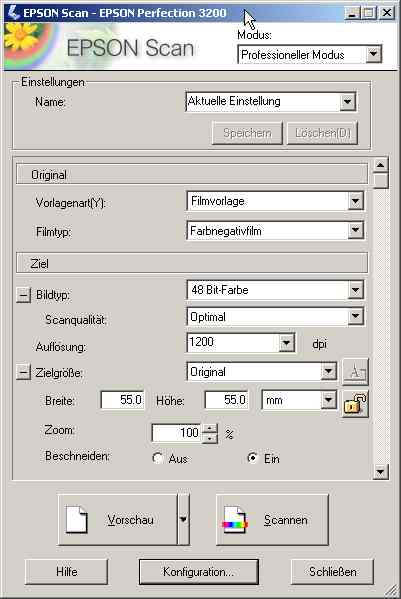
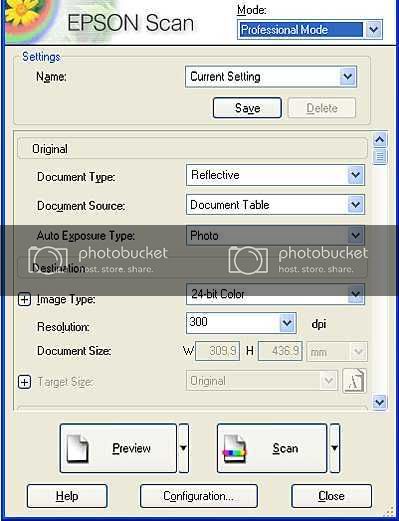
And use the Professional setting, Should be toward the top right in the drop down window. Then all those controls are available.
In German, but you will see where the Pro bit is.
-
June 12th, 2008, 07:36 AM
#13
Here's another but in English:
Thread Information
Users Browsing this Thread
There are currently 1 users browsing this thread. (0 members and 1 guests)
 Posting Permissions
- You may not post new threads
- You may not post replies
- You may not post attachments
- You may not edit your posts
-
Forum Rules
|
|


 Reply With Quote


